

Selling medical devices is nothing like selling most other products. A single deal can run for a year and pull in different departments. Winning a single deal in a hospital usually means convincing a whole group, and each one cares about something different.
The surgeon wants to know the device performs in the operating room. Procurement wants a fair price. A review committee wants proof it’s safe and worth the money. A hospital administrator is watching the budget, and a distributor is often handling the actual order. A good medical device or healthcare CRM keeps all of those people, and where each one stands, in one place so nothing slips.
In this article, we’ll compare 5 CRMs that medical device sales teams actually use, with a plain breakdown of what each does well, and what it costs.
What Is a Medical Device CRM?
A CRM for healthcare or medical devices is a customer relationship management system designed to manage the complex commercial relationships, opportunities, activities, and workflows involved in selling medical devices. It has to account for the reality that medical device companies sell into layered healthcare ecosystems rather than to a single buyer.
The reason medical device teams need something more than a basic contact list is that they’re rarely selling to one person. A device deal can involve surgeons, physicians, clinical champions, hospital administrators, procurement teams, value analysis committees, biomedical engineering, finance, distributors, group purchasing organizations (GPOs), and multi-location provider systems. A good CRM keeps all of those people, and where each one stands, in one place so nothing slips.
A medical device CRM should help your team keep track of a few basic things:
- The doctors, hospitals, and clinics you sell to
- The distributors you work with
- Every open deal and what stage it’s in
- Visits, calls, and emails with each account
- What product and which territory each deal belongs to
- What the next step is, and who owns it
- A realistic view of what’s likely to close and when
What to Look For in a Healthcare CRM Software
If you’re shopping for a medical device or healthcare CRM, it helps to know what separates a useful one from a glorified contact list. The simplest test for any feature is this. Does it help you close deals or coach reps, or is it just another screen nobody opens? Here’s what to look for, and why each one matters:
- A place to track every account and contact: Doctors, hospitals, clinics, distributors, and the buying groups behind them should all live in one spot. If you have to dig through email to remember who’s who on a deal, the system isn’t doing its job.
- Deal tracking you can slice by product and territory: A big capital equipment sale and a routine reorder are nothing alike, so you need to see them separately, by region and by rep, not all mashed into one list.
- Activity that logs itself: Emails, meetings, calls, and visits should land in the CRM on their own. The less typing you ask of reps, the more the records reflect reality. This is the single biggest thing that keeps a CRM trustworthy.
- A clear view of who’s involved in each deal: You want to see at a glance who you’ve talked to and who you’ve missed. A deal with a happy surgeon but no one from procurement looks healthy and is actually stuck.
- Follow-up reminders and next steps: Every open deal should have an obvious “what happens next” attached to it, so things don’t go quiet for a month without anyone noticing.
- Guidance for reps on what to do next: In a long, complicated sale, it helps when the system nudges reps toward the right next move instead of leaving them to guess.
- Honest pipeline and forecast views: Managers need to tell a real deal from a stale one, and base the forecast on what’s actually happening rather than hopeful guesses.
- A clean tie-in to Salesforce: If most of your team already runs Salesforce, anything that lives outside it just creates double work, which is exactly what drives reps away from the CRM.
- Security and permissions that fit a regulated business: You’re in a field with real compliance pressure, so who can see and change what needs to be controlled, with a reliable record of activity.
Best Medical Device CRMs at a Glance
Here’s a quick overview of how these best CRMs for healthcare or medical device compare. Scroll to any tool below to read the full breakdown.
| Tool | Best for | Pricing (per user/month) | Key features |
| Agentforce Sales (formerly Sales Cloud) | Teams that want one customizable platform to run the full pipeline on | From $25, up to $550 across 5 tiers; 30-day free trial | Lead, account, and opportunity management; forecasting; pipeline reporting; workflow automation; AI agents on higher plans |
| RepMove | Field reps and managers who sell in person, visit by visit | From $16.67 (billed annually); free trial, no free tier | Route planning, NPI lookup, mobile visit logging, talk-to-text notes, territory management |
| Veeva Vault CRM | Large, regulated pharma and life-sciences orgs, including big device makers | Custom quote only (no public pricing) | One platform for sales, marketing, and medical; deep compliance; offline access; AI call reports |
| Zoho CRM (Life Sciences) | Small to mid-sized teams wanting low cost and heavy customization | Free for 3 users; paid from about $10 to $31 | Omni-channel outreach, key account management, quoting, Zia AI; healthcare fit needs configuration |
1. Agentforce Sales (formerly Salesforce Sales Cloud)
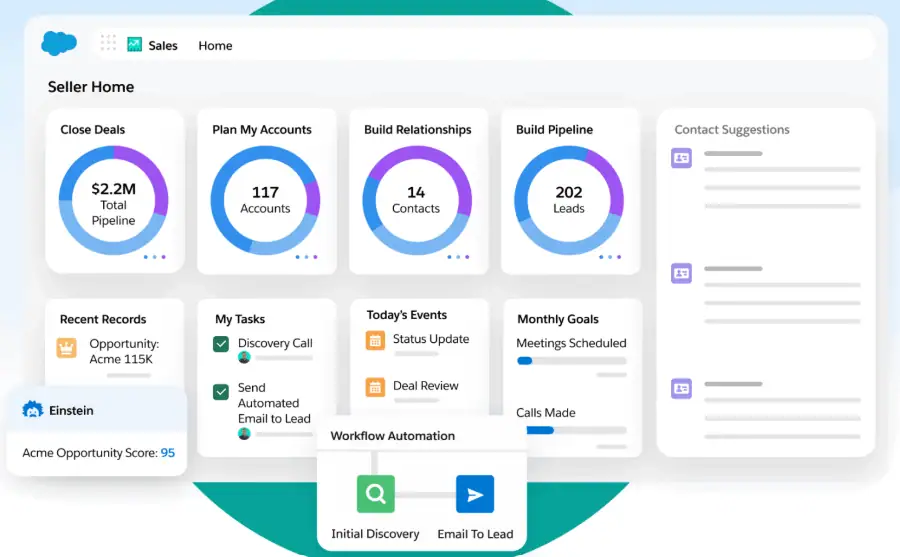
Agentforce Sales is Salesforce’s main sales CRM, and it’s the system most B2B teams, including a lot of medical device companies, run their pipeline on. It covers the core sales work end to end, from leads and accounts to opportunities, forecasting, and reporting, with AI agents now layered across the deal cycle on the higher plans. It fits teams that want one widely used platform they can customize heavily and connect to almost anything. The trade-off is that it takes setup and admin time to run well, and like any CRM, the reporting is only as reliable as what reps actually log.
Key features
- Lead, account, contact, and opportunity management track every deal and the people involved, on every plan.
- Activity management captures emails, events, and other engagement against the right records automatically.
- Forecast management builds real-time forecasts you can adjust to your own metrics (forecasting starts on Pro Suite).
- Pipeline management with reports and dashboards shows where deals stand, with advanced pipeline management and deal insights on Enterprise and above.
- Workflow automation handles repetitive sales processes and territory assignments with a drag-and-drop builder.
- Quoting and contract approvals let teams create and track quotes and orders (Pro Suite and above).
- Agentforce AI agents and conversation intelligence assist across the deal cycle (Enterprise edition and above).
Pricing
Sales Cloud is sold per user per month, billed annually for most plans, and the cheapest plan can also be paid monthly. A 30-day free trial is available with no credit card, plus a very limited free tier. The features most sales teams care about climb with the plan, so forecasting starts on Pro Suite, while conversation intelligence, advanced pipeline management, and Agentforce are reserved for Enterprise and up. Budget for extras on top of the seat price, including a Premier Success Plan at 30% of net license fees and add-ons like Revenue Intelligence (from $220/user/month).
- Starter Suite ($25/user/month): Lead, account, contact, and opportunity management with built-in sales flows, lead routing, and automatic email and event sync.
- Pro Suite ($100/user/month): Adds more customization and automation, sales quoting and forecasting, and access to AgentExchange.
- Enterprise ($175/user/month): Adds advanced pipeline management and deal insights, conversation intelligence, and Agentforce.
- Unlimited ($350/user/month): Adds predictive AI, sales engagement, a full sandbox, and the Premier Success Plan.
- Agentforce 1 Sales ($550/user/month): Adds the full AI suite with unmetered Agentforce, plus Salesforce Spiff, Sales Planning, Salesforce Maps, Tableau Next, and Slack Enterprise+.
2. RepMove
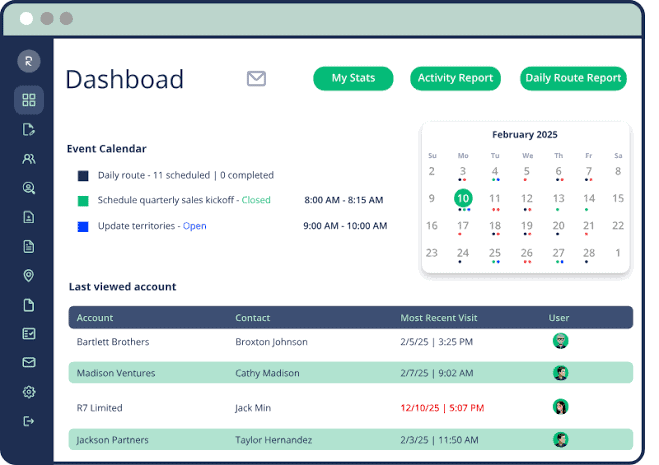
RepMove is one of the few tools built as a dedicated medical device CRM rather than a general platform you adapt. It is a mobile-first field sales CRM made specifically for medical sales reps who spend their days driving between providers.
It’s built around the reality of outside sales, so the standout features are route planning, quick note-taking, and NPI lookups rather than deep deal analytics. It fits reps in the field and the managers tracking them, especially device and distributor teams that sell in person. It’s lighter on forecasting and complex deal management than the bigger enterprise CRMs, so it works best as a rep productivity tool rather than a full revenue system.
Key features
- The mobile app plans and optimizes each rep’s route for the day, so they can fit in more provider visits with less driving.
- Reps can look up NPI numbers from the official registry inside the app and attach them to accounts without switching tools.
- Every provider’s full history sits in the app, including past notes and the date of the last visit, so reps can prep before they walk in.
- Talk-to-text notes and fast account updates let reps log a visit in seconds between stops.
- Territory management and assigned or shared accounts keep reps organized across regions (Sales Pro plan and above).
- Sales pipelines and deals track opportunities through each stage (Sales Pro plan and above).
- Satellite locations can be linked to accounts, and the app connects to other tools through two-way integration (Accelerate plan).
Pricing
RepMove is sold per user per month and is cheapest when billed annually, which saves about 10% over the monthly and quarterly options. A free trial is available with no credit card, but there is no free tier. The entry plan is aimed at solo reps, and the team features most companies want, like the web-based CRM, territory management, and pipelines, start on the middle plan. Pricing below reflects annual billing.
- Flex ($16.67/user/month, billed annually): Mobile app for individual reps with route planning, note tracking, account and contact management, and mileage and call reports.
- Sales Pro ($54/user/month, up to 10 users, billed annually): Adds the web-based desktop CRM, territory management, sales pipelines and deals, document management, and personalized onboarding.
- Accelerate ($80/user/month, 11+ users, billed annually): Adds support for 10,000+ records and two-way integrations for larger teams.
3. Veeva Vault CRM
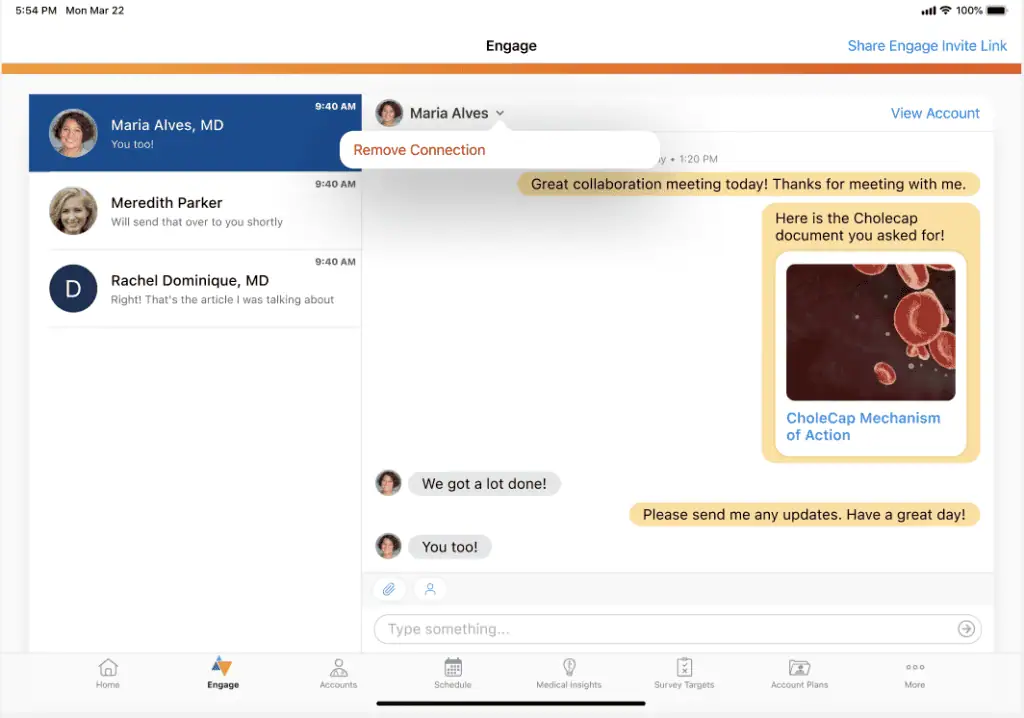
Veeva Vault CRM is the heavyweight CRM built specifically for the life sciences industry, and it’s the standard for pharma and biotech teams whose reps engage doctors directly. It runs sales, marketing, and medical on one platform with a shared customer database and deep compliance built in, plus full offline access for reps working in the field.
It fits large, regulated life-sciences organizations, including big device and diagnostics companies that need region-by-region compliance. For a smaller or mid-market device sales team, it’s likely more platform, and more cost, than the job calls for.
Key features
- Connects sales, marketing, and medical teams on one platform with a shared customer database, so everyone works from the same provider records.
- Compliance features are built into the core and kept current with changing regulations across different countries.
- Full offline support on iPad and iPhone keeps accounts, content, and settings available even without a connection in the field.
- The Agentic Call Report captures free-text notes from a visit and turns them into structured field insights.
- Voice recording transcribes call details straight into the CRM, so reps spend less time typing things up.
- Media Search uses AI to find, summarize, and pull up approved content before or during a customer meeting.
- Handles life-sciences-specific work like sampling, approved email, events management, and territory and key account planning.
Pricing
Veeva does not publish pricing, so costs come through a direct sales agreement and are scaled to the size of the organization. It’s an enterprise platform sold on annual contracts, and there is no public free trial, though Veeva runs guided demos. Expect implementation and data migration to involve Veeva or a certified partner, which adds to the total cost. Several apps in the Vault CRM Suite are licensed on top of the core CRM.
5. Zoho CRM (Life Sciences)
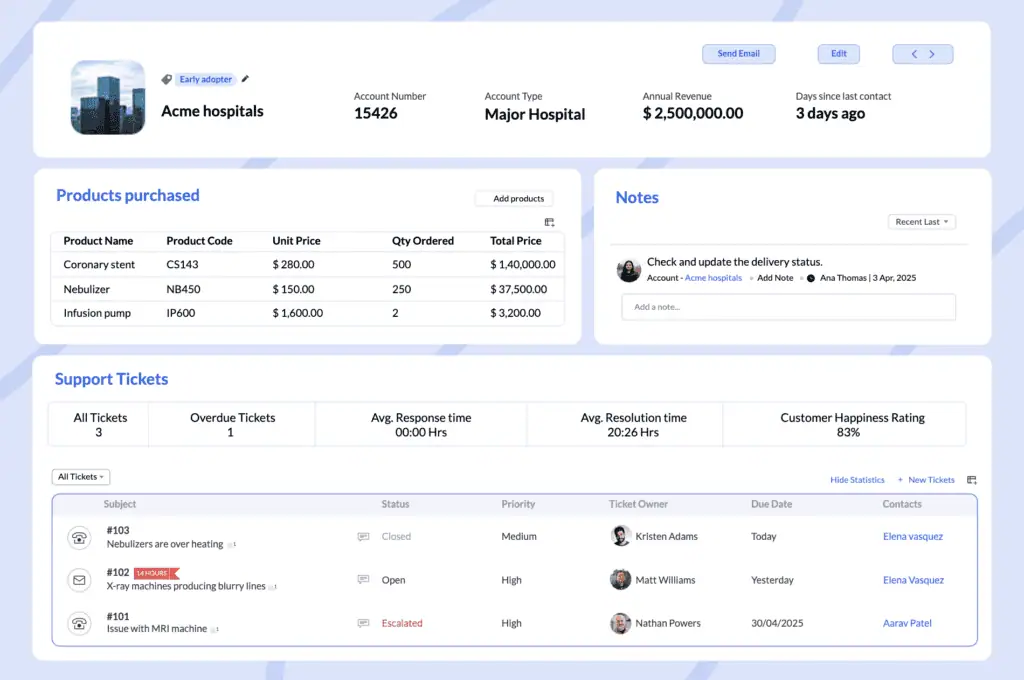
Zoho CRM is a flexible, lower-cost general CRM that you configure as a medical device CRM or for life-sciences sales, rather than a healthcare-specific product that works out of the box. Zoho says as much itself, describing it as an industry-agnostic platform shaped to fit through customization. It fits small and mid-sized teams that want a lot of control over how the CRM works, a low price per seat, and someone available to set it up. The trade-off is that the healthcare and device-specific capabilities come from configuration and add-ons, so the vertical fit is something you build rather than buy.
Key features
- Omni-channel engagement reaches HCPs and HCOs over email, chat, SMS, phone, and social media from inside the CRM.
- Key account management helps reps build long-term relationships across clinicians, administrators, and supply chain contacts in a health system.
- Quoting tools generate one-page or multi-page quotes, auto-approve discounts and payment plans, and convert quotes into orders with notifications to OEMs and logistics.
- Zia, Zoho’s AI, surfaces contextual insights, flags incomplete or inconsistent records, and suggests the best time to reach a lead.
- Performance reporting identifies top reps by territory and drills into the activities, like calls, meetings, and demos, that actually close deals.
- Route planning helps field reps cover more ground with less travel, available through integration with Zoho RouteIQ.
- Compliance support centralizes documents, approvals, and audit trails for regulations like FDA, EMA, and CAPA, set up through customization.
Pricing
Zoho CRM is sold per user per month and is one of the more affordable options on this list. There is a Free edition for up to 3 users and a free trial on the paid plans, with CPQ and inventory arriving on Professional, the Zia AI sales assistant and territory management on Enterprise, and consulting and migration help on Ultimate. Remember that the healthcare-specific setup is configuration work, and field route planning is a separate add-on through Zoho RouteIQ:
- Free (about $0, up to 3 users): Leads, deals, workflows, reports, and a mobile app for very small teams.
- Standard (about $10/user/month): Adds workflow and assignment rules, AI agents, cadences, sales forecasting, and reports and dashboards.
- Professional (about $17/user/month): Adds CPQ, email intelligence, process automation, inventory management, and Google Ads integration.
- Enterprise (about $29/user/month): Adds the Zia AI sales assistant, journey orchestration, territory management, custom functions, and customer portals.
- Ultimate (about $31/user/month): Adds higher feature limits, consulting, migration assistance, and custom AI and ML.
How Revenue Grid Completes Your Medical Device CRM
Everything above comes down to one thing. A CRM is only useful if it reflects what’s really happening with your accounts. And this is where even a well-kept medical device or healthcare CRM tends to fall short.
What your CRM store is the deal stage, the dollar amount, and the names of a few contacts. What it doesn’t know is the part that decides whether you win. It doesn’t know that the surgeon who loved your device hasn’t replied in three weeks. It doesn’t know that the person who keeps pushing the deal forward is the biomedical engineer, not the one whose name is on the account. It doesn’t know what you promised in the last meeting. That context lives in your reps’ heads, and when a rep leaves or a territory changes, it walks out the door with them.
Revenue Grid is built around exactly that missing piece. It’s a relationship intelligence platform that sits on top of the Salesforce you already use, so you don’t replace anything. It fills in what the record has been leaving out. Here’s what it offers:
- Activity Capture logs every email, meeting, and field visit into Salesforce on its own, so the record stays current without your reps typing anything in.
- Relationship intelligence shows who’s actually engaged on a deal and who’s gone quiet across everyone involved in the decision, and it holds the full account history so a rep change doesn’t reset the relationship to zero.
- True Pipeline surfaces the deals that look healthy on paper but have actually stalled, so managers can catch risk early instead of at quarter-end.
- Sales Forecasting builds the forecast from real activity in the field rather than from numbers someone typed in to hit a deadline.
- Deal Guidance points each rep toward the right next move on a deal instead of leaving them to guess.
- Sales Sequences keep follow-up on track after a hospital or provider meeting, so deals don’t go quiet on their own.
The result of using Revenue Grid is a system that your team can finally trust. Managers stop running pipeline reviews on guesswork. Reps stop losing context every time a territory shifts. And forecasts start reflecting what’s really going on in the field instead of what someone typed in at the end of the quarter.
If your team sells medical devices on Salesforce, that’s the gap Revenue Grid is built to close. See how it captures activity on its own, shows you where every relationship really stands, and guides your reps to the next right move. Request a Demo.
Book a demo to see Revenue Grid in action!
What is a medical device CRM?
A medical device CRM is the software a sales team uses to track every account, contact, and deal involved in selling medical devices. It goes beyond a basic contact list because device deals pull in many people, like surgeons, procurement teams, review committees, and distributors, who each move on their own timeline. A good one keeps all of those relationships, the visit history, and the current deal stage in one place, so reps and managers always know where things actually stand.
What is the best CRM for medical device sales?
There is no single best CRM for medical device sales, because the right fit depends on how you sell. Field-heavy teams often prefer a mobile tool like RepMove, large regulated organizations lean toward Veeva, and most B2B device companies run their pipeline on Salesforce. If you already use Salesforce, the bigger question is whether reps keep it current, which is where an add-on like Revenue Grid helps. Match the tool to your sales motion and the systems you already run.
Do medical device companies use Salesforce?
Yes, many medical device companies run their sales on Salesforce, usually Sales Cloud (now Agentforce Sales). It handles leads, accounts, opportunities, forecasting, and reporting, and connects to almost any other system. The catch is that Salesforce only reflects what reps enter, and device reps spend their days in hospitals rather than at a desk. When activity does not get logged, the pipeline and forecast turn unreliable, which is the most common issue behind low CRM adoption.
How much does a medical device CRM cost?
Pricing varies widely. Field sales tools like RepMove start around $17 per user per month, general platforms like Zoho range from free to about $31, and Salesforce runs from $25 to $550 per user per month depending on the edition. Enterprise life-sciences platforms like Veeva are custom-quoted and cost considerably more. Remember to budget for extras beyond the seat price, such as implementation, support plans, and add-ons, which can add a meaningful amount to the total.
How is a medical device CRM different from a healthcare CRM?
They solve different problems. A medical device CRM is a sales tool that helps reps manage hospital accounts, providers, distributors, and deals. A CRM for healthcare usually means patient relationship management, which providers and payers use to coordinate care, appointments, and records. Some platforms, like Salesforce Health Cloud, focus on the patient side, so they fit device companies only when the work touches patient engagement. For a sales team, a sales-focused CRM is the better starting point.
How does Revenue Grid help medical device sales teams?
Revenue Grid is a relationship intelligence platform that sits on top of Salesforce, so it strengthens the CRM you already use rather than replacing it. It captures emails, meetings, and field visits automatically, so records stay current without manual entry. It also shows who is engaged on each deal, flags deals that have quietly stalled, and guides reps toward the next step. The result is a more accurate pipeline and forecast, and less time reps spend updating the system.