


Key Takeaway
- Traditional AI meeting note-takers capture what was said, but reps still have to update the CRM, write follow-ups, and manage next steps themselves.
- Revenue Grid Meetings Assistance automatically captures meeting summaries, action items, risks, and competitor mentions in the relevant Salesforce records.
- Follow-up messages are drafted using the latest conversation and the account's previous history, including past commitments and current deal risks.
- Every meeting adds to the account's history, giving reps and managers useful context for future meetings, deal reviews, and questions through AI Chat.
Traditional note-takers leave you with a recap. The work that follows is still yours to handle.
Every sales conversation creates next steps: CRM records need updating, follow-ups need sending, action items need assigning, and new risks or opportunities need to reach the people who can act on them. When that work depends on someone going back through a transcript later, important details get delayed or missed.
Revenue Grid turns the conversation into action as soon as the meeting ends.
What Revenue Grid gets done after every call
Meetings Assistance turns what happened in the conversation into the work that needs to happen next.
It updates CRM records, drafts follow-ups, captures action items, and adds new account intelligence to the deal history. Reps leave the meeting with the work already moving instead of another record they need to process. 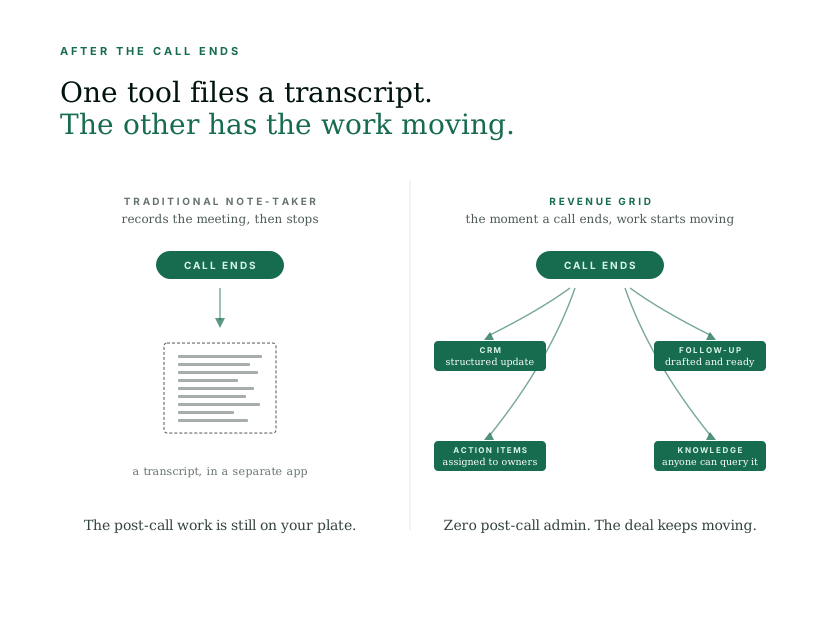 Here’s what you get when conversations stop ending in a transcript and start ending in action:
CRM stays current without any manual entry
According to Validity’s 2025 State of CRM Data Management report, 76% of CRM users say less than half of their organization’s data is accurate and complete.
Most of that gap comes down to manual entry; the updates someone meant to make after a call and never got to.
Meetings Assistance captures the conversation and writes a structured record straight into Salesforce. You get:
- A summary
- Action items with owners
- Risks raised, and competitors mentioned.
Those insights are written to the relevant opportunities and accounts, so the CRM reflects what actually changed in the conversation.
By the time the call ends, the record is already current. Reps do not need to reconstruct the meeting later, and anyone who opens the account can see the latest state of the deal.
The meeting becomes knowledge the team can use
With Revenue Grid, each conversation becomes part of the account history the team can use later.
That accumulated context also feeds future Meeting Memos, so every conversation helps prepare reps for the next one. It is also available through Revenue Grid’s AI Chat, where one can ask questions such as, “What has changed on this account since last week?” or “How did the last negotiation actually go?” and get answers based on the full account history.
The answers are tailored to who’s asking. A rep gets the next best action on a deal, a manager gets a read on where it stalled.
This means important context from a meeting stays useful long after the call ends, whether it is needed for the next meeting or a deal review months later.
Follow-up is written for you, from the full relationship
The follow-up is written for you the moment the call ends, so it’s one less thing you sit down to do. And because it draws on the account’s full history rather than the single call, it reflects the full relationship:
- What was discussed on the call
- What was promised earlier in the deal
- What’s at risk right now
From there, it moves into your outreach across the channels you already use, Outlook, Gmail, Teams, and Slack. When any email needs your personal input, you get a notification, so the outreach keeps running on its own and still reads like it came from you.
The same meeting, with and without Revenue Grid
The same meeting can end as a transcript you file away or as work that’s already moving. Here’s both, side by side.
| A standalone note-taker | Revenue Grid | |
| The record | A transcript in a separate app | Structured outputs written into Salesforce |
| CRM update | Manual, done later if at all | Automatic, current the moment the call ends |
| Follow-up | Left for the rep to write | Drafted from the full history, ready to send |
| Action items | Sitting in someone’s notes | Assigned to owners in the CRM |
| Deal intelligence | Expires after the call | Retrievable across the whole relationship |
If you’re already with Revenue Grid, ask your customer success manager to show you Meetings Assistance on one of your accounts.
See how Revenue Grid turns every conversation into action
What does Revenue Grid Meetings Assistance do?
Revenue Grid Meetings Assistance turns sales conversations into structured CRM updates, action items, follow-up drafts, and account intelligence. It helps sales teams complete post-meeting administrative work and keeps important conversation details accessible across the account history.
Does Revenue Grid automatically update Salesforce after meetings?
Yes. Revenue Grid captures meeting summaries, action items with owners, risks, and competitor mentions, then writes this information to the relevant Salesforce accounts and opportunities. Reps don’t have to manually enter those details after every call.
Can Revenue Grid draft follow-up emails after sales calls?
Yes. Revenue Grid drafts follow-ups using the meeting discussion and the broader account history, including previous commitments and current deal risks. It supports outreach workflows across Outlook, Gmail, Teams, and Slack, with notifications when personal input is needed.
How is Revenue Grid different from an AI meeting note-taker?
Traditional AI meeting note-takers primarily capture transcripts and summaries. Revenue Grid connects meeting intelligence to Salesforce records, follow-up workflows, and ongoing account history. Action items, deal risks, and other important details become accessible to the wider team.
Can Revenue Grid help sales reps prepare for future meetings?
Yes. Revenue Grid uses accumulated account context to inform future Meeting Memos. Reps can also use AI Chat to ask questions about previous conversations, open commitments, and changes in an account, helping them prepare with the latest relationship history.