

Key Takeaway
- Reps spend only ~40% of their week actually selling (Salesforce 2026 State of Sales), and deal tracking software exists to win back the rest lost to admin and data entry.
- Activity and email capture is the foundation: every downstream signal (deal health, forecasts, coaching) is only as reliable as the activity automatically captured and matched to the right record.
- Deal health scoring should be built from signals that can’t be manipulated (activity recency, stakeholder breadth, stage velocity) so leaders spot dying deals before the end-of-quarter surprise.
- Multi-threading matters: single-contact deals close at materially lower rates, since one champion leaving can take the whole deal cold.
- A sales methodology (MEDDICC, BANT) only works when built into the opportunity record as stage-exit criteria reps fill in, and not parked in a PDF.
- Salesforce-native architecture (storing data in standard objects under your existing permission model) clears procurement faster and matters most for regulated industries needing SOC 2, ISO 27001, GDPR, and HIPAA.
Quick Overview of Deal Tracking Software For Revenue Teams
We’ve shortlisted 7 tools for this guide. Below you’ll get a quick TL;DR of what each tool does, who it’s for, and what it costs.
| Tool | Pricing | Best for | Key features |
| Revenue Grid | $30–$149/user/month across three tiers (Activity Capture 360, Knowledge Capture, Revenue Grid Ultimate); no free trial | Salesforce-centric revenue teams that need complete activity capture, deal health scoring, and forecasting native to the CRM | Automatic activity capture into standard Salesforce objects, True Pipeline with deal health scoring, AI forecasting, Deal Guidance with stage-exit criteria |
| Salesforce | From $25/user/month (Starter) up to $550/user/month (Agentforce 1 Sales); 30-day free trial | Mid-market and enterprise teams that need to model unique sales processes across multiple business units | Activity auto-capture, advanced pipeline management, multi-level forecasting, Agentforce AI agents |
| Zoho CRM | Free for up to 3 users; paid from $14/user/month annually; 15-day trial on paid plans | SMBs and mid-market teams that want enterprise depth at a budget price | Multiple pipelines, Blueprint stage enforcement, Zia AI predictions, workflow rules |
| DealRoom | Quote-based, priced by deal volume; no free trial | M&A teams handling pipeline, due diligence, and post-merger integration in one platform | M&A deal pipeline, due diligence checklists, virtual data room, BI reporting |
| Revenue.io | Custom quote across three tiers; no free trial | Salesforce-centric revenue teams that want AI-driven deal execution and forecasting | Real-time deal health scoring, Ask Anything natural-language queries, opportunity summaries, Salesforce-native architecture |
| Outreach | Seat-plus-consumption pricing through AI Credits; custom quote; no free trial | Teams already running Outreach for sequencing who want deal management in the same workflow | Editable deal grid, AI Deal Agent, Deal Health Scores with 7-day trends, activity timeline |
| Attio | Free for up to 3 seats; paid from $29/user/month annually; 14-day Pro trial | VC firms, marketplaces, and PLG teams that need flexible custom data modeling | Custom object types, data enrichment from hundreds of sources, customizable pipelines, modern Airtable-style UI |
| Pipedrive | From $14/seat/month annually; 14-day free trial | Small and growing sales teams that want a deal tracker without enterprise weight | Visual kanban pipeline, AI report builder, deal rotting alerts, 500+ integrations |
Core Capabilities to Evaluate in Deal Tracking Software
The right tool for any team depends on how they sell, what’s already in their stack, and the problem they’re actually trying to fix. There are plenty of good options outside this guide too. So let’s cover the capabilities that separate a real deal tracking platform from a prettier pipeline view, giving you a framework to evaluate any vendor against.
1. Activity and email capture: the foundation of every deal signal
Every signal further up the stack depends on whether the activity underneath an opportunity is captured completely and matched to the right record. When a rep’s emails, calendar invites, and meeting notes either never make it into Salesforce or land on the wrong opportunity, deal health scores are wrong, forecasts inherit the gap, and managers coach off a partial picture. When you are evaluating vendors, look for the following:
- Capture that runs server-side and automatically, so the data is preserved even when reps forget to log it or move between devices.
- High matching accuracy between activity records and the right opportunity, contact, and account, validated with a real sample of your data during the proof of concept.
- Configurable PII filtering that lets administrators decide what content is excluded before any of it lands in Salesforce, which matters for regulated industries like financial services, or healthcare.
- Storage into standard Salesforce objects, so the captured activity is reportable, triggerable in workflow, and visible to the rest of the org through the tools they already use.
This is the layer to evaluate first, because nothing downstream can be more reliable than what feeds it. The catch is that a CRM only holds what a rep remembers to enter, so the moment an email or meeting goes unlogged, the record is already incomplete.
Revenue Grid is built to close that gap. It captures emails, meetings, calendars, and contacts automatically and writes them into standard (or custom) Salesforce objects you own outright, with no retention limits, governed by the permission model already protecting the rest of your org. Every downstream signal then reads from a complete record in the same place reps and managers already work. 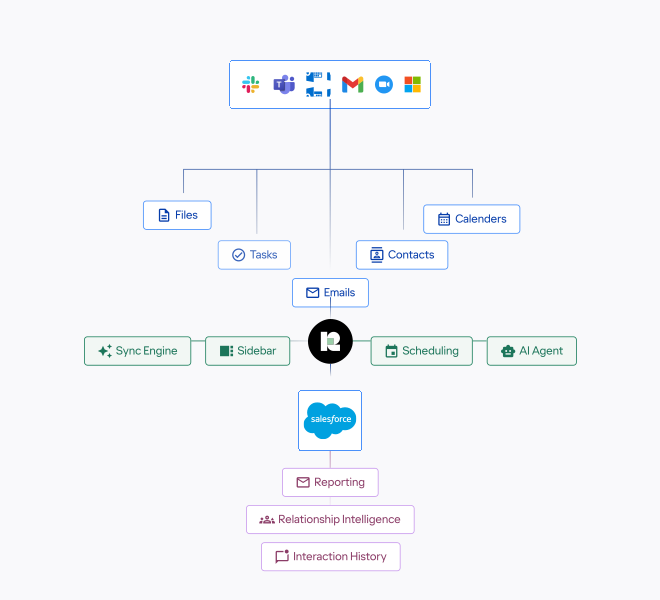
Strong activity capture in Salesforce is the difference between a complete record and one built on whatever a rep remembered to log.
2. Pipeline visibility and deal health scoring
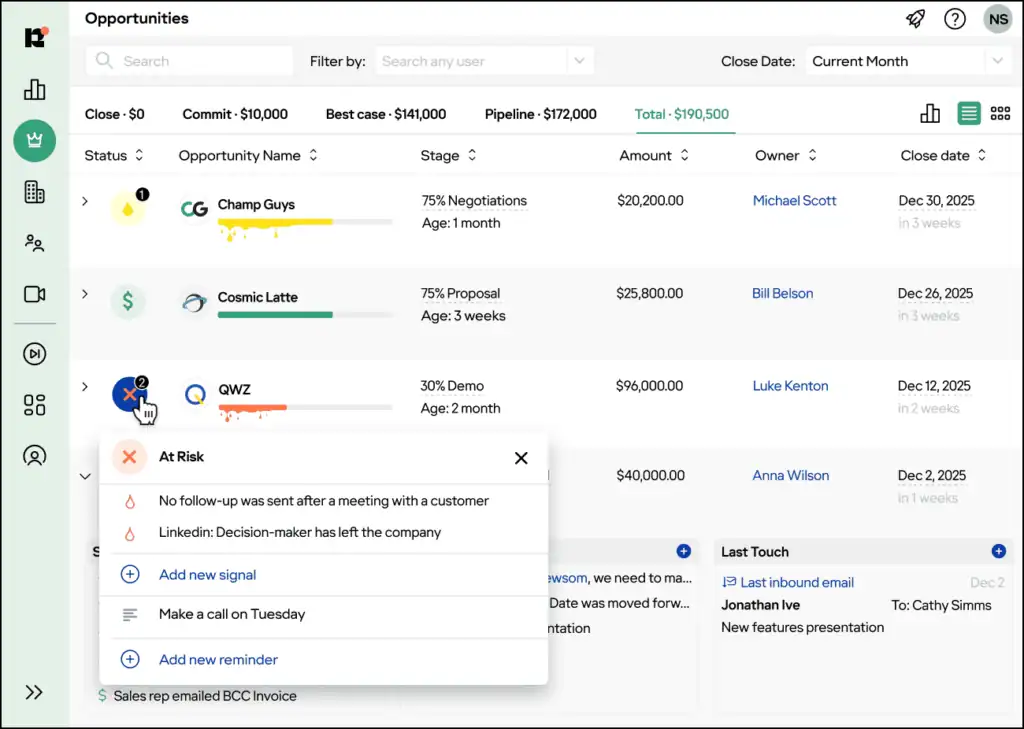
A pipeline view that only shows what reps have entered is a pipeline view that confirms what reps want managers to see. Useful deal health scoring works the other way around, combining objective signals that the rep is not in a position to manipulate, so leadership finds out which deals are dying before the end-of-quarter surprise rather than after it.
The features worth comparing here are:
- Health scores built from inputs reps don’t directly control, including activity recency, the breadth of stakeholders engaged on the buying side, stage velocity, and how the current deal compares to past won and lost opportunities of similar size.
- Visual pipeline views that can be filtered by segment, region, rep, and time period without an admin needing to build a custom report each quarter.
- Risk flags that name the cause, so a deal marked at risk shows whether it is single-threaded, stalled in stage, missing a next step, or showing a sudden drop in engagement.
Real deal pipeline visibility means seeing the deal as it is, not as the rep wants it to look.
3. Relationship intelligence and multi-threading
Deals with only one point of contact on the buying side close at materially lower rates than deals with multiple stakeholders engaged. The reason is straightforward: champions get promoted, change companies, or lose internal political capital, and a deal with no second relationship is one departure away from going cold.
Relationship intelligence is the capability that protects against that, and the things to look for are:
- Visibility into every contact who has engaged on the buying side, including the ones reps have not yet added to the opportunity by hand.
- An engagement score per contact, so the team can tell which stakeholders are actually active versus which are copied on threads out of courtesy.
- A clear read on which personas the deal is missing, whether that is the economic buyer, a technical evaluator, an executive sponsor, or a procurement contact.
4. Guided selling and stage exit criteria
A sales method only works when it lives inside the tool your reps already use. MEDDICC training that sits in a PDF is just a slideshow. MEDDICC built into the opportunity record, as fields reps fill in and checks that control when a deal can move forward, is the method actually doing its job.
Tools worth a look in this category should give you:
- Configurable stage-exit criteria, so the company can encode its own version of MEDDICC, BANT, or a hybrid model rather than someone else’s idea of best practice.
- In-record prompts that show reps which criteria are unmet on a given opportunity before they try to advance the stage.
- Visibility for managers across the team, so deal reviews can concentrate on the opportunities where the methodology is signaling that something important is missing.
Revenue Grid surfaces guided-selling criteria on the opportunity record inside Salesforce. Reps see which boxes are still unchecked before stage advancement, and managers see which methodology gaps correlate with the deals that slip from one quarter into the next.
5. Forecasting reliability and category accuracy
Sales forecasting accuracy depends entirely on the pipeline data underneath it, so the capabilities to evaluate in this layer are:
- Pipeline hygiene automation that catches missing close dates, stale next steps, and deals stuck in stage longer than the historical average for the segment.
- Activity-completeness weighting, so opportunities with light engagement carry less confidence in the rollup than opportunities with deep, multi-stakeholder engagement.
- Category accuracy reporting that compares commit, best case, and pipeline categories against actual outcomes over multiple quarters, not only the current one.
- Scenario modeling that lets a leader see the forecast under different assumptions before committing to a number with the board.
Revenue Grid’s AI forecasting runs on the captured activity rather than self-reported deal stages, so the model is grounded in what the data actually shows about each opportunity. Leaders can disaggregate the forecast by risk tier and trace any number back to the underlying activity that supports it.
6. Sales coaching and manager workflows
Flagging a deal as risky is the easy part. The harder part is turning that flag into a useful coaching conversation, and the deal tracking software you pick should make that step short. A manager should be able to open the dashboard, see why the deal is at risk, and walk into the one-on-one already knowing what to ask.
When you evaluate tools here, look for:
- A manager view that ranks the top deal risks per rep, so the one-on-one starts with the opportunities that matter most rather than the ones that come up first alphabetically.
- One-click drill-down from the pipeline view into the activity, contacts, and methodology gaps on any single deal.
- Pattern analytics across a rep’s book of business, so coaching can address behavior trends rather than only the deal that came up this week.
- Notification routing into Slack or Microsoft Teams when a deal crosses a defined risk threshold, so coaching can happen in real time rather than waiting for the next scheduled review.
This handoff, from knowing a deal is at risk to knowing what to say about it, is what Revenue Grid is built to shorten.
Revenue Grid surfaces a prioritized list of what to do next on each deal, so a manager walks into the one-on-one with the focus already set rather than reconstructing it. From there, the platform compares conversational and activity patterns across reps to separate what top performers do from everyone else, and correlates coaching effort against win rates so you can see which nudges actually move the number.
7. Sales sequences triggered by deal signals
A cadence that fires the same five emails to every prospect on a fixed schedule is a cadence that ignores the different stages a deal might be at. Useful sales sequences automation responds to conditions inside the opportunity, so a stalled stage triggers a different outreach than a fresh deal in the qualification stage.
The features that matter in this category are:
- Triggers based on field changes, activity gaps, and deal health drops, not only on time-based steps.
- Branching logic, so the sequence can adapt when a prospect responds, books a meeting, or goes quiet for longer than a defined window.
- Native flow into Salesforce, so every email, call, and task created by the sequence lands back on the opportunity record where the rest of the deal context already lives.
- Manager visibility into which sequences are firing on which deals, and what the response patterns look like across the team.
The capability is strongest when sequences read from the same source as deal health and forecasting, so the outreach is reacting to what the platform already knows about the opportunity rather than running on a parallel set of trigger conditions. That alignment is the test to apply when you compare vendors in this category.
8. Security, governance, and admin simplicity in Salesforce
Deal tracking software lives close to some of the most sensitive data in the business, which is why sales CRM software with Salesforce-native architecture tends to clear procurement reviews faster than tools running on a parallel data store. So for buyers in financial services, healthcare, and regulated industries generally, a security review is as important before finalizing any deal tracking software.
The criteria to evaluate are:
- Storage in standard Salesforce objects rather than a parallel database controlled by the vendor, so the data inherits the permission model the security team has already approved.
- Compliance certifications that match procurement requirements, including SOC 2 Type II, ISO 27001, GDPR, and HIPAA for organizations handling protected health information.
- Configurable PII filters that let administrators decide what kinds of email content are excluded from capture before any of it lands in the system.
- Admin tooling that respects Salesforce’s role hierarchies and sharing rules rather than reinventing them in a separate console.
Revenue Grid is Salesforce-native by design. The activity, deal health, and forecasting data lives inside Salesforce and is governed by the customer’s existing permission model. SOC 2 Type II, ISO 27001, GDPR, and HIPAA controls are in place for regulated buyers, and PII filtering is configurable by the administrator before data is written to the org.
The 8 Best Deal Tracking Software
Below is a closer look at each platform, covering what it does well for deal tracking, the features that matter most when you are evaluating, and how it prices.
1. Revenue Grid
Revenue Grid is a Salesforce-native deal tracking platform. All modules sit inside Salesforce and write into standard or custom objects you own, with no parallel data store and no sync layer to maintain.
The platform automatically captures every email, meeting, and calendar event tied to an opportunity, scores deal health from that captured signal, and turns the result into next-step guidance for reps and coaching cues for managers.
Key features
- Activity Capture writes emails, meetings, calendar events, and contacts to standard or custom Salesforce objects, governed by your existing permission model.
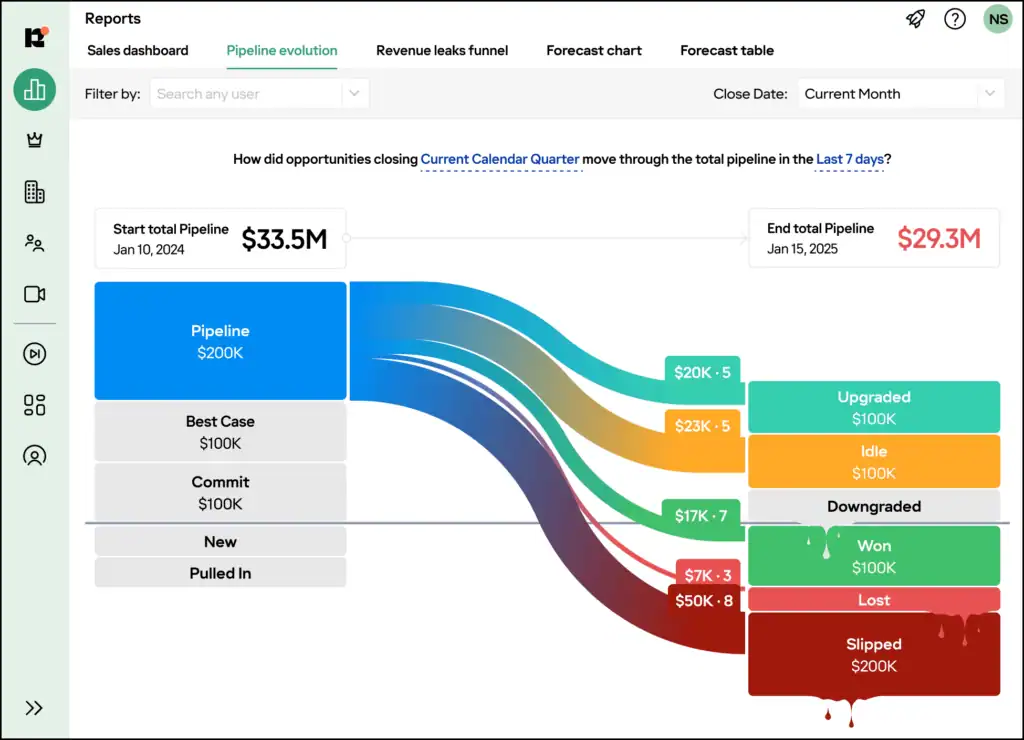
- True Pipeline view with deal health scoring built from engagement signals, stage velocity, and stakeholder breadth, with risk flags that name the cause behind each one.
- AI forecasting that runs on captured activity rather than self-reported deal stages, with category accuracy tracked quarter over quarter.
- Deal Guidance that surfaces stage-exit criteria on the opportunity record and flags methodology gaps before stage advancement.
- Sales Sequences triggered by deal signals like activity gaps, stage stalls, or health-score drops, with all actions writing back into Salesforce.
- Meetings Assistance with pre-meeting briefs pulled from Salesforce, conversation capture during the call, and automated follow-up drafting.
- Salesforce-native security where data lives inside your existing permission model, with SOC 2 Type II, ISO 27001, GDPR, and HIPAA certifications in place.
Pricing
Revenue Grid is sold as a per-user monthly subscription with three tiers. Each tier builds on the previous one, and the full deal tracking platform sits in the top tier. Founder Pricing is offered as a custom rate for qualifying organizations getting early access to new AI capabilities. A free trial is not publicly offered, and onboarding, advanced customization, and dedicated hosting are sold separately as professional services.
- Activity Capture 360 ($30/user/month): Automated activity capture into Salesforce, historical sync, inbox and calendar sidebar, online scheduling, and native Salesforce activity reporting.
- Knowledge Capture ($49/user/month): Adds AI chat and search across captured sales data, the revenue-grade data lake, and record assistance.
- Revenue Grid Ultimate ($149/user/month): Adds True Pipeline, AI forecasting, Meetings Assistance, Deal Guidance, Sales Cadences, Team Analytics, Relationship Intelligence, RG Mentor, and Intel Assistance.
- Founder Pricing (custom): Special rates for qualifying early-access customers helping shape the platform’s AI roadmap.
2. Salesforce
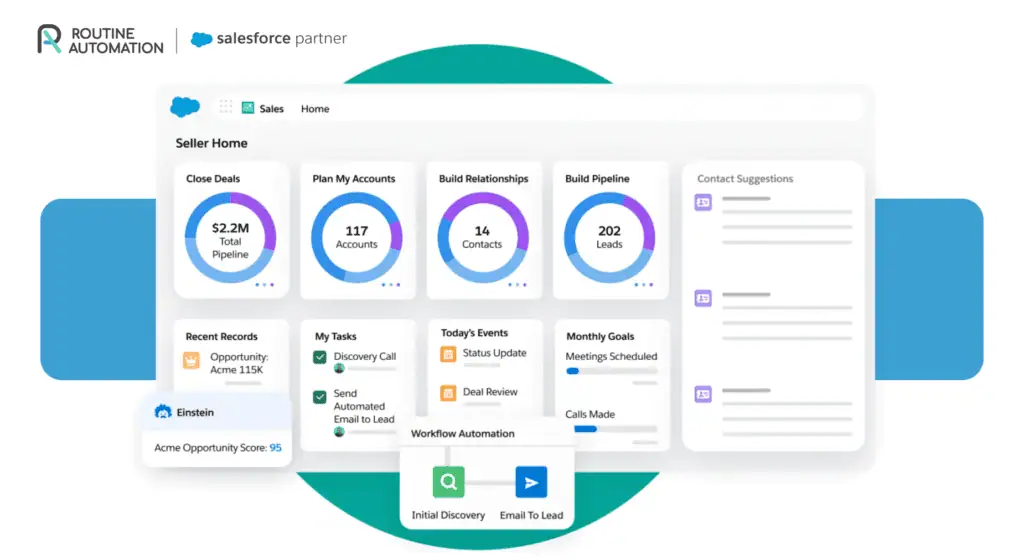
Salesforce Sales Cloud (now branded as Agentforce Sales) is the enterprise default for sales force automation, and its deal tracking is the deepest of any major CRM. It is built for organizations that need to model unique sales processes, run multiple pipelines per business unit, and connect deal data to almost every other business system. Most deployments need a dedicated admin or implementation partner and a rollout that runs in months.
Key features
- Auto-capture of emails, meetings, and calendar events into the right lead, contact, account, or opportunity record.
- Opportunity management with stage tracking, close-date projection, and probability-weighted pipeline rollups.
- Forecasting at individual, team, and territory level, with custom metrics aligned to your business goals.
- Advanced pipeline management and deal insights inside the opportunity record (Enterprise plan and above).
- Conversation intelligence with call recording, transcription, and topic tagging (Enterprise plan and above).
- Agentforce AI agents that handle research, drafting, and follow-up across the deal cycle.
Pricing
Salesforce Sales Cloud uses a per-user monthly subscription across five plans, with a 30-day free trial that does not need a credit card. Only Starter Suite supports monthly billing, and higher plans require an annual commitment. Most of the deal tracking depth lives in Enterprise and above, and implementation cost (not included in the seat price) tends to be the bigger line item for mid-market and enterprise rollouts.
- Starter Suite ($25/user/month, billed monthly or annually): Lead, contact, account, and opportunity management with built-in sales flows and AI activity sync.
- Pro Suite ($100/user/month, billed annually): Adds sales quoting, forecasting, deeper customization and automation, and AppExchange access.
- Enterprise ($175/user/month, billed annually): Adds advanced pipeline management, deal insights, and conversation intelligence.
- Unlimited ($350/user/month, billed annually): Adds predictive AI, sales engagement, a full sandbox, and the Premier Success Plan.
- Agentforce 1 Sales ($550/user/month, billed annually): Adds the full AI suite with unmetered Agentforce usage, Salesforce Spiff, Sales Planning, Salesforce Maps, Tableau Next, and Slack Enterprise+.
3. Zoho CRM
Zoho CRM is a budget-friendly CRM that gets close to enterprise depth at a fraction of the seat cost. The deal tracking layer covers multiple sales pipelines, predictions and next-step suggestions through the Zia assistant, and Blueprint, which gates stage transitions until required fields and approval steps are completed.
The platform connects to Zoho’s broader ecosystem of business apps, which is a real advantage for teams already running other Zoho products.
Key features
- Multiple sales pipelines with custom stages, layouts, and access rules for inbound, outbound, or enterprise deal flows.
- Blueprint workflow that enforces stage transition rules, required fields, and approval steps before a deal can move forward.
- Zia AI predictions for win probability, expected close date, and best-next-action prompts on each deal record.
- Workflow rules and scheduled automations that trigger tasks, emails, or field updates based on deal stage or date conditions.
- Stage flow and conversion analytics that surface time-in-stage, drop-off points, and pipeline bottlenecks.
- Forecasting with custom hierarchies and AI-augmented projections on Enterprise and Ultimate plans.
Pricing
Zoho CRM uses a per-user monthly subscription, with a permanently free tier for up to three users and a 15-day free trial on the paid plans. Annual billing saves roughly 20 to 30% compared with monthly rates. Most of the deal tracking depth, including Blueprint, advanced workflow automation, and Zia AI, lives in Professional and Enterprise. Some Zia features require a minimum user count, which is worth checking before committing to a plan.
- Free ($0, up to 3 users): Basic lead, account, and deal management with limited automation.
- Standard ($14/user/month, billed annually): Adds custom fields, lead scoring, multiple sales pipelines, and Zoho Marketplace access.
- Professional ($23/user/month, billed annually): Adds Blueprint for process enforcement, quote and inventory management, webhooks, and Google Ads integration.
- Enterprise ($40/user/month, billed annually): Adds Zia AI predictions, territory management, custom functions, sandbox testing, and custom reports.
- Ultimate ($52/user/month, billed annually): Adds advanced analytics through Zoho Analytics, expanded storage and email limits, priority support, and dedicated infrastructure.
4. DealRoom
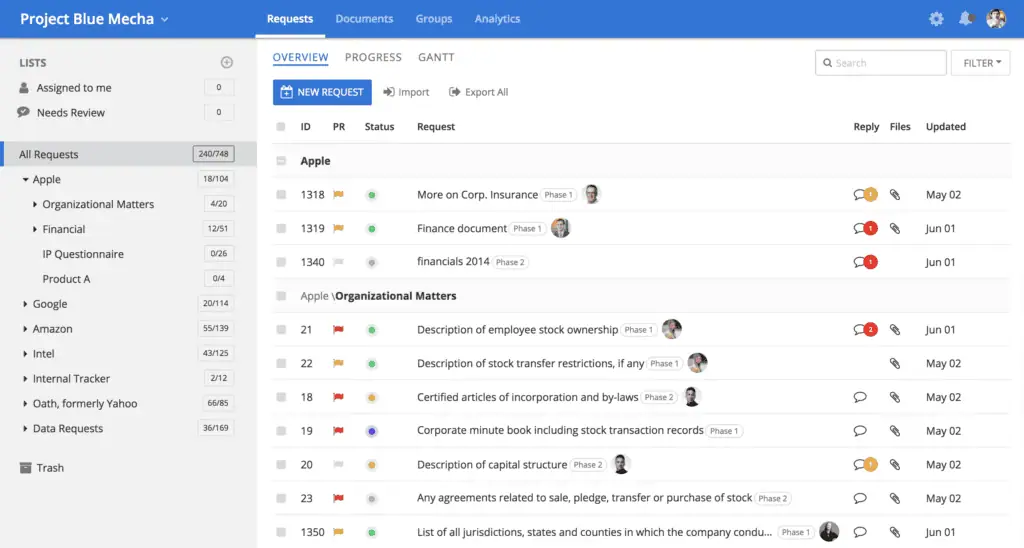
DealRoom is a deal management platform built specifically for M&A dealflow, used by corporate development teams, private equity firms, investment banks, and other buy-side and sell-side groups. It pulls pipeline tracking, due diligence, post-merger integration, a virtual data room, and BI reporting into a single system, which is the main reason teams switch from spreadsheets and email threads to a structured M&A platform.
Key features
- Deal pipeline with custom stages, real-time updates, and qualitative or quantitative metrics on each opportunity.
- Dashboard view that lets users switch between deals in one click and see a full overview of each.
- Centralized notes and document storage tied to each deal record, accessible to every team member on the deal.
- Built-in due diligence checklists, task tracking, and version-controlled document management.
- Virtual data room with encryption, access controls, document-level permissions, and detailed audit trails.
- BI reporting with prebuilt dashboards, pipeline funnels, and exportable reports in JPG, Excel, or PDF.
- DealRoom AI for Diligence (add-on) that generates playbook items and extracts key insights from deal documents.
Pricing
DealRoom uses a quote-based model rather than published per-seat prices. The subscription scales with deal volume rather than user count, so every seat on the team is included in whatever tier the company purchases. There are no per-document or per-page fees and no listed overage charges. A free trial is not publicly offered, and pricing is shared through a demo and sales conversation.
5. Revenue.io
Revenue.io is a Salesforce-native deal execution platform that brings pipeline visibility, conversation intelligence, guided selling, and forecasting into one system. The product runs an AI layer over the Salesforce opportunity record, drawing on captured call, email, and meeting activity to generate its signals.
Key features
- Real-time deal health scoring built from engagement signals, stage movement, and conversation data.
- Automated opportunity summaries that surface key moments, action items, and recent activity on each deal.
- Ask Anything About a Deal, a natural-language interface that pulls answers from calls, emails, and CRM data on demand.
- Opportunity risk assessment that flags at-risk deals and shows what is missing or needs attention on each.
- Next-step recommendations on each opportunity, generated from conversation and activity data.
- Pipeline grouping by rep, stage, or status, with role-based access controls on summary visibility.
- Forecasting that analyzes deal momentum, stakeholder engagement, and pipeline activity across Salesforce.
Pricing
Revenue.io is sold across three tiers, all priced through a custom quote with no published seat rates. Each tier builds on the previous one. Deal management capabilities appear in Engage, and the heavier AI features for deal scoring, forecasting, and coaching sit in Orchestrate.
- Activate (custom quote): Salesforce-native dialer with real-time call coaching, speed-to-lead routing, and omni-channel basics for SMS, IVR, and voicemail drop.
- Engage (custom quote): Adds guided cadences, opportunity playbooks, deal re-engagement sequences, centralized tasks, and outcome attribution tied to revenue.
- Orchestrate (custom quote): Adds Ask Revenue natural-language queries, deal scoring and pipeline risk insights, AI coaching, the Revenue Intelligence Dashboard, and the Forecast Analyzer.
6. Outreach
Outreach is primarily a sales engagement platform, with deal management positioned as one capability inside its broader AI agent platform for revenue teams. The deal management module gives reps and managers a unified workspace for inspecting and updating every open opportunity, with AI handling much of the routine field maintenance behind the scenes.
The platform makes the most sense for teams already running Outreach for sequencing and conversation intelligence, since the deal grid sits inside the same workflow they already use.
Key features
- Editable deal grid that lets reps update every deal in the pipeline from a single view, with changes writing back to the CRM.
- CRM validation rules respected from inside the deal grid, so any update has to comply with the rules already set in the CRM.
- AI Deal Agent that recommends field updates automatically and surfaces what has changed on each deal in the last seven days.
- Deal Health Scores with seven-day trends and suggested actions for each opportunity.
- Activity timeline showing buyer and seller calls, emails, and meetings against the deal in chronological order.
- Topics view that shows what has been mentioned recently across calls and emails, with comparison across deals.
- Saved deal-grid views with filtering and sorting for repeatable inspection sessions.
Pricing
Outreach uses a combination of seat-based and consumption-based pricing through AI Credits, and actual prices are not published on the site. Deal management capabilities appear from the middle tier (Amplify Plus) and above, while forecasting is reserved for the top tier (Amplify Pro). A free trial is not publicly offered, and pricing is shared through a demo and sales conversation.
- Amplify Core (custom quote, 25,000 AI Credits): Core AI agents, engagement and account planning, and voice conversation intelligence. Deal management is not included at this tier.
- Amplify Plus (custom quote, 50,000 AI Credits): Adds deal and pipeline management, advanced AI agents, and advanced conversation intelligence with rep coaching.
- Amplify Pro (custom quote, 100,000 AI Credits): Adds forecasting, self-service forecast configuration, the full suite of AI agents, and advanced managed services.
7. Attio
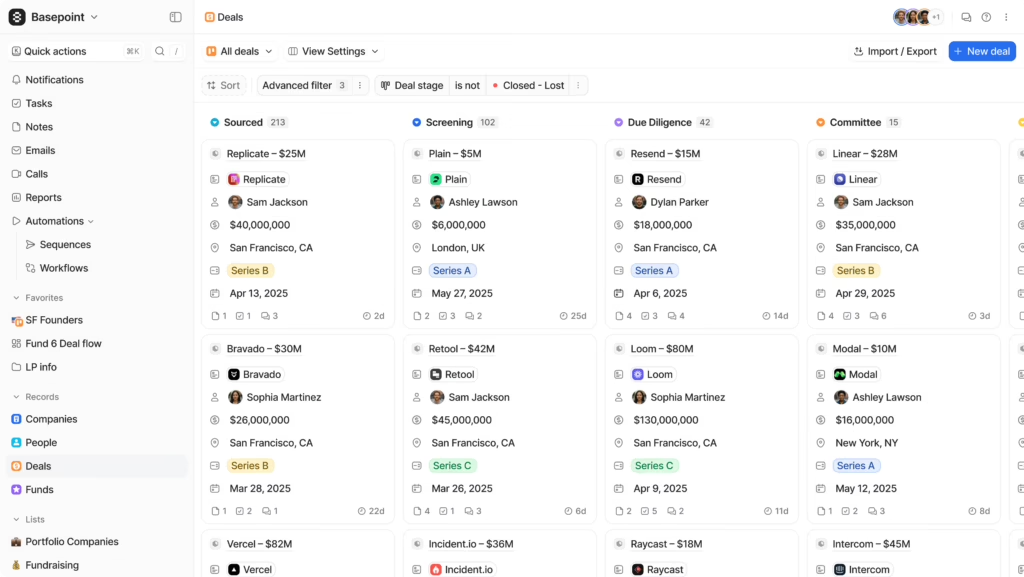
Attio is a flexible CRM that lets teams shape the data model around their own deal process. It is widely used by venture capital firms for deal flow tracking and increasingly adopted by marketplaces, product-led growth teams, and traditional sales organizations.
Key features
- Custom object types alongside the standard Company, Deal, and Person records, each with custom attributes you define.
- Customizable deal pipelines with stage tracking and saved views by stage, owner, or any custom attribute.
- Automatic data enrichment that pulls company and person details from hundreds of public data sources into the record.
- Email and calendar sync that auto-syncs contacts and interactions, building a relationship timeline per record.
- Workflow automation for sourcing, follow-up, stage transitions, and exit, configurable through a visual builder.
- Call Intelligence and email sequences for outbound workflows tied directly to deal records (Pro plan and above).
- Custom reports and dashboards for pipeline analysis, deal velocity, and team performance.
Pricing
Attio uses a per-user monthly subscription with four plans. There is a permanently free plan for up to three seats, and a 14-day free trial of the Pro plan is available to everyone. Annual billing saves about 20% compared with monthly rates.
- Free ($0, up to 3 seats): Real-time contact syncing, automatic data enrichment, and the core CRM with no seat-based collaboration features.
- Plus ($29/user/month annually; $36 monthly): Adds private lists, enhanced email sending, and removes the seat limit.
- Pro ($69/user/month annually; $86 monthly): Adds Call Intelligence, email sequences, advanced permissions, and priority support.
- Enterprise (custom, billed annually): Adds unlimited custom objects, unlimited teams, and advanced security and admin controls.
8. Pipedrive
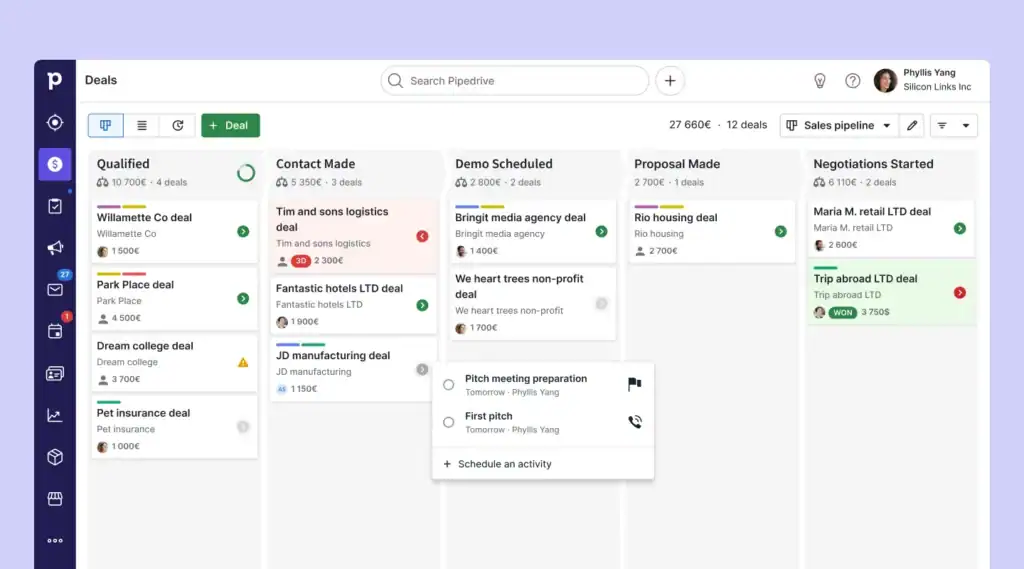
Pipedrive is a sales CRM built around a kanban pipeline board. Every deal sits as a card, and reps move cards across stages as the deal progresses. Managers see where every opportunity sits in one view, and filters let you slice the board by rep, deal size, region, or any custom field.
The platform is great for small and growing sales teams that want sales pipeline software without the weight of a full enterprise CRM.
It connects with 500+ apps (Gmail, Outlook, Slack, Zoom, and Zapier among them), and built-in AI helps with report creation and email drafting.
Key features
- Visual kanban pipeline with custom stages, time-in-stage indicators, and filters by rep, deal size, region, or any custom field.
- One workspace for leads, contacts, deals, calendar events, and pipeline activity.
- Real-time sales feed that surfaces overdue tasks and upcoming activities for each rep.
- Workflow automations and email sequences for nurturing deals over time (Growth plan and above).
- Forecast reports and subscription revenue tracking (Growth plan and above).
- Lead capture and automatic routing to the right rep through the LeadBooster module (Premium plan and above).
- Custom deal scoring rules and company data enrichment (Premium plan and above).
- Contracts and e-signatures sent directly from a deal record (Premium plan and above).
- AI features for report creation, email drafting, and shared inbox handling.
Pricing
Pipedrive uses a per-seat monthly subscription. There is a 14-day free trial that does not require a credit card, and no permanently free tier. Annual billing is offered alongside monthly billing and saves roughly 42%. The product is sold in four plans, plus add-ons that are billed per company rather than per seat.
- Lite ($14 per seat per month, billed annually): Covers the visual pipeline, lead and contact management, the AI report builder, the real-time sales feed, and the 500+ integration library. Email sync and automations are not included at this tier.
- Growth ($39 per seat per month, billed annually): Adds two-way email sync with Gmail or Outlook, open and click tracking, sales automations, email sequences, subscription tracking, forecast reports, and a meeting scheduler.
- Premium ($59 per seat per month, billed annually): Adds lead capture and routing, custom deal scoring, company data enrichment, AI email tools, contracts with e-signatures, and team-level permissions for groups and individuals.
- Ultimate ($79 per seat per month, billed annually): adds suspicious-activity alerts and IP-based access rules, phone and email data enrichment for outreach, a sandbox account for safely testing setup changes, and extended phone support hours.
Add-ons are billed per company:
- LeadBooster from $32.50/month for the full lead capture toolkit.
- Projects from $6.67/month for project management alongside deals.
- Campaigns from $13.33/month for email marketing.
- Web Visitors from $41/month for tracking who is browsing your site.
- Smart Docs from $32.50/month for document management.
Before you pick a tool
Deal tracking software only works as well as the data underneath it. The fanciest dashboard cannot rescue a pipeline built on emails reps forgot to log, contacts entered three weeks late, and stages set by gut feel. Before you compare features and pricing, audit how much of your sales activity actually reaches Salesforce today, and whether the people who need to see it can find it without asking. Good sales pipeline management starts with knowing what is actually in the pipeline
Revenue Grid was built to close that gap. It captures every email, meeting, and calendar event into standard Salesforce objects automatically, and turns that complete activity record into deal health scores, forecasts, and next-step guidance you can trust. Book a demo with Revenue Grid to see what your pipeline looks like when every interaction is already on the record.
Book a demo to see Revenue Grid in action!
What is deal tracking software?
Deal tracking software gives revenue teams live visibility into every open opportunity. It shows who is involved, what has happened, where risk sits, and what should happen next. The strongest platforms pull captured activity into the opportunity, score deal health from real signals, and surface the next move for reps and managers.
How does deal tracking software differ from a CRM?
The CRM is the system of record, storing contacts, opportunities, and activities, and running the reporting and workflows on top of them. Deal tracking software is the intelligence layer that sits over those records. It auto-captures the emails, meetings, and calendar events that reps would otherwise log by hand, scores each opportunity’s health from those signals, flags risks like single-threaded relationships or stalled stages, and recommends the next move. Put simply, the CRM remembers what happened and deal tracking software tells you what to do about it.
What features should I prioritize in deal tracking software for Salesforce?
When you evaluate deal tracking software, these are the five capabilities that separate a real system from a prettier pipeline view:
- Automatic activity capture that writes emails, meetings, and contacts into standard Salesforce objects, so the data is reportable and triggerable.
- Deal health scoring built from activity recency, stakeholder breadth, and stage velocity.
- Guided selling tied to your methodology’s exit criteria, whether MEDDICC, BANT, or a custom variant.
- Forecasting weighted by activity completeness rather than rep optimism.
- A security model that inherits Salesforce permission sets and sharing rule
How long does it take to implement deal tracking software?
A focused rollout runs about ninety days. The first thirty are foundation, covering stage definitions, Salesforce field setup, activity capture, and role-based dashboards. Days thirty-one to sixty are activation, turning on deal health scoring, running manager deal reviews from real signals, and piloting signal-triggered workflows. The final thirty are optimization, benchmarking forecast accuracy and tuning scoring weights from win-loss data. Salesforce-native tools shorten this timeline because there is no parallel integration to maintain.
How does Revenue Grid help with deal tracking in Salesforce?
Revenue Grid is a Salesforce-native deal tracking platform. Activity capture writes every email, meeting, and contact into standard Salesforce objects automatically, so the underlying data is complete and governable. True Pipeline scores deal health from those signals and surfaces risks on the opportunity record. AI forecasting runs on the captured activity rather than self-reported stages, and Deal Guidance and Meetings Assistance close the loop with stage-exit prompts, pre-meeting briefs, and follow-up drafting. Book a demo with Revenue Grid to see it running inside a Salesforce instance like yours.