

Key Takeaway
- The most active account isn't always the one that needs your attention most.
- Dropping engagement, missed next steps, and missing decision-makers can signal deal risk.
- Revenue Grid's Deal Guidance analyzes these signals against the full relationship history.
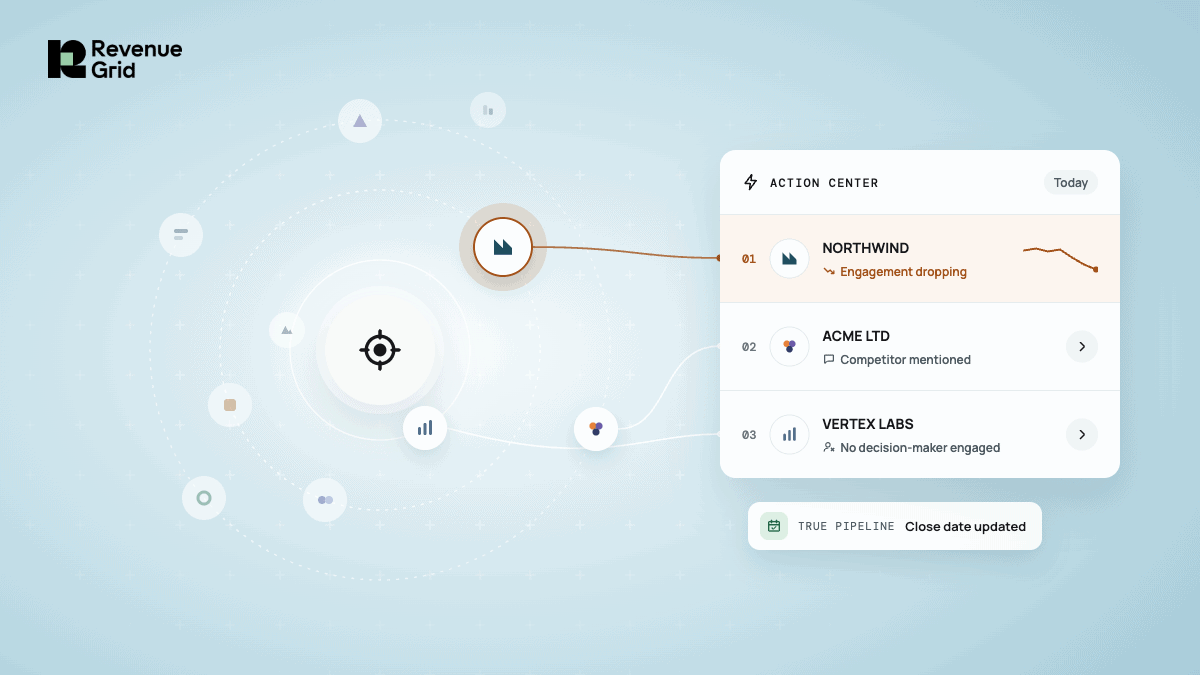
- Action Center brings the accounts that need attention into your daily priorities.
- True Pipeline keeps deal stages, close dates, and amounts current as activity changes.
- Meeting Memos, automated follow-ups, and Salesforce updates help reps act on those priorities.
Personalized engagement gets harder once reps have more accounts than they can actively track. The loudest account often gets attention first: the latest email, the deal someone just mentioned, or whatever happens to be top of mind. That means priority gets set by visibility instead of revenue potential, deal risk, or what needs action now.
Revenue Grid Reads Every Relationship So You Know Where to Focus
Revenue Grid helps teams scale efficiently by analyzing the full context of every relationship and surfacing real-time risks, opportunities, and signals that show reps where to focus to drive revenue.
Know which accounts need attention before they slip away
According to Ebsta’s 2023 B2B Sales Benchmark Report, which analyzed 3.2 million opportunities across 364 companies, win rates fall 47% and sales cycles run 81% longer once engagement drops from a strong level. By the time a deal looks obviously at risk, some of the damage may already be done.
Revenue Grid’s Deal Guidance analyzes activity and relationship context across deals to surface the accounts that need attention.
That might include:
- A previously active account where engagement has dropped
- A competitor mentioned in a recent conversation
- A missing or unengaged decision-maker
- A next step that has not happened when expected
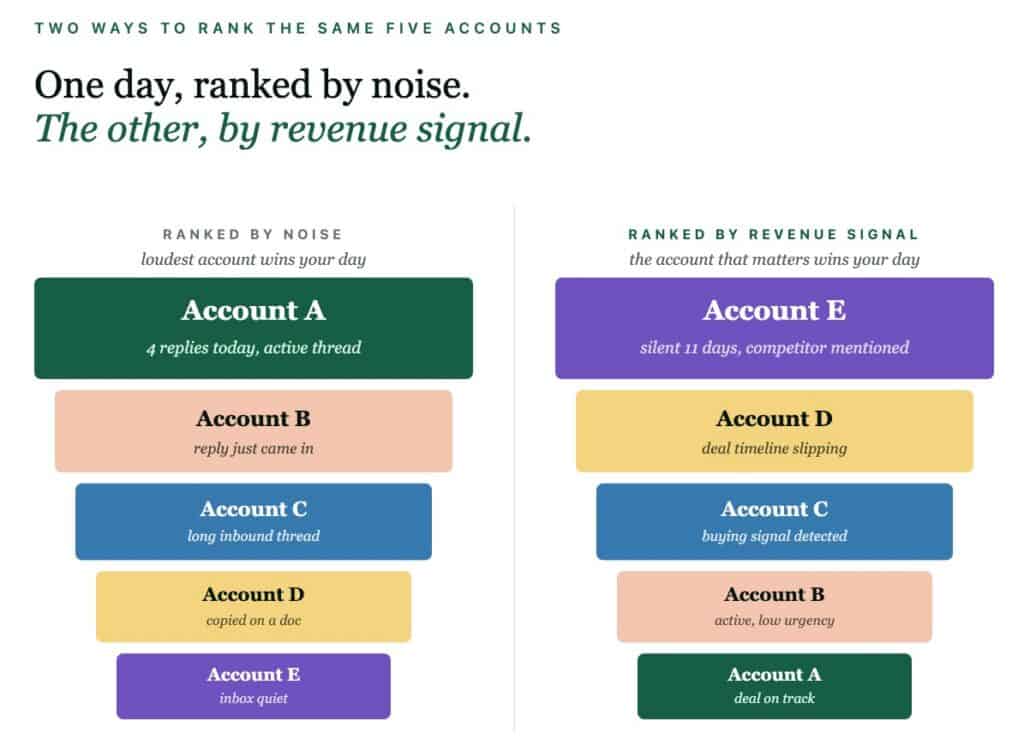
The slipping account comes to your Action Center alongside your other tasks, already ranked against your day. No one has to remember to check it, run a report, or notice the silence.
An insurance business unit managing multiple teams used Revenue Grid Deal Guidance to surface accounts with dropping contact frequency before renewal windows closed. In the first year, they got 30% more new contracts per business unit. (Source: Insurance reference, approved)
Act while there is still time to change the outcome
A deal can start losing momentum before anyone formally marks it as at risk. If the stage, close date, or deal amount is still based on an old update, reps may not realize something has changed until much later.
Revenue Grid’s True Pipeline keeps that picture current as activity happens. It updates stages, close dates, and deal amounts based on what is actually happening across the deal. That helps prioritize, forecast, and commit to a number without wondering if it’s stale.
That accuracy comes from how Revenue Grid reads risk. Instead of reacting to a single missed call or one quiet week, it runs every buyer signal and sales activity through a connected knowledge lake and looks at the whole pattern. So the risk it surfaces is a real one, worth acting on, not noise.
Those insights flow directly into Salesforce, so reps work from the same current view of the deal. Revenue Grid also adapts to the team’s playbook and KPIs, so what it flags reflects how the team actually sells.
Turn the priority into the next action
Knowing an account needs attention is only useful if reps can act on it.
When the next step is a conversation, Meetings Assistance puts the context Revenue Grid has already surfaced to work.
Before the call, a Meeting Memo brings together the latest account updates, deal context, and relevant talking points. Reps can go into the conversation knowing what changed and what needs attention without rebuilding the account history themselves.
After the call, the work handles itself:
- The conversation is captured and summarized automatically
- Next steps and follow-ups are drafted
- Everything maps to the right record in Salesforce, no manual entry
The next action gets delivered where you already work, Outlook, Gmail, Teams, Slack, so nothing waits on you to open another tool or write it down before you forget.
The result is an account that keeps its momentum. You caught it early, you showed up prepared, and the follow-up is already in motion, so it doesn’t drift back into silence while you’re pulled onto the next thing.
Prioritization is only as good as the context behind it
Plenty of tools can flag a stalled deal or push a reminder. What they can’t do is see the whole relationship. They work from one meeting, one thread, or whatever was last typed into the CRM.
Revenue Grid looks across the relationship to determine whether it matters, where it belongs in the day, and what should happen next. These are signals no tool working from a partial picture would ever catch.
Instead of spending the day deciding what deserves attention, reps can spend more of it acting on the accounts that matter most.
See which accounts need attention now, and what to do next
How does Revenue Grid help sales reps prioritize accounts?
Revenue Grid analyzes relationship history, buyer engagement, and deal activity to identify accounts that need attention. Its Deal Guidance surfaces risks and opportunities, while the Action Center brings those priorities together with the rep’s daily tasks.
How does Revenue Grid identify deals at risk?
Revenue Grid evaluates signals such as declining engagement, competitor mentions, missing decision-makers, and overdue next steps. It considers these signals alongside the broader relationship context to help reps identify risks before deals lose further momentum.
Can Revenue Grid automatically update sales pipeline information?
Yes. Revenue Grid’s True Pipeline uses ongoing deal activity to keep opportunity stages, close dates, and deal amounts current. This gives sales teams more up-to-date information for prioritization and forecasting.
How does Revenue Grid help reps take action on deal risks?
When Revenue Grid identifies an account that needs attention, it surfaces the priority in the Action Center. Meeting Memos help reps prepare with relevant account context, while Meetings Assistance captures conversations, drafts follow-ups, and records next steps in Salesforce.
Does Revenue Grid integrate with Salesforce?
Yes. Revenue Grid brings deal intelligence, account updates, and meeting information into Salesforce. It also supports workflows across Outlook, Gmail, Teams, and Slack, helping reps act on account priorities using their existing tools.