

Key Takeaway
- Revenue intelligence platforms only drive results when they capture accurate CRM data, reduce manual data entry, and give sales teams real-time visibility into pipeline health.
- Revenue Grid is the most complete Salesforce-native revenue intelligence platform, combining automated activity capture, deal intelligence, AI-powered insights, and reliable forecasting in a single system.
- Gong is the strongest for conversation intelligence and analyzing sales calls, but it doesn’t solve end-to-end deal health or forecast accuracy.
- Clari is best for revenue operations teams that need disciplined forecasting, structured pipeline analytics, and accurate forecasting signals.
- Salesloft and Outreach excel in sales engagement for SDR/BDR motions and improving rep activity across multi-step outreach.
- The right revenue intelligence software depends on your primary bottleneck: incomplete sales data, unpredictable forecasts, weak sales coaching, or outbound execution gaps.
- Teams see the fastest revenue growth and sales performance lift when they choose a platform that fits their existing systems and supports data-driven decisions across the entire team.
If you’re looking at revenue intelligence tools, you’re probably dealing with one of the usual problems: forecasts keep shifting, pipeline reviews aren’t giving you the full story, and your CRM reflects activity only when a rep remembers to update it. That gap between what’s happening and what’s recorded is what breaks predictability.
Most teams try to fix it with more dashboards or stricter reporting rules. It doesn’t work. You can’t build accuracy on top of incomplete data, and you can’t expect sellers to document every touchpoint.
Revenue intelligence platforms exist to solve that operational gap. They pull in activity automatically, structure it cleanly, and give you a pipeline view you can trust. Some tools do this well. Some add noise. A few look good in demos but fall apart in real adoption.
So before we compare revenue intelligence tools, let’s ground ourselves in the reality most teams are living with.
The Uncomfortable Truth About Revenue Intelligence Platforms
Most revenue intelligence tools fail because they depend on perfect CRM data and perfect adoption — two conditions that rarely exist in real teams.
The biggest breakdown happens at the rep level. When a platform adds steps, extra fields, or another tab to manage, adoption drops fast. Once reps stop feeding the system, the intelligence layer collapses. Forecasts drift; risk alerts miss context, and leadership stops trusting the numbers.
The second failure point is implementation. Vendors promise quick wins, but most teams hit the same walls: sync delays, missing activities, brittle integrations, and weeks of RevOps cleanup. When Salesforce hygiene isn’t pristine, the platform ends up amplifying gaps instead of fixing them.
This is why so many implementations stall by month six. Revenue intelligence only works when it removes friction, captures activity on its own, and fits into the workflow the team already uses. AI-powered revenue intelligence software now automates repetitive tasks, saving time and increasing efficiency for sales teams.
And that’s the turning point for the discussion. If we remove the assumptions, what should a revenue intelligence platform actually do?
What Best Revenue Intelligence Platforms Actually Do
Strip away the marketing language and the feature pages, and the best platforms all solve the same three problems. They don’t compete on volume of features; they compete on how effectively they handle these fundamentals.
1. They capture activity without asking reps to change behavior.
Every deal lives in emails, calls, calendars, notes, conversation data, and scattered channels. A good platform pulls all of that in automatically, maps it to the right account, and removes the need for sellers to “log activity.” If this part is weak, the rest of the system collapses.
2. They organize that activity into intelligence the business can use.
Raw activity isn’t helpful. You need enriched, contextual data: who reached out, what was said, how deals are moving, where buyer signals drop. Tools that do this well give managers and CROs a single source of truth. Tools that don’t create even more reporting chaos.
3. They translate insight into action.
Dashboards highlight problems. Good platforms highlight what to do about them.
This is where early risk detection, next-step guidance, and forecasting accuracy come from. Insight without direction simply becomes another tab no one opens.
When these three pieces are working, teams finally get what revenue intelligence promised: predictability, cleaner execution, and a sales process that doesn’t depend on heroic manual effort.
Now that you understand what makes a tool effective…
The next step is to match these capabilities with the right internal buyers and stakeholders and then evaluate each platform accordingly.
5 Revenue Intelligence Platforms
Before diving into the deeper evaluations, here’s a practical snapshot of how these platforms behave in the real world and where each one tends to excel.
| Platform | Best For | Standout Capability | Time to ROI | Key Limitation |
|---|---|---|---|---|
| Revenue Grid | Salesforce teams that want predictable ROI without heavy lift | Activity Capture & Deal Intelligence | 4–6 months | Salesforce-only |
| Gong | Teams that rely heavily on call analysis and coaching | Best-in-market conversation intelligence | 9–12 months | Forced bundles drive cost up fast |
| Clari | RevOps-led orgs with strong data hygiene | Deep enterprise forecasting | 12–18 months | Low rep value, adoption issues |
| Salesloft | SDR/BDR teams running high-volume outreach | Solid multichannel engagement | 6–9 months | Integrations break often |
| Outreach | Large enterprises with mature RevOps | Scalable sales engagement automation | 9–12 months | Complex setup, slow support |
How the top revenue intelligence platforms compare
Now that we’ve grounded the fundamentals and surfaced what actually drives success or failure, we can look at how each platform performs against those realities. And it makes sense to start with the tool that was built directly around the CRM most teams rely on — Salesforce, i.e., Revenue Grid.
1. Revenue Grid
Best for Salesforce-native revenue intelligence and guided selling
Revenue Grid positions itself as a unified revenue intelligence software built directly around Salesforce. Instead of focusing on surface-level engagement or isolated AI features, it targets the root causes of revenue inconsistency: missing CRM data, weak qualification signals, and deals that quietly stall because managers don’t see movement early enough.
Revenue Grid’s unique focus
The core differentiator is its Signals engine, an AI layer that analyzes deal activity, relationship strength, engagement gaps, next-step risk, and pipeline movement. Instead of dashboards that teams must interpret, Revenue Grid surfaces precise, time-sensitive alerts directly inside Salesforce and email. This keeps managers ahead of deal slippage and forecasting misses.
The platform also brings zero-touch CRM data capture, pulling meetings, emails, and contacts into Salesforce automatically. For teams struggling with incomplete pipeline data or sales forecasting variability, this alone removes a major source of revenue leakage.
The official product suite includes:
- Inspect for pipeline visibility, forecasting accuracy, and deal progression analysis
- Engage for guided selling, next-step suggestions, and workflow automation
- AI Signals for risk detection and revenue opportunities
- Auto-capture that keeps Salesforce records complete without rep effort
These capabilities align closely with what RevOps teams look for today: reliable data, predictable forecasting, and automated enforcement of sales process stages.
Before we break into capabilities, it’s worth highlighting industry recognition:
Revenue Grid was named a Major Player in the IDC MarketScape: Worldwide Revenue Intelligence Platforms 2024 Vendor Assessment,
which evaluates vendors based on strategy, execution, and product capabilities.
This assessment reflects how Revenue Grid compares to other revenue intelligence platforms in the market.
Strengths revenue teams highlight
- Automated activity capture of all sales activities into Salesforce
- AI Signals that detect deal risks early and surface next actions
- True pipeline visibility with deal guidance
- Salesforce-native architecture and no external data warehouses
- Reduces dependency on spreadsheets and manual forecasting
- Helps enforce qualification frameworks consistently
Common limitations discussed in communities
- Best only if Salesforce is the primary CRM
- Broader scope than a pure engagement tool — learning curve reflects that
- Geared toward mid-market and enterprise, not early-stage teams
What users say about Revenue Grid
“Revenue Grid has significantly reduced our manual data entry by automatically capturing all activities into our CRM.
This automation allows our team to focus more on building customer relationships rather than administrative tasks.
It’s a huge time-saver and keeps our data accurate.”
— M J Baek, Director
Pricing structure
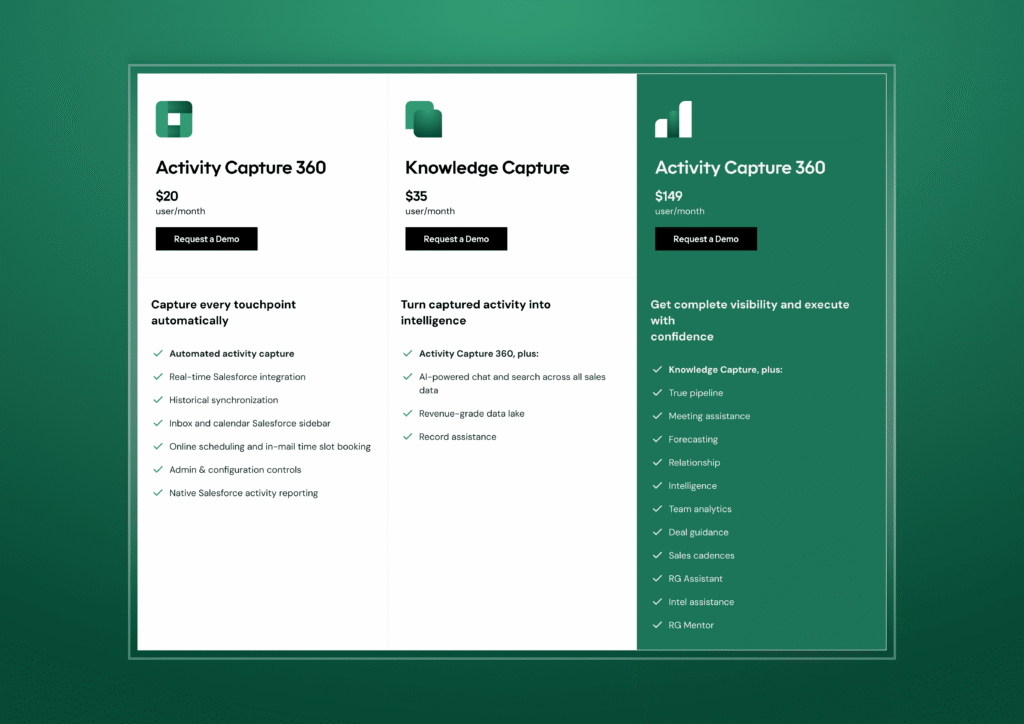
Revenue Grid pricing tiers for activity capture 360, knowledge capture, and Revenue Grid Ultimate.
Teams evaluating Revenue Grid often compare it to Gong for deal intelligence and to Salesforce Einstein for CRM-native analytics.
The typical decision driver is simple: Revenue Grid gives more accurate, actionable forecasting and pipeline guidance. However, not every organization anchors its strategy in Salesforce-native process discipline. Some depend more on what happens in conversations: the demo, the discovery call, the objection handling.
That’s where Gong enters the picture.
2. Gong
Best for teams that rely heavily on sales conversations
What’s new with Gong
Teams on Reddit and G2 have noted that Gong’s pricing has increased over the past year, especially for companies
switching to the revenue intelligence bundle. Many customers say the conversation intelligence module is still strong,
but adding forecasting or sales intelligence requires extra spend and additional onboarding time.
Gong remains the most recognizable name in conversation intelligence, and for good reason: teams with long sales cycles, heavy demo volume, or multi-stakeholder deals often depend on insights that only come from the calls themselves. Gong captures those moments, structures them, and surfaces the patterns that influence deal movement.
Gong’s unique features
Gong delivers the most value when call activity is high. It analyzes conversations, flags key moments such as competitor mentions or pricing discussions, and helps managers jump straight to the clips that matter instead of listening end to end.
Its deal intelligence view adds context by showing how buyer engagement shifts through the cycle, helping leaders identify deal risk and spot forecast issues before they surface in a QBR.
Strengths sales teams consistently mention
- Best-in-market call recording and transcription
- Strong conversation intelligence for coaching
- Deal intelligence that tracks movement and engagement
- Broad integrations and strong brand credibility
Common issues raised by users
- Occasional call recording drops or long transcript processing delays
- Gong Engage performance often feels disconnected from core workflows
- Pricing escalates quickly because of required bundles
- Significant Salesforce storage consumption (≈25MB per rep per day)
- Limited pipeline management compared to Revenue Grid
- No built-in revenue leak detection
What users say about Gong
“There’s so much in Gong that we don’t use everything. Gong’s deal forecasting we don’t use, their pipeline management we haven’t gotten into.
It’s probably the highest-end option on the market.”
— Karel Bos, Head of Sales
Pricing structure
Gong’s published pricing starts at $120/user/month, but real spend usually looks different. Most companies land closer to $287/user/month once required modules are included. A 150-rep team reports annual costs around $50K for the base layer alone, plus $20K–$30K in implementation and additional Salesforce storage fees.
As teams start absorbing those costs, they also notice that Gong answers the “what happened on the call?” question. Clari answers the “what will this quarter look like?” question, which is why many teams evaluate Clari next.
3. Clari
Best for forecasting and pipeline visibility for RevOps-Led Teams
Clari is the forecasting platform most revenue teams turn to when spreadsheets stop scaling. Its strength is giving leadership a clear, top-down view of deal movement, forecast alignment, and stage progression. Teams with strong RevOps support and clean Salesforce data tend to see the most value.
Clari’s unique focus
Clari works best when forecasting is already a disciplined process. It pulls activity signals into structured views, highlights deal changes, and gives managers a predictable way to inspect pipelines without chasing reps. Stage-by-stage inspection, rollups, and forecast snapshots are the features users mention most.
After acquiring Wingman, Clari added conversation intelligence, but most teams still treat it as a forecasting tool first. Its engagement module, Groove, is often described as slower and less intuitive than Salesloft or Outreach, which creates a split workflow across teams.
Strengths users consistently praise:
- Strong forecasting structure
- Clear pipeline inspection tools
- Good for RevOps teams needing hierarchy management
- AI insights through Copilot
Common issues raised by users:
- Interface feels heavy and unintuitive for reps
- Groove described as “slow” and “missing basic features”
- Requires clean CRM data to work well
- Not truly two-way with Salesforce
- Long implementation cycles (8–16 weeks)
What users say about Clari
“Clari is a tool for sales leaders. It adds no value to reps as far as I can see.”
— Reddit user
Pricing structure
Clari’s published pricing starts around $100–$150 per user for core forecasting, but customer reports place real spend closer to $200–$400 per user once Copilot, Groove, and service costs are added. For many teams, that trade-off is acceptable because Clari delivers discipline and predictability, but for teams that focus on rollups or forecast snapshots, Salesloft becomes the option.
4. Salesloft
Best for sales engagement and automation
Salesloft positions itself as a Revenue Orchestration Platform that helps revenue teams automate sales execution, prioritize outgoing engagement, and gain real-time visibility into buyer signals, all while keeping workflows aligned to revenue goals.
At its core, Salesloft helps reps manage multi-touch outreach across email, calls, and social channels, surface AI-driven recommendations, and track engagement outcomes at scale. This focus makes it a staple for high-volume sales development and outreach motions, especially for SDR and BDR teams.
Salesloft’s unique focus
Salesloft’s foundational strength is its cadence automation engine. The platform allows teams to create structured outreach sequences, automate repetitive tasks, and build consistent engagement rhythms that drive pipeline momentum. Integrated analytics aim to help reps and managers identify which activities correlate with progress and where coaching opportunities lie.
The official platform also includes CRM integration across Salesforce, HubSpot, Microsoft Dynamics, and more, syncing activity and contact updates automatically to reduce manual entry.
Salesloft’s conversation intelligence captures and analyzes customer interactions so teams can refine strategies based on what buyers actually say rather than guesswork.
Strengths sales teams mention:
- Robust cadence automation for structured outreach
- Multi-channel sequencing across calls, emails, and social
- Integrated CRM sync that reduces data entry
- AI-driven insights that surface performance trends and buyer signals
Common issues raised in community feedback:
- HubSpot integration often described as unreliable by some users
- Documentation and onboarding materials sometimes feel outdated
- Billing rigidity and difficult cancellation terms reported
Revenue intelligence less deep than dedicated tools in some cases
What users say about Salesloft
“Integrations are brittle, every Salesforce field mapping change requires support tickets.”
— u/RevOpsLead, r/SalesOperations
Pricing structure
Salesloft does not publish set prices publicly; you often request a quote based on team size and feature needs. Industry estimates place typical rates around $125–$180+ per user/month for standard plans, with higher enterprise pricing for advanced modules.
Users also report that feature add-ons, contract terms, and cancellation policies can add complexity to overall costs. This is usually where the evaluation shifts. Once teams outgrow high-volume SDR execution and start looking for deeper coordination across reps, managers, and sales operations, especially in large, multi-region sales orgs, the conversation moves toward Outreach.
5. Outreach
Best for enterprise sales engagement with structured, high-volume workflows
Outreach is built for organizations that run coordinated outbound motions and need a system that keeps reps, managers, and operations aligned. Larger teams with defined playbooks tend to get the most value because Outreach centralizes outreach sequences, activity tracking, and deal progression in one platform.
Outreach’s unique focus
Outreach combines sales engagement and deal management in a single interface. Reps execute multi-step sequences across email, calls, and tasks, while sales managers track engagement signals, deal momentum, and early signs of slippage. For enterprises, Outreach effectively becomes the operational layer that ties activity to pipeline health.
Kaia, Outreach’s conversation intelligence module, supports call summaries and coaching, though users often note it isn’t as deep as dedicated CI tools. The Forecast module adds rollups and pipeline analytics, which appeals to teams trying to consolidate engagement and revenue workflows.
Strengths sales teams mention
- Strong automation for multi-step sales engagement
- Enterprise-grade workflows and permissions
- Deal and pipeline inspection tools inside the same platform
- Kaia assists with call summaries and basic coaching
- Tight Salesforce integration for activity syncing
Common issues raised in community feedback
- Performance can lag when managing large sequences
- Kaia’s CI depth trails Gong and other CI leaders
- Pricing and add-ons feel rigid or opaque
- Setup and ongoing admin can be heavy for smaller teams
- Forecasting accuracy varies and depends heavily on process maturity
What users say about Outreach
“Outreach great for complex enterprise motions but overkill unless you have full-time RevOps.”
— u/EnterpriseRevOps, r/SalesOperations
Pricing structure
Outreach does not publicly list pricing, but most teams report:
- Core engagement: ~$100–$160 per user/month
- Add-ons like Kaia or Forecast: push pricing to $200–$240+ per user/month
- Enterprise plans: require annual commitments with additional onboarding fees
Customers also mention renewal terms and add-on modules can increase total cost quickly, especially for teams layering forecasting or conversation intelligence.
As different as these platforms are, one theme keeps surfacing in user feedback: what you budget for and what you actually end up managing are rarely the same. The features look similar on paper, but the operational load, admin time, required modules, and add-ons create wide gaps in long-term cost.
This is where most buying decisions go sideways, which makes understanding the true cost of ownership just as important as comparing features.
The Hidden Costs Everyone Ignores
Comparing revenue intelligence platforms purely on seat price is misleading. The real cost shows up in admin overhead, RevOps maintenance, training time, CRM data cleanup, and the gaps created when a tool doesn’t match how your sales cycle actually works. These hidden costs directly affect pipeline visibility, forecast accuracy, and your broader revenue optimization efforts far more than the sticker price ever will.
Seat Price vs. True Spend
Here’s what most revenue teams budget for versus what they actually end up paying once required modules, onboarding, and forecasting add-ons enter the picture:
| Platform | Quoted Price / User | Real Spend Range | Notes |
|---|---|---|---|
| Revenue Grid | ~$150/mo | $200–$240/mo | Fewer add-ons; Salesforce-native |
| Gong | ~$120/mo | $250–$300+/mo | Bundled modules drive cost up |
| Clari | ~$100–150/mo | $200–$400+/mo | Copilot + Groove increase TCO |
| Salesloft | ~$125–180/mo | $180–$250+/mo | Add-ons + admin overhead |
| Outreach | ~$100–160/mo | $200–$240+/mo | Kaia + Forecast add-ons |
Quoted prices vs. real-world spend for leading revenue intelligence platforms
These ranges reflect actual customer reporting across G2, Reddit’s r/salesops, and vendor pricing disclosures (2025–2026). The pattern is consistent: seat price is only one part of the total cost of ownership.
What leaders should ask before signing
Before approving a budget, revenue leaders should ask:
- Which features are included versus required add-ons?
- How much RevOps time will ongoing admin require?
- What level of CRM data cleanliness does the platform assume?
- How soon should we expect measurable improvements in pipeline accuracy or forecast reliability?
- What happens to historical activity and AI insights if we cancel?
Teams that address these upfront avoid the operational drag that quietly inflates TCO over the first 12 months.
How to Choose the Right Revenue Intelligence Platform
The simplest way to choose a revenue intelligence platform is to anchor the decision to the operational gap slowing your pipeline. AI claims, dashboards, and interface polish matter far less than whether the platform helps your revenue team execute with consistency, accuracy, and real revenue optimization.
- If the root issue is incomplete CRM data, no amount of deal intelligence will help. You need a platform that captures activities automatically so forecasting and pipeline inspection rest on something reliable.
- If the problem is inconsistent coaching or pipeline reviews without context, teams that run heavy discovery and demo cycles benefit more from conversation intelligence that reflects what buyers actually said.
- If the tension sits in volatile forecasts, the priority shifts to platforms that surface deal risk in real time rather than relying on rep-entered updates that drift by the week.
- Lastly, if most of your pipeline comes from outbound execution, a disciplined engagement engine will create more predictable momentum than analytic add-ons ever will.
As motions become more complex: multiple products, regions, or handoffs, simplicity starts to matter just as much as capability. Tools that require heavy admin lift rarely scale well, no matter how impressive the demos look.
A quick way to filter vendors is to ask five grounding questions:
- Will this reduce manual work for reps?
- Can it meaningfully fix our top bottleneck within 60–90 days?
- Can RevOps support it without adding headcount?
- Does it fit our Salesforce architecture cleanly?
- Will the insights change behavior, or become another dashboard no one opens?
If a platform can’t clear those, it won’t support long-term revenue optimization.
Once you view the market through this lens, the lanes become obvious. Gong delivers the strongest conversation intelligence. Clari leads forecasting. Salesloft and Outreach shine in outbound execution.
Revenue Grid is the choice for teams that want predictable, Salesforce-native revenue intelligence without the operational complexity that slows adoption.
If you want to see how that approach works in practice, book a demo with Revenue Grid.
How do revenue intelligence platforms integrate with existing CRM systems?
Most revenue intelligence platforms connect to CRM systems like Salesforce, HubSpot, and Microsoft Dynamics through secure APIs. Once connected, the platform automatically pulls emails, meetings, sales call logs, and pipeline updates into one unified view.
Stronger tools use AI-powered activity capture to eliminate manual data entry and ensure CRM records stay complete. The cleaner the sales data, the more accurate your forecasting, pipeline visibility, and deal insights become.
What are the cost implications of implementing a revenue intelligence platform?
The true cost goes beyond seat licenses. Real-world spend usually includes:
- User licenses (typically $150–$300 per seat depending on modules)
- Onboarding and implementation services
- Salesforce storage costs for call recordings or activity logs
- RevOps admin time for workflow maintenance
- Additional AI modules, such as forecasting, conversation intelligence, or engagement analytics
Buyers often pay 30–60 percent more than the quoted price once operational needs and add-ons are included.
How can revenue intelligence software enhance team collaboration?
Revenue intelligence software improves collaboration by giving teams a shared source of truth across sales engagement, pipeline reviews, and customer communication. AI maps every sales interaction: emails, meetings, call notes, deal progression, into a unified timeline. This allows:
- Sales reps to see buyer intent signals
- Managers to coach using conversation intelligence
- RevOps to align forecasting and process enforcement
- Leadership to run pipeline reviews with real data instead of manual updates
What ROI can be expected from switching to a revenue intelligence platform?
Teams typically see ROI in four areas:
- Improved forecasting accuracy through AI analysis of historical and current deal patterns
- Reduced admin work from automated activity capture
- Higher win rates due to early identification of deal gaps or stalled accounts
- Better coaching outcomes from insights pulled directly from sales conversations
Most organizations report measurable improvements within 60–120 days, especially when the platform strengthens revenue optimization and reduces data hygiene problems in Salesforce.
How do pricing models compare across different platforms?
Pricing varies depending on whether the platform is built for conversation intelligence, forecasting, or sales engagement.
General market ranges:
- Gong: Conversation intelligence + deal insights; high pricing with bundled modules
- Clari: Forecasting-focused; cost increases with Copilot and Groove
- Salesloft & Outreach: Engagement platforms; add-ons for coaching and analytics
- Revenue Grid: Salesforce-native revenue intelligence with fewer required add-ons
The more modules required to support your revenue cycle, the higher the overall total cost of ownership.
What role does AI play in revenue intelligence?
AI is the engine behind modern revenue intelligence. It:
- Automates repetitive tasks like data entry
- Analyzes buyer interactions across emails, calls, demos, and meetings
- Identifies patterns and trends in customer behavior
- Surfaces actionable insights for deal progression
- Provides real-time visibility into pipeline health
- Enhances sales forecasting accuracy using historical deal data
- Routes leads and opportunities automatically based on likelihood to convert
AI transforms raw activity into structured intelligence that supports better decision-making across the entire revenue operation.
How does conversation intelligence support sales performance?
Conversation intelligence analyzes call recordings to highlight important moments such as objections, competitor mentions, pricing discussions, and next steps.
It improves sales performance by:
- Helping managers coach with real examples
- Showing sales reps which talk tracks lead to higher win rates
- Highlighting engagement signals across buying committees
- Feeding AI models that improve deal scoring and pipeline confidence
It’s especially valuable for teams with long sales cycles or multiple stakeholders.
What should teams expect during implementation of a revenue intelligence platform?
A typical implementation takes 30–120 days, depending on your CRM complexity. Most teams work through:
- CRM integration and activity capture setup
- Mapping deal stages and opportunity fields
- Enabling AI-driven forecasting or engagement insights
- Training reps, managers, and RevOps
- Validating data quality and pipeline visibility
Smooth adoption depends on how well the platform fits your existing workflows.