


Picture this: your sales rep sends a cold outreach email on Monday. The prospect doesn’t reply. Tuesday passes. Wednesday, the rep means to follow up but gets pulled into a product demo. By Friday, the lead has gone cold — and nobody noticed because there was no system catching the gap.
Now multiply that across a team of 20 reps, each managing 50 to 100 active prospects. The math gets uncomfortable fast. Leads slip. Follow-ups arrive too late or not at all. And the revenue that should have moved through your pipeline quietly stalls instead.
This is the reality for sales teams relying on manual outreach inside Salesforce. The CRM captures everything — but it doesn’t act on anything. That gap between data and action is where deals die.
Email sequencing automation in Salesforce closes that gap. Instead of relying on individual reps to remember the right follow-up at the right time, automated sequences handle the cadence for them — consistently, at scale, and tied directly to CRM data. The result is a more predictable outreach engine and more time for reps to focus on conversations that actually move deals forward.
This guide covers how email sequencing automation works inside Salesforce, what the native tools can and can’t do, how integrations extend those capabilities, and what it takes to build sequences that actually perform.
What Is Email Sequencing Automation?
An email sequence is a pre-built series of emails sent to a prospect or customer over a defined period, triggered by specific actions, timelines, or CRM data. Think of it as a structured conversation your team has with every prospect — without requiring a rep to manually initiate each touchpoint.
A typical sequence might look like this:

Anatomy of an email Sequence
- Day 1: Initial outreach email introducing your solution
- Day 3: Follow-up with a relevant case study or resource
- Day 7: A softer check-in asking if the timing is right
- Day 14: A final breakup email that leaves the door open
Each step fires automatically based on the schedule you set — or adapts based on prospect behavior. If someone opens the Day 1 email but doesn’t reply, the sequence continues. If they click a link, you can trigger a different branch. If they respond, the sequence pauses so a rep can take over.
That logic — timing, branching, pausing, resuming — is what separates a true email drip campaign from a batch-and-blast approach. It’s not just about sending more emails. It’s about sending the right email to the right person at the right moment, without requiring a human to orchestrate every step.
In a sales context, sequences are used across the entire customer journey: cold outreach, post-demo follow-ups, trial nurture, renewal reminders, and re-engagement campaigns. When they’re built well and tied to your CRM data, they become one of the highest-leverage tools in your sales stack.
What Salesforce Offers Natively — and Where It Falls Short
Salesforce has invested in email automation capabilities over the years, but the native toolset tells a mixed story depending on which edition you’re running and what you’re trying to accomplish.
Salesforce’s Built-In Email Tools
Out of the box, Salesforce gives you several ways to send and automate emails:
- Email Templates: Create reusable templates with merge fields that pull in contact and account data from your CRM. Available across all editions.
- List Email: Send a single email to a group of leads or contacts directly from a list view or campaign. Good for one-time sends, not sequences.
- Salesforce Engage (part of Pardot/Marketing Cloud Account Engagement): Allows sales reps to send tracked emails and use pre-approved templates built by marketing. Requires a Pardot license.
- Flow Builder: Salesforce’s automation tool that can trigger email sends based on record changes, field updates, or time-based conditions. Powerful, but requires technical setup and doesn’t natively support reply detection or sequence branching.
- High Velocity Sales (now Einstein Sales Cadences): Available in Sales Cloud with certain editions, this feature lets you build multi-step cadences that include email, call, and LinkedIn tasks. The closest native equivalent to a true sequencing tool.
The Honest Limitations
Einstein Sales Cadences is a meaningful step forward, but it comes with real constraints that sales teams run into quickly:
- It’s only available on Sales Cloud Enterprise and above, or as a paid add-on
- Reply detection and automatic sequence pausing require additional configuration
- Reporting on sequence performance is limited compared to dedicated tools
- Personalization at scale — dynamic content, conditional branching based on engagement — requires workarounds
- Gmail and Outlook sync for tracking opens and clicks depends on your inbox integration setup
For teams running straightforward outreach at moderate volume, native Salesforce tools can get the job done. But as sequences grow more complex — multiple personas, different industries, branching logic based on engagement — the gaps become harder to work around.
That’s where email sequencing automation integrations with Salesforce come into play.
The Real Benefits of Getting Email Sequencing Right
Before diving into how to build and integrate sequences, it’s worth being clear on what you’re actually trying to achieve — because the benefits go well beyond “sending more emails.”
Consistency Across Your Entire Team
When outreach depends on individual reps, quality varies. Your top performer follows up five times with perfectly timed messages. A newer rep sends two emails and moves on. Sequences standardize the process so every prospect gets the same quality of outreach, regardless of who owns the account.
This matters especially for onboarding new reps. Instead of spending weeks learning the right cadence, they’re productive from day one because the sequence does the heavy lifting.
Time Back for Actual Selling
Research consistently shows that sales reps spend less than 35% of their time actually selling. The rest goes to administrative tasks — logging activities, scheduling follow-ups, writing emails. Automation reclaims a significant portion of that time.
A rep managing 80 active prospects manually might spend two hours a day on follow-up emails alone. With sequences handling the cadence, that same rep can focus those two hours on discovery calls, demos, and closing conversations.
Better Engagement Through Timing and Personalization
Automated sequences don’t just send emails on a schedule — they respond to behavior. A prospect who opens your email three times in one day is showing intent. A sequence that recognizes that signal and adjusts the next touchpoint accordingly will outperform one that ignores it.
When sequences pull in CRM data — industry, role, deal stage, previous interactions — every email feels relevant rather than generic. That’s the difference between a 15% open rate and a 35% open rate on the same outreach campaign.
Measurable, Improvable Performance
Manual outreach is nearly impossible to optimize because there’s no consistent baseline. Sequences create one. You can see exactly which step in a sequence drives the most replies, which subject lines generate the highest open rates, and where prospects drop off. That data turns your outreach from guesswork into a system you can continuously improve.
How to Set Up Email Sequences in Salesforce
Whether you’re using Salesforce’s native Einstein Sales Cadences or a third-party integration, the setup process follows a similar logic. Here’s how to approach it systematically.
Step 1: Define Your Sequence Goals and Audience
Before building anything, get clear on what this sequence is supposed to accomplish and who it’s for. A cold outreach sequence for enterprise IT buyers looks completely different from a post-trial nurture sequence for SMB decision-makers.
Define:
- The specific stage in the buyer journey this sequence targets
- The persona receiving the emails (role, industry, company size)
- The desired outcome (booked meeting, demo request, renewal confirmation)
- The exit criteria — what action removes someone from the sequence
Step 2: Map Your Sequence Steps and Timing
Plan the full sequence on paper before building it in the platform. Decide how many touchpoints you need, what each one says, and how much time passes between them. A typical B2B outreach sequence runs 6 to 8 touchpoints over 3 to 4 weeks — enough to be persistent without becoming noise.
Consider mixing channels. Email is the backbone, but sequences that include call tasks and LinkedIn touchpoints at key intervals tend to outperform email-only cadences by 30 to 40% in reply rates.
Step 3: Build Your Templates with Merge Fields
In Salesforce, navigate to Email Templates under the App Launcher or within the Sales Engagement settings. Build each step as a separate template, using merge fields to pull in contact name, company, industry, and any other relevant CRM data.
Keep each email focused on one idea. The goal of step one is to get a reply, not to explain your entire product. Short, direct emails consistently outperform long ones in cold outreach — aim for 75 to 125 words per step.
Step 4: Configure Your Cadence in Einstein Sales Cadences
If you’re using Salesforce’s native tool, go to Sales Engagement in the App Launcher, then select Cadences. Click New Cadence and use the cadence builder to add steps, assign templates to email steps, set wait times between steps, and define branching logic where available.
Assign the cadence to a target audience — either manually by adding prospects or automatically through a Flow that adds leads matching specific criteria.
Step 5: Set Up Tracking and Exit Rules
Configure reply detection so that when a prospect responds, the sequence pauses automatically and creates a task for the rep to follow up personally. Set up open and click tracking through your inbox integration. Define what happens when someone reaches the end of the sequence without responding — whether that’s moving them to a different cadence, updating a field in Salesforce, or simply marking the outreach as complete.
Step 6: Test Before You Launch
Run the sequence on a small test group — 10 to 20 contacts — before rolling it out broadly. Check that merge fields populate correctly, emails arrive at the right intervals, reply detection works as expected, and all tracking is firing. Fix issues at this stage rather than after you’ve enrolled 500 prospects.
Email Sequencing Automation Integrations with Salesforce
Native Salesforce tools cover the basics, but most sales teams eventually hit a ceiling. When your sequences need more sophisticated branching, deeper personalization, better analytics, or tighter inbox integration, third-party tools become the practical path forward.
What Good Integrations Add
The best email sequencing automation integrations with Salesforce don’t replace your CRM — they extend it. They sit between your inbox and Salesforce, capturing every interaction automatically and feeding that data back into the records your team relies on.
Key capabilities to look for in an integration:
- Bi-directional sync: Changes in Salesforce update the sequence tool, and engagement data from the sequence tool updates Salesforce records automatically
- Automatic activity logging: Every email sent, opened, clicked, and replied to is logged against the correct contact and opportunity without manual entry
- Reply detection and sequence pausing: When a prospect responds, the sequence stops and the rep gets notified — no manual monitoring required
- Behavioral branching: Sequences adapt based on engagement signals — a prospect who clicks a pricing link gets a different next step than one who hasn’t opened anything
- A/B testing: Test subject lines, email copy, and send times across sequence steps to continuously improve performance
- Sequence-level analytics: See open rates, reply rates, and conversion rates by step, by sequence, by rep, and by segment
Gmail and Outlook Integration
One of the most practical integration points is connecting Salesforce to the inbox your reps actually use. When Salesforce and Gmail are properly integrated, reps can enroll prospects in sequences, view CRM context, and log activities without leaving their inbox. The same applies to Outlook environments.
This matters more than it might seem. If reps have to switch between tools to manage sequences, adoption drops. The best integrations make the workflow invisible — the rep works in their inbox, and Salesforce stays updated automatically.
Integration Best Practices
A few things that separate clean integrations from messy ones:
- Map your data fields before connecting tools. Decide exactly which fields sync in which direction. Ambiguity here creates duplicate data and sync conflicts later.
- Set clear ownership rules. When a sequence tool and Salesforce both hold contact data, define which system is the source of truth for each field type.
- Audit your sync logs regularly. Most integrations surface errors in a sync log. Check it weekly in the first month after launch to catch issues before they compound.
- Train reps on the unified workflow. The integration is only as good as the adoption. Show reps exactly how the tools connect and what they no longer need to do manually.
- Start with one sequence type. Don’t try to migrate all your outreach to the new integration at once. Start with cold outreach or one specific persona, prove the workflow, then expand.
Common Challenges — and How to Work Through Them
Even well-planned email sequencing programs run into friction. Here are the challenges that come up most often and how to address them practically.
Sequences That Feel Generic
The most common complaint from prospects receiving automated sequences is that the emails feel templated. This usually happens when sequences rely too heavily on static templates without pulling in meaningful CRM data.
Fix it by enriching your contact and account records before enrolling prospects. Industry, company size, recent news, and specific pain points tied to the prospect’s role all give you material for personalization. Even one sentence that references something specific to the prospect’s situation dramatically improves reply rates.
Sequences Running When They Shouldn’t
A prospect who’s already in active conversation with a rep shouldn’t be receiving automated follow-up emails. This happens when exit rules aren’t configured properly or when reply detection fails.
Audit your exit criteria for every sequence. At minimum, a sequence should pause when a prospect replies, when an opportunity reaches a certain stage, or when a rep manually marks the outreach as complete. Build these rules in before launch, not after an awkward situation with a prospect.
Low Visibility Into What’s Working
If your reporting only shows total emails sent and overall open rates, you’re flying blind. You need step-level data to understand where sequences are winning and where they’re losing prospects.
Set up dashboards that show performance by sequence step, not just by campaign. Track reply rate by step number — if step three consistently underperforms, that’s your signal to rewrite it. Track time-to-reply to understand which send times generate the fastest responses.
Adoption Gaps Across the Team
Sequences only work if reps actually use them. Adoption problems usually trace back to one of two things: the tool is too complex to use consistently, or reps don’t trust that the automation will represent them well.
Address both by involving reps in the sequence-building process. When reps contribute to the templates and see their own language reflected in the automation, they’re far more likely to enroll prospects consistently. Pair that with a workflow that minimizes the steps required to enroll someone, and adoption follows.
Data Quality Issues Undermining Personalization
Merge fields only work when the underlying CRM data is accurate and complete. A sequence that opens with “Hi [First Name],” because the first name field is blank is worse than no personalization at all.
Before launching any sequence, run a data quality check on the fields your templates reference. Set required fields on lead and contact records to prevent incomplete data from entering your sequences in the first place.
Building Sequences That Actually Perform: A Practical Framework
The mechanics of setting up a sequence are straightforward. The harder part is building sequences that generate real replies and real pipeline. Here’s a framework that works across most B2B outreach scenarios.
The Sequence Architecture
- Step 1 — The Hook (Day 1): Lead with a specific, relevant observation about the prospect’s situation. Not a product pitch — a problem statement that shows you understand their world. Keep it under 100 words.
- Step 2 — The Value Add (Day 3-4): Share something genuinely useful — a relevant resource, a data point, a short insight. Ask nothing in return. This builds credibility before you ask for time.
- Step 3 — The Social Proof (Day 7-8): Reference a result you’ve helped a similar company achieve. Keep it specific and brief. One sentence of proof outperforms three paragraphs of features.
- Step 4 — The Direct Ask (Day 10-12): Make a clear, low-friction ask. A 15-minute call, a specific question, a yes/no response. Remove every barrier between the prospect and a reply.
- Step 5 — The Bump (Day 16-18): A one-line follow-up on your previous email. Sometimes the simplest message gets the reply.
- Step 6 — The Breakup (Day 21-25): Let them know you’ll stop reaching out. Done well, this generates replies from prospects who were interested but hadn’t prioritized responding.
Subject Line Principles
- Keep subject lines under 50 characters — they display fully on mobile
- Avoid spam trigger words: “free,” “guaranteed,” “limited time”
- Use lowercase subject lines for later steps — they feel more personal and less like marketing
- Test one variable at a time when A/B testing subject lines
Send Time Optimization
Data across B2B email campaigns consistently shows that Tuesday through Thursday, between 8 and 10 AM in the recipient’s time zone, generates the highest open and reply rates. That said, your specific audience may behave differently — use your sequence analytics to validate timing for your segments rather than assuming industry benchmarks apply universally.
Measuring What Matters: Sequence Performance Metrics
Tracking the right metrics is what separates teams that improve their sequences from teams that just run them. Here’s what to watch and what each metric tells you.
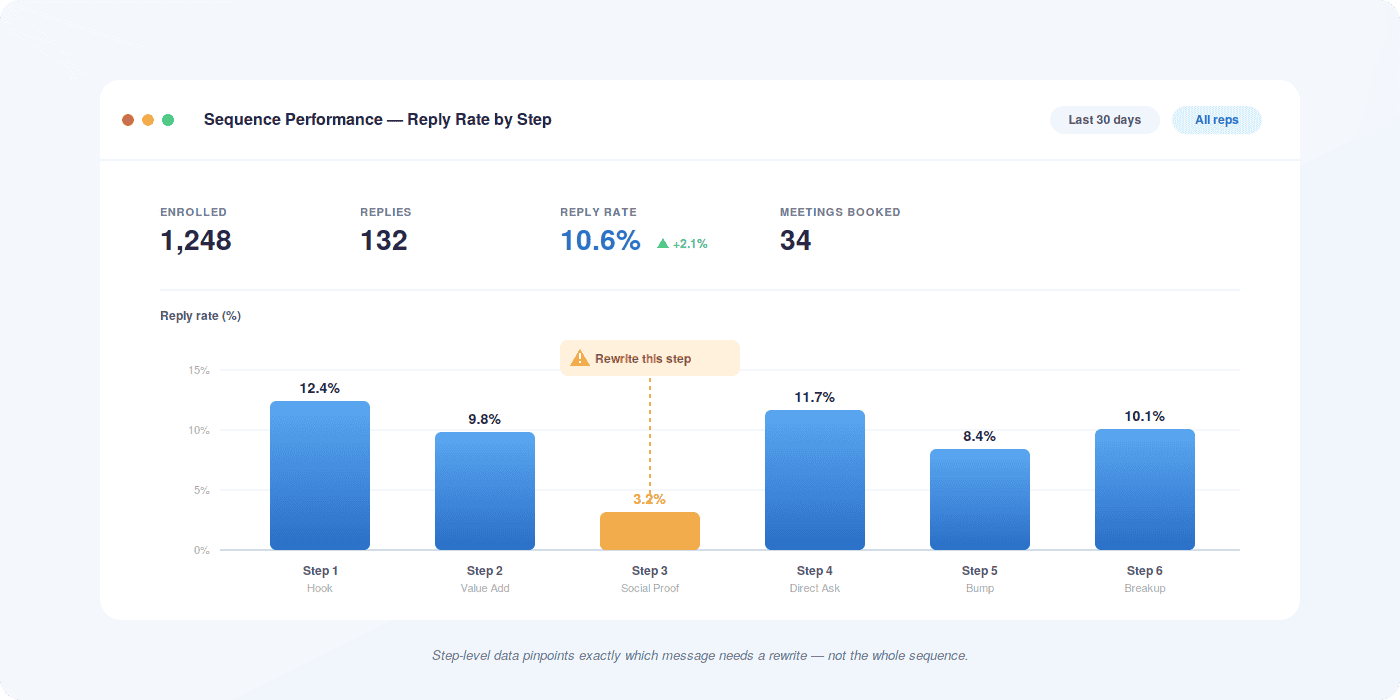
- Open Rate by Step: Tells you whether your subject lines are working. A drop-off in opens at a specific step usually signals a subject line problem, not a content problem.
- Reply Rate by Step: The most important metric. Shows you which step in the sequence is generating actual engagement. Industry average for cold outreach is 1 to 5% — well-optimized sequences hit 8 to 15%.
- Click-Through Rate: Relevant when your sequence includes links to resources or landing pages. High clicks with low replies suggest your content is interesting but your call to action isn’t compelling.
- Sequence Completion Rate: The percentage of enrolled prospects who reach the final step without replying or exiting. High completion rates with low reply rates mean the sequence isn’t resonating — time to rewrite.
- Meeting Booked Rate: The ultimate measure of outreach effectiveness. Track what percentage of sequence enrollments result in a booked meeting, and use that as your north star metric for optimization.
- Unsubscribe Rate: A rising unsubscribe rate signals that your targeting is off or your sequence is too aggressive. Address it before it affects your sender reputation.
Where Revenue Grid Fits In
Salesforce gives you the CRM foundation. What it doesn’t give you — at least not natively — is the intelligence layer that makes sequences adaptive, the automatic activity capture that keeps records accurate without manual logging, and the analytics depth that tells you exactly why a sequence is or isn’t working.
Revenue Grid is built specifically to extend Salesforce in these areas. Its sales cadence capabilities let you build multi-step sequences that respond to real engagement signals, not just time-based triggers. Every email interaction is automatically captured and synced back to Salesforce, so your CRM data stays accurate without requiring reps to log anything manually.
The email campaign tools give marketing and sales a shared view of outreach performance — which sequences are generating pipeline, which segments are responding, and where the handoff between automated and human touchpoints should happen. And because Revenue Grid sits natively inside Salesforce rather than alongside it, there’s no data fragmentation between systems.
For teams that have already built sequences in Salesforce and are hitting the ceiling of what native tools can do, Revenue Grid is the practical next step — not a replacement for what’s working, but an extension that makes it work better.
If you’re evaluating whether your current setup is leaving pipeline on the table, book a demo to see how Revenue Grid’s sequencing capabilities work inside your existing Salesforce environment.
How do I start with email sequencing automation in Salesforce?
Start by assessing which edition of Salesforce you’re running — Einstein Sales Cadences is available on Sales Cloud Enterprise and above. If you have access, navigate to Sales Engagement in the App Launcher and explore the Cadences builder. If your edition doesn’t include it, or if you need more advanced capabilities, look at AppExchange integrations or dedicated tools like Revenue Grid that connect directly to your Salesforce org. Before building anything, define your target audience, sequence goal, and exit criteria. A clear strategy before you touch the platform saves significant rework later.
What are the benefits of using Salesforce for email sequences over other platforms?
The primary advantage is that Salesforce is already your system of record. When sequences run inside Salesforce — or through tools tightly integrated with it — every interaction is tied to the correct contact, account, and opportunity automatically. You don’t have to reconcile data between separate systems or manually update records after a campaign runs. For sales teams, that means accurate pipeline data, better forecasting, and a complete activity history on every account without extra administrative work.
How can I ensure my email sequences are effective and engaging?
Three things drive sequence performance more than anything else: relevance, timing, and brevity. Relevance means your emails reference something specific to the prospect’s role, industry, or situation — not just their first name. Timing means sending at the right interval (not too aggressive, not too sparse) and at the right time of day for your audience. Brevity means each email makes one clear point and one clear ask. Beyond those fundamentals, run A/B tests on subject lines and email copy, track reply rates by step, and rewrite underperforming steps based on data rather than instinct.
Can I integrate third-party tools with Salesforce for better email sequencing?
Yes — and for most teams running sequences at scale, integration is the practical path to the capabilities Salesforce doesn’t offer natively. Tools that integrate with Salesforce can add behavioral branching, deeper personalization, automatic activity logging, and more granular analytics. The key is choosing an integration that syncs bi-directionally with Salesforce rather than creating a parallel data environment. Revenue Grid’s Salesforce and email integration is built specifically for this — it extends sequencing capabilities while keeping Salesforce as the single source of truth for all customer data.
What steps should I take if my email sequences are not performing as expected?
Start with your data before changing your copy. Check open rates by step — if opens are low, the problem is your subject lines or sender reputation, not your email content. If opens are healthy but replies are low, the issue is your message or call to action. If replies are coming in but not converting to meetings, look at how your reps are handling the handoff from automated to personal outreach. Also audit your targeting — sequences sent to the wrong persona or the wrong stage in the buyer journey will underperform regardless of how well they’re written. Fix the audience before rewriting the emails.