


Key Takeaway
- Not all sales forecasting software works the same way. Some sit on top of your CRM and others capture their own activity signals. The right choice depends on your CRM, your team size, and how sophisticated your forecasting process actually is.
- Built-in CRM forecasting (Salesforce, HubSpot) is fine as a starting point, but it only reads what reps manually enter. If your team isn't logging consistently, the forecast will be off regardless of the tool.
- AI-driven forecasting improves over time, but only if the underlying data is clean. A well-trained model on dirty pipeline data still produces unreliable numbers.
- For most B2B sales teams, pipeline-based forecasting is the most immediately useful method. For enterprise orgs that need cross-functional alignment, a broader platform like Pigment or Clari makes more sense.
- Native integrations beat third-party syncs. Tools built specifically for your CRM (Revenue Grid for Salesforce, Forecastio for HubSpot) tend to produce more accurate data with less maintenance overhead.
There’s no shortage of sales forecasting software out there, and all of them claim to give you a sales number you can trust. But they don’t all work the same way. Some sit on top of your CRM and analyze what’s already there. Others pull in their own data signals. A few are part of bigger revenue intelligence platforms where forecasting is just one piece.
Accurate sales forecasts are crucial for making informed business decisions related to budgeting, marketing, and hiring. Sales forecasting tools predict future sales by using historical data with interactive sales dashboards, evaluating current sales pipeline information, and considering market trends, so the right tool can have a direct impact on your entire sales strategy and future revenue.
We looked at the top sales forecasting solutions in 2026 and broke down the key features and pricing for each so you can compare them in one place instead of digging through a dozen different websites.
Quick Overview of the Best Sales Forecasting Tools in 2026
Here is a side-by-side snapshot before we get into the details.
| Tool | Best For | Starting Price |
|---|---|---|
| Revenue Grid | Salesforce teams seeking forecasting powered by deal activity, engagement signals, and relationship intelligence. | $149/user/month |
| Clari | Large enterprise sales organizations with 50+ reps requiring advanced forecast rollups and pipeline inspection. | Custom quote (estimated ~$100–125/user/month) |
| Gong Forecast | Teams already using Gong conversation intelligence that want forecasting layered into existing workflows. | Custom quote as an add-on to the base Gong license |
| Forecastio | HubSpot-based sales teams needing more advanced forecasting than native HubSpot forecasting provides. | $249/month including 2 seats |
| Pigment | Organizations connecting sales forecasting directly into company-wide financial planning workflows. | Custom quote |
| HubSpot Forecasting | Existing HubSpot users wanting a straightforward built-in sales forecasting capability. | $90/seat/month with Sales Hub Professional |
Understanding Sales Forecasting Methods Before Choosing Software
Before evaluating tools, it helps to understand what forecasting approaches the right sales forecasting software should support. Sales forecasting methods can be broadly divided into two groups: qualitative and quantitative.
Qualitative forecasting relies on expert opinions and is particularly useful when historical data is limited such as when launching a new product or entering a new market. Common qualitative techniques include expert judgment, market research, and focus groups.
Quantitative forecasting uses numerical data and statistical analysis to predict future sales based on past sales data and historical sales data. Common quantitative techniques include:
- Time series analysis is a quantitative method that breaks down historical sales data into specific time intervals to predict future performance, making it ideal for businesses with recurring cycles.
- Regression analysis explores relationships between different variables (such as headcount, marketing spend, or seasonal patterns) to predict sales outcomes.
- Causal analysis examines external factors such as marketing campaigns and economic conditions to understand how they influence sales revenue.
- Pipeline forecasting uses the current sales pipeline and conversion probabilities at each deal stage to predict future revenue. For small businesses with a CRM, pipeline forecasting can significantly improve visibility into expected revenue.
- Length-of-sales-cycle forecasting tracks how long deals take to close to estimate when current leads will turn into revenue, which is especially useful for teams with longer or more complex sales processes.
For small businesses, it’s generally recommended to focus on simple, consistent models like moving averages for stable sales before investing in more sophisticated forecasting capabilities.
The sales forecasting software you choose should support the methods that match your sales process and data maturity and not force you into a rigid approach that doesn’t fit how your team operates.
Which Are the Best Sales Forecasting Tools in 2026?
Some of these tools are standalone forecasting products, while others are modules inside larger platforms. If you’re already paying for a CRM or revenue platform, check whether forecasting is included in your current plan before buying something separate.
1. Revenue Grid
Revenue Grid is a relationship intelligence and sales automation platform that runs natively on top of Salesforce. Forecasting is one module inside it, sitting alongside pipeline visibility, deal guidance, sales sequences, and team analytics.
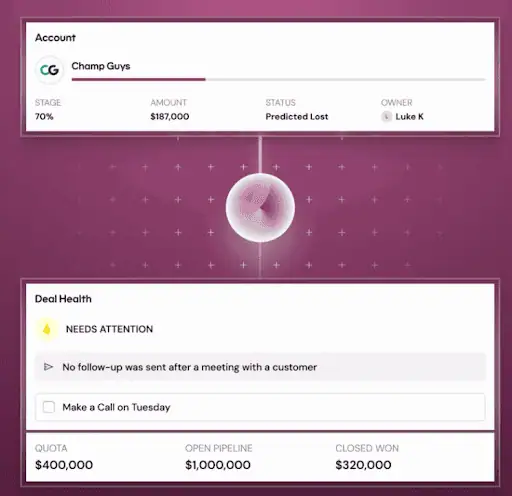
The reason that matters is that because all of these live on one platform, the forecasting tool has access to signals from across your entire sales pipeline: email activity, meeting data, deal stage changes, and rep engagement. So when it generates a forecast, it’s not just adding what reps have manually entered. It’s pulling from actual deal activity to show you which deals are healthy, which are going quiet, and how that affects your number.
AI enhances sales forecasting accuracy in Revenue Grid by analyzing vast amounts of customer data to predict which deals are most likely to close, allowing sales managers to improve their forecasting accuracy and consistently achieve revenue goals. This AI-driven sales forecasting approach gives sales leaders clear and accurate predictions — not just a gut-check number.
What Are the Key Features of Revenue Grid?
- Deal health scoring layered into the forecast, so you’re not just seeing dollar amounts. You’re seeing which deals are trending well and which are carrying risk, even if they’re sitting in “committed”
- AI-projected forecast that estimates where you’re likely to land based on current pipeline signals and predictive analytics, not just what reps have manually called
- Week-over-week forecast tracking that shows exactly what changed since the last forecast call (which deals moved, which slipped, which got added) so you’re not scrambling to figure out what shifted
- Forecast segmentation by product, geography, segment, or revenue type — useful if your team doesn’t forecast everything in one big bucket
- AI Mentor that lets you ask natural-language questions about your forecast (“where are we on Q2?” or “which reps are at risk of missing quota?”) and get instant data-driven insights pulled from your Salesforce data
- Automated forecasting workflows with submission reminders, so the weekly forecasting process is consistent across the team and not dependent on someone chasing reps for updates
- Native Salesforce integration where everything runs inside your existing CRM — no separate sales tech stack required
- Customizable sales dashboard for pipeline health monitoring and real-time data on deal insights across your entire team
How Much Does Revenue Grid Cost?
Revenue Grid prices per user per month across three tiers. There is a 14-day free trial and special founder pricing for early-stage companies. Robust sales forecasting capabilities are only available in the top-tier plan. Here’s how the three tiers are priced:
- Activity Capture 360: $30/user/month. Auto-captures emails, calendar events, and contacts to Salesforce. No forecasting included.
- Knowledge Capture: $49/user/month. Includes everything in Activity Capture 360 plus AI-powered search and chat across all sales data. Still no forecasting.
- Revenue Grid Ultimate: $149/user/month. This is where forecasting lives, along with pipeline visibility, team analytics, deal guidance, relationship intelligence, sales sequences, meeting assistance, and the AI Mentor/Assistant tools.
Professional services (implementation, onboarding, advanced customization, dedicated CSM) are available as separate paid add-ons.
2. Clari
Clari is a revenue platform that covers revenue forecasting, pipeline management, conversation intelligence, sales engagement, and deal inspection. Forecasting is one product inside it.
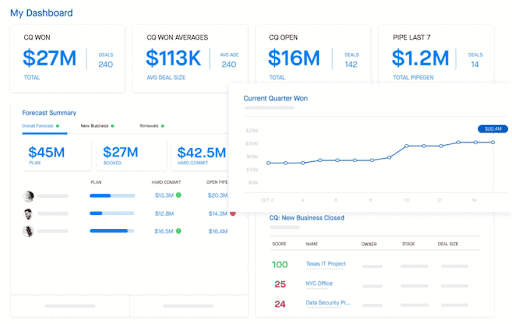
The advantage of forecasting living inside a bigger platform is that it has access to more data. Clari automatically captures activity from emails, calls, calendar events, and CRM updates across your team. It integrates with Salesforce and is generally built for larger sales orgs with 50+ reps, though it still lags behind Revenue Grid when it comes to full revenue intelligence.
What Are the Key Features of Clari?
- Automated forecast rollups from rep level all the way up to CRO, so you’re not manually aggregating numbers across regions and teams every week
- AI-driven sales forecasting that compares what your team has called against what Clari’s predictive models suggest based on actual deal activity, giving you two numbers to cross-reference for improved forecast accuracy
- Commit categories (best case, commit, upside, pipeline) with the ability to override and adjust at each level while tracking who changed what and when
- Deal health scoring that assigns each opportunity a probability score based on two years of your company’s own historical sales data, not a generic formula
- Real-time data pipeline inspection views where leaders can drill into any number and see the deals behind it, how they’ve moved, and what’s changed since last week
- Scenario modeling that lets you play out “what if” situations on your forecast before committing to a number
- Conversation intelligence (Clari Copilot, formerly Wingman) available as an add-on that ties call insights directly to pipeline data, so forecast reviews include deal insights from what’s being said on calls
- Native Salesforce integration with bi-directional data sync
How Much Does Forecasting Cost in Clari?
Clari doesn’t publish pricing on their website. You’ll need to talk to sales for a custom quote. The final cost depends on which modules you need, how many users you have, and your contract terms. Based on information available through software review and benchmarking sites, here’s an estimate:
- Clari Core (Forecasting & Pipeline): Estimated at around $100 to $125/user/month billed annually. This is the flagship forecasting product.
- Clari Copilot (Conversation Intelligence): Estimated at around $60 to $100/user/month as an add-on for call recording, AI summaries, and coaching.
- Groove (Sales Engagement): Priced separately for sequencing and dialer functionality.
Professional implementation services typically run from $10K to $25K depending on complexity. No free plan or free trial is currently available.
3. Gong Forecast
Gong is a conversation intelligence platform that records and analyzes sales calls. Gong Forecast is a separate product added later for sales forecasting and pipeline forecasting.
There are two tiers of the forecasting product: Forecast Essentials, which covers deal boards, account boards, and win/loss insights, and full Gong Forecast, which adds forecast submission, AI predictors, and forecast analytics on top.
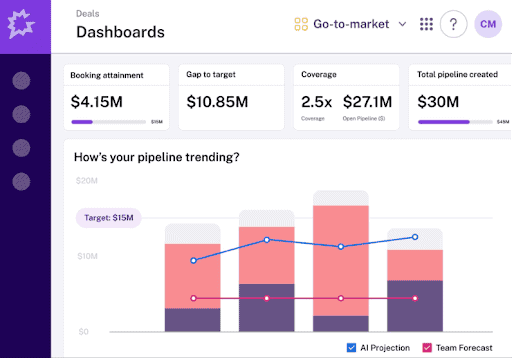
Gong’s forecast is built on the actual content of conversations: what did the buyer say on the last call, did they raise objections, did they mention a competitor, were next steps agreed on or left vague. It makes the most sense if you’re already using Gong for call recording and want your forecast to reflect what’s actually being said in your sales process. Instead of relying on rep optimism, you get deal health scores based on real buyer conversations.
What Are the Key Features of Gong Forecast?
- Deal health scoring powered by conversation data, so you can see which committed deals have strong buyer engagement and which are going quiet based on actual calls and emails
- Forecast submission and rollup from rep to manager to VP to CRO, with full visibility into who submitted what and when
- AI Deal Reviewer that automatically flags risks and changes across your pipeline without you having to dig through individual opportunities — a strong example of automated forecasting in action
- Account Boards for managing renewals and expansion alongside new business, giving CSMs and account managers the same forecasting structure
- Forecast analytics that track accuracy over time, so you can measure whether your team’s calling is improving quarter over quarter
- Dashboards and target management to track sales team performance and progress against quota using real-time data
How Much Does Gong Forecast Cost?
Gong doesn’t list pricing on their website. You’ll need to go through their sales team for a quote. From what they share publicly, the cost structure works like this:
- A per-user license fee for the base Gong platform (Foundation)
- A one-time onboarding fee required for most teams
- Gong Forecast sold as an add-on on top of the Foundation license
- Annual or multi-year contracts; larger teams can negotiate volume discounts
4. Forecastio
Forecastio is a sales forecasting and pipeline intelligence tool built specifically for teams running HubSpot. If Revenue Grid is the Salesforce-native option, Forecastio is the HubSpot-native equivalent. It connects directly to your HubSpot CRM, pulls in your historical deal data, and uses a mix of AI/machine learning, time-series models, and weighted pipeline methods to generate accurate forecasts.
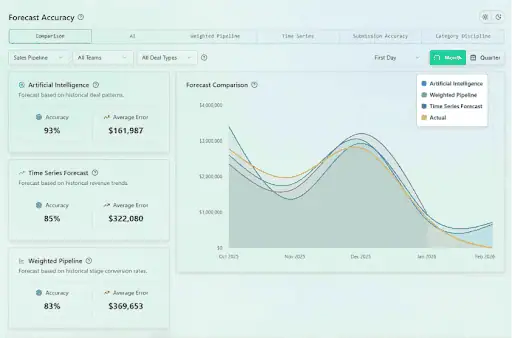
It’s especially useful for teams that want to compare different forecasting methods, AI, time-series, weighted pipeline, side by side instead of being locked into one approach. This kind of trend analysis and multi-method view gives sales managers more confidence when they need to predict future performance for a board or leadership team.
What Are the Key Features of Forecastio?
- Multiple forecasting methods in one tool: Weighted pipeline, time-series, or AI/ML-based forecasting depending on your sales model, with the ability to combine them and cross-reference results for more accurate sales forecasts
- AI close date prediction that estimates not just whether a deal will close but when, reducing end-of-quarter surprises
- Forecast accuracy tracking that measures how close your predictions were to actual results over time, broken down by method, pipeline, and time period
- Full audit trail that logs every forecast change automatically like what changed, when, and who made the update and this is useful for keeping reps accountable and tracing why a number shifted
- Pipeline health analysis that surfaces slippage rates, deal aging, stage bottlenecks, and early signs of pipeline leakage as part of its pipeline health monitoring
- Deal-level risk signals based on configurable rules (time stuck in a stage, repeated close date pushes) that automatically flag risky deals
- “What-if” scenario modeling to test different assumptions before committing to a number
How Much Does Forecastio Cost?
Forecastio has two plans, both billed annually. There is no free plan, but pricing is straightforward:
- Sales Forecasting: $249/month (includes 2 seats, additional seats at $49/seat/month). Covers AI forecasting, time-series forecasting, automated pipeline stage probabilities, what-if scenarios, forecast accuracy tracking, audit trail, deal signals, and risky deal analysis.
- Forecasting & Pipeline Intelligence: $369/month (includes 2 seats, additional seats at $69/seat/month). Everything in Sales Forecasting plus pipeline health overview, stage performance and bottleneck detection, slippage tracking, deal velocity analysis, and enhanced deal risk prioritization.
5. Pigment
Pigment is a business planning platform used by finance, sales, HR, and operations teams. Sales forecasting is one use case inside it, alongside budgeting, headcount planning, territory and quota planning, and supply chain forecasting.
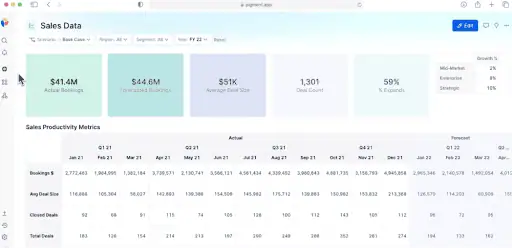
The difference between Pigment and the other tools on this list is scope. Tools like Revenue Grid are built for sales leaders looking at the pipeline. Pigment is built for organizations where the sales forecast needs to feed directly into the financial plan. It pulls accurate data from your CRM, ERP, HRIS, and other systems in real time, so finance and sales are working off the same numbers.
If your CFO and CRO are constantly working off different versions of future revenue, Pigment gets them on the same page in real time.
What Are the Key Features of Pigment’s Sales Forecasting?
- Scenario planning that lets you model best case, baseline, and worst-case outcomes and instantly see how each affects your revenue number — particularly valuable for communicating with boards and investors
- Automated data import from CRM (like Salesforce), ERP, and other business systems in real time, so forecasts are always built on current data rather than last week’s export
- Drill-down capability to break apart your pipeline by stage, region, industry, deal type, or any other dimension — giving sales managers the granular deal insights they need
- Cross-functional alignment where a change in the sales forecast automatically flows through to the financial plan, headcount model, or capacity plan
- Flexible modeling that lets you build forecasting logic around how your business actually works, rather than forcing you into a rigid template
- Collaborative planning where multiple stakeholders (sales leaders, finance, RevOps) can input assumptions and review forecasts in the same platform
- AI-powered agents that help with trend analysis, surface valuable insights, and automate repetitive planning tasks
How Much Does Pigment Cost?
Pigment doesn’t publish pricing on its website. Everything is custom and quote-based. The cost is structured around three components: platform access, user seats (with different pricing for power users vs. viewers), and the planning modules or use cases you need. Data volume, model complexity, and number of integrations also affect the price.
6. HubSpot Forecasting
HubSpot’s forecasting tool is built directly into Sales Hub. If your team is already running deals, contacts, and pipeline inside HubSpot, forecasting is just another tab in the same system. It uses your deal data (stages, amounts, close dates) to generate reliable forecasts, and you can customize it further with forecast categories so reps can adjust their calls without changing deal stages.
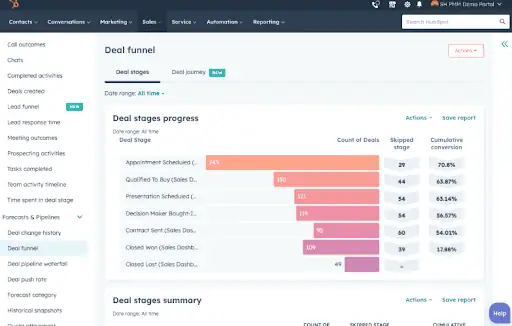
If you’re already on Sales Hub Professional or Enterprise, this is the simplest option — there’s nothing new to buy or integrate. It’s a solid fit for small and mid-sized teams that need reliable forecasting based on CRM data, without the complexity or cost of a dedicated revenue forecasting software platform. For small businesses with a CRM, it also serves as a practical entry point into pipeline forecasting that can improve visibility as the team scales.
What Are the Key Features of HubSpot Forecasting?
- Team rollup view that lets sales managers see forecasts broken down by team, then drill into individual sales performance to identify who needs help and where
- Forecast categories that let reps group deals (commit, best case, pipeline, etc.) independently from deal stages, giving you two layers of signal instead of one
- Manual forecast submissions where reps and managers can enter their own call for the month or quarter, alongside the data-driven numbers
- Forecasting across multiple pipelines so sales can track new business in one pipeline while service tracks renewals in another — all within the same tool
- Weighted pipeline view that adjusts deal values based on stage probability for a more realistic picture of future revenue than the raw pipeline total
- Historical snapshots that show how your forecast evolved over the quarter, so you can spot patterns and build better forecasting capabilities over time
- Submission reminders scheduled by admins so the weekly forecast process doesn’t depend on someone chasing reps
- Mobile app support for reviewing and submitting forecasts on the go
- Multi-currency support with automatic conversions based on your account’s exchange rates
How Much Does HubSpot Forecasting Cost?
Forecasting is only available on Sales Hub Professional or Enterprise. It’s not included in the Free or Starter plans. Each user who needs forecasting access requires an assigned Sales seat. All plans require an annual commitment.
- Sales Hub Professional: $90/seat/month (billed annually, or $100/seat/month paid monthly). Includes forecasting features, sequences, sales analytics, call recording, sales workspace, and the Breeze Prospecting Agent. There’s also a required one-time onboarding fee of $1,500.
- Sales Hub Enterprise: $150/seat/month (billed annually). Includes everything in Professional plus conversation intelligence, deal journey analytics, pipeline approvals, deal splits, and lead form routing. Requires a one-time onboarding fee of $3,500.
How Does Sales Forecasting Software Work?
Understanding how sales forecasting software works helps you evaluate which tools will actually improve forecast accuracy for your team and which are just adding noise to your sales tech stack.
At the core, sales forecasting software integrates with your CRM and other data sources to pull in accurate data about your current sales pipeline, past sales data, and rep activity. From there, it applies forecasting models, ranging from simple weighted pipeline calculations to AI-driven sales forecasting algorithms to predict future outcomes.
More advanced platforms go further by analyzing historical data on deal velocity, stage conversion rates, and engagement signals to generate predictive analytics and predictive insights about which deals are most likely to close and when. This kind of automated forecasting removes the reliance on gut-feel rep submissions and replaces it with data-driven insights grounded in real sales performance patterns.
The best tools also surface deal insights and flag risks in real time, giving sales managers the pipeline health monitoring they need to take action before a deal goes dark and not after it’s already lost.
What to Look for in the Right Sales Forecasting Software
Choosing the right sales forecasting software comes down to a few key factors:
CRM compatibility. Does the tool integrate cleanly with your existing CRM, whether that’s Salesforce, HubSpot, or another platform? Native integrations (like Revenue Grid for Salesforce or Forecastio for HubSpot) tend to produce more accurate data than third-party syncs.
Data sources. Does the tool only read what’s in the CRM, or does it also capture activity data like emails and meetings? The broader the data inputs, the more accurate predictions you can expect.
Forecasting methods supported. The right sales forecasting software should support multiple methods — pipeline-based, time-series, AI-driven, scenario planning — so your team isn’t locked into a single approach. Qualitative forecasting is particularly useful when historical data is limited, while quantitative approaches work best with clean historical sales data.
Sales automation and workflow. Does the platform support automated forecast submissions, reminders, and rollups? A good sales automation platform reduces the manual work involved in the forecasting process so sales managers can focus on coaching rather than chasing updates.
Forecasting features and reporting. Look for customizable sales dashboards, audit trails, forecast accuracy tracking, and the ability to drill into deal-level data. These features determine how useful the tool is beyond just generating a number.
Scalability. Does the platform grow with your team? Some tools are better suited for small businesses, while others (like Clari or Pigment) are designed for enterprise-scale sales orgs that need cross-functional revenue forecasting.
Why Choose Revenue Grid as Your Sales Forecasting Tool?
A sales forecast is only as good as the data behind it. Most forecasting tools pull from a narrow slice: deal stages, amounts, close dates, and whatever reps manually entered in the CRM. That’s a limited view, and it leaves a lot of blind spots.
Revenue Grid takes a different approach. As a relationship intelligence and sales automation platform, it automatically captures every email, meeting, and touchpoint across your team and syncs it to Salesforce in real time. Your forecast is built on top of that activity — which means it reflects how your relationships with buyers are actually progressing: who’s engaged, who’s gone quiet, which deals have momentum, and which are stalling.
So instead of spending the first 20 minutes of every meeting figuring out why a number moved, you can see exactly which deals shifted, who went quiet, and what’s behind every change week over week. Reps stop relying on gut calls, and sales leaders stop chasing updates.
Forecasting in Revenue Grid also sits alongside pipeline visibility, deal guidance, sales sequences, and team analytics inside the same platform. So when a deal looks shaky, you can move from spotting the problem to acting on it without switching tools. Built-in AI also lets you ask natural-language questions about your forecast and get instant answers pulled from your Salesforce data. This makes it one of the most practical AI-driven sales forecasting experiences available today.
Book a demo with Revenue Grid to see how forecasting works when it’s powered by real relationship intelligence, not just CRM inputs.
1. What is sales forecasting software?
Sales forecasting software predicts how much revenue your team is likely to close in a given period based on your pipeline data. It pulls from deal stages, amounts, close dates, and (in more advanced tools) activity signals like meetings and emails to generate a projected number. Most tools also let reps and managers submit their own forecast calls alongside the data-driven one. Accurate sales forecasts help teams make better decisions around budgeting, hiring, and sales strategy. This is why choosing the right tool matters.
2. How accurate are AI-based sales forecasting tools?
Accuracy depends on the quality of your data and how long the tool has been learning from your pipeline. AI-driven sales forecasting tools typically improve over time as they ingest more historical sales data from your organization. Most vendors claim 85 to 95 percent accuracy, but the real measure is how your tool performs against your own actuals over a few quarters. AI enhances sales forecasting accuracy by analyzing vast amounts of data to predict which deals are most likely to close, allowing managers to improve their forecasting accuracy and consistently achieve revenue goals.
3. Do I need a separate forecasting tool if my CRM already has one?
If you’re on Salesforce or HubSpot, you already have basic forecasting built in. The question is whether that’s enough. Built-in CRM forecasting works off deal stages and manually entered data. If you want forecasts that factor in actual deal activity, engagement signals, and deal health, you’ll likely need a dedicated tool or a platform like Revenue Grid that layers robust sales forecasting capabilities on top of your CRM.
4. What's the difference between forecasting and pipeline management?
Forecasting is about predicting what’s going to close in a given period. Pipeline management is about tracking the health and progression of deals currently in your pipeline. The two are related but not the same. A healthy pipeline doesn’t guarantee an accurate forecast. A good revenue forecasting software usually includes pipeline health monitoring as part of the package.
5. How often should we update our sales forecast?
Most teams run weekly forecast calls, with updates submitted by reps before each call. Some orgs update in real time as deal stages change. The right cadence depends on your sales cycle length and how volatile your deals are. Shorter cycles usually mean more frequent updates. Regularly updating forecasts based on new data is one of the most important factors in maintaining forecasting accuracy over time.
6. Can forecasting tools integrate with Salesforce and HubSpot?
Most of them can. Tools like Revenue Grid are built natively on Salesforce, meaning the integration is direct with no third-party sync. Forecastio is built for HubSpot. Others like Clari and Pigment integrate with both but aren’t native to either. When you evaluate how sales forecasting software integrates with your existing stack, native integrations tend to be cleaner. No data syncing lag or duplication.
7. What should I look for when comparing sales forecasting tools?
Start with your CRM, since that determines which tools integrate cleanly. Then look at what data sources the tool uses: does it only read what’s in the CRM, or does it also capture activity data like emails and meetings? Check whether the tool supports qualitative and quantitative forecasting methods, or just one. Look at the forecasting features available: are there customizable sales dashboards, pipeline health monitoring, audit trails, and forecast accuracy tracking? Finally, consider whether forecasting is standalone or part of a broader sales cloud or revenue intelligence platform that includes pipeline visibility and deal guidance.