

Einstein Activity Capture has no standalone price. EAC Standard is included free with eligible Sales Cloud editions for up to 100 users, while Licensed EAC comes with paid products such as Salesforce Inbox, Sales Cloud Einstein, Sales Engagement, or Performance and Unlimited editions. Depending on the route you choose, Einstein Activity Capture effectively costs $0 to around $50 per user/month before hidden costs.
Key Takeaway
- EAC has no standalone pricing page because it's not a standalone product. What you pay depends entirely on which Salesforce edition or add-on you're already on, making the true cost harder to calculate than it should be.
- The free version (EAC Standard) deletes your activity data after 6 months and blocks most of the features teams actually want. Getting the full version means buying something else first.
- The per-seat fee is the smallest part of the bill. Implementation alone can run $50K–$200K+, and the add-on stacking (Inbox → Einstein → Sales Engagement → premium support) compounds fast.
- EAC captures data but doesn't always make it usable. Activity is stored in AWS by default, which means it won't show up in standard Salesforce reports, list views, or automations without additional workarounds.
- If you're not already on Performance or Unlimited, the total cost of ownership for full EAC functionality often exceeds what a purpose-built alternative like Revenue Grid costs all-in.
If you have ever tried to look up the price of Einstein Activity Capture, you have probably noticed that there is no pricing page. There is no checkout. There is no “EAC starts at $X per user per month” anywhere on Salesforce’s website. For a product that thousands of sales professionals rely on every day, that is surprising.
The reason is that Salesforce Einstein Activity Capture is not actually a product you buy on its own. It is a capability that Salesforce has tucked inside several different products and editions. So, the question “what does EAC cost?” is really the question “which path to EAC am I taking, and what does that path cost me?”
EAC pricing in 2026 is based on a freemium model where basic functionality is included with most Sales Cloud licenses, while advanced features require paid add-ons or higher-tier editions. Understanding which tier you actually need and what it will truly cost is the real challenge.
This guide walks through how Salesforce licenses EAC, what each path actually costs, and the hidden line items that often catch revenue teams off guard. We also compare EAC with Revenue Grid, which offers the same core capability of automated activity capture as a standalone product with public pricing, so you can see what the alternative looks like when licensing is not a puzzle you have to solve.
How Salesforce Packages Einstein Activity Capture
Before we get to dollars, it helps to understand that Salesforce Einstein Activity Capture ships in two versions, and the version you get depends entirely on what other Salesforce products you own.
Einstein Activity Capture automatically syncs emails, events, and contacts between Salesforce and external Google or Microsoft email and calendar applications including Microsoft Outlook and Google Calendar. This enhances sales productivity by ensuring customer data is current across platforms. The tool is designed to automate the logging of various customer interactions such as emails, calendar events, meetings, and tasks, thereby freeing up valuable time for sales representatives and reducing manual data entry.
However, EAC allows users to generate insights from captured data but does not enable the creation of Salesforce records from this data, which can limit its utility for detailed reporting and analytics. This distinction matters more than most teams realize when evaluating it against their sales processes and reporting requirements.
Einstein Activity Capture Standard (Free Version)
EAC Standard is bundled into Sales Cloud Starter, Professional, and Enterprise editions at no additional cost, and it lets you enable up to 100 salesforce users. That sounds generous until you look at what Standard actually does. Captured activity data is retained for only about 3 to 6 months before being deleted. EAC is included with every Sales Cloud edition, providing zero incremental cost for passive email and calendar visibility — which is beneficial for small teams that only need to see email threads on contact and lead records.
Many of the features people associate with EAC including Email Insights, activity metrics, and the analytics dashboards are either reduced or unavailable. Standard is a starting point, not a complete solution.
Einstein Activity Capture Licensed (Full Version)
The Licensed version includes longer data retention, removes the 100-user cap, and unlocks features like Email Insights, Recommended Connections, and the Activities Analytics Dashboard. Licensed EAC is what most revenue teams actually want for meaningful pipeline management and sales analytics.
The catch is that you cannot buy Licensed EAC directly. You only get it by upgrading your Sales Cloud edition or by adding one of several other Salesforce products on top of your existing license.
How to Get Licensed EAC, and What Does it Cost?
There are five paths through the Salesforce ecosystem that include Licensed EAC. Some are higher editions of Sales Cloud itself, and some are add-ons you bolt onto your existing Sales Cloud license.
Sales Cloud Performance Edition
Licensed EAC is included at no additional cost. Performance Edition is a premium tier of Sales Cloud, so the EAC entitlement is baked into the subscription. You do not need to buy anything extra.
Sales Cloud Unlimited Edition
Same arrangement as Performance. Licensed EAC is included with the edition. Unlimited is the top tier of Sales Cloud and typically starts around $330 per user per month.
Sales Cloud Einstein Add-On
This is the most common path for teams on Enterprise Edition who want full EAC alongside the broader Salesforce Einstein AI suite including Lead Scoring, Opportunity Scoring, deal intelligence, and Forecasting. The Sales Cloud Einstein add-on costs around $50 per user per month, billed annually. This also gives sales professionals access to actionable insights and machine learning-powered recommendations directly within the Salesforce CRM.
Salesforce Inbox Add-On
If your main goal is just email and calendar sync, syncing Microsoft Outlook or Google Calendar events to Salesforce, and you do not need the rest of the Einstein AI features, Salesforce Inbox unlocks Licensed EAC at a lower price of about $25 per user per month. This is the cheapest paid way to get the full version and a reasonable entry point for teams focused purely on basic calendar sync and activity history.
Sales Engagement or Revenue Intelligence Add-Ons
Both of these higher-end Salesforce products include Licensed EAC. A Revenue Intelligence license is an add-on for Enterprise and Unlimited customers and is priced through a custom quote rather than a public list price. Teams that need full pipeline management, health scoring, and sales analytics on top of activity capture typically end up here.
If you are already on Performance or Unlimited Sales Cloud, you have Licensed EAC for free. If you are on Professional or Enterprise, you need to add one of the four add-ons above, and the cheapest of those is Salesforce Inbox at around $25 per user per month.
Cost Breakdown for a 50-Person Sales Team
| Your Setup | What You Need to Add | Cost Per User/Month | Annual Cost (50 users) |
|---|---|---|---|
| Sales Cloud Enterprise with basic sync only | No additional purchase required — use Einstein Activity Capture Standard. | $0 | $0 |
| Sales Cloud Enterprise with fully licensed EAC | Requires Salesforce Inbox add-on licensing. | Approximately $25 | Approximately $15,000 annually |
| Sales Cloud Enterprise with EAC and full Einstein AI suite | Requires Salesforce Einstein add-on licensing. | Approximately $50 | Approximately $30,000 annually |
| Sales Cloud Performance or Unlimited | No additional licensing required because EAC capabilities are already included. | $0 | $0 |
These figures are on top of your existing Sales Cloud subscription, which itself ranges from around $165 per user per month for Enterprise to $330 or more for Unlimited. Almost every price is negotiated, discounts of 20 to 40 percent are normal for mid-market and enterprise customers, especially with multi-year contracts or larger bundles.
The Real Cost of Einstein Activity Capture: Hidden Fees to Plan For
The headline per-seat fee is just the first line on the invoice. EAC carries a handful of additional costs that often do not show up in the initial conversation with your Salesforce account executive but can meaningfully change your total cost of ownership.
Salesforce Einstein’s total cost of ownership extends beyond monthly licensing fees, often including implementation costs that can range from $50,000 to $200,000 for mid-market deployments, and can exceed $500,000 for enterprise implementations due to data migration, custom integrations, and extensive user training programs. Organizations often find that their actual investment in Salesforce Einstein exceeds initial budgets by 150–300% when accounting for multi-year implementation cycles, extensive customization requirements, and ongoing consultant dependencies.
The fragmented add-on model of Salesforce Einstein creates significant financial burdens, as essential sales capabilities require multiple expensive licenses which can lead to a total annual investment of $336,000 for a 50-person organization just in licensing fees. Here are the specific hidden costs to plan for.
1. Premier or Signature Success Support
Salesforce includes basic support with every license, but most enterprise customers end up upgrading to Premier or Signature Success for faster response times and a dedicated success contact. These tiers are typically priced at around 30 percent of your overall license fees. On a 50-seat Sales Cloud Einstein deployment at $50 per user per month, premium support adds roughly $9,000 per year on top of the license cost.
2. Implementation and Change Management
Turning EAC on is not a single click. Implementing EAC can require significant consulting time, often between 500 to 1,000 hours. Einstein’s implementation typically requires 6-18 months to achieve full operational capability, during which organizations may experience a 20-40% productivity reduction as teams adapt to new workflows and sales processes.
A typical rollout involves coordinating with your Microsoft 365 or Google Workspace admin to authorize connections, configuring sharing rules, setting up exclusion lists for personal emails, and training sales representatives on privacy settings. Many organizations bring in a Salesforce consulting partner, which can add anywhere from a few thousand to tens of thousands of dollars depending on scope. Implementation fees are real, significant, and almost always underestimated.
3. Extended Data Retention
This is one of the most overlooked costs and it is a constraint that forces an upgrade. Here is how retention works across the different EAC licenses:
- Sales Cloud Standard license (free EAC): 6 months, then data is permanently deleted
- Sales Cloud Einstein, Inbox, Sales Engagement, Revenue Intelligence: 24 months by default
- Maximum extension: Up to 5 years, but only by contacting Salesforce Support
For regulated industries like financial services, healthcare, or legal, this often forces the upgrade conversation regardless of whether you wanted the other paid features.

4. Reporting Workarounds and the AWS Storage Problem
EAC data traditionally stores in AWS, affecting Salesforce storage limits and triggering potential overage charges. Unlike alternatives that store captured data directly in the Salesforce platform, making it queryable and reportable, EAC’s architecture means captured activity history is not available for standard Salesforce reports, list views, or process automation by default.
Salesforce’s Summer ’25 release introduced a “Sync Email as Salesforce Activity” option that closes some of this gap, but with two important caveats: the new sync only applies going forward (historical data still lives on AWS), and certain advanced use cases involving custom objects and attachments still require workarounds. Teams that need full reporting on activity data often end up paying for multiple tools or investing engineering time into custom dashboards: a real budget item that does not appear on your Salesforce invoice.
5. Learning Curve and Productivity Impact
The learning curve associated with EAC and the broader Salesforce Einstein ecosystem is a cost that rarely appears in budget discussions. Sales teams switching from manual tasks or existing systems to intelligent automation typically experience disruption before they see productivity gains. Combined with the 6–18 month implementation timeline, this productivity gap can be significant for teams with aggressive revenue targets.
6. License Retention for Departed Reps
When a sales rep leaves and you remove their EAC license, the historical activity data they generated including emails and meetings tied to active opportunities can become inaccessible. To preserve that history, many organizations continue paying for inactive licenses. Over a few years, these ghost seats can quietly become a meaningful recurring cost that is almost never budgeted for at the start.
7. Lock-In and Migration Risk
Because EAC stores captured data outside your Salesforce org, migrating away from it is not a simple export. If your needs change and you decide to switch activity capture solutions, the historical data captured by EAC may not come with you cleanly. Salesforce has also announced that Lightning Sync, the predecessor to EAC, will be retired, emphasizing the need for users to transition to EAC or other modern solutions. Understanding this lock-in risk upfront is part of evaluating the real cost of the platform.
Hidden Cost Summary
| Cost Category | When It Hits | Rough Impact | Operational Effect |
|---|---|---|---|
| Underlying Sales Cloud license | Upfront and recurring subscription cost | $80 to $330+ per user/month | Core CRM platform cost scales significantly with team growth. |
| Premium support | Annual recurring expense | Approximately 30% of license fees | Adds substantial operational overhead for enterprise-grade support access. |
| Implementation fees | Initial deployment phase | $50K–$200K+ for mid-market organizations | Includes consulting, customization, integrations, and onboarding. |
| Data retention extension | Triggered when compliance or retention requirements increase | Forces migration to higher paid tiers | Long-term storage and compliance requirements increase licensing dependency. |
| Reporting workarounds | Ongoing operational burden | Third-party tooling or engineering investment | Native reporting limitations create additional infrastructure and maintenance costs. |
| Ghost licenses for departed reps | Recurring over time | Compounds annually | Unused seats silently increase software spend as organizations scale. |
| Migration if you switch later | Future platform transition | Potential loss of historical data | Platform lock-in may create expensive and risky migration projects later. |
If EAC’s licensing costs and limitations are starting to pile up, Revenue Grid Activity Capture 360 is worth a closer look. Starting at $30 per user/month, it keeps captured activity as native Salesforce records, supports custom objects, and gives teams long-term access to their activity history. Compare Einstein Activity Capture and Revenue Grid side by side to see which setup makes more sense for your team.
When It Makes Sense to Look Beyond EAC
EAC Works Well When All Three of These Are True
- You’re already on Sales Cloud Performance or Unlimited and Licensed EAC is included
- Your retention needs are short (~2 years or less) and you’re not in a regulated industry
- Your reporting needs are simple enough that the Activity Timeline view is sufficient without needing captured data in standard Salesforce reports or automation
The Problems Tend to Surface in Predictable Places
You’re on Enterprise Edition and add-on costs keep stacking. You start with Salesforce Inbox at $25 per user per month to unlock Licensed EAC, then realize you also need Einstein Conversation Insights for call recording and conversation intelligence, then Sales Engagement for outreach, then premium support on top of all of it. Each add-on is reasonable on its own, but stacked together across multiple tools, they can double your effective per-seat cost.
Your data retention requirements are non-negotiable. Financial services, healthcare, legal, and other regulated industries often require communication histories going back several years. EAC’s default retention windows fall well short of that, creating a compliance gap that’s expensive to close.
You need captured activity to actually do something. The most common frustration is that EAC captures data but stores it in a way that limits what you can build on top of it. If your RevOps team wants to trigger workflows based on activity patterns, build custom reports, improve forecast accuracy through deal insights, or connect activity data to custom objects, EAC’s architecture makes that harder than it should be. To access advanced EAC features such as activity metrics reporting, an upgrade to a higher-tier Salesforce edition or the purchase of paid add-ons is often required.
How Revenue Grid Activity Capture Compares With Einstein Activity Capture
Most of the hidden costs above trace back to the same root cause: EAC stores captured data outside your Salesforce org, and the features you get depend on which Salesforce product you happened to buy it inside of. Revenue Grid takes the opposite approach, it writes captured data into native Salesforce records from the start and comes as a single product with public pricing.
Unlike EAC, which stores captured data in AWS and makes it unreportable outside of the Einstein Analytics dashboard, Revenue Grid stores data directly in Salesforce, making it queryable and reportable through standard Salesforce tools. This means your sales analytics, pipeline management, and deal intelligence capabilities are all built on complete, accessible data rather than a separate data store with limited read-only access.
Learn more by reading through a full feature-by-feature comparison of Einstein Activity Capture vs Revenue Grid.
Revenue Grid Pricing
Revenue Grid offers three pricing tiers, each adding more capability on top of the last.
| Tier | Price (Per User/Month) | What’s Included |
|---|---|---|
| Activity Capture 360 | $30 | Email and meeting capture, calendar synchronization, and complete data ownership directly inside Salesforce. |
| Knowledge Capture | $49 | Includes everything in Activity Capture 360 plus AI-powered search and contextual insights across sales data. |
| Ultimate | $149 | Includes all lower-tier features plus forecasting, sales cadences, deal guidance, relationship intelligence, and AI assistants. |
For straight activity capture, the relevant tier is the $30 Activity Capture 360 plan. For teams that also want forecasting, health scoring, and guided selling, the comparison shifts to the $149 Ultimate tier, which is closer in scope to combining Sales Cloud Einstein with several other Salesforce add-ons.
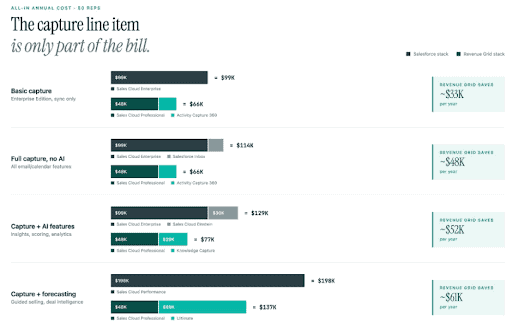
Pricing Comparison: 50-Person Sales Team
| Scenario | Salesforce All-In Cost | Revenue Grid All-In Cost | Difference |
|---|---|---|---|
| Basic capture (Enterprise Edition) | Sales Cloud Enterprise $99,000 + EAC Standard $0 = $99,000/year | Sales Cloud Professional $48,000 + Activity Capture 360 $18,000 = $66,000/year | Revenue Grid saves approximately $33,000/year |
| Full capture, no AI | Sales Cloud Enterprise $99,000 + Inbox $15,000 = $114,000/year | Sales Cloud Professional $48,000 + Activity Capture 360 $18,000 = $66,000/year | Revenue Grid saves approximately $48,000/year |
| Capture plus AI features | Sales Cloud Enterprise $99,000 + Sales Cloud Einstein $30,000 = $129,000/year | Sales Cloud Professional $48,000 + Knowledge Capture $29,400 = $77,400/year | Revenue Grid saves approximately $51,600/year |
| Capture plus forecasting and guided selling | Sales Cloud Performance $198,000 = $198,000/year | Sales Cloud Professional $48,000 + Ultimate $89,400 = $137,400/year | Revenue Grid saves approximately $60,600/year |
Should You Choose EAC or Revenue Grid?
Choose EAC if:
- You’re already on Sales Cloud Performance or Unlimited and Licensed EAC is included
- You have under 100 users with simple sync needs and short retention is fine
- You’re going all-in on the broader Einstein and Agentforce ecosystem and want everything inside the Salesforce platform
Choose Revenue Grid if:
- You want captured activity to feed into a complete relationship intelligence layer — with deal intelligence, health scoring, and forecast accuracy built on top — not just sit in a timeline
- You’re on Sales Cloud Professional or Enterprise and don’t want to pay $50 per user per month just to unlock full activity capture
- You need data ownership, custom objects, attachments, or unlimited retention without opening a support case
- You want 24/7 premium support included instead of paying 30% extra for it
- You want one predictable price instead of stacking add-ons across multiple tools
- You need captured activity to enhance sales productivity beyond passive logging — triggering workflows, surfacing deal risks, and powering actionable insights across your full sales process
Revenue Grid Activity Capture 360 starts at $30 per user per month, includes premium support, writes data into native Salesforce records, and works on top of any Salesforce edition. For most revenue teams, it delivers more functionality than EAC at a lower total cost of ownership.
Book a demo with Revenue Grid to see how activity capture works when it’s built to power your entire revenue workflow.
Is Einstein Activity Capture free?
Partially. EAC Standard is bundled into most Sales Cloud editions at no extra charge, but it comes with a 6-month data retention limit and excludes features like Email Insights, activity metrics, and the Analytics Dashboard. To get the full version (Licensed EAC), you need to either upgrade to Performance or Unlimited Edition, or purchase a qualifying add-on, the cheapest being Salesforce Inbox at around $25 per user per month.
Why can't I report on emails captured by EAC in standard Salesforce reports?
Because EAC historically stores captured data in AWS rather than writing it as native Salesforce records. That means the data appears in the Activity Timeline UI but isn’t accessible through standard reports, list views, or workflow automation. Salesforce’s Summer ’25 release introduced an option to sync new emails as native Salesforce Activity records, but historical data and some advanced use cases still aren’t covered. Teams that need full reportability often end up building workarounds or paying for a third-party tool.
Does switching away from EAC mean losing historical activity data?
Potentially, yes. Because EAC stores captured data outside your Salesforce org, deactivating it means that historical activity, emails, meetings, contacts, may no longer appear in record timelines. There’s no clean export path, which creates meaningful migration risk if your data retention requirements grow or your needs change down the line. This lock-in is worth factoring in before committing, especially for teams in regulated industries.
How does Revenue Grid differ from EAC beyond just pricing?
The core difference is where the data lives and what you can do with it. Revenue Grid writes captured activity directly into native Salesforce records, making it fully reportable, queryable, and usable in automations without workarounds. It also adds a relationship intelligence layer on top and surfaces deal risks, engagement signals, and health scoring, which EAC doesn’t offer. And unlike EAC, it comes as a single product at a flat per-user price that doesn’t depend on which Salesforce edition you’re on.
Is Salesforce Einstein Activity Capture free to use?
Yes. Einstein Activity Capture Standard is included at no additional cost with eligible Sales Cloud editions for up to 100 users. The free Standard version has restrictions, including a maximum activity-data retention period of six months, and teams that need more users or paid EAC capabilities need an eligible edition or add-on.
How much does Einstein AI cost?
There is no single price for “Einstein AI” because Salesforce uses Einstein and Agentforce across several AI products. For example, Salesforce currently lists Sales Cloud Einstein at $50 per user/month, while Agentforce for Sales starts at $125 per user/month. These are separate from Einstein Activity Capture, which has its own licensing and pricing structure.
What license is needed for Einstein Activity Capture?
EAC Standard is available with eligible Sales Cloud editions, including Starter, Pro Suite, Professional, and Enterprise, for up to 100 users. Paid EAC access is also included or available through certain Salesforce editions and products such as Performance or Unlimited, Einstein for Sales/Sales Cloud Einstein, Inbox, Sales Engagement, and Revenue Intelligence.