


Key Takeaway
- A sales sequence is a pre-planned series of multi-channel touchpoints designed to move a prospect toward a booked meeting, demo, or signed deal.
- The average prospect needs 8 touchpoints before booking a meeting. Most reps stop at 3. (RAIN Group)
- Sequences using 3+ channels outperform single-channel sequences consistently.
- This guide covers 5 use cases with 16+ copy-paste templates and channel benchmarks.
- If your sequence touches aren’t logged in the CRM, you’re optimizing without visibility. Revenue Grid’s automated activity capture closes that gap.
Your SDR sends 50 emails a day, and only three of them get replies. The other 47 sit in inboxes alongside 120 competing vendor pitches, all fighting for 11 seconds of attention.
The gap between a growing pipeline and a stalled one is structure.
A sales sequence is a pre-planned series of multi-channel touchpoints (emails, calls, LinkedIn messages, SMS, video) built to move a prospect toward a specific outcome: a booked meeting, a scheduled demo, a signed contract. Some platforms call them “sales cadences” or “contact sequences,” but the underlying concept is the same.
RAIN Group’s research found that it takes 8 touchpoints on average to land a first meeting. Top performers need only 5, and they convert 2.7x more contacts into meetings than average sellers.
This guide delivers 5 use cases with day-by-day breakdowns, 16+ templates you can paste into your outreach tool today, benchmarks to measure against, and an optimization framework that ties sequence activity to pipeline movement.
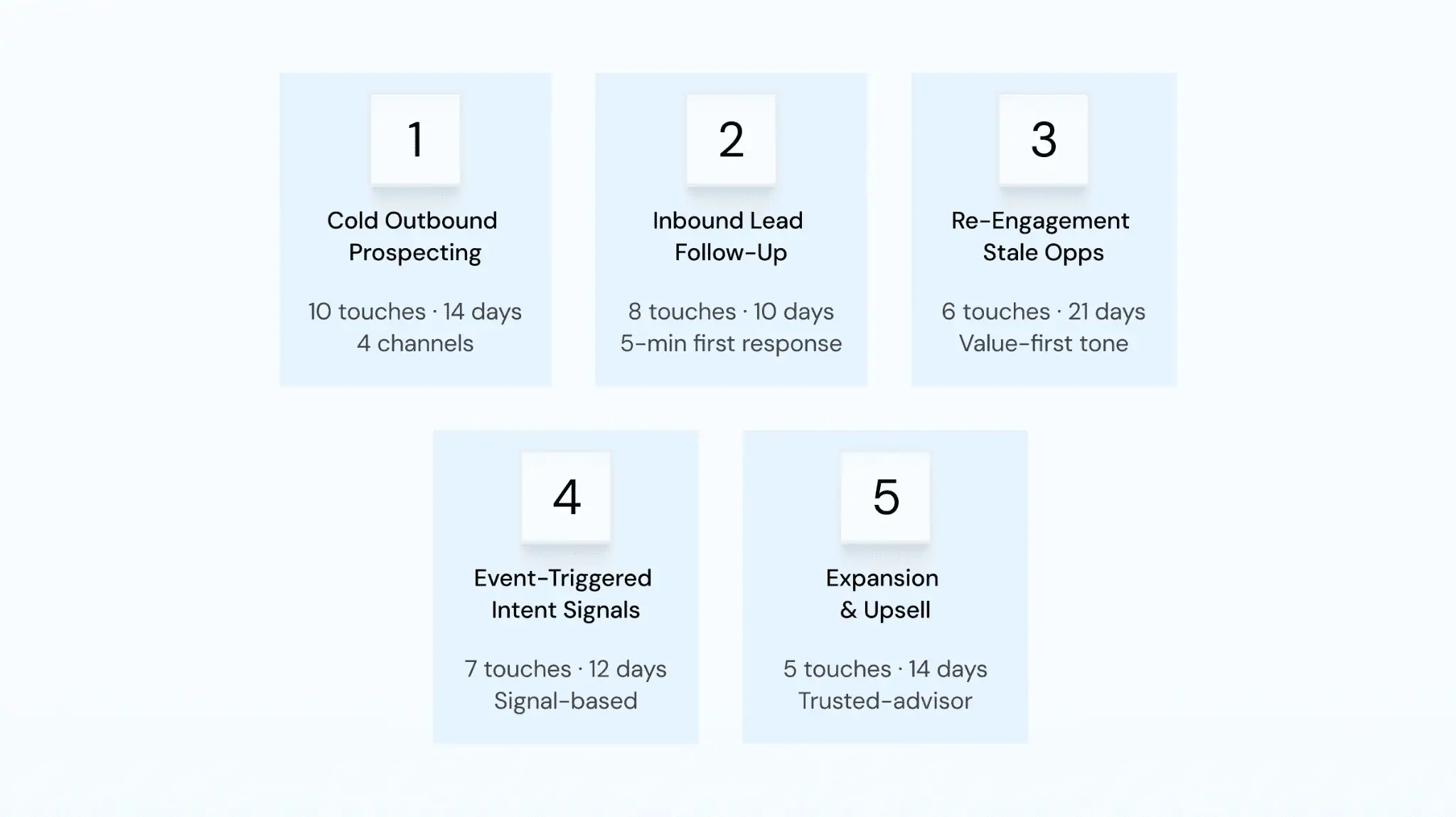
Five sales sequence use cases covered in this guide: cold outbound, inbound follow-up, re-engagement, event-triggered, and expansion.
What Makes a Sales Sequence Actually Work?
Four pillars separate sequences that convert from sequences that underperform, and each one comes with data to back it up.
-
Multi-Channel Outreach Beats Single-Channel Every Time
Email-only sequences underperform because buyers have channel preferences: some read emails at 6 AM, others respond to calls, and a few engage exclusively on LinkedIn.
The prescription: minimum 8 touches over 10–14 days, mixing at least 3 channels.
| Channel | Avg. Engagement Rate (2026 Benchmark) | Best For |
| Open: 25–35%. Reply: 3–8%. (Belkins 2024, 16.5M emails) | Scale, async communication, content delivery | |
| Phone | Connect: 4–10%. Dial-to-meeting: ~2.3%. (Cognism 2024, 55K dials) | Urgency, relationship building, complex value props |
| DM reply: ~10.3%. Connection acceptance: 30–40%. | Executive outreach, warm intros, social proof | |
| SMS | Response: 30–45%. | Speed-to-lead, appointment reminders |
| Video | View: 40–60% when personalized. | Differentiation, demo previews |
LinkedIn messages pull roughly double the reply rate of cold email, phone creates urgency that written messages cannot match, and video stands out precisely because almost nobody sends it. Relying on a single channel means ignoring all of these advantages.
Personalization That Goes Beyond {First_Name}
Token-based merge fields are table stakes because every automated tool inserts {First_Name} and {Company}, and buyers recognize the pattern instantly.
Genuine personalization references a prospect’s recent initiative, a specific industry challenge, or content they published, and the difference between the two approaches is immediately obvious.
The first version reads like an automated template, while the second reads like someone who spent 90 seconds on LinkedIn before writing.
You can scale this approach with a persona matrix, a framework that maps sequence messaging to specific buyer roles so reps never start from a blank page. The full matrix appears in the optimization section below.
Timing That Respects the Buyer
For cold outbound, space touches 1–3 days apart in week one, then widens to 3–5 days in week two. For re-engagement, stretch to 3–7 days between touches.
The goal is to stay top-of-mind without crossing the line into unwanted outreach. AI-powered send-time optimization pushes this further by analyzing individual engagement patterns, so if a prospect consistently opens emails at 7:30 AM on Wednesdays, the next touch lands at exactly that time.
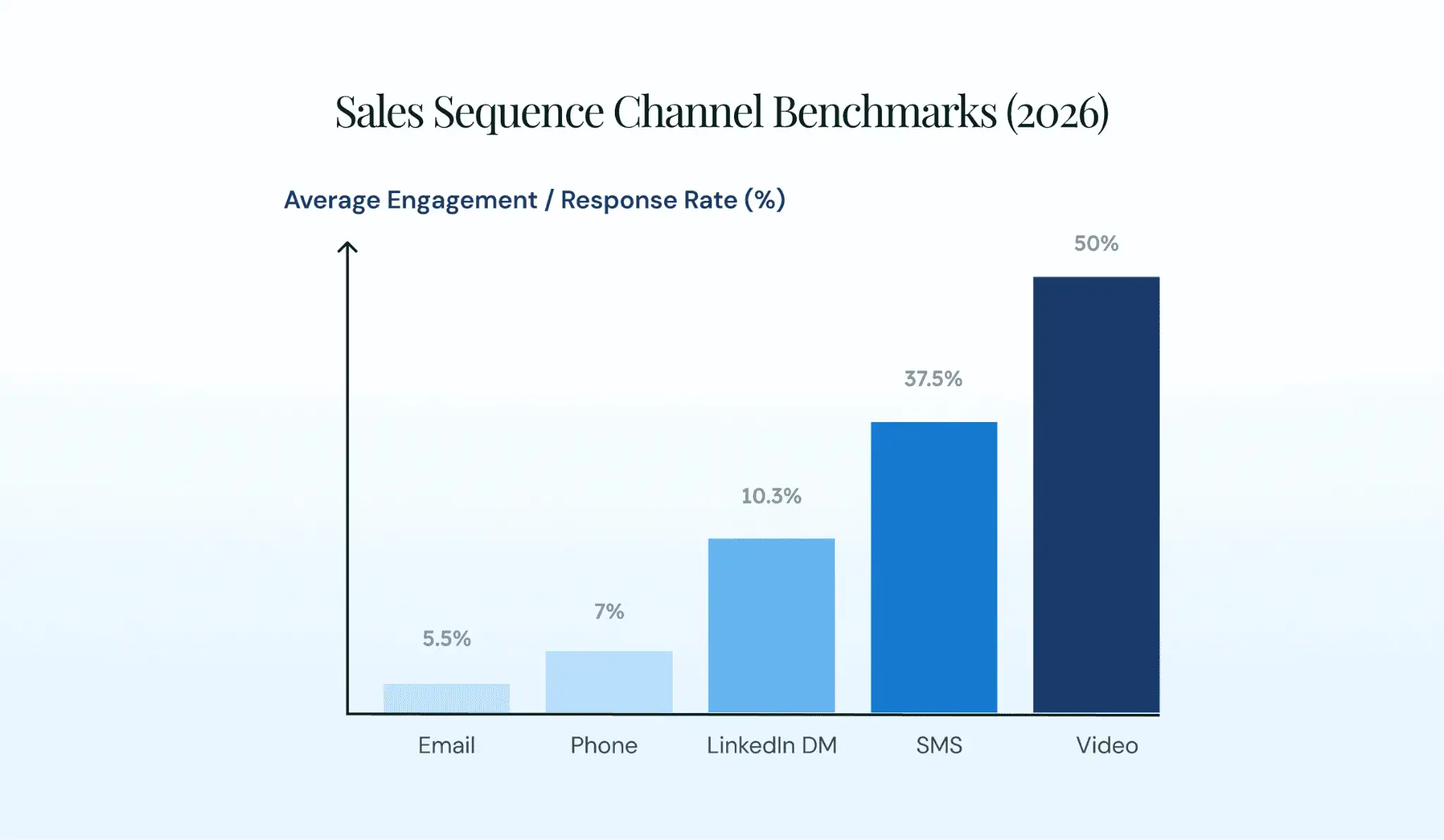
Average engagement rates by channel in 2026. Video and SMS lead on response rate, while email and phone provide scale and urgency.
Every Touch Needs a CRM Footprint
A sales sequence is only as useful as the data it generates. If touches aren’t logged in your CRM, you cannot measure what works, coach reps, or forecast pipeline with confidence.
Salesforce’s State of Sales found that reps spend 70% of their time on non-selling tasks. The Bridge Group reports just 3.6 quality conversations per SDR per day, a 55% decline since 2014. Manual CRM logging drags this number further.
Most reps log fewer than 30% of their outreach activities. That makes 70%+ of sequence data invisible to managers, RevOps, and forecasting models.
Automated activity capture solves this problem. Revenue Grid’s data capture engine logs every email, call, and meeting to the correct CRM record without manual input, and it integrates natively with Salesforce, SAP, Oracle, and Microsoft. One of their clients, Vapotherm captured 110K emails and 27K calendar events automatically in year one, saving 761 person-days.
Without that data foundation, every benchmark, A/B test, and coaching insight rests on incomplete information.
Use Case 1: Cold Outbound Prospecting Sequence
Cold outbound is where most teams start with sequences. It is also where they make the costliest mistakes: too few touches, one channel, generic copy.
When to Use It
- Net-new accounts from an ICP list
- SDR/BDR-led motions with no prior relationship
- Account-based outreach to specific personas (e.g., VP of Sales at mid-market SaaS)
- New market entry where brand awareness is low
Day-by-Day Cadence: 10 Touches Over 14 Days
- Day 1: Email 1 (initial outreach)
- Day 2: LinkedIn connection request
- Day 3: Phone call 1
- Day 5: Email 2 (new angle, new value)
- Day 7: Phone call 2 + voicemail
- Day 9: LinkedIn message (engage with their content or share a relevant insight)
- Day 10: Email 3 (case study or data point)
- Day 12: Phone call 3
- Day 13: Personalized video (60-second Loom or Vidyard)
- Day 14: Email 4 (breakup email)
The logic behind this channel mix is straightforward: email opens the door, LinkedIn builds familiarity, phone creates urgency, and video differentiates you from every other rep in the prospect’s inbox.
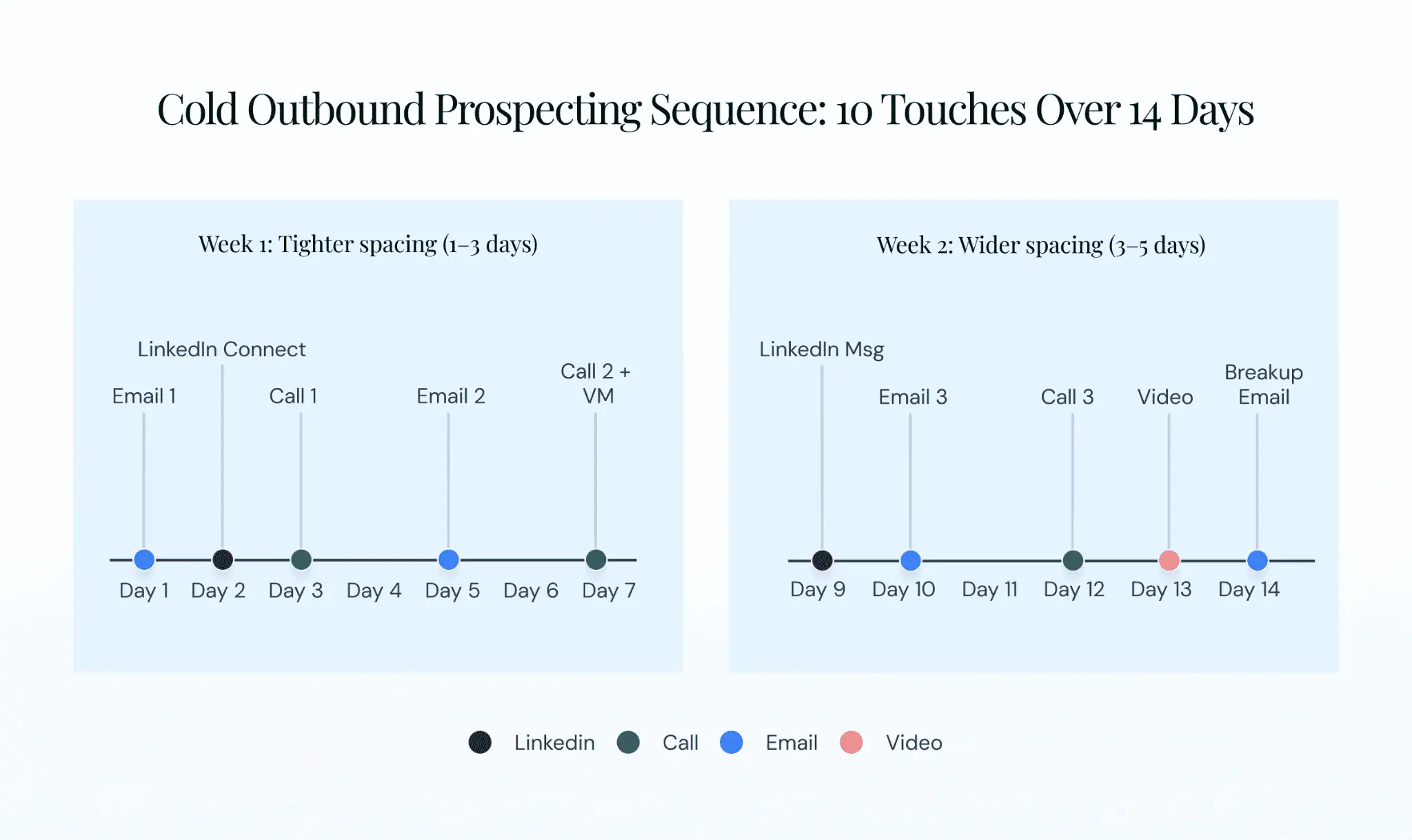
Day-by-day timeline for a 10-touch cold outbound sales sequence color-coded by channel: email in blue, phone in green, LinkedIn in orange, video in purple.
Templates
Subject: Quick question about [specific initiative]
Hi [Name],
I noticed [Company] just [specific observation: expanded to a new region, posted a VP Sales opening, announced a product launch]. When mid-market SaaS teams hit that stage, pipeline visibility across the new motion usually becomes the bottleneck.
We helped [similar company type] solve that in [timeframe]. Worth a 15-minute call this week?
[Rep Name]📧 Email 2 — Follow-Up with New Angle
Subject: [Relevant stat] caught my eye
Hi [Name],
Here’s something worth reading: A research found the average prospect needs 8 touchpoints before booking a meeting. Most teams stop at 3.
If [Company]’s team is building its outbound motion, I’d love to share what works for teams at your stage. Open to a quick call Thursday or Friday?📞 Cold Call Script Framework
Opener: “Hi [Name], this is [Rep] from [Company]. I know I’m calling out of the blue. Do you have 30 seconds for me to explain why, and you can tell me if it’s worth continuing?”
Reason: “I’m reaching out because [Company] matches the profile of teams we work with: [specific firmographic or trigger].”
Value prop: “We help [persona type] [specific outcome, e.g., ‘get full pipeline visibility without reps manually logging every touch’].”
CTA: “Would it make sense to set up 15 minutes to explore this?”🔗 LinkedIn Connection Request (300-character limit)
Hi [Name], saw your post about [topic]. We work with [similar companies] on [related challenges]. Would love to connect and share perspectives.
Pro Tip: A/B test subject lines in batches of 50+ sends before declaring a winner, and test only one variable at a time because declaring a winner on 12 sends is guessing, not testing.
Use Case 2: Inbound Lead Follow-Up Sequence
The prospect raised their hand by filling out a form, downloading content, or attending a webinar, and this changes the rules entirely. Speed matters more than persistence in this context, and relevance means referencing the specific action they took.
When to Use It
- Demo requests
- Content downloads (eBooks, whitepapers, reports)
- Webinar registrations or attendees
- Free trial or freemium sign-ups
- Pricing page visits tracked via intent data
- Chatbot conversations that didn’t convert
Day-by-Day Cadence: 8 Touches Over 10 Days
The first touch must happen within 5 minutes of form submission. This is the single most important variable in inbound conversion.
- Within 5 minutes: Phone call 1 + Email 1 (reference the specific action)
- Day 1 (4 hours later): SMS (if phone number available)
- Day 2: Email 2 (new value, not “just following up”)
- Day 3: Phone call 2
- Day 5: LinkedIn connection request
- Day 7: Email 3 (case study or social proof)
- Day 8: Phone call 3
- Day 10: Email 4 (clear next step)
Templates
Subject: Your [resource name] + a quick question
Hi [Name],
You just [downloaded our guide on X / requested a demo / registered for our webinar on Y]. Wanted to make sure you got everything you needed.
Teams exploring [topic] usually care most about [top 2 priorities]. Is that what’s driving this for you?
Does [tomorrow at time] work for a quick call?📧 Email 2 — Value-Add Follow-Up
Subject: Related to what you were researching
Hi [Name],
Since you were looking at [topic from their action], this might be useful: [relevant data point, case study result, or link to complementary resource].
For context, [similar company] saw [specific outcome] after tackling the same challenge. Worth 15 minutes to see if the pattern fits [Company]?📞 Call Script (Inbound Context)
“Hi [Name], this is [Rep] from [Company]. You [downloaded our guide on X / requested a demo]. I wanted to make sure you got what you needed and see if there’s anything specific I can help with.”
(Pause. Let them talk.)
“What prompted you to look into [topic]?”📱 SMS Template
Hi [Name], saw you just [action]. Happy to jump on a quick call. Does [time] work? — [Rep Name]
Pro Tip: Reference the exact resource or action in every touch. Generic follow-ups erode the warm-lead advantage you already earned.
Use Case 3: Re-Engagement Sequence for Stale Opportunities
Every pipeline has deals that stalled, from prospects who stopped responding after a demo to opportunities stuck at the same stage for twice the average sales cycle and closed-lost deals worth revisiting after a budget reset. Re-engagement sequences offer a structured way to revive these conversations without coming across as pushy.
When to Use It
- Opportunities stuck longer than the average sales cycle
- Prospects silent after a demo, proposal, or pricing conversation
- Closed-lost deals worth revisiting after 60–90 days
- Leads who engaged with content but never booked a meeting
Day-by-Day Cadence: 6 Touches Over 21 Days
This cadence uses wider spacing than cold outbound, and the tone shifts entirely to value-first messaging with no pressure.
- Day 1: Email 1 (new value trigger)
- Day 5: LinkedIn message (share an insight or engage with their recent content)
- Day 9: Email 2 (breakup email)
- Day 14: Phone call (reference previous conversations)
- Day 18: Personalized video or direct mail (pattern interrupt)
- Day 21: Email 3 (industry change, product update, or case study)
Templates
Subject: Something changed since we last spoke
Hi [Name],
When we connected in [month], you mentioned [specific challenge from previous conversation]. Since then, [new development: product update, case study, industry shift] has changed the equation.
Would it be worth revisiting the conversation? Even 10 minutes to see if timing is better now.📧 Email 2 — Breakup Email
Subject: Should I close your file?
Hi [Name],
I’ve reached out a few times without hearing back. I completely understand if [challenge] isn’t a priority right now.
Let me know and I’ll check back in [timeframe]. If it is a priority, I’m here whenever you’re ready. Happy to reconnect whenever the timing is right.(This email often gets the highest reply rate in any sequence. Removing pressure triggers a response.)🔗 LinkedIn Message — Change-Based OutreachCongrats on [specific change: new role, company news, published article], [Name]. When [change type] happens, [common challenge] usually follows. Happy to share what we’ve seen work.
Trigger Events Worth Watching:
- Champion job changes
- Funding rounds
- Leadership changes at the target account
- Earnings reports mentioning relevant challenges
- New technology adoption (e.g., Salesforce implementation)
- Regulatory shifts
Use Case 4: Event-Triggered Sequence (Intent Signals + Job Changes)
This is the most sophisticated use case, and most sequence guides online skip it entirely. These sequences fire based on a specific buyer behavior or external signal rather than a static list, and they convert at higher rates because timing and relevance are built in from the start.
When to Use It
- Prospect visits the pricing page multiple times within a week
- Target account shows high intent on G2 or TrustRadius
- Champion from a closed-won account moves to a new company
- Target account announces a funding round, acquisition, or leadership change
- Prospect re-opens an email from 3 months ago
- Competitor’s customer posts about dissatisfaction on a review site
Day-by-Day Cadence: 7 Touches Over 12 Days
- Day 1: Email 1 (reference the specific trigger)
- Day 2: LinkedIn connection request or message
- Day 3: Phone call 1
- Day 5: Email 2 (connect trigger to a specific value prop)
- Day 8: Phone call 2
- Day 10: LinkedIn message (share a relevant resource)
- Day 12: Email 3 (clear CTA)
Every touch in the sequence must reference the specific trigger event, because generic copy in a trigger-based sequence defeats the entire purpose of launching one.
Templates
Hi [Name], I noticed your team at [Company] has been researching [category]. [Specific signal: “you visited our pricing page twice this week” or “your team reviewed 4 vendors on G2 last month.”]
When companies at your stage start evaluating [category], they usually care most about [top 2 priorities]. Worth a 15-minute call to shortcut the research?📧 Job Change Outreach
Hi [Name], congrats on the move to [New Company]. At [Previous Company], you [specific context from the previous relationship]. I’d love to explore whether [value prop] could help you hit the ground running.
Open to a quick chat next week?🔗 LinkedIn — Funding Event
Congrats on the Series [X], [Name]. When companies at your stage scale [relevant function], [common challenge] usually becomes the bottleneck. Happy to share what we’ve seen work.
Response Windows by Trigger:
| Trigger Event | Respond Within |
| Pricing page visit (2+ times) | 24 hours |
| G2/TrustRadius research spike | 48 hours |
| Champion job change | 1 week of start date |
| Funding announcement | 3 business days |
| Leadership change | 1 week |
| Competitor dissatisfaction signal | 48 hours |
Trigger-based sequences work only if your CRM captures the interaction data that creates the trigger. If pricing page visits or email re-opens aren’t logged, the signal never fires.
Revenue Grid’s AI-driven insights surface these signals by analyzing captured interaction data across the pipeline. When a prospect re-engages with old content or shows buying signals, Revenue Grid flags the opportunity and enables teams to launch sequences at the right moment.
Use Case 5: Expansion and Upsell Sequence (Post-Sale)
Most sales teams skip expansion sequences entirely, even though Ebsta and Pavilion’s 2025 GTM Benchmark found that 52% of new revenue comes from existing customers. A few case studies still hold: acquiring a new customer could cost 6–7x more than expanding an existing one.
Post-sale sequences are structured revenue motions that deserve the same rigor as outbound prospecting, not a task to leave to account management.
When to Use It
- Contract renewal approaching (60–90 days out)
- Usage data shows the customer has outgrown their current plan
- New feature launch relevant to an existing customer segment
- Customer champion has expanded their team
- Customer achieves a milestone (e.g., hits an ROI target) that creates an upsell opening
Day-by-Day Cadence: 5 Touches Over 14 Days
This is a relationship-first motion, so the tone should feel like a trusted advisor rather than a cold outreach rep.
- Day 1: Email 1 (share a usage insight, ROI milestone, or product update)
- Day 4: Phone call (warm: “I was looking at your team’s usage and noticed…”)
- Day 7: Personalized video (60-second Loom showing a feature relevant to their expansion opportunity)
- Day 10: Email 2 (case study from a similar customer who expanded)
- Day 14: In-app message or Slack message (meet them where they already are)
Templates
Hi [Name], your team’s usage of [product/feature] has grown [X]% since we started working together. A few customers at a similar stage found that [specific upgrade] helped them [specific outcome].
I put together a quick comparison of your current plan vs. what [upgrade] unlocks. Worth 20 minutes to walk through it?📧 Feature Launch Outreach
Hi [Name], we just launched [feature]. Based on how your team uses [current feature], I think it could [specific benefit]. Here’s a 2-minute overview: [link].
Happy to do a live walkthrough if it looks relevant.📞 Upsell Call Framework
Opener: “Hi [Name], I was looking at your team’s usage of [feature] and noticed [specific data point: ‘your team has tripled activity volume since Q1’]. That’s a strong signal.”
Bridge: “Based on what I’m seeing, there’s an opportunity to [specific outcome].”
Ask: “Would it be helpful if I showed you what that looks like for a team at your stage?”
How to Build and Optimize Sales Sequences Step by Step
Templates alone do not scale without a repeatable process for building, launching, governing, and iterating on sequences across the team.
Step 1: Define Your Goal and Audience
Every sequence starts with a measurable goal: meeting booked, demo scheduled, renewal confirmed, or expansion deal closed, and then maps that goal to a specific persona.
Persona Matrix:
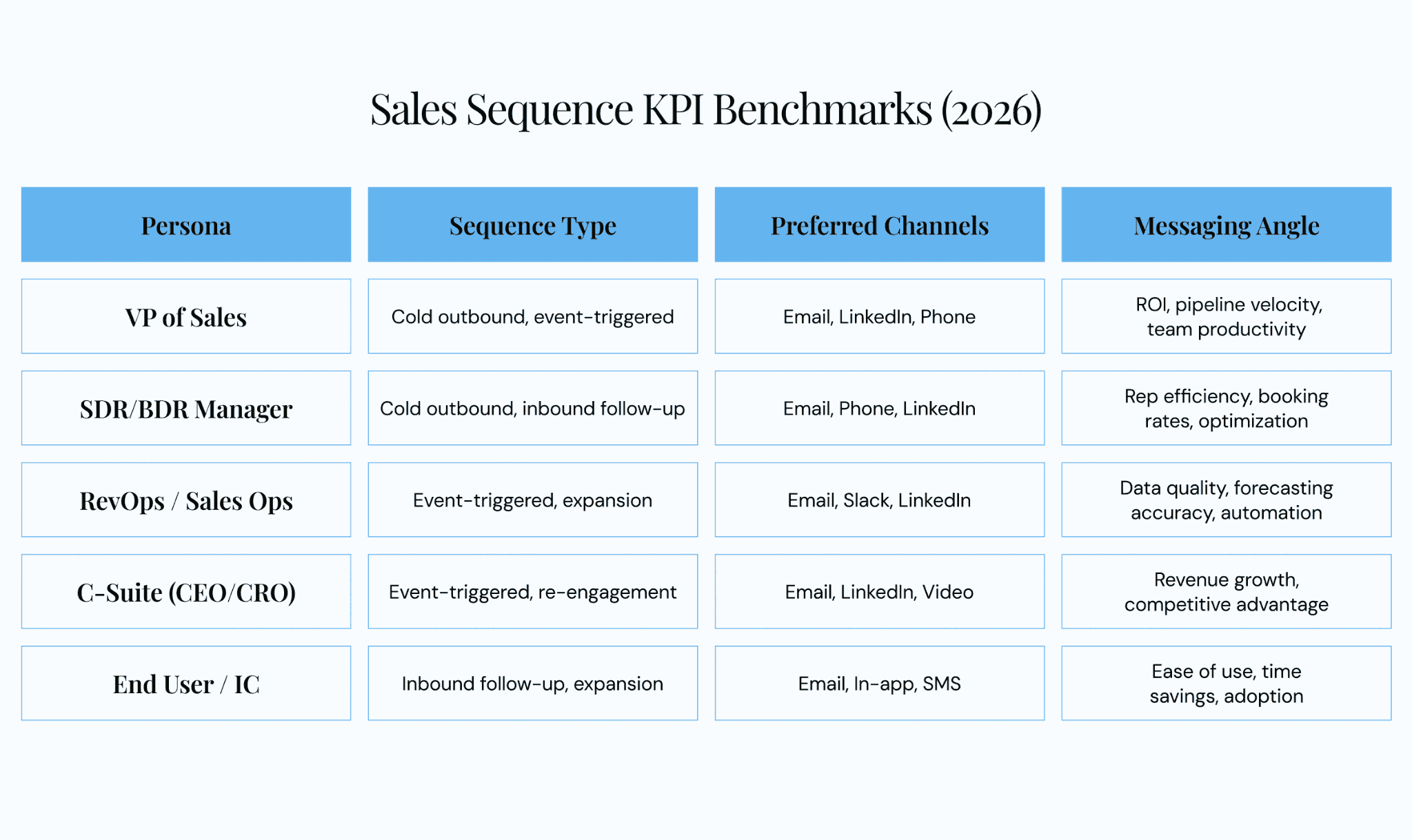
Sales sequence persona matrix mapping buyer roles to recommended sequence types, channels, and messaging angles.
Determine entry criteria: manual enrollment (rep selects contacts), trigger-based (automated on a signal), or list import (batch upload from a campaign).
Step 2: Map the Channel Mix and Cadence
Select channels based on persona preference (reference the matrix above). Set touch count and spacing using the use-case benchmarks from this article. Build the sequence timeline visually before loading it into any tool.
Sketching the sequence on paper first prevents the common trap of building sequences based on what the platform makes easy instead of what the buyer actually needs.
Step 3: Write and Load Messaging
Draft messaging using the templates above as starting points. Customize with persona-level, account-level, and individual-level personalization layers.
Form a Content Committee to produce and QA sequence content at scale:
- Sales (1–2 top reps): Real-world language that resonates with buyers.
- Marketing (1 product marketing lead): Alignment with brand voice, value props, campaign themes.
- Enablement (1 enablement lead): Version control, approval workflows, distribution.
- RevOps (optional): Data requirements, CRM field mapping, reporting setup.
Without a Content Committee, every rep writes messaging in isolation, which leads to inconsistent quality, a fractured brand voice, and zero institutional learning across the team.
Step 4: Activate, Assign, and Govern
Complete this checklist before any sequence goes live:
☐ Sequence activated in platform
☐ Assigned to correct reps, teams, and territories
☐ Version number and changelog documented
☐ Content Committee approval obtained
☐ Sunset criteria defined (e.g., retire if reply rate < 2% after 100 enrollments)
☐ Review cadence scheduled (weekly for new sequences, monthly for mature ones)
Step 5: Measure, Test, and Iterate
KPI Benchmark Table:
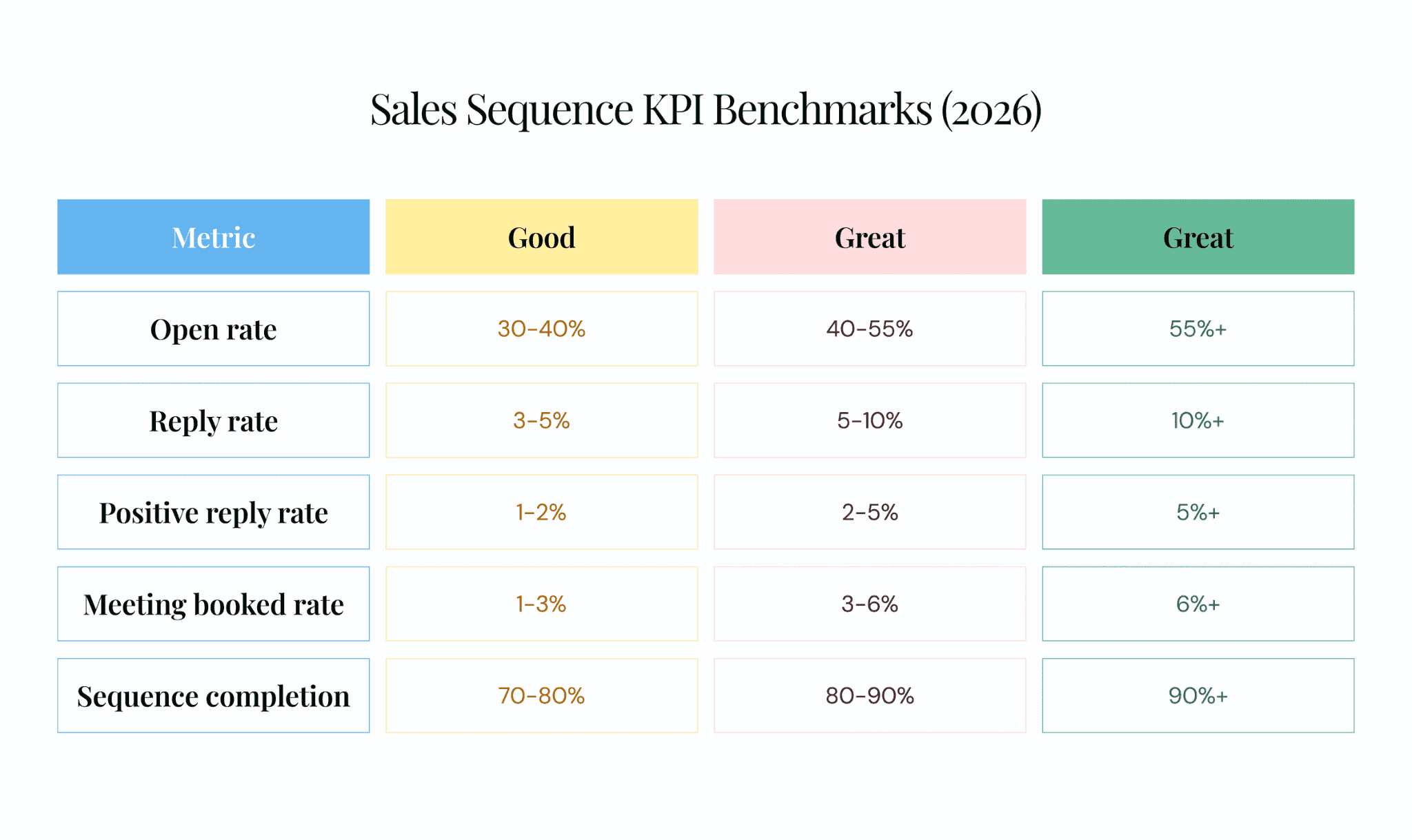
Sales sequence KPI benchmark ranges for sales sequences. Use these targets to evaluate whether your sequences need optimization or retirement.
A/B testing rules: Test one variable at a time (subject line, send time, channel order, or messaging variant), run a minimum of 50–100 enrollments per variant, and declare a winner only when results are statistically meaningful.
Review cadence: Review new sequences weekly during their first 4 weeks, shift to monthly reviews for mature sequences, and run a quarterly portfolio review across the full library.
AI accelerates this by recommending winning variants and auto-adjusting send times based on engagement patterns. For deeper frameworks on how sequence data feeds pipeline visibility and revenue outcomes, Revenue Grid’s intelligence layer connects these metrics directly.
How AI and Automation Supercharge Sales Sequences
AI is no longer theoretical for sales sequences, it is a practical accelerator across every stage of the lifecycle, from writing to sending to measuring.
McKinsey’s 2025 State of AI found that 71% of organizations regularly use generative AI, with marketing and sales as the top function. Salesforce’s State of Sales reports that reps using AI sales tools are 3.7x more likely to meet quota.
AI-Powered Personalization at Scale
AI tools analyze prospect data (LinkedIn profiles, company news, tech stack, previous interactions) and generate personalized email copy, subject lines, and call talking points. Research time drops from 10 minutes per prospect to under 1 minute.
There are two modes to understand: co-pilot, where AI suggests and the rep approves before sending, and auto-pilot, where AI drafts and sends using pre-approved rules. Co-pilot suits high-value complex deals where human judgment matters, while auto-pilot fits high-volume, lower-ACV motions where speed matters more than bespoke messaging.
Intelligent Send-Time and Channel Optimization
AI identifies the optimal send time per individual prospect based on their engagement history. If a prospect ignores the last 2 emails, the system recommends switching to phone or LinkedIn. This dynamic channel optimization separates static sequences from intelligent ones.
Automated Activity Capture and Sequence Intelligence
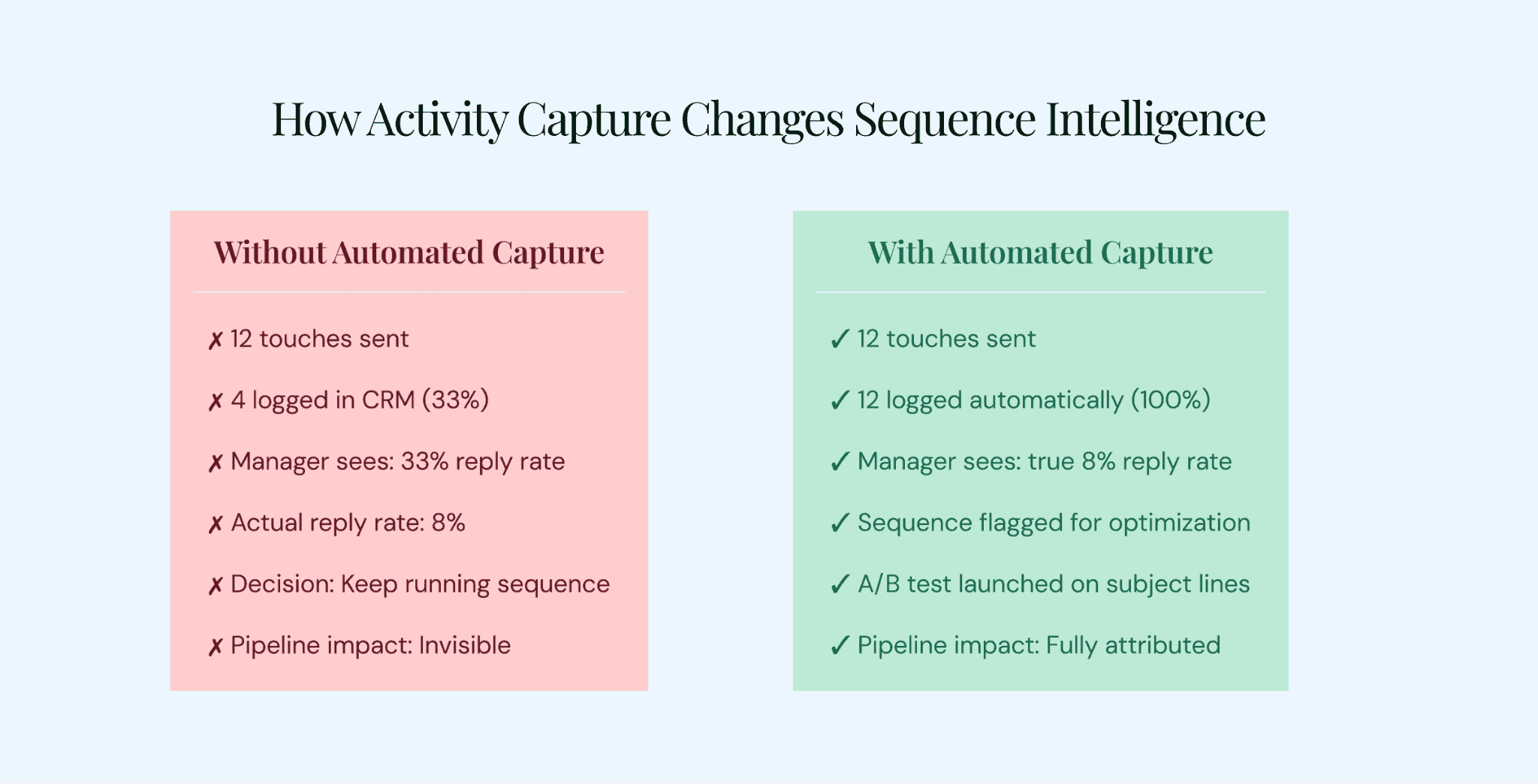
The difference automated activity capture makes. Without it, managers optimize on false data. With it, every touch is logged and every metric is accurate.
Most sales sequence reporting is unreliable because it rests on incomplete data. If reps manually log only 30% of activities, managers make optimization decisions based on a fraction of reality.
Revenue Grid’s activity capture technology automatically logs every interaction from every channel to the correct CRM record, with native integrations for Salesforce, SAP, Oracle, and Microsoft. Combined with Revenue Grid’s AI-driven insights, sales leaders see exactly which sequences, channels, and messages drive pipeline progression, while the platform’s co-pilot and auto-pilot capabilities recommend next actions based on buyer engagement signals and execute routine steps automatically.
CTA: See how Revenue Grid turns sequence activity into pipeline intelligence.
5 Sales Sequence Mistakes That Cost Pipeline
- Stopping after 3 touches. 8 touchpoints is the average needed to book a meeting. Most positive replies come on touches 5–8. Quitting early leaves meetings on the table.
- Relying on a single channel. A prospect ignoring your emails doesn’t mean they’re uninterested. It means email isn’t their preferred channel right now. Gartner found that 73% of B2B buyers actively avoid irrelevant outreach. Channel mismatch is part of that irrelevance.
- Identical messaging to every persona. A VP of Sales cares about pipeline velocity and forecasting, while an SDR Manager cares about booking rates and rep efficiency. Sending the same email to both wastes a touch, so use the persona matrix to tailor messaging by role.
- Ignoring sequence data. If activity isn’t captured in the CRM, there’s no way to know which sequences, channels, or messages perform. This mistake compounds: every week of running untracked sequences is a week of lost optimization.
- Never retiring underperformers. Set clear sunset criteria: if a sequence stays below 2% reply rate after 100+ enrollments and at least one A/B test, retire it. Keeping underperforming sequences active wastes rep time and damages sender reputation.
Build Sequences That Drive Revenue
All five use cases in this guide share one connecting thread.
Cold outbound creates pipeline from scratch, inbound follow-up converts raised hands into booked meetings, re-engagement revives stalled deals, event-triggered sequences catch buyers at the exact right moment, and expansion sequences turn existing customers into growing revenue.
The gap between activity and revenue is data. Teams that capture every interaction, use AI to surface insights, and optimize on complete data build sequences that compound over time, while teams that skip this step are optimizing without the visibility they need.
Revenue Grid’s automated activity capture, AI-driven insights, and pipeline visibility enable teams to build, measure, and optimize every sequence with confidence.
1. What is a sales sequence?
A pre-planned series of multi-channel touchpoints (emails, calls, LinkedIn, SMS, video) designed to move a prospect toward a specific outcome like a booked meeting, scheduled demo, or signed contract. Sequences can be manual, semi-automated, or fully automated depending on your workflow. Also called “sales cadences” or “contact sequences” depending on the platform you use.
2. How many touches should a sales sequence have?
Eight touches over 10–14 days is the baseline for cold outbound sequences. Inbound follow-up typically needs 6–8 touches over 10 days. Re-engagement works best with 5–6 touches spaced over 21 days. Expansion sequences need only 4–5 touches over 14 days.
3. What is the difference between a sales sequence and a sales cadence?
The terms are interchangeable in practice. Some practitioners say “cadence” refers to the timing and rhythm of touches, while “sequence” covers the full workflow including messaging, channels, and branching rules. The label often depends on the platform. Salesloft uses “cadence.” Outreach uses “sequence.” Salesforce uses “sales cadence.” Same concept across all three.
4. What channels should be included in a sales sequence?
The primary channels are email, phone, LinkedIn, SMS, personalized video, and direct mail. The right mix depends on buyer persona, industry, and deal stage. A minimum of 3 channels is recommended for any sequence. Multi-channel sequences consistently outperform single-channel ones because buyers have different communication preferences across roles and organizations.
5. How do you measure sales sequence effectiveness?
Track six core metrics: open rate, reply rate, positive reply rate, meeting booked rate, sequence completion rate, and pipeline generated per sequence. Accurate measurement depends on complete activity data in the CRM. If touches aren’t logged, your metrics are unreliable.
6. Can AI improve sales sequences?
AI improves sales sequences in three measurable ways. It personalizes email copy and call talking points using prospect data, reducing research time from 10 minutes to under 1 minute per prospect. It optimizes send times and channel selection per individual. It also automates activity capture so teams optimize on complete data.
7. What is a trigger-based sales sequence?
A sequence initiated by a specific buyer action or external signal rather than manual list enrollment. Triggers include website visits, content downloads, job changes, funding announcements, and competitor dissatisfaction signals. These sequences convert at higher rates because timing and relevance are inherent to the outreach.
8. How often should sales sequences be updated or retired?
Review new sequences weekly for their first 4 weeks to catch early performance issues, then shift to monthly reviews. Retire any sequence that stays below 2% reply rate after 100+ enrollments and at least one round of A/B testing. Run a quarterly portfolio review of all active sequences across the team. Governance is continuous, not a one-time setup.