


Key Takeaway
- AI revenue acceleration tools unify engagement, intelligence, and forecasting into a single platform, they are not just outbound automation rebranded.
- 79% of opportunity data never reaches CRM. Every AI insight built on incomplete data is unreliable, regardless of the vendor’s marketing claims.
- The sales velocity equation breaks revenue into four variables. Most tools only touch one (volume). The best platforms compress all four.
- Five capabilities separate real AI revenue acceleration tools from point solutions: auto activity capture, pipeline visibility, forecast accuracy, in-context guidance, and native sequencing.
- Salesforce-native architecture matters. Tools that sync from external storage introduce data lag, retention limits, and compliance gaps.
- A 12-point buyer’s checklist (included below) gives you the framework to evaluate any vendor during an RFP, including the red flags most demos hide.
Three out of four sellers missed quota in the first half of 2025 because the data feeding their forecasts, deal signals, and pipeline reviews was incomplete before any AI touched it.
That number should unsettle any revenue leader who recently signed a six-figure contract for an AI sales platform. It suggests the category has a structural problem. Sales teams are buying AI revenue acceleration tools to speed up cycles, improve win rates, and sharpen forecasts, yet quota attainment keeps declining. Win rates dropped from 29% to 19% year over year. Average B2B sales cycles stretched to 6.5 months, up from 4.9 in 2019.
The gap between expectation and outcome points to a simple root cause. Most AI revenue acceleration tools accelerate the wrong layer. They automate outbound cadences, generate call summaries, or score deals, all useful features in isolation. None of them fix the broken data foundation underneath.
This guide is built for Salesforce-using mid-market and enterprise revenue teams evaluating their next platform. It covers how to define the category, where competitors fall short, what Salesforce-native architecture actually means, and a 12-point checklist you can take into your next RFP. Every stat is sourced and dated within the last 24 months. Every product claim is verified against public documentation.
What Are AI Revenue Acceleration Tools? (And What They’re Not)
AI revenue acceleration tools are platforms that use artificial intelligence to increase the speed, accuracy, and predictability of the revenue cycle, from first touch through closed-won and expansion. They work by unifying four capabilities that most sales organizations currently buy as separate point solutions: engagement sequencing, pipeline intelligence, revenue forecasting, and activity data capture.
This definition matters because the term gets stretched. A tool that only automates outbound email cadences is a sales engagement platform. A tool that only records calls and surfaces coaching insights is a conversation intelligence platform. A tool that only inspects pipeline and flags forecast risk is a revenue intelligence platform. Each solves a real problem. None of them alone qualifies as revenue acceleration.
The distinction has direct budget implications. Stacking three or four point solutions: Gong for conversation intelligence, Clari for forecasting, Outreach for sequencing, plus Einstein Activity Capture for data sync, can run $400 to $500 per user per month when you factor in platform fees, onboarding, and auto-renewal uplifts.
Revenue acceleration is the convergence of those capabilities into a single, data-complete platform. The revenue intelligence market reached $3.8 billion in 2024 and is growing at a 34.6% compound annual rate, according to Landbase’s analysis. Sellers now use an average of eight tools, per the Salesforce State of Sales 2026 report. Forty-two percent feel overwhelmed by their stack. Overwhelmed reps are 45% less likely to hit quota.
So the first filter when evaluating AI sales acceleration tools is straightforward: does this platform unify engagement, intelligence, forecasting, and data capture into one system? Or does it solve one quadrant and require you to buy three more vendors to cover the rest?
Why “Faster Outreach” Isn’t Enough in 2026 (The Hidden Bottleneck)
The most-cited statistic in AI sales content is a 2007 study from Lead Response Management claiming that responding to a lead within five minutes increases contact rates by 900%. That study is 19 years old. It was conducted before Salesforce had a mobile app, before LinkedIn existed as a sales channel, and before the average enterprise deal involved 6 to 10 stakeholders over a 6.5-month cycle.
Faster outreach solves a real problem for transactional, high-velocity sales motions with sub-seven-day cycles. For the mid-market and enterprise teams Revenue Grid serves (200 to 5,000+ employees, sales cycles of 30+ days, Salesforce as the CRM of record), the bottleneck is somewhere else entirely.
It sits in the data layer between the rep’s actual work and what Salesforce knows about it.
Up to 79% of opportunity data never makes it into CRM. That figure comes from MarketsandMarkets research cited in Marketricka’s 2026 Revenue Intelligence Tools Guide. Reps spend less than 30% of their time selling, per Salesforce’s own State of Sales report (reaffirmed in the 2026 edition, where 60% of selling time goes to non-selling tasks). The biggest non-selling time sinks are manual CRM updates and prospect research.
This data gap creates revenue leakage at every stage. Forecasts built on rep self-reports swing 20 to 30% quarter over quarter. Pipeline reviews become arguments about data accuracy instead of deal strategy. AI-powered deal scoring flags risks based on incomplete inputs, creating false confidence or unnecessary alarm.
Only 45% of sales leaders report high confidence in their forecast accuracy. That number comes from Gartner and has barely moved despite widespread AI adoption across the category.
The implication is uncomfortable for vendors selling AI-powered sales intelligence. If the underlying activity capture in Salesforce is broken, if emails, meetings, calls, and calendar events aren’t automatically logged to the right Salesforce records, then every AI layer sitting on top of that data is making predictions based on fiction. Faster fiction is still fiction.
CRM automation for Salesforce needs to start at the capture layer, not the insight layer. Fix the inputs first. The outputs follow.
Sales velocity measures how quickly revenue moves through the pipeline. The formula is simple:
V = (Number of Opportunities × Win Rate × Average Deal Value) ÷ Sales Cycle Length
Every revenue leader has seen this equation. Most AI revenue acceleration tools claim to improve it. Few are specific about which variable they actually move.
That specificity matters. Cutting cycle length from four months to three months increases annualized recurring revenue by 46%. Cutting it from four months to two months increases ARR by 143%. Those figures come from Bridge Group research, cited in DemandFarm’s 2025 analysis of sales acceleration tools.
An AI SDR tool, the kind that automates cold outreach and books meetings, primarily affects the “Number of Opportunities” variable. It fills the top of the funnel. It does not improve win rates, shorten deal cycles, or increase average deal value. For teams with 30-day-plus sales cycles and multiple stakeholders per deal, top-of-funnel volume is rarely the constraint. The constraint is what happens after the first meeting.
Outreach’s own 2025 Sales Data Report found that deals involving live meetings close 32 days faster than those managed through asynchronous sequences alone. Ebsta and Pavilion’s research found that single-threaded deals, where only one contact is engaged, have 113% lower win rates. Engaging C-suite stakeholders increases upsell potential by 189%.
The sales velocity formula reveals where real sales cycle acceleration happens. Win rate improves when reps get deal-health flags and next-best-action guidance mid-cycle — not post-mortem call recordings. Cycle length compresses when stalled deals get automatic alerts, when multi-threading is tracked by the system, and when meeting prep is automated rather than manual. Deal value increases when expansion signals surface during the first contract, not after renewal.
A guided selling platform that touches all four variables delivers compound acceleration. A single-variable tool delivers linear improvement at best.
The Five Capabilities That Define a Real AI Revenue Acceleration Tool
Strip away the marketing language and evaluate any vendor against five capabilities. These are the functional requirements that separate a unified revenue acceleration platform from a point solution wearing a bigger label.
1. Automatic Activity Capture (Without Rep Effort)
Every email, meeting, call, and calendar event should log to the correct Salesforce record automatically. No clicks. No browser extensions. No “remember to sync.” This is the data foundation. Without it, every capability below operates on incomplete information.
Vapotherm, a medical device company, captured 110,000 emails to Salesforce automatically using Revenue Grid, saving 761 working days per year across their sales organization.
2. Pipeline Visibility and Deal Health AI
The platform should surface deal-level risk signals in real time: stalled deals, single-threaded opportunities, missing stakeholders, declining engagement velocity. These signals should appear in the rep’s workflow, not in a separate dashboard the manager checks on Fridays.
Deal health scoring powered by real engagement data is what separates signal from noise.
3. Forecast Accuracy and Risk Flagging
AI sales forecasting software should base predictions on captured activity patterns, not the rep’s subjective confidence rating. The platform should track forecast variance over time and flag deals where activity patterns diverge from stage expectations.
4. In-Context Rep and Manager Guidance
Revenue Signals: real-time nudges that tell reps what to do next based on deal patterns, should arrive inside the inbox, inside Salesforce, or inside the calendar. Not in a separate tab. Guidance that requires a context switch doesn’t get used.
5. CRM-Native Engagement Sequencing
Outbound sequences, follow-up cadences, and drip campaigns should execute inside the CRM workflow, not from an external platform that syncs back intermittently. Native sequencing means the engagement data is already in Salesforce the moment it happens.
Most vendors cover three or four of these capabilities. The gap is almost always Capability #1 — automatic activity capture. It is the least glamorous, most operationally critical function. Vendors skip it because it requires deep CRM integration work. Buyers overlook it because the demo focuses on the AI-powered insights sitting on top.
Here is the hard truth most vendors avoid: if Capability #1 is missing or partial, Capabilities #2 through #5 are running on bad data.
The 11 Tools Buyers Compare (And How to Decide Between Them)
Salesforce-using revenue teams typically evaluate tools from three adjacent categories plus one unified approach. Here is how they break down, with pricing realities and review-site themes that vendor demos don’t surface.
Sales Engagement Platforms (Outreach, Salesloft, Mixmax, Yesware)
Outreach dominates sequencing and cadence automation. G2 reviewers praise its workflow power. The complaints are consistent: pricing is undisclosed publicly (estimated $100 to $160 per user per month), bugs at scale cause productivity drag, and support quality has declined, multiple G2 reviewers report cycling through three or more CSMs in a single contract year. Outreach connects to one CRM at a time.
Salesloft offers cleaner UX than Outreach and strong cadence flexibility. After the Clari acquisition closed in December 2025, the product roadmap is in flux. Reporting customization remains limited, and some enterprise buyers are pausing evaluations until the merger integration stabilizes.
Mixmax and Yesware serve smaller teams and lighter use cases. Neither is enterprise-grade for organizations with 50+ reps and complex Salesforce configurations.
Revenue Intelligence Platforms (Gong, Clari, Aviso)
Gong leads conversation intelligence with best-in-class call recording and coaching insights. The friction is in pricing and AI maturity. Gong’s Foundations plan runs $1,400 to $1,600 per user per year, plus a $50,000 platform fee, plus onboarding costs. One G2 reviewer noted purchasing 110 licenses with only 50 active, a common underutilization pattern. Multiple reviewers describe AI features as being in early stages.
Clari excels at forecast inspection and pipeline analytics. G2 reviewers flag a steep learning curve, a UI that can feel unintuitive, and a dependency on manual data input from reps, the same data-quality problem the tool is supposed to solve. Clari’s December 2025 acquisition of Salesloft creates overlap questions for existing customers.
Aviso focuses on AI-driven forecasting for larger enterprises. Adoption is more limited compared to Gong and Clari, with a less intuitive interface.
Activity Capture Tools (Einstein Activity Capture, Cirrus Insight, LinkPoint 365, Weflow)
Einstein Activity Capture (EAC) is Salesforce’s native activity-sync feature. It captures emails and calendar events, but with hard limits that enterprise teams hit quickly. EAC stores data on AWS, not in Salesforce records, meaning the captured data doesn’t appear in standard reports, list views, or automation. Retention caps at 24 months. Shared mailboxes and assistant-managed calendars are not supported. Custom object association is unavailable.
Cirrus Insight, LinkPoint 365, and Weflow offer basic email and calendar sync. None includes an intelligence or forecasting layer. They solve the narrowest version of the activity-capture problem without addressing what happens after the data lands.
Salesforce-Native Unified Platform (Revenue Grid)
Revenue Grid spans all four quadrants: activity capture, pipeline intelligence, revenue forecasting, and engagement, built natively on Salesforce. Data writes directly to Salesforce records (including custom objects) with no external storage dependency, no 24-month retention cap, and full support for shared mailboxes, assistant-managed calendars, and on-premises deployment.
Revenue Grid is ranked in G2’s Top 10 for Revenue Operations software, with 94% of reviewers rating it 4 or 5 stars. The most common praise centers on Salesforce-Outlook integration and time savings from automatic activity logging. The most common criticism is a steep learning curve for advanced features and slower loading at scale.
What Salesforce-Native Actually Means (And Why It Matters for AI)
Vendors use “Salesforce integration” as a checkbox feature. Every tool on the list above integrates with Salesforce at some level. The difference between integration and native architecture has direct consequences for data quality, compliance, and AI performance.
Salesforce-native means the application lives inside your Salesforce org. Data writes directly to Salesforce objects, standard and custom. Reports, dashboards, automation rules, and workflow triggers all work against this data natively. There is no external database, no sync delay, and no separate admin console for data mapping. Security certifications (SOC 2 Type II, ISO 27001, GDPR) inherit from the Salesforce org’s existing compliance posture.
Salesforce-integrated means the application stores data in its own cloud and pushes a subset back to Salesforce through an API connection. This introduces sync lag (minutes to hours), data mapping complexity, retention limits imposed by the external vendor, and a separate security surface for compliance audits.
Einstein Activity Capture occupies a confusing middle ground. It is a Salesforce-branded feature, but it stores captured activity data on AWS infrastructure outside the Salesforce org. That data does not appear in standard Salesforce reports, list views, or triggers. It cannot associate with custom objects. It imposes a 24-month retention ceiling. For organizations in financial services, healthcare, or any industry with strict data-residency requirements, this architecture creates audit risk.
For AI-powered features: deal scoring, forecast modeling, next-best-action guidance, native architecture matters because the AI trains on and predicts from the same data store the organization already trusts. There is no reconciliation step between “what the AI sees” and “what Salesforce shows.” The moment an email is captured, it is available to every workflow, report, and AI model in the org.
Revenue Grid writes to Salesforce objects directly, supports custom-object association, offers indefinite data retention, handles shared mailboxes and assistant-managed calendars, and provides cloud, private cloud, and on-premises deployment options. For Salesforce AI sales tools evaluation, these are not feature extras. They are architectural requirements that determine whether AI outputs are trustworthy.
Forecast Accuracy: The Real KPI for Revenue Acceleration
Most AI revenue acceleration content focuses on pipeline velocity, deal counts, or activity volume as success metrics. Those are input metrics. The output metric that boards, CFOs, and CROs actually track is forecast accuracy.
Forecast accuracy measures how close your committed revenue call was to actual closed-won revenue for a given period. The standard measurement is MAPE (Mean Absolute Percentage Error) or its weighted variant, WMAPE. A forecast that predicted $5M and delivered $4.2M has an 84% accuracy rate, or a 16% MAPE.
Industry benchmarks paint a clear picture of the gap. Seventy-nine percent of sales organizations miss their forecast by more than 10%, according to SiriusDecisions research cited in Forecastio’s 2026 Sales Forecasting Accuracy Guide. Gartner reports that fewer than half of sales leaders express high confidence in their forecasting. Only about 7% of organizations achieve forecast accuracy above 90%.
World-class organizations operate at 80 to 95% accuracy. Average organizations sit at 50 to 70%. The difference between those ranges often determines whether a CRO keeps their job through a board cycle.
The variable that most directly improves forecast accuracy is data completeness. When 79% of opportunity data never reaches CRM, the forecast model is working with roughly one-fifth of the signal it needs. Automated activity capture: logging every email, meeting, call, and calendar event to the correct Salesforce record without rep effort, closes that data gap at the input layer.
Revenue Grid’s approach to AI sales forecasting is built on this foundation. Forecasts are grounded in the actual engagement history between reps and buyers, not the stage labels reps assign during Sunday-night Salesforce updates. Deal progression is measured by observable behaviors (email volume, meeting cadence, stakeholder breadth) rather than subjective confidence ratings.
How Mid-Market and Enterprise Salesforce Teams Are Using AI Revenue Acceleration (Real Outcomes)
Claims are easy. Quantified outcomes from named organizations are harder to fabricate. Here are four.
Vapotherm (Medical Device — Enterprise)
Vapotherm deployed Revenue Grid to automate Outlook-to-Salesforce sync across their sales organization. The results were immediate and measurable: 110,000 emails captured automatically into Salesforce, saving 761 working days per year. That time shifted directly from CRM admin work to selling.
Multi-Billion-Dollar Commercial Bank (Financial Services — Enterprise)
A commercial bank with multiple business lines implemented Revenue Grid to solve fragmented pipeline visibility. Bankers saved 15 hours per week on manual data entry. New meetings increased by 50%. Auto-captured calendar events grew by 10x, giving leadership an accurate picture of relationship depth for the first time.
Insurance Brokerage (Financial Services — Mid-Market)
An insurance brokerage deployed Revenue Grid across business units and measured three outcomes within the first year: 30% increase in new contracts per business unit, 50% increase in meetings per employee, and 16 hours per week saved per broker from eliminated manual CRM entry.
Morgan & Morgan (Professional Services — Enterprise)
Morgan & Morgan, one of the largest personal injury law firms in the U.S., used Revenue Grid to optimize Salesforce adoption across a high-volume caseload environment. Case load capacity increased by 15 to 20%, driven by automated email and calendar sync that removed friction from Outlook-to-Salesforce workflows.
These outcomes share a pattern. The primary lift came from fixing activity capture first. Once the data foundation was reliable, pipeline visibility, forecast accuracy, and coaching effectiveness improved as downstream effects.
How to Evaluate AI Revenue Acceleration Tools (A 12-Point Buyer’s Checklist)
Vendor demos are optimized for impressions, not informed decisions. This checklist is designed for the RevOps leader, Salesforce admin, and CRO who need to compare platforms against operational requirements — not slide decks.
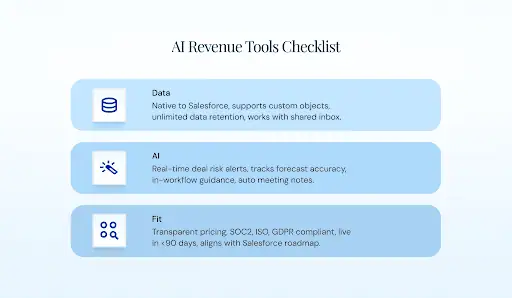
Possible red flags could be:
- External storage
- Data caps
- Heavy setup
- Low adoption
Get a Salesforce-native demo (15 min)
Conclusion: Revenue Acceleration Starts at the Data Layer
The AI revenue acceleration tools market is noisy, fast-moving, and crowded with vendors who frame speed as the primary value proposition. Faster outreach. Faster follow-ups. Faster cadences. Those matter — for top-of-funnel, transactional motions with short cycles.
For mid-market and enterprise Salesforce teams running 30-day-plus sales cycles with multiple stakeholders, the real acceleration happens when the data layer is trustworthy. When every email, meeting, and call is captured to the right Salesforce record automatically. When forecasts are built on observed engagement patterns, not rep self-reports. When pipeline reviews focus on deal strategy instead of data accuracy debates.
Revenue Grid is the only platform that spans engagement, intelligence, forecasting, and activity capture natively inside Salesforce. No external data storage. No 24-month retention caps. No sync delays. No additional tools required to cover the capabilities your revenue team needs.
Book your 15-minute Revenue Grid demo — see your Salesforce data accelerate
What are AI revenue acceleration tools?
AI revenue acceleration tools are platforms that use artificial intelligence to increase the speed, accuracy, and predictability of the revenue cycle. They unify four capabilities: engagement sequencing, pipeline intelligence, revenue forecasting, and activity data capture. They are distinct from sales engagement platforms (which focus on outbound cadences) and revenue intelligence platforms (which focus on forecasting and deal inspection).
How does AI shorten the sales cycle?
AI compresses sales cycles by automating activity capture (eliminating CRM admin time), flagging stalled deals in real time, providing next-best-action guidance to reps mid-deal, and surfacing multi-threading gaps before they become deal-killers. Teams that fix activity capture first typically see cycle compression of 20 to 40%, because reps spend more time selling and less time on administrative tasks.
What’s the difference between sales engagement, sales acceleration, and revenue intelligence?
Sales engagement platforms automate outbound sequences and cadences (Outreach, Salesloft). Revenue intelligence platforms inspect pipeline health, forecast revenue, and surface deal risks (Gong, Clari). Sales acceleration is the umbrella category that combines both with activity capture and guided selling into a unified platform. Revenue Grid is an example of a unified approach.
Will AI replace sales reps?
No. Salesforce’s State of Sales 2026 report found that 87% of sellers say AI makes their job less stressful, not redundant. AI handles CRM admin, meeting prep, and data capture — the tasks reps dislike most. Selling, relationship-building, and deal negotiation remain human activities.
What is the sales velocity formula?
Sales velocity measures how quickly revenue moves through the pipeline: V = (Number of Opportunities × Win Rate × Average Deal Value) ÷ Sales Cycle Length. Each variable can be improved by different AI capabilities. The highest-impact variable for enterprise teams is typically cycle length, where a one-month reduction can increase ARR by 46%.
How do AI revenue acceleration tools integrate with Salesforce?
Integration quality varies significantly. Some tools write data natively to Salesforce objects (Revenue Grid). Others store data externally and sync subsets back via API (Gong, Clari, Outreach). Einstein Activity Capture stores data on AWS, not in Salesforce records. The architecture determines whether captured data appears in standard reports, supports custom objects, and is available for Salesforce automation and AI features like Agentforce.
What ROI can teams expect from AI revenue acceleration?
ROI depends on the baseline. Organizations with broken activity capture see the largest gains: 15 to 20 hours per week saved per rep, 30 to 50% increases in logged meetings, and 20 to 40% improvement in forecast accuracy within the first 90 days. Revenue Grid customers have documented 761 working days saved per year (Vapotherm), 30% contract increases per business unit (insurance brokerage), and 15 to 20% case-load increases (Morgan & Morgan).
How is Revenue Grid different from Einstein Activity Capture?
Einstein Activity Capture is free with Sales Cloud but stores data on AWS (not in Salesforce records), caps retention at 24 months, does not support custom objects, and cannot handle shared mailboxes or assistant-managed calendars. Revenue Grid writes directly to Salesforce records, supports custom objects, offers indefinite retention, handles shared mailboxes and assistant calendars, and layers pipeline intelligence, forecasting, and guided selling on top of the captured data.