

There’s no shortage of email sequence software in 2026, and most of them look similar on a feature page. Multi-step sequences, A/B testing, reply detection, CRM integration. Every tool checks those boxes.
The real difference is what each tool is built around. Some are built for cold outreach at scale, where deliverability and sender rotation matter most. Others are built for sales teams working deals already in the pipeline, where the sequence has to reflect what’s actually happening with the buyer. A few are bundled inside bigger CRM or revenue platforms, where sequences are one piece of a larger workflow.
So don’t pick the tool which has the most features. Think about which one matches how your team actually sells. This comparison breaks down 7of the top email sales sequence tools by what they’re built for, and their pricing so you can figure out which category fits you.
1. Revenue Grid Sales Sequences
Revenue Grid is a relationship intelligence platform built natively around Salesforce. Its Sales Sequences module that handles automated outreach. Every email sent, reply received, and step completed syncs back to your CRM in real time without any manual logging. It supports multichannel sequences across email, phone (built-in dialer), SMS, and LinkedIn.
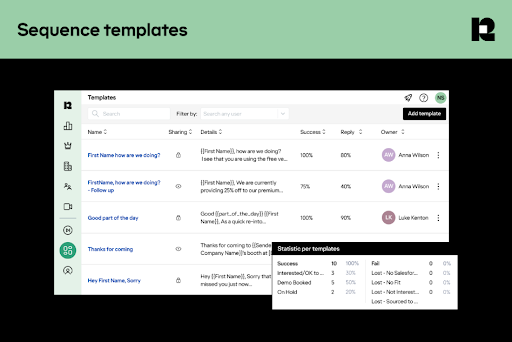
It supports email sequences that are more about structured follow-ups, deal nurturing, and keeping reps connected with prospects who are already in your pipeline.
Key Features:
- Native Salesforce integration where sequences run from inside your CRM, and all activity (sends, opens, replies, calls) auto-logs to the corresponding Salesforce records
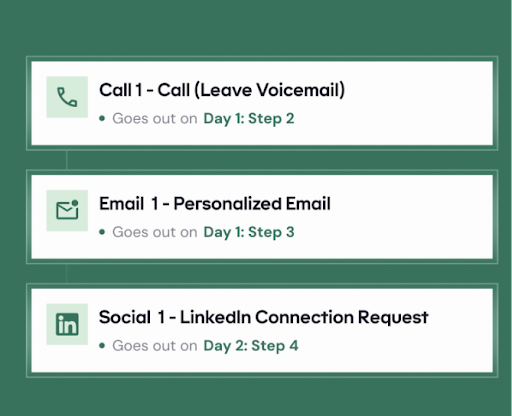
- Built-in dialer and SMS steps within sequences, so reps don’t need a separate tool to add phone touchpoints
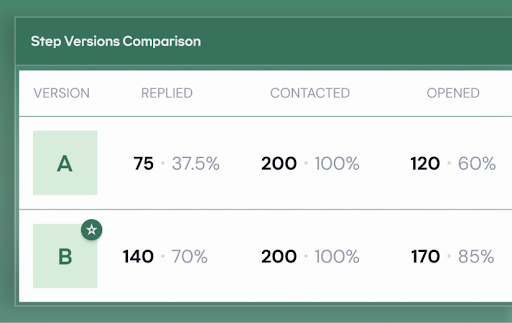
- A/B testing on sequence steps to measure which email copy, subject lines, or timing drives better engagement
- Smart reply detection that automatically pauses or removes a prospect from a sequence when they respond, preventing awkward double-sends
- Personalization pulled from Salesforce fields so that the sequence dynamically adapts messaging based on the prospect’s role, company, deal stage, and other CRM data
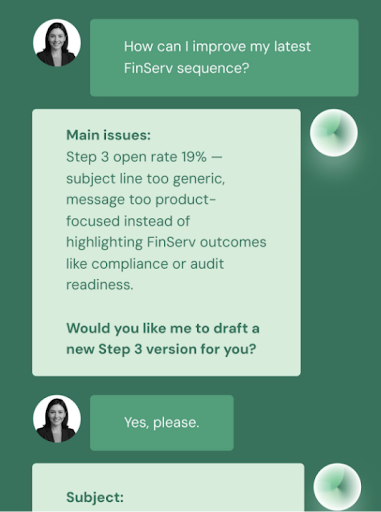
- Built-in AI chat that lets you query your own sequence data with plain-language questions like “which step has the lowest reply rate?” and get answers instantly
- Pre-made sequence templates for common use cases (prospecting, nurturing, follow-up) so you’re not building every flow from scratch
- Sequence performance reporting with engagement tracking across opens, clicks, replies, and conversions at every step
Revenue Grid is best for teams using Salesforce, and they want sequences tied to real deal activity and relationship history, not just contact lists.
Pricing:
Revenue Grid prices per user per month across three tiers. Sales Sequences is only available in the top-tier plan. There’s no free plan, but they do offer a 14-day free trial.
- Activity Capture 360: $30/user/month. It has auto-captures emails, contacts, and calendar events to Salesforce, the inbox sidebar, and scheduling tools.
- Knowledge Capture: $49/user/month. It has everything in Activity Capture 360, plus AI-powered chat and search across all sales data.
- Revenue Grid Ultimate: $149/user/month. This plan has everything in Knowledge Capture, plus Sales Sequences, pipeline visibility, forecasting, team analytics, deal guidance, meeting assistance, relationship intelligence, and the RG Mentor/Assistant tools.
Professional services (implementation, onboarding, advanced customization, dedicated CSM) are available as separate paid add-ons.
2.Saleshandy
Saleshandy is a cold email outreach platform that lets you build and automate multi-step email sequences at scale. You can connect unlimited email accounts, set up automated follow-ups, and manage all your sequence replies from one place. The platform also supports multichannel sequences that can mix in calls, WhatsApp, and manual tasks alongside email steps.
Key Features:
- Sender rotation across unlimited connected email accounts within a single sequence, distributing send volume to protect the domain reputation
- A/B through A-Z variant testing on email copy at each step of a sequence
- Multichannel sequencing that lets you chain email, phone calls, WhatsApp messages, and custom tasks into one automated flow
- AI Sequence Copilot that generates and suggests email copy for each step in your sequence
- Unified inbox that collects replies from every sending account tied to your sequences into a single view
- Sequence Score that evaluates your setup (email copy, settings, deliverability signals) and flags issues before you launch
- Inbox Placement Testing to check whether your emails are hitting the inbox, spam, or promotions before you activate a sequence
- Built-in email verification that checks prospect emails before they enter a sequence, reducing bounces without needing a separate tool
Saleshandy is best for high-volume cold outreach teams that need sender rotation and deliverability protection at scale
Pricing:
Saleshandy offers a 7-day free trial on all plans with no credit card required. Every plan includes unlimited email accounts — there’s no per-seat or per-account fee. Pricing is divided into Outreach plans (for sequences) and Lead Finder credits (for prospecting), billed separately.
- Outreach Starter: $25/mo (billed annually; $36/mo if monthly): 2,000 active prospects, 6,000 emails/month, AI-powered sequences
- Outreach Pro: $69/mo (billed annually; $99/mo if monthly): 30,000 active prospects, 150,000 emails/month, A-Z variant testing, unified inbox
- Outreach Scale: $139/mo (billed annually; $199/mo if monthly): 60,000 active prospects, 240,000 emails/month, white label for agencies, SSO
- Outreach Scale Plus: starts at $209/mo (billed annually; $299/mo if monthly): 100,000 active prospects, 300,000 emails/month, dedicated success manager, scales up to 500K+ on custom plans
Email infrastructure is available as an add-on: domains at $14/year, and email accounts at $4/account/month, for both Google Workspace and Microsoft 365.
3.Apollo
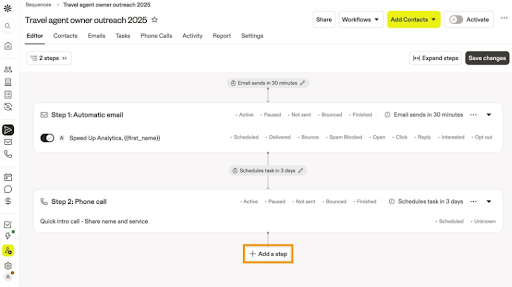
Apollo is an all-in-one sales intelligence platform that combines a B2B contact database with built-in email sequencing. The sequence side lets you build automated, multi-step outreach flows that mix emails, calls, and LinkedIn tasks. Because your prospect data and your sequences live in the same tool, you can go from finding a lead to enrolling them in a sequence without any CSV exports or third-party integrations.
Key Features:
- Mix of automatic and manual email steps within a single sequence — automatic steps send on their own, while manual steps prompt the rep to personalize and send, which is useful for high-touch deals
- AI-powered sequence and email generation where you describe your goal (e.g., “cold outreach to VP Marketing at SaaS companies”) and Apollo builds the full sequence with messaging
- Dynamic personalization using variables pulled from Apollo’s own contact database (name, title, company, custom fields) without needing to merge from a separate source
- A/B testing on subject lines, body copy, and send times within individual sequence steps (available on Professional plan and above)
- Conditional logic and if/then branching so the sequence path can change based on prospect behavior (opened, clicked, replied, no response)
- Auto-pause on reply or meeting booked to prevent follow-ups from going out after a prospect has already engaged
- Enrollment triggers that automatically add contacts to sequences based on signals like job changes, intent data, or list membership
- Native CRM syncs with Salesforce and HubSpot, where all sequence activity logs are automatically recorded.
Apollo is best for teams who want prospecting and sequencing in one tool, without stitching a database and an outreach platform together.
Pricing:
Apollo uses a per-user-per-month subscription plus a credit-based system on top. Credits are used for data actions (revealing emails, phone numbers, exporting contacts) and not for sending emails within sequences. Credits don’t roll over and expire at the end of each billing cycle.
There’s a free plan for testing that gives you 2 active sequences, 10,000 email credits/account/month, very limited sends, and data access. The paid plans are as follows:
- Basic: $49/user/month (annual; $59 monthly). Gives you unlimited sequences, core automation, email open and click tracking, 5,000 credits/year, advanced search filters, meeting scheduler
- Professional: $79/user/month (annual; $99 monthly). It covers everything in Basic plus A/B testing, advanced sequences, dialer, 10,000 credits/year, 200 mobile credits/month
- Organization: $119/user/month (annual; $149 monthly, minimum 3 users). This has everything in Professional plus international dialer, custom reports, SSO, advanced security, 15,000 credits/year
Additional credits cost $0.20 each after your plan’s allocation runs out, with a minimum purchase of 250 credits (monthly) or 2,500 credits (annual).
4.Woodpecker
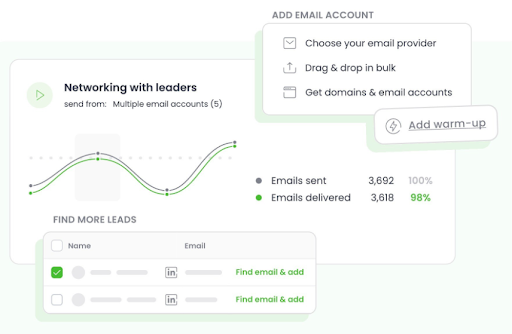
Woodpecker is a cold email tool built specifically around sending personalized email sequences. You set up multi-step campaigns with automated follow-ups, and it handles the sending with human-like randomization (varied send times, pauses between emails) to keep things out of spam. It also supports adding LinkedIn steps (profile visits, connection requests, messages) alongside email within the same campaign.
Key Features:
- Condition-based campaigns where the next step changes based on prospect behavior (opened, clicked, replied, no action), so different prospects follow different paths through the same sequence
- A/B testing with up to 5 variants per step, letting you test subject lines, body copy, or call-to-action within a single campaign
- Adaptive sending that adjusts email volume and timing dynamically based on deliverability signals, mimicking human sending patterns
- AI-powered response sentiment detection that flags hot leads, interested replies, and out-of-office responses automatically
- Automatic out-of-office rescheduling that detects autoreplies and re-queues the follow-up for when the prospect is back
- Centralized inbox for managing replies from all connected sending accounts in one place
- Built-in text variations within emails (called Spintax) so each prospect gets a slightly different version, which helps avoid spam filters
- LinkedIn automation add-on that lets you chain LinkedIn profile visits, connection requests, and messages into your email sequence as additional steps
Woodpecker is best for cold email agencies or lean teams that want strong deliverability without paying per user
Pricing:
Woodpecker uses a single flexible plan priced by how many new prospects you contact per month, not per user or per email sent.
The base starts at $35/month for 500 contacted prospects, and scales at $7 per additional 100 prospects. Every plan includes unlimited email accounts, unlimited team members, unlimited follow-ups, free warm-up, and free catch-all email verification.
You also get 400 Lead Finder credits per month included. There’s a 14-day free trial with no credit card required, and all features unlocked.
5.Lemlist
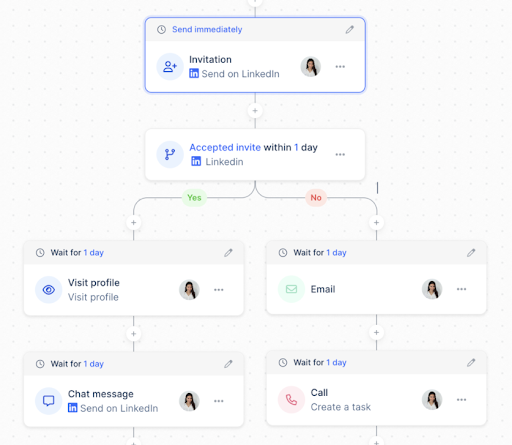
Lemlist is a multichannel outreach platform that lets you run sequences across email, LinkedIn, phone calls, and WhatsApp from a single campaign. You can customize not just text but also images, thumbnails, and even landing pages dynamically for each prospect.
It also comes with a 600M+ lead database built in, so you can find and enrich prospects without leaving the tool.
Key Features:
- Multichannel sequences combining email, LinkedIn (profile visits, connection requests, text and voice messages), phone calls, and WhatsApp steps in one automated flow
- AI-powered personalization that generates unique email copy, custom images, and dynamic variables for each prospect automatically
- Advanced condition-based logic that adjusts the next step based on how a prospect interacts (e.g., auto-trigger a call step if they opened but didn’t reply)
- Built-in call dialer with VoIP integrations (Aircall, Ringover) so phone steps happen inside the platform, not a separate tool
- LinkedIn AI voice messages that let you send personalized voice notes on LinkedIn as part of your sequence
- Unified inbox that pulls replies from email, LinkedIn, and WhatsApp into one place
- A community template library with 37,000+ real campaigns you can duplicate, complete with open and reply rate benchmarks
- Chrome extension that lets you find, enrich, and push leads into sequences directly from LinkedIn or Gmail
- Intent signals (website visits, job changes, fundraising, LinkedIn engagement) to help you time your sequences around buying moments
- Inbox rotation and warm-up booster included on all plans to protect deliverability
lemlist is best for teams running highly personalized, multichannel outreach across email, LinkedIn, and WhatsApp.
Pricing:
Lemlist prices per user per month with monthly, quarterly (10% off), and yearly (20% off) billing options. All plans come with a 14-day free trial. No automatic charge after the trial ends.
- Email Pro: $79/user/month ($63 on yearly): This gives you 3 email senders per user, 200 enrichment credits/month, unlimited email follow-ups, 600M+ lead database, AI personalization, CRM integrations, deliverability hub, and warm-up
- Multichannel Expert: $109/user/month ($87 annually). This covers everything in Email Pro plus 5 email senders per user, 400 enrichment credits/month, LinkedIn automation, built-in dialer, manual task steps, unified inbox, WhatsApp available as add-on
- Enterprise: Custom pricing (minimum 5 users). It includes everything in Multichannel Expert plus dedicated account manager, custom roles and permissions, SSO/SAML, 1:1 onboarding, priority support
Key add-ons include WhatsApp automation at $20/user/month, additional phone numbers at $15/number/month, extra email senders at $9/email/month, and additional domains and mailboxes at $4-8/account/month.
6.HubSpot Sequences
HubSpot Sequences is the email sequence tool built into HubSpot’s Sales Hub. Unlike standalone cold email platforms, it’s designed for one-to-one sales follow-ups rather than mass cold outreach.
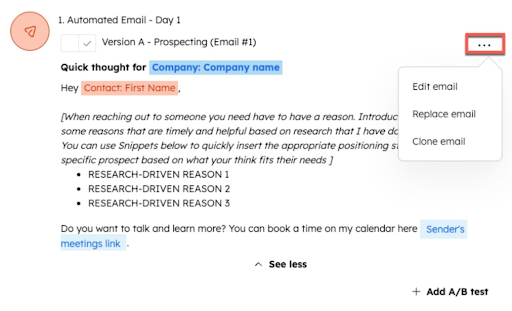
Sequences send from your connected email (Gmail or Outlook), auto-enroll contacts through workflows, and automatically unenroll them when they reply or book a meeting. Everything logs directly into HubSpot CRM, so there’s no manual data entry. It’s best suited for teams already using HubSpot who want sequences tightly wired into their CRM, pipeline, and reporting.
Key Features:
- Sequences send from your personal email account (not a bulk sender), so every message looks and behaves like a regular one-to-one email
- Automatic unenrollment when a contact replies to any email in the sequence or books a meeting through a meeting link
- Mix of automated emails and manual task reminders (email, call, general tasks) within the same sequence, so you can automate the routine steps and get prompted for the high-touch ones
- LinkedIn Sales Navigator integration that adds InMail and connection request task steps directly inside a sequence
- Workflow-based enrollment so contacts can be auto-added to sequences based on triggers like form submissions, page views, or deal stage changes
- A/B testing on sequence emails to compare subject lines and copy variations
- All sequence activity (sends, opens, replies, meetings booked) logs automatically to the contact and deal record in HubSpot CRM
- Step performance analytics showing engagement metrics at each step so you can identify where prospects are dropping off
- Sequence sharing across the team so top-performing sequences can be reused without rebuilding them
It is best for teams already on HubSpot Sales Hub who need sequences tightly wired into their CRM and pipeline.
If you’re on Salesforce instead of HubSpot, Revenue Grid offers a similar CRM-native experience.
Pricing:
Sequences are not available on HubSpot’s free or Starter plans. You need Sales Hub Professional or Enterprise, and each user running sequences needs an assigned Sales seat. All plans require annual commitment.
- Sales Hub Professional: $100/seat/month (billed annually), includes sequences, forecasting, custom reporting, playbooks, and a one-time onboarding fee of $1,500
- Sales Hub Enterprise: $150/seat/month (billed annually), includes everything in Professional plus SSO, advanced permissions, predictive lead scoring, custom objects, and a one-time onboarding fee of $3,500
7.Reevo
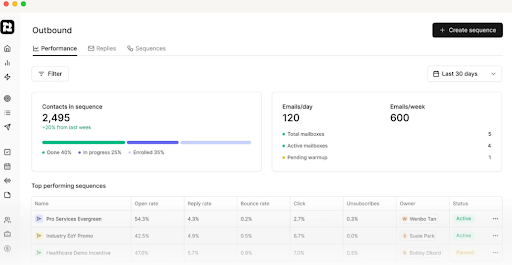
Reevo is a tool that bundles your CRM, email sequences, dialer, and meeting intelligence into one platform. The sequencing piece lives inside the CRM, so when a sales rep sends an email or makes a call from a sequence, it automatically shows up on the contact record without any syncing or logging.
Key Features:
- In-app domain and inbox purchasing with auto-configured SPF, DKIM, and DMARC, removing the need for separate infrastructure setup
- Built-in inbox warming that runs automatically on new accounts before sequences go live
- Native dialer with click-to-call, auto-logged conversations, and full account history visible during the call
- Meeting scheduler with calendar sync, custom availability rules, and automatic lead routing to the right rep
- AI that reasons across your full dataset, so you can ask plain-language questions about pipeline health, deal objections, or next steps
- Automatic contact enrichment, deduplication, and lead-to-account mapping as prospects enter the system
- First-party data capture from emails, calls, and meetings feeds directly into AI insights without needing third-party integrations
Reevo is best for early-stage teams who want CRM, sequences, and dialer bundled in one tool instead of buying them separately. Larger Salesforce teams typically get more from a mature platform like Revenue Grid.
Pricing:
Reevo doesn’t publish specific dollar amounts on their pricing page. All plans require you to talk to sales for a custom quote. They offer three tiers based on team size, each with different usage limits:
- Core (up to 5 users): 1,000 enrichment credits/user/month, 1,000 dialer minutes/user/month, 2,500 meeting recording minutes/user/month, 50 active sequences per org, 48-hour support SLA
- Pro (up to 10 users): 2,000 enrichment credits/user/month, 2,000 dialer minutes/user/month, 4,000 meeting minutes/user/month, 100 active sequences per org, 24-hour support SLA, Slack Connect with the Reevo team
- Enterprise (10+ users): fully custom plan built around your needs
How to choose the right email sequence tool
Start with these 3 questions to find the right fit. Once you know the category, picking the specific tool gets a lot easier.
What CRM are you running on?
If your team runs everything through Salesforce or HubSpot, a CRM-native tool (Revenue Grid for Salesforce, HubSpot Sequences for HubSpot) will save you from sync issues, duplicate data, and the overhead of maintaining a separate system. Standalone tools can integrate with your CRM, but there’s always some lag or manual cleanup involved.
What kind of outreach are you running?
Cold outbound at scale (hundreds of new prospects a week) needs a tool built for deliverability, sender rotation, and inbox warm-up, like Saleshandy, Woodpecker, or lemlist. One-to-one follow-ups with prospects already in your pipeline need a tool tied to your CRM and deal data, like Revenue Grid or HubSpot Sequences. Mixing both in one tool usually means compromising on one.
Do you need multichannel, or is email enough?
If email alone isn’t enough and your team also works prospects through calls, LinkedIn, and SMS, look for tools that handle all of those in one sequence (Revenue Grid, lemlist, etc). Otherwise, you’ll end up with reps switching between three tools to run one outreach flow.
Why Choose Revenue Grid for Your Sales Sequences
Every sales email you send either starts a relationship, strengthens it, or risks losing it. What you say should reflect what’s actually happening in the deal, and what can help move it forward. Most sequencing tools can’t help you with that part. They’ll tell you if the email was opened, but they won’t tell you what’s going on in the relationship.
Revenue Grid is built around that missing piece. As a relationship intelligence platform, it automatically captures every email, meeting, and touchpoint across your team, syncs it to Salesforce, and gives you a complete picture of how every relationship in your pipeline is developing.
Your sales sequences run on top of that context. So, when a rep is writing a follow-up or choosing the right moment to reach out, they can see the full engagement history, who else on the team has been involved, and how the deal is trending. This helps craft the right response.
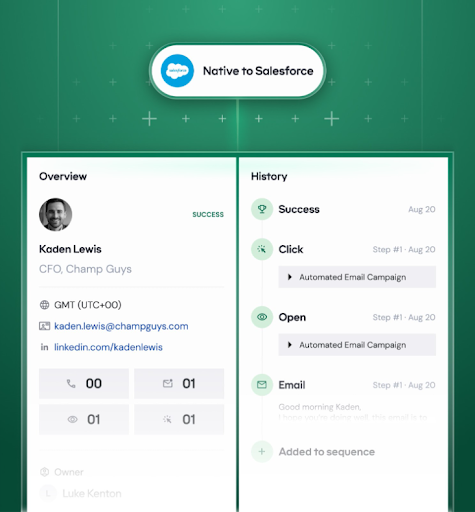
Revenue Grid’s Salesforce integration is native, so every sequence of action is captured in real time with no sync issues or duplicate data.
Here’s what makes Revenue Grid different from the other tools on this list:
Outreach runs from where you already work
Sequences, follow-ups, and calls happen directly inside Salesforce or your inbox, with every action updating in real time. Reps don’t have to switch tools or manually log activity, which means fewer gaps in CRM data and less admin work at the end of the day.
A/B testing and sequence analytics that actually get used.
Built-in reports track engagement at every step (opens, clicks, replies, conversions) and A/B testing shows which messages perform best. Instead of guessing why a sequence isn’t working, you can see exactly which step is losing prospects and fix it.
Ask your data, get instant answers.
Revenue Grid’s built-in AI chat lets you ask questions like “which step has the lowest reply rate?” or “how can I improve my sequence timing?” and get answers on the spot. No pulling reports, no digging through dashboards.
Multichannel out of the box.
Email, calls, LinkedIn, and SMS all live inside the same sequence, with the built-in dialer handling phone steps natively. Every touchpoint is tracked and synced to Salesforce automatically, so the full engagement story stays in one place.
Teams using Revenue Grid report 5+ hours saved per rep per week, 85% more meetings booked, and a 14% increase in sales after three months. That’s the difference between a sequencing tool that sends emails and a sequencing tool built around how your pipeline actually moves.
Book a demo with Revenue Grid to see how it can help you craft email sales sequences that convert more prospects into real conversations and conversations into closed deals.
What is email sequence software?
Email sequence software lets you set up a series of emails that go out automatically on a schedule. You define the steps, the timing, and the messaging, and the tool handles the sending and follow-up. Most tools also track opens, clicks, and replies, so you know what’s working.
How do I choose the right email sequence tool for my team?
Start with how your team actually works. If you run everything through Salesforce, you want something with native CRM integration, so activity syncs automatically. If your priority is high-volume cold outreach, look for tools with strong deliverability features and sender rotation. Think about whether you need multichannel steps like calls, LinkedIn, and SMS, or just email.
What's the difference between a sales sequence tool and a marketing automation platform?
Sales sequence tools are built for one-to-one outreach from a rep’s email account. The emails are designed to look and feel like personal messages. Marketing automation platforms like HubSpot or Marketo are built for one-to-many campaigns: newsletters, nurture flows, and bulk sends. If your goal is booking meetings through personalized outreach, you want a sales sequence tool.
How many emails should I include in a sequence?
It depends on the situation. Cold outreach sequences typically have 4 to 6 emails spread over 2 to 3 weeks. Warmer sequences like post-demo follow-ups can be shorter. The right number is, however, as many as it takes to give the prospect enough context to decide, without overwhelming their inbox.
Do I need a separate tool for email warm-up and deliverability?
Some sequence tools include warm-up and deliverability features built in. Woodpecker and Saleshandy both offer inbox warm-up and placement testing as part of their plans. If your tool doesn’t include it, you’ll want a separate warm-up service before running high-volume sequences, or your emails may land in spam.
How do I know if my sequences are working?
Look beyond open rates. Reply rates, positive reply rates, and meetings booked are better indicators of whether your sequences are moving deals forward. Most tools offer step-level reporting, so you can see exactly where prospects are engaging or dropping off. A/B testing helps you isolate what’s making the difference, whether that’s subject lines, email copy, timing, or the number of steps