

Key Takeaway
- Sales sequences must match the buyer journey.Effective email sequences are tailored to where the prospect is in the sales cycle—not just scheduled follow-ups.
- Use different sequences for different scenarios.Cold outreach, post-demo, inbound leads, webinars, upsells, and renewals each require distinct messaging, timing, and goals.
- Timing and spacing drive engagement.Cold emails work best every 2–4 days, while warmer leads need faster follow-ups, and renewals should start ~90 days in advance.
- Personalization and relevance are key.Referencing real pain points, using prospect-specific context, and leveraging social proof significantly improve response rates.
- Data + tools improve sequence performance.Platforms like Revenue Grid enhance sequences with CRM data, automation, and analytics to optimize engagement and conversions.
The best sales sequences are not just follow-up emails sent on a schedule. They’re designed around where the prospect is, what they already know about you, and what needs to happen next to move the conversation forward. This guide walks through 7 sales email sequences across the full sales cycle, with templates, timing, and breakdowns you can learn from.
The sales email sequences in this guide are based on what we’ve seen work across Revenue Grid customers. They’re not hard rules. Test them, tweak them, throw out what doesn’t fit, and double down on what does. Find the scenario closest to what you’re working on, and adapt it to your needs.
1. Cold prospecting email sequence
A cold prospecting email sequence is your first attempt at starting a conversation with someone who doesn’t know you or your company yet. SDRs and BDRs typically use this as part of their sales execution strategy to book a first meeting with a potential buyer.
This sequence works best spread over 2-3 weeks with touches every other business day. You want to stay on their radar without being annoying. Most of your touches will be emails, but throwing in a LinkedIn connection request early on and a phone call or two in the middle can help you stand out.
Here’s what each email in the sequence should cover:
Email 1 (Day 1): Open with something specific to their role or industry, name the problem you solve, and briefly introduce how you help. Keep it short. Include a soft ask like “Would this be worth a conversation?”
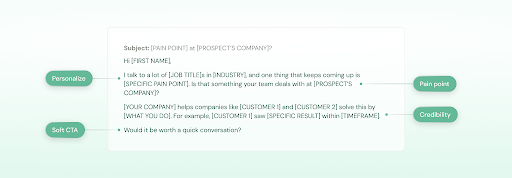
Personalize beyond the merge fields. Mentioning a recent hire they made, a product launch, or something they posted on LinkedIn shows you actually looked into them. That alone puts you ahead of 90% of cold emails that could have been sent to anyone.
Email 2 (Day 5): Share something useful that’s relevant to their situation. This could be a short industry insight, a blog post, or a quick stat. Don’t pitch here, just give them a reason to pay attention to you.
Email 3 (Day 10): Bring in social proof. Share a quick result a similar company got using your product, or drop in a customer quote. This is where you show them you’ve actually done this before.
Email 4 (Day 16): Try a different format. A short screen recording or a 60-second video showing your product in action can work well here since it breaks the pattern and gives them something concrete to look at.
Email 5 (Day 20): Your last email. Be honest that this is your final outreach and make it easy for them to reply with a simple yes, no, or not right now.
Template: Opening email (Day 1)
Subject: [PAIN POINT] at [PROSPECT’S COMPANY]?
Hi [FIRST NAME],
I talk to a lot of [PROSPECT’S JOB TITLE]s in [INDUSTRY], and one thing that keeps coming up is [SPECIFIC PAIN POINT]. Is that something your team deals with at [PROSPECT’S COMPANY]?
[YOUR COMPANY NAME] helps companies like [RELEVANT CUSTOMER 1] and [RELEVANT CUSTOMER 2] solve this by [ONE-SENTENCE DESCRIPTION OF WHAT YOU DO]. For example, [RELEVANT CUSTOMER 1] saw [SPECIFIC RESULT] within [TIMEFRAME].
Would it be worth a quick conversation to see if we could help?
[SIGN OFF]
Template: Final email (Day 20)
Subject: Should I close your file?
Hi [FIRST NAME],
I’ve reached out a few times and haven’t heard back, which is totally fine. I don’t want to keep filling up your inbox if the timing isn’t right.
If you’re interested in learning how [YOUR COMPANY NAME] can help with [PAIN POINT], I’d still love to chat. If not, no hard feelings at all.
Either way, just let me know, and I’ll follow your lead.
[SIGN OFF]
2. Post-demo follow-up email sequence
A post-demo follow-up email sequence is what you send after a discovery call or product demo to keep the deal moving forward. This is used to reinforce what was discussed, handle any lingering objections, and push toward a decision.
This is one of the most important sequences you’ll run because the prospect is already warm. They’ve seen your product and shown interest. The goal now is to make it easy for them to say yes. Space your emails 2-3 days apart over about two weeks, and keep every touch tied back to what came up during the demo.
If there are multiple decision-makers involved, your sales engagement approach needs to go wider. Ask your contact what information would help them make the internal case. Sometimes that’s an ROI breakdown, sometimes it’s a security doc, sometimes it’s just a one-pager they can forward.
Take detailed notes during the demo and use their exact words in your follow-up. If they said “we’re drowning in manual data entry,” use that phrase back. It shows you were actually listening, and it makes your emails feel like a continuation of the conversation rather than a generic follow-up.
Here’s what each email in the sequence should cover:
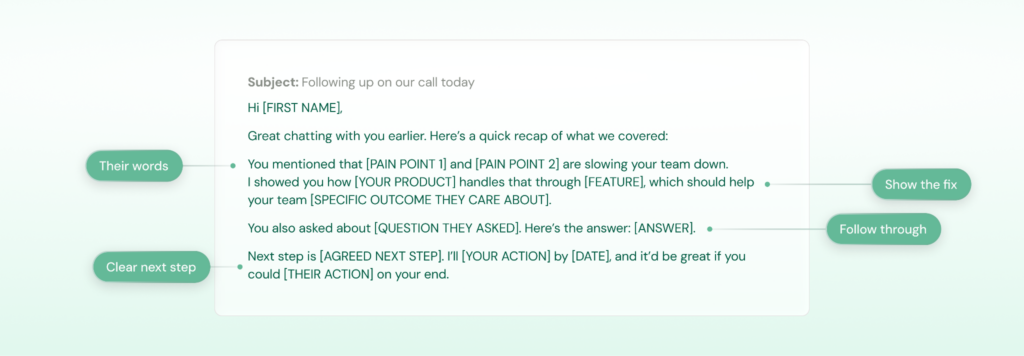
Email 1 (same day as demo): Send a recap of the conversation. Mention the specific pain points they brought up, what you showed them, and any next steps you agreed on. If they asked questions you couldn’t answer on the spot, answer them here.
Email 2 (Day 3): Share a case study or customer story that’s relevant to their situation. Pick one that matches their industry or the specific challenge they mentioned during the demo.
Email 3 (Day 6): Address the most common objection for deals at this stage. If they mentioned concerns about implementation, pricing, or switching costs during the demo, tackle that head-on with specifics.
Email 4 (Day 9): Send a short email checking in on where things stand internally. If there are other stakeholders involved, offer to set up a second call or send over materials they can share with their team.
Email 5 (Day 12): Create some gentle urgency. This could be a limited-time offer, a reminder about their contract renewal timeline, or simply asking if they have a decision date in mind so you can support them accordingly.
Template: Recap email (same day as demo)
Subject: Following up on our call today
Hi [FIRST NAME],
Great chatting with you earlier. Here’s a quick recap of what we covered:
You mentioned that [SPECIFIC PAIN POINT 1] and [SPECIFIC PAIN POINT 2] are slowing your team down. I showed you how [YOUR PRODUCT] handles that through [FEATURE/WORKFLOW YOU DEMOED], which should help your team [SPECIFIC OUTCOME THEY CARE ABOUT].
You also asked about [QUESTION THEY ASKED]. Here’s the answer: [ANSWER].
As we discussed, the next step is [AGREED NEXT STEP]. I’ll [YOUR ACTION ITEM] by [DATE], and it would be great if you could [THEIR ACTION ITEM] on your end.
Let me know if anything else comes to mind.
[SIGN OFF]
Template: Handling objections (Day 6)
Subject: Quick thought on [OBJECTION TOPIC]
Hi [FIRST NAME],
One thing that comes up a lot at this stage is [COMMON OBJECTION, e.g., “concerns about how long implementation takes”]. Figured I’d get ahead of it in case it’s on your mind too.
[1-2 SENTENCES DIRECTLY ADDRESSING THE OBJECTION WITH SPECIFICS. e.g., “Most teams in your size range are fully set up within two weeks. We handle the migration on our end, so your team doesn’t need to block out time for it.”]
[CUSTOMER NAME] had the same concern and ended up going live in [TIMEFRAME]. Happy to connect you with them if that would help.
Any questions I can clear up?
[SIGN OFF]
3. Inbound lead follow-up email sequence
An inbound lead follow-up email sequence is what you send when someone has already shown interest in your product. Maybe they downloaded an ebook, signed up for a free trial, requested a demo, or filled out a contact form. The point is, they came to you.
Because they made the first move, this sequence can be shorter and more direct than cold outreach. You don’t need to convince them you exist or explain why you’re reaching out. They already know. What you do need to do is respond fast, figure out what they’re looking for, and make it easy for them to take the next step. Aim for 4-5 emails over 10-12 days.
Here’s what each email in the sequence should cover:
Email 1 (within an hour of the action): Acknowledge what they did and introduce yourself as their point of contact. If they downloaded content, reference it. If they requested a demo, confirm it and suggest times. Speed matters here because they’re most interested right now.
Email 2 (Day 2): Connect their action to a specific problem you solve. If they downloaded a guide on pipeline management, talk about the pipeline. If they signed up for a trial, ask what prompted it. The goal is to show you understand why they reached out, even if they haven’t told you yet.
Email 3 (Day 5): Share something that builds on their initial interest. A relevant case study, a short video walkthrough, or a specific use case that matches what you think they’re trying to solve. Keep it tied to the action they originally took.
Email 4 (Day 8): Make a direct ask. By now, they’ve had enough time to look at your content and think about it. Ask if they’d like to hop on a call, see a demo, or start a conversation about their needs. Be specific about what the call would cover so it doesn’t feel like a generic sales pitch.
Email 5 (Day 12): If you haven’t heard back, send a short email with a different angle. Maybe a quick win they can get from your product without even talking to you, or a question that’s easy to reply to. Keep it low-pressure.
Template: First response email (within an hour)
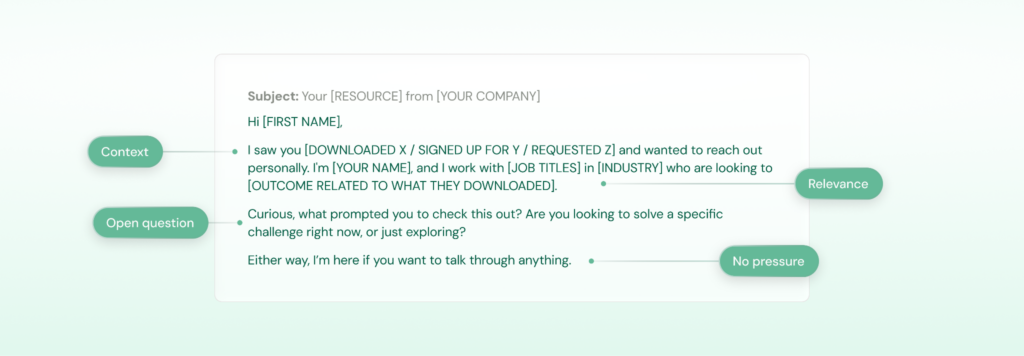
Subject: Your [RESOURCE/REQUEST] from [YOUR COMPANY]
Hi [FIRST NAME],
I saw you [DOWNLOADED X / SIGNED UP FOR Y / REQUESTED Z] and wanted to reach out personally. I’m [YOUR NAME], and I work with [JOB TITLES] in [THEIR INDUSTRY] who are looking to [OUTCOME RELATED TO WHAT THEY DOWNLOADED].
Curious, what prompted you to check this out? Are you looking to solve a specific challenge right now, or just exploring?
Either way, I’m here if you want to talk through anything.
[SIGN OFF]
Template: Direct ask email (Day 8)
Subject: Would a walkthrough help?
Hi [FIRST NAME],
I wanted to check in since you [ORIGINAL ACTION] a little over a week ago. A lot of [JOB TITLES] I work with find it helpful to see how [YOUR PRODUCT] handles [CHALLENGE RELATED TO THEIR ACTION] in practice rather than just reading about it.
If that sounds useful, I can do a quick 20-minute walkthrough focused on [SPECIFIC USE CASE]. No pressure, just a chance to see if it fits what you’re looking for.
Here’s my calendar if you want to grab a time: [LINK]
[SIGN OFF]
4. Webinar email sequence
A webinar sequence emailis what you send before and after a webinar to turn registrants into sales leads. It covers the full lifecycle: confirming their registration, building anticipation, and then following up after the event while your content is still fresh in their minds.
This sequence is split into two phases. The pre-webinar phase is about making sure they actually show up. The post-webinar phase is about converting that attendance into a real conversation. Space the pre-event emails based on how far out the webinar is, and send your post-event follow-ups within 2-3 days while the content is still top of mind.
Pre-webinar emails:
Email 1 (right after registration): Confirm their spot. Share the date, time, and agenda. Keep it simple and give them a calendar invite link so they don’t have to remember it.
Email 2 (3 days before the event): Build some anticipation. Tease a specific takeaway or insight they’ll get from attending. Something concrete like “you’ll walk away with a framework for X” works better than vague promises.
Email 3 (morning of the event): A short reminder with the join link. Nothing more. People are busy and they’ll appreciate you making it easy to find.
Post-webinar emails:
Email 4 (same day or next day): Thank them for attending and share the recording and slides. Mention one or two key takeaways from the session and connect them to a problem your product solves.

Email 5 (3 days after the event): Go deeper on a topic that came up during the webinar. Share a related resource like a case study, blog post, or guide, and tie it to how your product helps with that specific challenge.
Email 6 (6 days after the event): Make your ask. Offer a personalized conversation about how the topics covered in the webinar apply to their specific situation. Be specific about what you’d cover so it doesn’t feel generic.
Template: Post-webinar follow-up (same day or next day)
Subject: [WEBINAR TITLE] recording + a quick thought
Hi [FIRST NAME],
Thanks for joining [WEBINAR TITLE] yesterday. Here’s the recording and slides in case you want to revisit anything: [LINK]
One thing that got a lot of attention during the session was [SPECIFIC TOPIC/INSIGHT FROM THE WEBINAR]. It’s something we hear a lot from [JOB TITLES] in [INDUSTRY], and it’s actually one of the main reasons teams start using [YOUR PRODUCT].
If that part resonated with you, I think you’d find [RELATED RESOURCE] worth a look. It goes deeper into how [CUSTOMER NAME] approached the same challenge.
Happy to chat if you have any questions about what we covered.
[SIGN OFF]
Template: The ask email (6 days after)
Subject: How [WEBINAR TOPIC] applies to [PROSPECT’S COMPANY]
Hi [FIRST NAME],
The webinar covered [TOPIC] at a pretty high level since there were so many different companies in the room. But the specifics of how it works depend a lot on your setup.
I’d love to spend 20 minutes walking through how [JOB TITLES] at companies like [PROSPECT’S COMPANY] are using [YOUR PRODUCT] to [SPECIFIC OUTCOME RELATED TO WEBINAR TOPIC].
Would that be useful? Here’s my calendar: [LINK]
[SIGN OFF]
5. Upsell email sequence
An upsell email sequence is what you send to existing customers to expand the relationship by introducing additional products or services that complement what they’re already using. Account managers run this when a customer is seeing good results, and there’s a natural next step you can offer them.
The advantage here is that you already have trust and a track record with this customer. They know you, they’re using your product, and ideally, they’re happy with it. Frame the new product as something that makes their current setup more complete, not as a separate purchase. The pitch should feel like you’re helping them get even more out of what they already have, not like you’re selling them something new.
Here’s what each email in the sequence should cover:
Email 1 (Day 1): Check in on how things are going with their current product. Ask about their results, whether they need anything, and if there are any issues to sort out. This sets the tone and makes sure you’re not trying to sell more to someone who’s unhappy with what they already have.
Email 2 (Day 4): Share a relevant insight or trend related to their industry that connects their current product to the new one you want to introduce. For example, if they’re using your portfolio management tool, you might share a report on how investors are diversifying into real estate and how that creates operational challenges.
Email 3 (Day 7): Introduce the upsell directly. Tie it back to what they’re already using and explain how the new product or feature fits into their workflow. Show them how it complements what they have rather than positioning it as something completely separate.
Email 4 (Day 10): Share a customer story of someone in a similar situation who added the same product and what it did for them. Concrete results from a similar company make the case better than any feature list.
Email 5 (Day 14): Make your ask. Offer a short call or walkthrough focused on how the new offering would work alongside what they’re already using. Keep it specific to their situation.
Template: Introducing the upsell (Day 7)
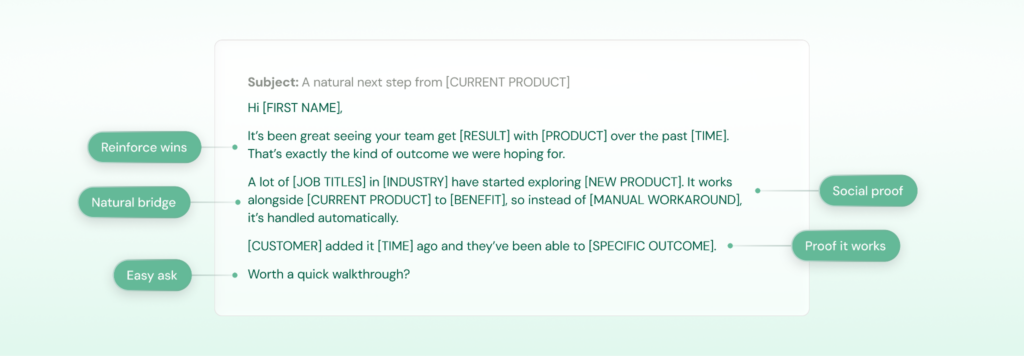
Subject: A natural next step from [CURRENT PRODUCT]
Hi [FIRST NAME],
It’s been great seeing your team get [SPECIFIC RESULT] with [CURRENT PRODUCT] over the past [TIMEFRAME]. That’s exactly the kind of outcome we were hoping for.
A lot of [JOB TITLES] in [INDUSTRY] who are in a similar position to you have started exploring [NEW PRODUCT/FEATURE] as the next step. It works alongside [CURRENT PRODUCT] to [SPECIFIC BENEFIT], so instead of [CURRENT LIMITATION OR MANUAL WORKAROUND], it’s handled automatically.
For example, [CUSTOMER NAME] added [NEW PRODUCT] about [TIMEFRAME] ago and they’ve been able to [SPECIFIC OUTCOME].
Would it be worth a quick walkthrough to see how it’d work for your setup?
[SIGN OFF]
6. Renewal email sequence
A renewal email sequence is what you send to existing customers as their contract approaches its expiration date. AEs and account managers use this to lock in the renewal well before the deadline, handle any concerns early, and avoid last-minute scrambles or surprise churn.
The worst thing you can do is wait until the last week of a contract to start the renewal conversation. By then, the customer may have already started evaluating alternatives. Start this sequence about 90 days out and space your touches over that period so it feels like a natural check-in rather than a last-minute sales push.
Here’s what each email in the sequence should cover:
Email 1 (90 days out): Start with a check-in. Ask how things are going, whether they’re getting what they need from the product, and if there are any issues you should know about. This isn’t a renewal email yet. It’s a relationship email that gives you time to fix problems before they become reasons not to renew.
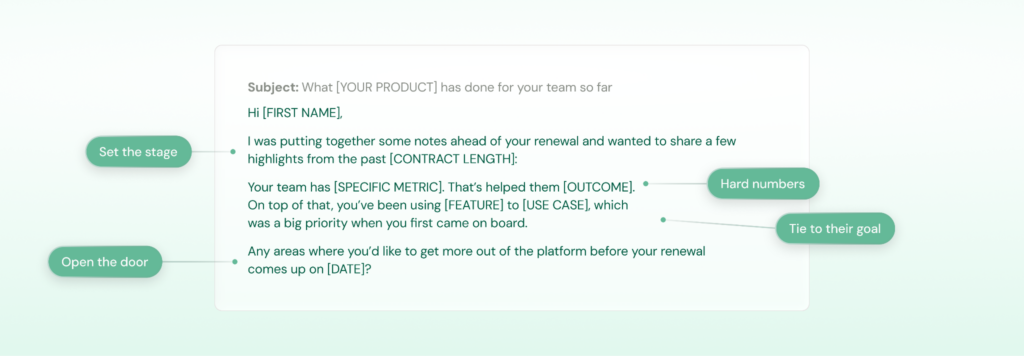
Email 2 (60 days out): Share a recap of the value they’ve gotten so far. Pull real usage data and results into your emails whenever possible. Saying “your team sent 4,200 sequences and booked 38% more meetings” is way more convincing than “your team has been getting great results.” Specific numbers make it hard to argue against renewing.
Email 3 (45 days out): Bring up the renewal directly. Let them know their contract is coming up, outline what the renewal looks like, and ask if there’s anything they’d like to discuss or change. If you have an upgraded plan or new features that would make sense for them, mention it here.
Email 4 (30 days out): Follow up with a specific reason to renew now. This could be locking in their current pricing, early renewal incentives, or upcoming product updates they’d benefit from. Give them a reason to act sooner rather than later.
Email 5 (14 days out): Send a direct email about next steps. Keep it short and logistical — here’s what needs to happen, here’s the timeline, and here’s who to loop in if there are approvals needed on their end.
Template: Value recap email (60 days out)
Subject: What [YOUR PRODUCT] has done for your team so far
Hi [FIRST NAME],
I was putting together some notes ahead of your renewal and wanted to share a few highlights from the past [CONTRACT LENGTH]:
Your team has [SPECIFIC METRIC, e.g., “sent 4,200 sequences through the platform”]. That’s helped them [OUTCOME, e.g., “book 38% more meetings compared to last quarter”]. On top of that, you’ve been using [FEATURE] to [USE CASE], which I know was a big priority when you first came on board.
I’d love to hear how things have been going from your side. Any areas where you’d like to get more out of the platform before your renewal comes up on [DATE]?
Happy to jump on a quick call if that’s easier.
[SIGN OFF]
Template: Renewal ask email (45 days out)
Subject: Your [YOUR PRODUCT] renewal on [DATE]
Hi [FIRST NAME],
Just a heads up that your [YOUR PRODUCT] contract renews on [DATE]. I wanted to get the conversation started early so we have plenty of time to sort out any questions on your end.
Your current plan includes [PLAN DETAILS]. Everything can stay as is, or if your team’s needs have changed, we can adjust. A few customers in a similar spot to you have recently moved to [HIGHER PLAN] to get [SPECIFIC BENEFIT], so that might be worth a look too.
Would next week work for a quick chat to go over everything?
[SIGN OFF]
How Revenue Grid Helps You Build, Execute, and Optimize Sales Sequences
Any sales engagement tool can automate an email sequence. That’s table stakes. But does the tool sending those emails actually know anything about the person receiving them?
Most standalone sequencing tools operate in a vacuum. They can tell you whether an email was opened or a link was clicked, but they can’t tell you that your prospect’s deal has been stalled for three weeks, that a key stakeholder went silent after the second meeting, or that a colleague on your team already has a relationship with someone else at that account. That context lives somewhere else (scattered across your CRM, your inbox, and your calendar) where your sequencing tool can’t see it.
Revenue Grid’s sales sequences are built into the same platform that automatically captures every email, meeting, and touchpoint across your team and syncs it to Salesforce. That means when a rep is building a sequence or deciding how to personalize a follow-up.
With access to dozens of Salesforce fields, every message automatically adapts to the buyer’s role, company, and deal stage. When a step needs your personal input, you get a notification, so every touch feels relevant and human rather than templated.
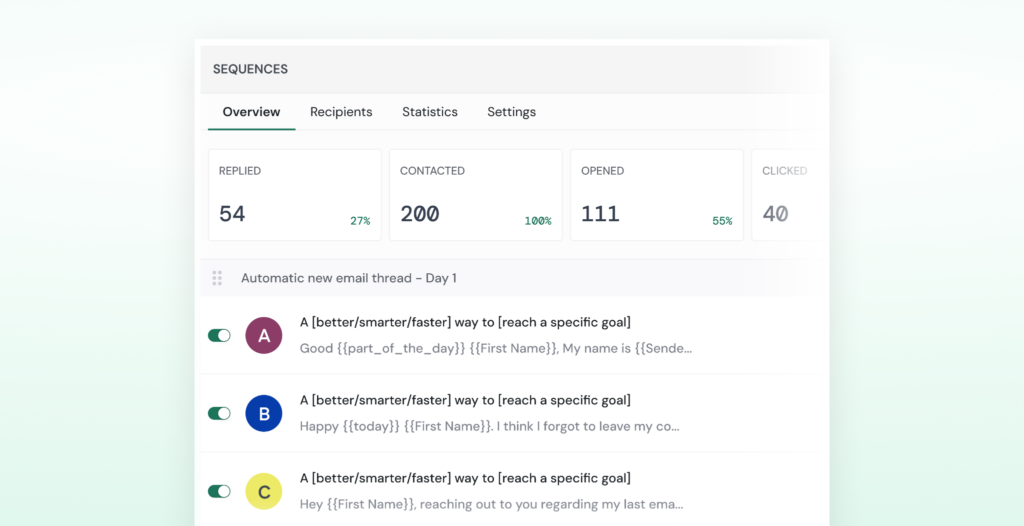
With Revenue Grid Sales Sequence, you can track engagement across every sequence step: opens, clicks, replies, and conversions. A/B testing shows you which messages actually perform, so you can refine and scale what works. Winning sequences can be shared across the team so the whole org benefits.
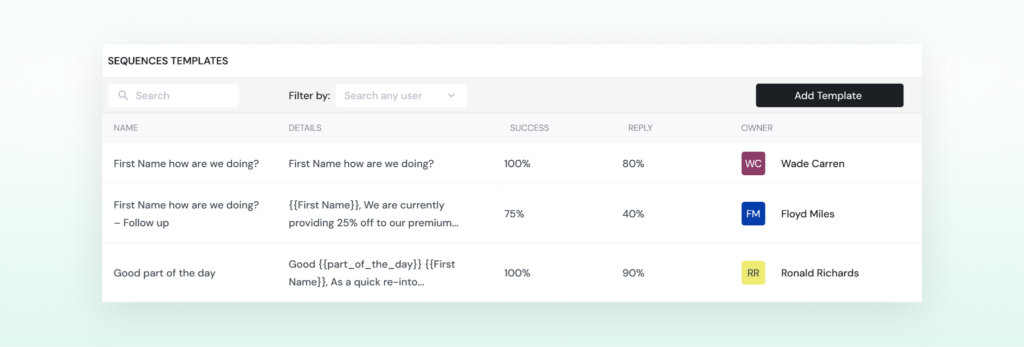
And because your sequences live inside a revenue intelligence platform, you always have visibility into:
- The full history of engagement on that account
- Who else on the team has been in touch
- How the deal is trending in real time
- What signals suggest the prospect is ready to move, or about to go cold
Book a demo with Revenue Grid to see how sales email sequences work when they’re backed by real relationship data.
How many emails should a sales sequence have?
Most sequences have between 4 and 6 emails, but it depends on the situation. A cold prospecting sequence might need 5 emails spread over 3 weeks, while an inbound follow-up can be shorter since the prospect already knows who you are. The key is to have enough touches to stay on their radar without overwhelming them.
How far apart should I space my sales emails?
For cold outreach, every 2 to 4 business days works well. For warmer sequences like post-demo follow-ups, you can tighten that to every 2 to 3 days since the prospect is already engaged. Renewal sequences are the exception: those start 90 days out and are spaced weeks apart.
What's the best day and time to send sales emails?
Tuesday through Thursday mornings tend to perform well, but this varies by industry and audience. The more important thing is consistency and testing. Track your open and reply rates across different send times and adjust based on what your data tells you.
How do I personalize sales emails at scale?
Start with your CRM data: role, industry, company size, and deal stage can all feed into your templates automatically. Beyond that, add one line per email that shows you’ve done your homework, like referencing something the prospect posted, a recent company announcement, or a challenge common in their space.
Should I include a call to action in every email?
Yes, but not every CTA needs to be “book a meeting.” Early emails can ask a question or share a resource. Middle emails can offer a case study or video. Save the direct meeting ask for when the prospect has had enough context to say yes. Every email should make it clear what you want them to do next, even if the ask is small.
When should I stop emailing a prospect who hasn't replied?
After 4 to 5 unanswered emails, it’s usually time to pause. Send a clear closing email that gives them an easy way to respond (yes, no, or not right now) and move on. You can always re-engage them in a few months with a different angle or new reason to reach out.
Can I use the same sequence for every prospect?
You can use the same structure, but the messaging should change based on the prospect’s situation. A VP of Sales and a RevOps Manager at the same company care about different things. The sequences in this guide are starting points: adapt the language, the pain points, and the proof points to match who you’re actually talking to.