



Picture this: your sales rep sends a strong first email to a promising prospect. The prospect opens it, clicks a link, and then… nothing happens. No follow-up lands. No second touchpoint. The rep meant to circle back, but three other deals pulled their attention away. By the time they remember, the prospect has moved on.
This isn’t a motivation problem. It’s a process problem. And it plays out dozens of times a week across sales teams running outreach manually, juggling sequences across disconnected tools, and trying to keep Salesforce updated at the same time.
Email sequencing automation changes that equation. When it’s properly integrated with Salesforce, your outreach doesn’t depend on a rep remembering to follow up. It runs on logic: the right message, to the right person, at the right time, automatically. Engagement data flows back into your CRM. Reps see exactly where each prospect stands. And nothing falls through the cracks.
But getting there takes more than flipping a switch. The integration has to be set up correctly, the sequences have to be designed thoughtfully, and the data feeding everything has to be clean. This guide walks through all of it, from how email sequencing automation actually works inside Salesforce, to the integration patterns that hold up at scale, to the metrics that tell you whether any of it is working.
What Email Sequencing Automation Actually Does
At its core, email sequencing automation is a system for delivering a planned series of emails to prospects or customers based on triggers, timing rules, or observed behavior, without requiring manual sends at each step. Instead of a rep deciding when to follow up, the sequence handles it. Instead of guessing which message to send next, the logic you define makes that call.
What separates sequencing from basic email blasts is the structure. Each step in a sequence builds on the previous one. A prospect who didn’t open step one might receive a different subject line on step two. A prospect who clicked a product link might skip the awareness content and jump straight to a demo invitation. The sequence adapts based on what’s happening, not just what was scheduled.
The business case is straightforward. Campaigns with four to seven steps generate roughly three times the reply rate of single-email outreach. Fifty-eight percent of replies come on the first email, but the remaining forty-two percent are distributed across later steps. That means cutting a sequence short after one or two emails leaves a significant portion of potential responses on the table.
For sales teams, the practical benefit is time. Automating follow-up execution frees up to thirty percent of outreach time previously spent on manual tasks. That time goes back to conversations, discovery calls, and deals that actually need human attention.
How Salesforce Handles Email Automation Natively
Salesforce offers a range of native tools for email automation, and understanding what each one does, and where each one stops, is the starting point for any serious integration project.
The Core Native Tools
Flow Builder is Salesforce’s primary automation engine. It lets you build multi-step processes called flows that trigger actions based on record changes, scheduled times, or user interactions. For email sequencing, Flow Builder handles the logic layer: when a lead reaches a certain stage, trigger an email; when three days pass without a response, send the next step.
Journey Builder, part of Marketing Cloud Engagement, goes further. It uses customer data to orchestrate personalized, multi-channel journeys, including email sequences for onboarding, nurture, and re-engagement. It’s well-suited for marketing-driven sequences where behavioral data from web activity, purchases, or form fills shapes the path a contact takes.
Automation Studio handles scheduled and triggered data operations, including email sends, queries, and imports. It’s particularly useful for recurring campaigns where timing and data freshness matter.
Behavioral Triggers within Marketing Cloud Engagement allow sequences to fire based on real-time actions, like a prospect abandoning a product page or not completing a sign-up flow. These triggers connect observed behavior directly to outreach, making communications more relevant without requiring manual intervention.
Where Native Tools Hit Their Limits
Salesforce handles straightforward email triggers well. But as sequences grow in complexity, the native toolset starts to show its seams. Managing multi-step sequences inside Salesforce typically means combining Flow Builder for logic, individual email templates for each step, campaign membership for grouping records, and manual checks to confirm follow-ups are executing as expected.
That’s a lot of moving parts. Each piece works, but they don’t form a unified sequencing system. There’s no single view showing where every prospect sits across all active sequences. There’s no easy way to pause a sequence when a rep takes a call with a prospect. And when something breaks, diagnosing which piece of the workflow failed takes time.
For teams running a handful of simple sequences, native Salesforce tools are often enough. For teams managing complex, multi-step outreach across large prospect pools, the gaps become friction, and friction costs deals.
Integration Architectures: How Email Platforms Connect to Salesforce
Most sales teams don’t rely on Salesforce alone for email sequencing. They use a dedicated sequencing or sales engagement platform and connect it to Salesforce so data flows in both directions. The architecture of that connection determines how reliable, scalable, and maintainable the whole system is.
Understanding the main integration patterns helps you choose the right approach for your team’s needs. For a broader look at how Salesforce integrations work across different use cases, that context is worth having before diving into the specifics below.
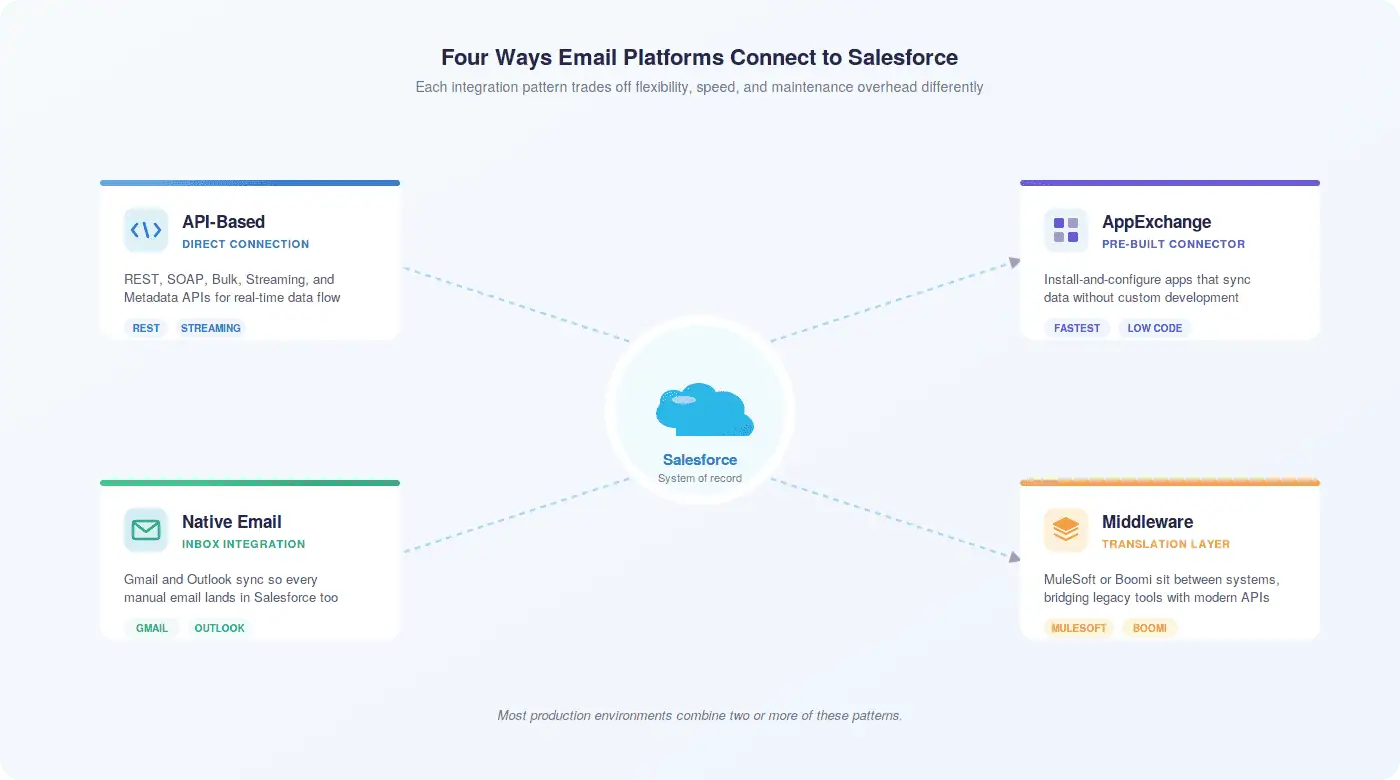
API-Based Integrations
Salesforce exposes several API types, each suited to different integration scenarios:
- REST API: Lightweight and fast, ideal for web and mobile applications that need real-time data access.
- SOAP API: Better suited for enterprise system integrations where structured, transactional data exchange matters.
- Bulk API: Designed for processing large datasets, useful when syncing thousands of records at once.
- Streaming API: Enables real-time event notifications, so external systems can react immediately when Salesforce records change.
- Metadata API: Manages configurations and customizations, relevant when integrations need to adapt to Salesforce org structure.
For email sequencing integrations, REST and Streaming APIs handle most of the work: pushing engagement data back into Salesforce as it happens, pulling contact and lead data into the sequencing platform, and keeping both systems current.
App-Based Integrations via AppExchange
Pre-built connectors from the Salesforce AppExchange offer the fastest path to integration for most teams. These apps handle the API layer for you, automatically syncing data between Salesforce and external sequencing platforms without custom development. They can create leads from external list sources, log email engagement as activity records, update contact fields based on sequence behavior, and trigger Salesforce workflows based on external events.
The tradeoff is flexibility. Pre-built connectors work well within their designed parameters, but customizing them to fit unusual data models or complex business logic often requires workarounds.
Middleware Solutions
Platforms like MuleSoft and Boomi sit between Salesforce and external systems, handling data transformation, protocol translation, and API management. They’re particularly valuable when an organization needs to integrate multiple systems simultaneously, or when legacy systems lack modern APIs that connect cleanly to Salesforce.
Middleware adds infrastructure overhead, but it pays off in organizations where email sequencing data needs to flow not just into Salesforce but also into data warehouses, BI platforms, or other downstream systems.
Native Email Client Integrations
Salesforce’s native integrations with Outlook and Gmail let reps view, edit, and log Salesforce records directly from their inbox. Emails and calendar events relate automatically to the right Salesforce records, preventing the data fragmentation that happens when reps maintain parallel records in their email client and CRM.
These integrations don’t replace a dedicated sequencing platform, but they close a critical gap: ensuring that manual emails sent outside of automated sequences still get captured in Salesforce, keeping the activity history complete.
Real-Time vs. Scheduled Synchronization
How often data syncs between systems matters more than most teams realize. Real-time synchronization propagates changes immediately, which is essential for customer-facing processes where stale data creates problems. If a prospect updates their contact information or unsubscribes from communications, that change needs to reach Salesforce before the next sequence step fires.
Scheduled synchronization batches updates at set intervals, typically hourly or nightly. It reduces API consumption and infrastructure load, and it’s appropriate for data where slight delays don’t affect business outcomes. The right choice depends on the specific data type and how quickly your team needs to act on changes.
Designing Email Sequences That Actually Move Deals Forward
The technology is only as good as the strategy behind it. A well-configured integration running a poorly designed sequence won’t move deals. Getting sequence design right is where most of the real work happens.
Start With Your Closed Deals, Not Templates
The most reliable foundation for sequence design is your own CRM data. Look at deals that closed in the last twelve months. What did the progression look like? How many touchpoints happened before a prospect agreed to a call? How long did each stage take? What content or messaging appeared in the emails that generated responses?
This reverse-engineering approach produces sequences grounded in how your specific buyers actually behave, not how a generic template assumes they should. It also reveals the natural timing intervals between steps, which vary significantly by industry, deal size, and buyer role.
Map Content to Buying Stage
Each step in a sequence should serve a specific purpose aligned to where the prospect is in their decision process. A common content progression looks like this:
- Step 1 (Day 0): Value proposition introduction. Short, direct, focused on a single relevant challenge.
- Step 2 (Day 3–4): Problem awareness. Expand on the challenge, reference industry context, establish credibility.
- Step 3 (Day 7–8): Feature and benefit demonstration. Connect specific capabilities to the articulated challenge.
- Step 4 (Day 12–14): Social proof. Customer outcomes, case study references, or relevant recognition.
- Step 5 (Day 18–21): Low-friction call-to-action. Webinar invitation, resource download, or brief conversation request.
- Step 6–7 (Day 25–35): Escalating commitment. Demo request, direct meeting ask, or decision-stage content.
This progression respects that most prospects need multiple exposures before they’re ready to engage. Pushing for a meeting on step one works occasionally, but it fails most of the time and burns goodwill in the process.
Set Clear Entry and Exit Criteria
Every sequence needs defined rules for who enters and who leaves. Entry criteria might include lead source, job title, company size, or a specific action like downloading a piece of content. Exit criteria should cover both positive outcomes, like a prospect booking a meeting or replying to an email, and negative ones, like an unsubscribe or a hard bounce.
Without exit criteria, sequences keep running after they should stop. A prospect who already booked a demo doesn’t need to receive the next step asking them to book a demo. That kind of misfire damages trust and signals that your systems aren’t talking to each other, which is exactly the impression you don’t want to create.
Timing Intervals and Send Windows
Spacing matters. Too frequent, and you generate opt-outs. Too sparse, and you lose momentum. Three to seven business days between early steps, extending to seven to fourteen days in later steps, works well for most B2B sequences. Tuesday through Thursday between 9 AM and 11 AM in the recipient’s local timezone consistently outperforms other windows, though your specific audience may differ.
Timezone-aware sending is non-negotiable for teams with geographically distributed prospect lists. An email landing at 3 AM local time doesn’t get opened, and it signals that the sender didn’t think about the recipient’s context.
Personalization: Going Beyond the First Name
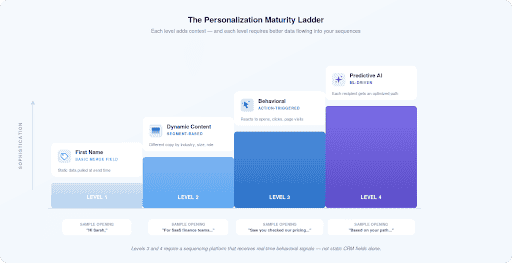
Inserting a prospect’s first name into an email subject line is table stakes. It’s not personalization in any meaningful sense. Real personalization changes what the email says based on who’s receiving it, what they’ve done, and what they care about.
Merge Fields and Dynamic Content in Salesforce
Salesforce email templates support merge fields that pull live data from CRM records into email content at send time. A template containing {!Lead:First_Name} displays the actual first name when the email deploys. The same logic applies to company name, job title, industry, or any custom field you’ve populated.
Dynamic content blocks take this further. Rather than every prospect receiving the same email body, dynamic blocks display entirely different content based on field values or segment membership. An enterprise prospect might see messaging about scalability and security. A mid-market prospect might see messaging about speed to value and ease of implementation. Same sequence, different experience.
Behavioral Personalization
Behavioral personalization adapts content based on what a prospect has done, not just who they are. If a prospect visited your pricing page, the next email in their sequence can reference pricing considerations directly. If they attended a webinar on a specific topic, subsequent emails can build on that content rather than starting from scratch.
This requires your email sequencing platform to receive behavioral signals from your website, marketing automation system, or other data sources, and pass them into Salesforce in a way that sequence logic can act on. The integration architecture matters here. Real-time behavioral data needs real-time sync to be useful.
Predictive Personalization
AI-driven personalization analyzes historical engagement patterns to identify which prospect characteristics and behaviors most strongly correlate with conversion. Rather than treating all prospects in a segment identically, predictive models surface which individuals are most likely to respond to which messages, allowing sequences to prioritize and adapt dynamically.
This capability typically lives in dedicated sales engagement platforms rather than native Salesforce tools, which is one reason teams with sophisticated personalization requirements often look beyond what Salesforce provides out of the box.
Multi-Channel Sequences: Email Isn’t the Whole Picture
Email sequences work better when they’re part of a coordinated multi-channel approach. Different prospects respond to different channels. Some reply to emails. Others pick up the phone. Some engage on LinkedIn before they’ll respond anywhere else.
Salesforce integrations with telephony platforms like RingCentral and Aircall allow call tasks to be embedded directly into sequences alongside email steps. LinkedIn integration enables social touchpoints to be tracked and coordinated with email outreach. SMS integration adds another channel for time-sensitive or high-priority outreach.
The key is coordination. Multi-channel sequences shouldn’t feel like a barrage from multiple directions. They should feel like a coherent conversation happening across the channels where a prospect is most reachable. That requires all channel activity to log back to Salesforce, giving reps a complete picture of every interaction regardless of where it happened.
For teams using Slack or Microsoft Teams internally, integrating those platforms with Salesforce also helps reps collaborate on active sequences without leaving their communication tools.
Common Integration Challenges and How to Address Them
Even well-planned integrations run into problems. Knowing what to watch for saves significant time and prevents the kind of data issues that undermine sequence performance.
Data Quality Problems
Sequences are only as good as the data feeding them. Missing email addresses, incorrect job titles, empty company fields, and duplicate records all create problems downstream. Personalization fails when merge fields reference empty data. Routing logic misfires when field values are inconsistent. Deliverability suffers when lists contain invalid addresses.
Before deploying any sequence, audit the data it will rely on. Check that required fields are populated across the target segment. Review imported data for formatting inconsistencies. Address duplicate records before they create split engagement histories. The time spent on data quality upfront prevents far larger problems after sequences go live.
Field Mapping Mismatches
When connecting an external sequencing platform to Salesforce, field names and data structures rarely align perfectly out of the box. A field called “Company” in one system might map to “Account Name” in another. Date formats differ. Picklist values don’t match. These mismatches cause data to land in the wrong fields or fail to sync entirely.
Document your field mapping before integration goes live. Involve stakeholders from both the Salesforce admin side and the sequencing platform side to confirm alignment. Test with a small dataset before opening the integration to full volume.
API Rate Limits
Salesforce imposes limits on API calls per day, and high-volume integrations can hit those limits, particularly during peak sending periods or when multiple integrations compete for the same allocation. When rate limits are exceeded, data stops syncing until the limit resets, creating gaps in your CRM records.
Monitor API consumption regularly. Batch updates where possible rather than making individual API calls per record. If your integration consistently approaches limits, evaluate whether your Salesforce license tier provides sufficient API allocation for your volume, or whether architectural changes to the integration would reduce consumption.
Sequence Logic Gaps
A common problem in Salesforce-native sequencing setups is that automation logic built across multiple tools, Flow Builder, campaign membership, email templates, and scheduled jobs, can fall out of sync. A flow might trigger correctly but reference an email template that was updated without adjusting the flow. A campaign membership rule might not account for a new lead source. These gaps are hard to spot until they cause a visible problem.
Establish a change management process for sequence modifications. When any component of a sequence changes, review all dependent components. Test changes in a sandbox environment before deploying to production. Document the logic of each sequence so that anyone maintaining it understands how the pieces connect.
Legacy System Compatibility
Organizations with older systems alongside Salesforce sometimes find that those systems lack the APIs needed for clean integration. Middleware platforms can bridge these gaps, translating between modern API standards and older protocols. For teams in this situation, evaluating middleware options early in the integration planning process prevents costly rework later.
Best Practices for Implementation
Getting email sequencing automation right in Salesforce isn’t just a technical exercise. It’s a change management effort. Here’s what separates implementations that stick from ones that get abandoned six months in.
Before You Build
- Define specific, measurable objectives: increase SQL volume by 25%, reduce average sales cycle by 20 days, improve first-response rate to 15%.
- Map your target segments and define entry and exit criteria for each sequence before touching any configuration.
- Audit data quality across the fields your sequences will use. Fix gaps before going live.
- Confirm that SPF, DKIM, and DMARC records are properly configured for your sending domains.
- Review applicable privacy regulations (GDPR, CAN-SPAM, CASL) and confirm your sequences include required consent mechanisms and unsubscribe options.
During Configuration
- Build and test sequences in a sandbox environment before deploying to production.
- Test both expected scenarios and edge cases: incomplete data, unsubscribed contacts, invalid email addresses.
- Verify that merge fields display correctly across representative records before enabling sequences at scale.
- Confirm that exit criteria fire correctly when prospects reply, book meetings, or unsubscribe.
- Check that engagement data, opens, clicks, replies, flows back into Salesforce activity records as expected.
After Launch
- Start with a pilot group of 50–100 prospects before opening sequences to full volume.
- Review performance weekly for the first month, looking for unexpected drop-offs, deliverability issues, or data sync problems.
- Assign clear ownership for sequence monitoring, optimization, and exception handling.
- Document sequence logic so that team members who didn’t build the sequences can maintain and modify them.
Common Pitfalls to Avoid
- Skipping data quality checks: Sequences built on dirty data produce poor results and create a false impression that automation doesn’t work.
- Building sequences that are too long or too frequent: More steps don’t automatically mean more replies. Excessive contact frequency drives opt-outs and damages sender reputation.
- Ignoring exit criteria: Sequences that keep running after a prospect has already engaged create awkward experiences and signal disconnected systems.
- Treating all prospects identically: Generic sequences sent to unsegmented lists underperform. Even basic segmentation by role or industry improves results meaningfully.
- Launching without a monitoring plan: Automation doesn’t mean set-and-forget. Sequences need regular review to catch performance degradation before it compounds.
Measuring What Matters: KPIs for Email Sequencing Automation
Measuring sequence performance requires looking at metrics across three levels: revenue outcomes, engagement signals, and list health. Each level tells a different part of the story, and focusing on only one gives you an incomplete picture.
Revenue Metrics
These are the metrics that answer the fundamental question: is this generating business value?
- Total revenue attributed to email sequences: Tracked through conversion attribution in your CRM and email platform.
- Revenue per email sent: Total sequence revenue divided by total emails sent. A declining trend signals that you’re broadcasting too broadly or to lower-quality segments.
- Pipeline influenced by sequences: Opportunities where email sequence engagement preceded pipeline creation, tracked through Salesforce campaign influence or custom attribution models.
- Cost per acquisition: Total sequence program cost divided by new customers acquired through sequence-influenced deals.
For teams wanting to build more sophisticated revenue reporting, Salesforce reporting and reporting tools provide the infrastructure for connecting sequence engagement to pipeline and closed revenue. Learning how to create reports in Salesforce and build dashboards that surface these connections is worth the investment.
Engagement Metrics
These metrics predict future conversions by revealing whether prospects are actively interacting with your content.
- Click-through rate (CTR): Clicks divided by delivered emails. Promotional emails typically land between 1–3%; educational content often reaches 20–30%. Benchmark against your own historical data, not just industry averages.
- Click-to-open rate (CTOR): Clicks divided by opens. This reveals whether your email design and calls-to-action convert readers into clickers. Typical ranges: 10–25% for general marketing, 5–15% for promotional.
- Reply rate by sequence step: Tracks where in the sequence prospects are most likely to respond, revealing which steps are working and which need revision.
- Conversion rate: The percentage of recipients who complete a desired action, such as booking a meeting, registering for a webinar, or requesting a demo.
Open rate is worth monitoring as a trend signal for subject line and deliverability health, but treat it cautiously as an absolute metric. Apple Mail Privacy Protection and similar features artificially inflate open counts, making raw open rate an unreliable measure of actual engagement.
List Health Metrics
These metrics protect the long-term viability of your email program.
- Bounce rate: Keep hard bounces below 2%. Higher rates signal list quality problems and damage sender reputation.
- Spam complaint rate: Should approach zero. Even small complaint rates trigger deliverability penalties from inbox providers.
- Unsubscribe rate: A rising trend signals that sequences are too frequent, too generic, or reaching the wrong audience.
- List growth rate: New subscribers minus unsubscribes and bounces, divided by total list size. A shrinking list eventually limits what sequences can achieve.
- Inbox placement rate: Target above 90%. Emails landing in spam folders generate no engagement regardless of content quality.
Build a weekly dashboard tracking all three metric levels. Use Salesforce dashboards to surface sequence performance alongside pipeline data, so the connection between outreach activity and revenue outcomes stays visible to both sales managers and CRM administrators. You can also share reports with leadership to keep sequence ROI visible at the right level.
Data Governance and Compliance in Automated Sequences
Automated sequences touch a lot of data, and that data carries legal and reputational obligations. Getting governance right isn’t optional, it’s foundational to running sequences that don’t create liability.
Regulatory Requirements
The three regulations most relevant to B2B email sequencing are:
- GDPR: Requires explicit prior consent before sending emails to EU residents. Consent must be freely given, specific, and revocable. Unsubscribe mechanisms must be easy to use and honored immediately.
- CAN-SPAM: Applies to commercial emails to US recipients. Requires honest subject lines, clear sender identification, a physical mailing address, and a functional unsubscribe mechanism. Emphasizes opt-out rather than opt-in.
- CASL: Canada’s anti-spam law, which requires express or implied consent before sending commercial electronic messages. Stricter than CAN-SPAM in several respects.
Sequences must implement these requirements at the technical level, not just the policy level. Unsubscribe links must work. Consent records must be stored and accessible. Preference centers must reflect actual communication preferences and be honored by sequence logic.
Email Authentication
SPF, DKIM, and DMARC records tell inbox providers that your organization owns the domains you’re sending from and that messages originate from authorized servers. Without these records properly configured, even well-crafted emails route to spam folders regardless of content quality.
Verify authentication records before deploying sequences. Test them using tools like MXToolbox or Google’s Postmaster Tools. Monitor DMARC reports to catch authentication failures early.
Salesforce Data Governance
Salesforce Data Cloud Governance provides policy-driven controls for managing data at scale, including AI tagging and classification that automatically labels records with tags like GDPR or PII. These controls enforce access permissions consistently across all data, ensuring that sensitive prospect information is accessible only to authorized users and systems.
For CRM administrators managing Salesforce integrations, establishing clear data governance policies before connecting external sequencing platforms prevents the kind of uncontrolled data access that creates both security risks and compliance exposure. Define which fields external platforms can read and write. Audit integration permissions regularly. Review data retention policies to ensure that prospect records aren’t held longer than necessary.
Continuous Optimization: How to Keep Sequences Improving
Sequences that aren’t actively optimized gradually decline in performance. Prospect expectations shift. Messaging that worked six months ago feels stale. New competitors enter the market with different positioning. Staying ahead of these changes requires a systematic approach to testing and refinement.
A/B Testing Framework
Test one variable at a time. When you change multiple elements simultaneously, you can’t attribute performance differences to any specific change. A structured testing approach looks like this:
- Identify the sequence step with the lowest click-through or reply rate.
- Form a hypothesis: “Changing the subject line from a question to a statement will increase open rate.”
- Create two versions differing only in the tested variable.
- Split your prospect sample randomly between the two versions.
- Run the test until you have statistically meaningful results, typically at least 200 recipients per variant.
- Implement the winning version and document the finding.
Variables worth testing systematically include subject lines, preheader text, sender name, email length, call-to-action phrasing, send timing, and step intervals. Each test adds to an organizational knowledge base about what resonates with your specific audience.
Segmentation Refinement
Start broad and get more specific over time. Initial sequences might segment by company size or industry. As you accumulate engagement data, you can identify sub-segments that respond differently, by job function, by technology stack, by deal size, or by lead source, and create more targeted sequences for each.
The goal is relevance, not complexity. More segments mean more sequences to maintain. Add segmentation only when the performance improvement justifies the operational overhead.
Timing Optimization
Aggregate data on optimal send times is a starting point, not a final answer. Your specific audience may behave differently from industry averages. Analyze your own engagement data to identify when your prospects are most likely to open and click. If your sequences reach prospects in multiple time zones, timezone-aware sending ensures each recipient gets emails during their local business hours.
AI-powered send time optimization, available in some sequencing platforms, analyzes individual engagement history to identify the optimal send window for each recipient. This level of personalization consistently outperforms fixed send times, particularly for large, geographically distributed prospect lists.
Content Refresh Cycles
Set a calendar reminder to review sequence content every ninety days. Check whether messaging still reflects current product positioning, whether referenced case studies are still relevant, and whether calls-to-action align with current offers. Sequences running on outdated content quietly underperform without triggering any obvious alerts.
Use Salesforce reporting tools to track sequence performance trends over time. A gradual decline in reply rate or click-through rate often signals that content needs refreshing before it becomes a significant problem.
Where Revenue Grid Fits In
Salesforce gives you a powerful foundation. But as sequences grow in complexity, managing them across native tools, Flow Builder, email templates, campaign logic, and manual checks, creates friction that compounds over time. Reps spend time troubleshooting instead of selling. Admins spend time maintaining instead of improving. And the gaps between tools create blind spots that cost deals.
Revenue Grid’s email automation and drip campaign capabilities are built natively on Salesforce, which means sequence data lives where your team already works. There’s no separate system to log into, no manual sync to manage, and no data fragmentation between your sequencing platform and your CRM. Engagement data flows directly into Salesforce activity records. Sequence logic can reference any Salesforce field. And reps get a unified view of every prospect’s status across all active sequences without leaving their workflow.
The ability to send emails directly from Salesforce, combined with deep email and calendar integration, means that every touchpoint, automated or manual, gets captured in the same place. Sales managers get accurate activity data for coaching. CRM administrators get clean records without chasing reps to log their outreach.
For teams using Outlook or Gmail, Revenue Grid’s integrations ensure that email activity syncs to Salesforce automatically, closing the gap between what reps do in their inbox and what appears in the CRM.
If your current setup involves stitching together multiple tools to approximate what a unified sequencing system should do, it’s worth seeing what a purpose-built solution looks like in practice.
The Bottom Line
Email sequencing automation integrated with Salesforce isn’t a shortcut to more emails. It’s a system for making every outreach touchpoint more deliberate, more relevant, and more likely to advance a deal.
The teams that get the most out of it treat it as a strategic capability, not a tactical tool. They design sequences around how their buyers actually behave. They keep their CRM data clean so automation has something reliable to work with. They measure revenue outcomes, not just open rates. And they optimize continuously rather than assuming that what worked at launch will keep working indefinitely.
How can email sequencing automation improve my Salesforce CRM efficiency?
Email sequencing automation reduces the manual work required to execute consistent outreach. Instead of reps manually scheduling and sending each follow-up, sequences handle execution automatically based on predefined logic. Engagement data, opens, clicks, replies, flows back into Salesforce activity records without manual logging. This keeps CRM data current, gives managers accurate visibility into rep activity, and frees reps to focus on conversations rather than administrative tasks. Teams typically recover up to thirty percent of outreach time previously spent on manual follow-up execution.
What are the best practices for integrating email sequencing with Salesforce?
Start with data quality. Audit the fields your sequences will use before configuring any automation. Define entry and exit criteria for each sequence before building. Test in a sandbox environment with representative data before going live. Confirm that engagement data syncs back to Salesforce correctly. Assign clear ownership for sequence monitoring and optimization. Use phased rollouts, starting with small prospect groups, to catch configuration issues before they affect large volumes. Review sequence performance weekly for the first month after launch.
Can I customize email sequences in Salesforce to suit my business needs?
Yes, extensively. Salesforce’s native tools, including Flow Builder, email templates with merge fields, and dynamic content, allow significant customization of sequence logic, content, and timing. You can create sequences that branch based on prospect behavior, reference any Salesforce field for personalization, and trigger based on virtually any record change or scheduled condition. For more complex customization requirements, dedicated sequencing platforms that integrate with Salesforce offer additional flexibility, including AI-driven personalization, multi-channel coordination, and more granular behavioral triggers than native Salesforce tools provide.
What common challenges are faced during Salesforce email sequencing integration?
The most frequent challenges are data quality issues, where incomplete or inconsistent CRM data causes personalization failures and routing errors; field mapping mismatches between Salesforce and external platforms; API rate limit constraints during high-volume periods; and sequence logic gaps when automation is built across multiple disconnected tools. Legacy system compatibility can also create integration complexity. Most of these challenges are preventable with thorough planning, data audits before launch, and clear documentation of integration architecture and sequence logic.
How does email sequencing integration affect data governance and security in Salesforce?
Integrating external sequencing platforms with Salesforce expands the surface area for data access, which requires explicit governance attention. Define which fields external platforms can read and write. Review integration permissions regularly to ensure they reflect current business requirements. Implement Salesforce’s native data governance controls, including field-level security and profile-based access restrictions, to limit what integrated systems can access. Ensure that sequences comply with applicable privacy regulations by implementing consent tracking, functional unsubscribe mechanisms, and preference centers. Audit data flows between systems periodically to confirm that sensitive prospect information is handled appropriately throughout the integration.