
Key Takeaway
- Salesforce Einstein Activity Capture (EAC) automates email and calendar logging into Salesforce, but captured data has historically lived on AWS, outside standard reports, dashboards, and Flows.
- The Summer '25 release introduced Sync Email as Salesforce Activity, which writes emails as native records. The migration is irreversible and historical backfill is capped at 180 days.
- Two deadlines are colliding in 2026: Activity 360 Reporting retires in Summer '26, and the Microsoft Graph migration deadline lands in August 2026.
- Revenue Grid writes every interaction directly into standard Salesforce objects, captures meeting content, and supports SAP, Oracle, and Microsoft Dynamics alongside Salesforce.
So, What Is Salesforce Einstein Activity Capture?
Salesforce Einstein Activity Capture is a Sales Cloud feature that connects a user’s Microsoft 365 or Google Workspace account to Salesforce, then automatically captures emails, calendar events, and contacts, and displays them on the Activity Timeline of related records. Einstein is Salesforce’s AI layer, and EAC is one of its most widely adopted features. It replaced the older Lightning Sync plugin, and it runs server-side, which makes it more reliable than the client-side tools it replaced.
EAC captures five things:
- Emails: sent and received messages matched against Salesforce Contacts, Leads, and Users
- Calendar events: meetings synced as Event records, with one-way or two-way options
- Contacts: address book contacts matched against Salesforce Contacts to reduce duplicates
- Einstein Email Insights: AI flags on emails that mention pricing, competitors, or urgency
- Internal Activity Feed: a central queue where unmatched activities land when EAC can’t figure out which record they belong to
Each of these sounds clean in isolation. The complexity lives in how the data is stored, which is where most evaluation conversations get tripped up.
How Einstein Activity Capture Actually Works
EAC runs server-side. When a user connects their mailbox, it scans new emails and calendar events, matches senders and attendees against Salesforce records by email address, then surfaces matches on the right timeline. For years, that was good enough. Then pipelines got more complex, reporting got more important, and the storage question stopped being a technical detail.
The captured vs. synced distinction that changes everything
EAC offers two ways to handle email data, and they behave very differently.
Captured emails (the legacy default). EAC scans incoming and outgoing emails, matches them to Salesforce records, and displays them on the Activity Timeline. The catch is that the underlying data lives on AWS, not inside Salesforce. You can see these emails on a record, but you cannot report on them, query them with SOQL, trigger a Flow from them, or export them in a standard backup.
Paul B. Fischer, a Salesforce consultant with 19 certifications, described it in a Cloud on Purpose post with a line that stuck with many admins:
“Salesforce is merely a window from which to view this email.”
The window is real, but what you’re looking at isn’t actually in the house.
Synced emails (Sync Email as Salesforce Activity). The Summer ’25 release changed this. With the option enabled, EAC writes emails as native Salesforce EmailMessage records that standard reports, dashboards, Flows, and APIs can reach.
The table below shows the difference in one glance.
| Attribute | Captured (default) | Synced (Sync Email as Activity) |
|---|---|---|
| Where data is stored | Separate AWS data store | Standard EmailMessage object |
| Visible on Activity Timeline | Yes | Yes |
| Available in standard reports | No | Yes |
| Queryable via SOQL or API | No | Yes |
| Triggers Flows and automations | No | Yes |
| Requires separate admin enablement | No | Yes |
| Historical backfill at migration | N/A | Capped at 180 days |
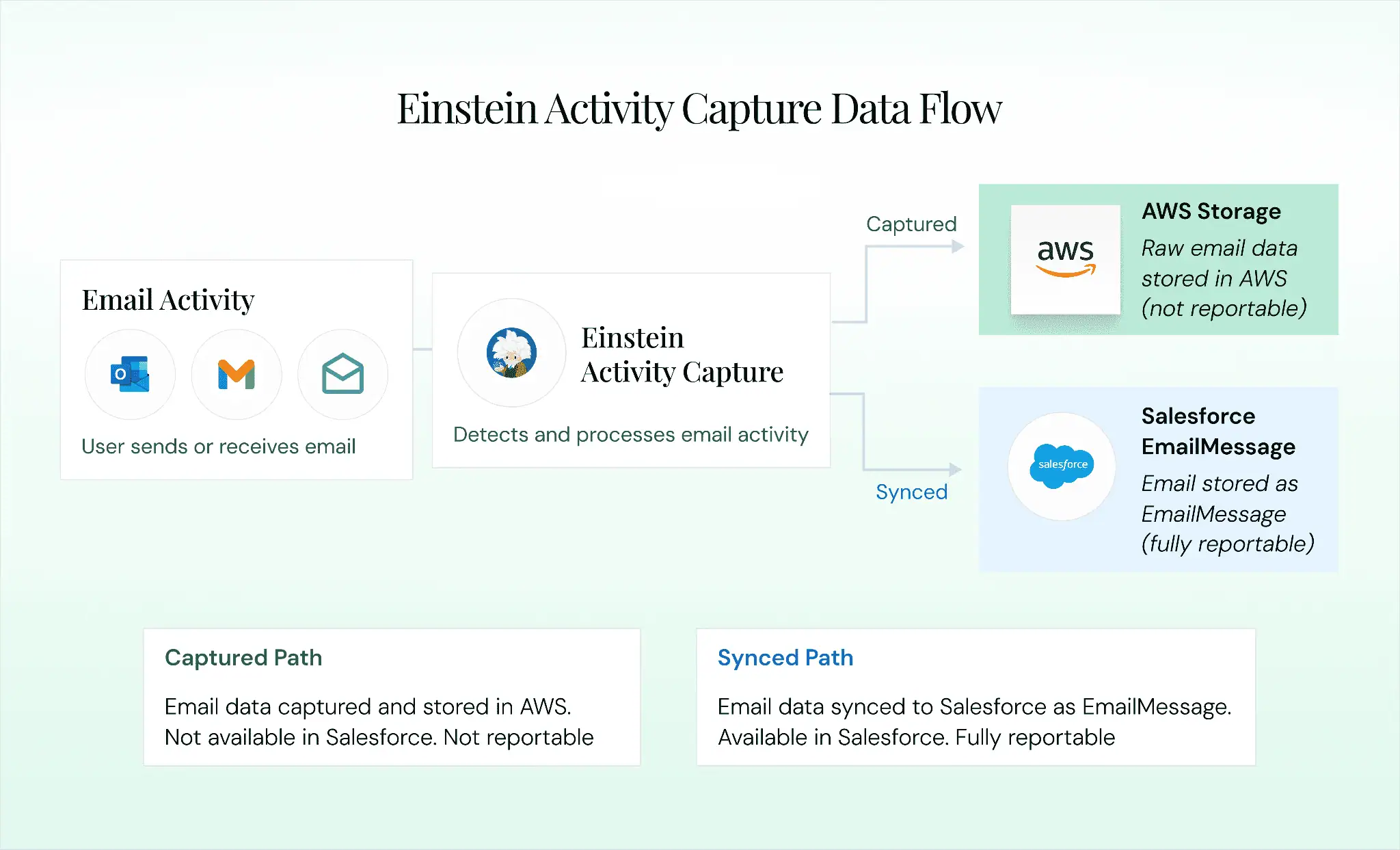
If your org turned EAC on three years ago and never switched to Sync Email as Salesforce Activity, every email captured in that time is sitting in AWS, invisible to your reports, and subject to a rolling retention window of 6 or 24 months. The Summer ’25 option helps new email going forward. It does not rescue the past.
Calendar, contact, and record matching
Calendar events have always been written as standard Salesforce Event records, which means they are reportable. Admins choose between one-way and two-way sync, and most teams should start with one-way to avoid duplicate events. Contact sync matches address book contacts against Salesforce Contacts by email address, with scope set to specific folders to keep personal contacts out of the org.
Record matching pulls email addresses from the To, From, CC, and attendee fields, then searches Contact, Lead, and User records for a match. When matching fails, the activity lands in the Internal Activity Feed, where admins manually associate orphaned activities with the right records. Since Summer ’25, admins can build custom matching rules using Salesforce Flow, which requires Flow expertise many admin teams do not have in unlimited supply.
Setting Up Einstein Activity Capture Without Regretting It Later
The full click-by-click setup lives in Salesforce Help. This section covers the decisions that matter most.
Before enabling EAC, confirm your Salesforce edition, System Administrator permissions, and the 100-user cap on the Standard tier. If you plan to enable Sync Email as Salesforce Activity, every synced email will consume Salesforce data storage, so estimate volume in advance.
The setup flow is sequential:
- Enable EAC in Setup and pick the edition behaviors that match your org
- Configure email and calendar integration with Microsoft 365 or Google Workspace
- Select calendar sync direction, starting with one-way to avoid duplicate event headaches
- Set up contact sync scope, deciding which folders or groups are in scope
- Assign EAC to users through permission sets, starting with a pilot group of 5 to 10
- Configure excluded domains, including your own internal email domains
- Enable Sync Email as Salesforce Activity if you need email data to be reportable
Step 7 is the single most important decision in this list. For Microsoft 365 customers, this is also the moment to migrate from Exchange Web Services to Microsoft Graph, because the deadline is not far away.
EAC is genuinely useful. It removes manual data entry and gives sales managers more visibility than they had before. That does not make the remaining limitations small.
The reporting black hole
The biggest frustration, by a significant margin, is that captured email data does not appear in standard Salesforce reports. Brent Downey, a Salesforce admin who runs the Admin Hero blog, put it plainly:
“The limitations of EAC are extreme for most of my clients. The inability to build custom reports on activity content, and the fact that they are stored outside of Salesforce, make it difficult for most clients to swallow. It also presents a challenge if or when you decide to turn off EAC because all of that activity ‘dissapears’ from the activity timeline as a result.”
That comment captures three problems in one breath: the reporting gap, the data ownership question, and the fact that turning EAC off takes history with it. Sync Email as Salesforce Activity addresses this for new email, but it does not rescue historical data. According to Validity’s State of CRM Data Management 2025 report, 76% of organizations say less than half of their CRM data is accurate and complete.
Matching accuracy that misses on complex deals
EAC’s record matching works well on clean environments with one rep per account. In the real world, it misfires. A single email address change can orphan historical emails and erase visibility into a customer relationship. In high-volume environments, CC’d emails often get counted multiple times on dashboards, which distorts the coaching conversations managers rely on. Misattributed data is worse than no data, because it creates confidence in the wrong story.
Retention windows that don’t match compliance policies
EAC data has a rolling expiration. Standard tier retains data for 6 months. Full tier defaults to 24 months. After that, the data is deleted. A Salesforce consultant named Matt Rosin explained the gap in a comment on Admin Hero:
“The prospect of emails that were visible in the timeline disappearing after 6 months, and people perhaps not uploading them manually, is a bit daunting from a compliance perspective (we store activities for 10 years).”
A 6-month window against a 10-year compliance requirement is a reason not to turn EAC on at all in certain industries.
The smaller limitations that add up
EAC logs that a meeting happened and who attended, but does not capture transcripts, action items, or sentiment, which is a blind spot for coaching. Sync is not real-time, with delays of minutes to hours that matter on fast-moving deals. And EAC does not work with SAP, Oracle, or Microsoft Dynamics, which rules it out for multi-CRM environments.
Two deadlines every Salesforce admin needs on their calendar
Two converging deadlines deserve a reminder right now:
- Summer ’26 (around June 2026): Salesforce is retiring Activity 360 Reporting, Activity Metrics, and the Activities Dashboard. Any forecasting workflow that depends on them needs a migration plan before Q2 2026.
- August 2026: Microsoft Graph becomes the only supported authentication method for EAC on Microsoft 365. Exchange Web Services begins shutting down in October 2026 and retires permanently in April 2027.
These deadlines are not optional, and they are arriving at the same time every other 2026 priority is landing.
EAC limitations at a glance
| Limitation | Impact | Severity |
|---|---|---|
| Default data stored outside standard objects | No standard reports on captured data | High |
| Limited matching accuracy | Emails associated with wrong records on complex deals | Medium |
| No call or meeting content capture | No visibility into what was discussed | High |
| Rolling data retention (6 or 24 months) | Compliance gap in regulated industries | High |
| Sync latency | Delays between activity and CRM visibility | Medium |
| Salesforce-only ecosystem | Cannot serve multi-CRM environments | Medium |
| Activity 360 retirement (Summer ’26) | Forced migration with limited historical backfill | High |
When EAC Is the Right Call, and When It Isn’t
EAC is not the wrong choice for every org. It is likely enough if you have fewer than 100 sales users, use only Salesforce as your CRM, run simple sales cycles, and don’t rely on activity data for forecasting. It also works if you’re comfortable enabling Sync Email as Salesforce Activity and don’t need call recording or meeting transcripts.
EAC runs out of room when your team needs full activity capture across emails, calls, and meetings, when reportable data is essential for forecasting and coaching, when deals are cross-threaded across multiple reps, when meeting content matters more than attendance, or when you operate in a regulated industry or a multi-CRM environment.
Why Revenue Teams Are Moving to Revenue Grid?
Teams don’t leave EAC because they stop believing in activity capture. They leave because they need activity data that actually works inside the rest of their revenue process.
Data that lives where your reports live
Vapotherm, a publicly traded medical device manufacturer, replaced its legacy activity capture approach with Revenue Grid. In year one, the platform auto-captured 110,000 emails and 27,000 calendar events, returning 761 person-days saved from manual data entry and $175,000 in cost savings. More importantly, their managers finally had the full engagement picture they had been missing, and forecasts started reflecting activity reality.
That happens because Revenue Grid writes every email, meeting, attachment, and task directly into Salesforce as native records. No external data store, no expiration window, no invisible gaps. Reports can reach it, dashboards can chart it, Flows can trigger on it, and AI features can use it.
Meeting content, not just meeting counts
Revenue Grid’s capture engine captures what was said, what was decided, and how the interaction aligns with opportunity progression. That is the gap EAC leaves open for coaching and deal review.
Morgan & Morgan, the law firm, saw a 15 to 20% increase in the number of matters their case staff could handle each month after deploying Revenue Grid. Brian Walsh, Senior Platform Analyst, described the outcome:
“By using Revenue Grid, we’ve found that there’s a 20% increase in the number of cases that our case staff can handle. That’s a big increase in productivity.”
Deal intelligence, multi-CRM support, and enterprise compliance
Revenue Grid reads engagement patterns across emails, meetings, and deal history, then surfaces the moments that matter: a quiet commit-stage deal flagged early, a buying committee gap made visible, a responsive contact going dark. According to Gartner’s 2024 Sales Survey, sellers who partner with AI effectively are 3.7 times more likely to meet quota.
The platform is native to Salesforce, SAP, Oracle, and Microsoft Dynamics, and covers SOC 2 Type II, ISO 27001, ISO 27701, and GDPR compliance. Full details are on the Revenue Grid security page.
Einstein Activity Capture vs Revenue Grid
| Capability | Einstein Activity Capture | Revenue Grid |
|---|---|---|
| Email capture | Yes (with limitations) | Yes (100% capture) |
| Calendar and contact capture | Yes | Yes |
| Call and meeting content capture | No | Yes |
| Data in standard CRM objects | No (AWS by default) | Yes |
| Full reporting on captured data | Limited | Yes |
| AI-driven pipeline insights | Basic | Advanced |
| Multi-CRM support (SAP, Oracle, Microsoft) | Salesforce only | Yes |
| Data retention | 6 or 24 months (rolling) | Unlimited |
| Deployment flexibility | Salesforce cloud only | Cloud, private cloud, or on-premises |
Want to see the difference in your own Salesforce org?
What is Einstein Activity Capture in Salesforce?
EAC is a Salesforce Sales Cloud feature that automatically captures emails, calendar events, and contacts from a user’s connected Microsoft 365 or Google Workspace account and displays them on the Activity Timeline of related records. It runs server-side and replaces the older Lightning Sync plugin.
Is Einstein Activity Capture free?
EAC Standard is included with Sales Cloud Starter, Professional, Enterprise, and Unlimited editions, capped at 100 users with 6-month data retention. The full version requires Unlimited, Performance, or the Sales Cloud Einstein add-on.
Where does Einstein Activity Capture store data?
By default, EAC stores captured email data on AWS, not in standard Salesforce objects. Calendar events and contacts are written as standard records. Sync Email as Salesforce Activity, introduced in Summer ’25, writes emails as native EmailMessage records, but the migration is irreversible and historical backfill is capped at 180 days.
Can I run reports on Einstein Activity Capture data?
By default, no. Captured email data is not available in standard reports, dashboards, or list views. Enabling Sync Email as Salesforce Activity makes new email data reportable. For full reporting across emails, calls, and meetings, a platform like Revenue Grid writes all activity data into standard CRM objects from the start.
What are the main limitations of Einstein Activity Capture?
Captured data stored outside standard objects, matching accuracy issues on complex deals, no meeting content capture, rolling data retention, sync latency, Salesforce-only support, and the Activity 360 retirement in Summer ’26.
Are there alternatives to Einstein Activity Capture?
Yes. Revenue Grid captures 100% of sales activities, stores data in standard Salesforce objects, supports multi-CRM environments including SAP, Oracle, and Microsoft Dynamics, and provides AI-driven pipeline insights.