


Key Takeaway
- Salesforce killed Workflow Rules and Process Builder on December 31, 2025. Flow Builder is the only supported declarative tool now.
- Salesforce automation in 2026 has three layers: process automation (Flow/Apex), activity automation (data capture), and intelligence automation (Agentforce/AI). Most teams only address the first one.
- Agentforce 360 is GA. Its ARR crossed $500M by December 2025. It is also only as smart as the data it runs on. Data quality is the #1 AI obstacle for 44% of organizations (BARC, 2025).
- Einstein Activity Capture stores data on AWS, not inside Salesforce. It is not available via the API. It has a 24-month retention cap.
- Revenue Grid captures activity data directly into Salesforce objects, scores deals with explainable Revenue Signals, and delivers pipeline intelligence and forecasting with no AWS dependency, no retention ceiling, and no manual rep effort.
Here is a pattern we see constantly.
A RevOps team spends six weeks building Flows to automate lead routing, deal stage updates, and approval chains inside Salesforce. Technically, everything works. The Flows fire. The fields update. The Slack notifications land.
Then the VP asks why the forecast is still off by 20%.
The answer has nothing to do with the Flows. Reps logged four out of thirty emails this month. Nobody captured the three calls with the champion who went dark. The opportunity stage hasn’t been updated since discovery.
The Salesforce automation is fine. The data feeding it is not.
This is the core issue with how most teams approach Salesforce automation in 2026. They optimize the logic layer while the data layer underneath stays broken. More Flows on bad data just means faster bad decisions.
This guide covers all three layers: the Salesforce automation tools, the December 2025 platform shift, the Agentforce AI layer, and the activity-data foundation that determines whether any of it matters.
What Is Salesforce Automation?
Salesforce automation is the use of native Salesforce platform tools, including Flow Builder, Apex, Approval Processes, and Agentforce, to automate repetitive business processes, capture sales activity data, and enable AI-driven decision-making across the revenue lifecycle.
The term gets used as if it means one thing. It means three. Conflating them is how teams end up with great workflows and terrible forecasts.
Meaning #1: Sales Force Automation (SFA). The CRM software category. Oracle defines SFA as software that automates manual, repetitive sales tasks so reps can focus on customers instead of CRM admin. This is the business layer: lead management, pipeline visibility, opportunity tracking, Salesforce sales automation, and forecasting.
Meaning #2: Salesforce platform automation. The native toolkit admins and developers use to build automated processes inside Salesforce. Flow Builder, Apex, Approval Processes, and now Agentforce. This is what most people mean when they say “CRM automation inside Salesforce.”
Meaning #3: Activity automation. The automatic capture of emails, meetings, and calls directly into Salesforce records without rep involvement. Salesforce activity tracking that happens automatically. This one gets overlooked almost universally. It is also where most CRM data gaps originate.
A complete Salesforce automation strategy maps all three as layers:
- Process automation. Flow and Apex handle logic, routing, field updates.
- Activity automation. Captures what actually happened in every customer interaction.
- Intelligence automation. Agentforce and Einstein take action on top of that data.
Each layer has different tools, different owners, and different failure modes. Fix only one and the other two will limit your results no matter how well the first one is built.
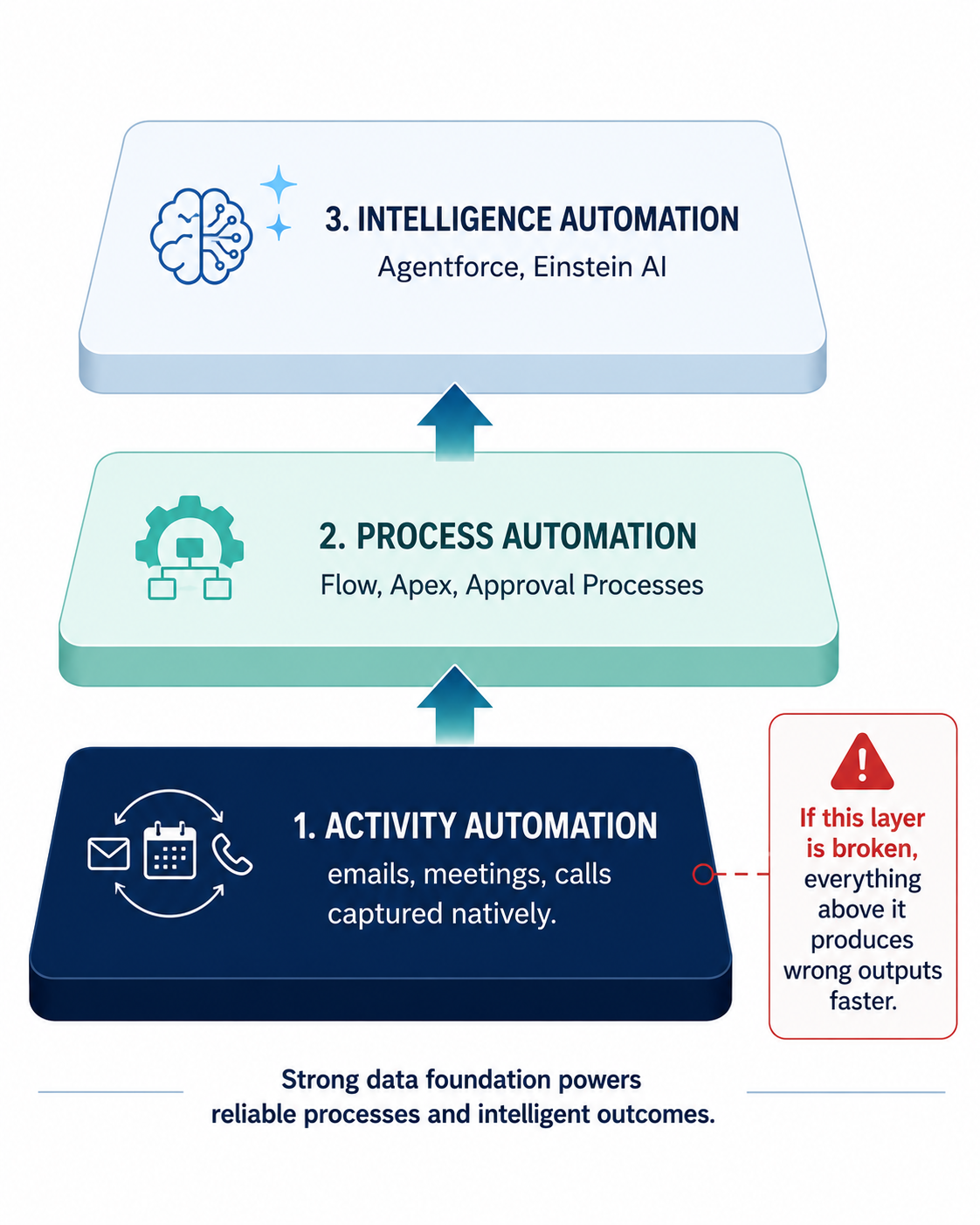
Three-layer Salesforce automation framework showing activity automation as the data foundation, process automation in the middle, and intelligence automation at the top.
Why Did Salesforce Automation Change So Dramatically in 2025?
Salesforce automation changed in 2025 because two inflection points landed simultaneously. Salesforce ended support for Workflow Rules and Process Builder on December 31, 2025, which means, no bug fixes, no enhancements, no investment. If your revenue-critical automation is built on Workflow Rules, you’re running unsupported infrastructure at the core of your sales process.
Salesforce also launched Agentforce 360 (agentic AI) as generally available in October 2025. Together, these events forced a complete reset of automation strategy for every Salesforce org.
The official guidance: migrate to Flow Builder.
What does “end of support” actually mean for your Salesforce org?
End of support for Salesforce Workflow Rules and Process Builder means existing automations continue to function, but Salesforce no longer provides bug fixes, security patches, or feature enhancements. Organizations are expected to migrate all automation logic to Flow Builder.
Most teams are treating this as a technical migration. Swap Workflow Rules for Flows, done.
That is a mistake. It is an architecture reset disguised as a migration.
The orgs using this moment to audit, consolidate, and document their entire automation estate will be in significantly better shape than those doing a mechanical lift-and-shift. Migrating Workflow Rules into equivalent Flows without auditing what you have just gives your technical debt a newer address.
What is Agentforce 360 and why does it matter?
Agentforce 360 is Salesforce’s agentic AI platform, an autonomous AI layer that reasons, decides, and executes inside Salesforce without a human in the loop. That is a fundamentally different category of Salesforce automation. It also has a data dependency that most implementations are not ready for.
It was launched as generally available on October 13, 2025. Unlike Einstein’s predictive AI, Agentforce deploys autonomous agents that reason, decide, and execute tasks inside Salesforce without human intervention. Its ARR surpassed $500 million by December 2025.
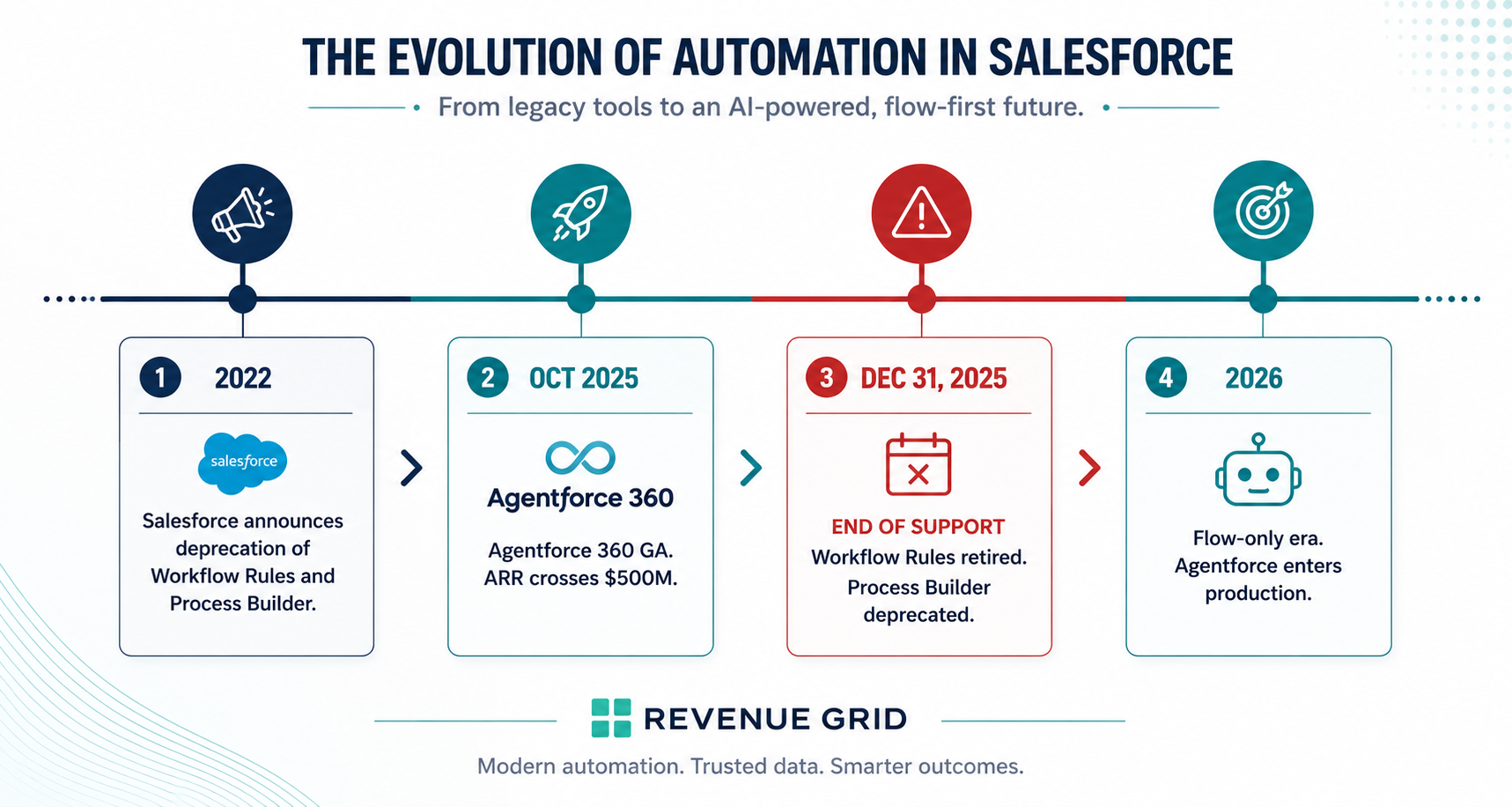
Salesforce automation timeline from 2022 deprecation through December 2025 Workflow Rules retirement and Process Builder deprecation to the 2026 Flow-only and Agentforce era.
Which Salesforce Automation Tools Should You Use in 2026?
The four active Salesforce automation tools in 2026 are Flow Builder (declarative, low-code, handles most use cases), Apex (code-based, for complex logic and bulk data), Approval Processes (for workflows requiring human sign-off), and Agentforce (autonomous AI agents). Workflow Rules and Process Builder reached end of support on December 31, 2025.
With the legacy tools retired, the decision framework for how to automate Salesforce processes simplifies to three active options plus Agentforce.
When should you use Salesforce Flow Builder?
Flow Builder is the default Salesforce automation tool for most use cases. It handles record-triggered flows, screen flows, scheduled flows, and Flow Orchestration. Salesforce MVPs recommend a 70% Flow, 20% Apex, 10% Agentforce mix across a typical automation estate.
Almost always. Salesforce Flow Builder is the primary low-code automation tool and the centerpiece of any Salesforce flow builder guide in 2026. Record-triggered flows, screen flows, scheduled flows, subflows, Flow Orchestration for multi-step processes. It covers the majority of Salesforce automation examples you will encounter.
A practical benchmark: 70% Flow, 20% Apex, 10% Agentforce. That ratio is not a rule. It is a signal about where complexity should live. Most automation belongs in Flow. Reach for Apex only when Flow genuinely cannot handle the job.
When does Apex make more sense?
Apex is Salesforce’s proprietary programming language. It belongs in your Salesforce automation strategy when Flow hits its limits on volume, complexity, or external system depth.
The most common technical debt pattern: using Apex when a well-built Flow would have worked. Every Apex trigger adds maintenance burden and requires a developer to modify. The threshold for reaching Apex should be high.
Is the Salesforce Flow vs Process Builder comparison still relevant?
No. Salesforce Process Builder was deprecated and reached end of support on December 31, 2025. The comparison is only relevant for migration planning. It is: what logic lives in your existing Process Builders, and what is the cleanest path to rebuild it in Flow?
Simple field updates and notifications migrate quickly. Multi-step processes with branching logic and cross-object updates need to be mapped first, then rebuilt.
What can Agentforce do? Real Salesforce automation examples.
Agentforce deploys autonomous AI agents inside Salesforce. They don’t just execute a predefined path. They analyze context, make decisions, and act autonomously across Salesforce and connected systems.
Concrete Salesforce automation examples using Agentforce:
- SDR Agent. Qualifies inbound leads, checks ICP fit against account data, books meetings on the rep’s calendar.
- Sales Coach Agent. Reviews call transcripts, identifies missed objection-handling opportunities, delivers coaching feedback.
- Service Agent. Resolves customer inquiries end-to-end without human escalation. OpenTable used this to resolve 70% of diner and restaurant inquiries autonomously (Salesforce Newsroom, October 2025).
The capability is impressive. The data dependency is uncomfortable. Agentforce makes decisions based on what it can see. If half your activity data never made it into Salesforce, the agent is reasoning from half a picture.
How Do You Migrate to Flow Without Breaking Revenue Processes?
Salesforce flow migration is not a weekend task. For most mid-market and enterprise orgs, it is a multi-sprint project with real revenue risk if handled without a plan.
Step 1: Audit what you have. Run Salesforce Optimizer. It surfaces your full Salesforce workflow automation inventory: Workflow Rules, Process Builders, Flows, and the objects each touches. The output almost always reveals automations nobody on the current team built, overlapping processes on the same trigger, and revenue-critical workflows that are undocumented.
Step 2: Prioritize by revenue impact. A Workflow Rule that fires on every closed-won opportunity is priority one. A Process Builder that sends an internal Slack ping is not. Migrate what matters to revenue first. Document everything before changing anything.
Step 3: Use the right tool for each case. Salesforce’s “Migrate to Flow” tool handles simple automations (field updates, email alerts, outbound messages) automatically. Complex Process Builders with branching logic, multi-object updates, or external integrations must be rebuilt from scratch in Flow.
What are the Salesforce Flow best practices for migration?
Three non-negotiable Salesforce Flow best practices are:
Fault paths. A Flow without a fault path fails silently. Nobody knows it broke until a commission calculation didn’t fire or a renewal date wasn’t set. Fault paths route failures to a record, task, or alert so someone can act.
Naming conventions. “FLW_Opportunity_StageChange_RevOps_2026” tells the next admin exactly what the Flow does, who owns it, and when it was built. “Untitled Flow 12” tells them nothing. Establish conventions before you build. Not after you have fifty Flows.
Sandbox testing. Every Flow that touches a revenue-critical object gets a full sandbox regression pass before production. The cost of one broken close-date automation in production is worth more than any time saved by skipping sandbox.
What Does Salesforce Agentforce Automation Actually Change?
Agentforce changes Salesforce automation by introducing agentic AI: autonomous agents that reason, decide, and execute without human intervention. Unlike Einstein’s predictive AI (which recommends actions for humans to take), Agentforce agents act independently. Their performance depends directly on the completeness of CRM data.
The implications are significant. So is the honest caveat.
Why does data quality cap Agentforce performance?
Data quality limits Agentforce because it is a reasoning layer built on top of your data. Give it complete, accurate data and it performs remarkably well. Give it partial data and the agent will make confident, fast, wrong decisions.
BARC’s 2025 study of 421 global organizations found that data quality became the #1 obstacle to AI delivery. 44% of organizations cited it, up from 19% the year before. The bottleneck has shifted. Deploying AI is easy. Feeding it complete data is the hard part.
A Salesforce MVP captured this in Digital Mass (2026): “If you can build things faster, that doesn’t necessarily mean you’re going to build better things faster. It just means you’re going to make more, faster.”
More agents on incomplete data means more wrong actions, faster.
Why Is Activity Data the Hidden Foundation of Every Salesforce Automation?
Activity data is the foundation of Salesforce automation because every automated process, report, and AI model depends on the completeness of CRM records.
Sales reps spend roughly 30% of their week actually selling, according to Salesforce’s State of Sales (6th edition, 2024, 5,500 respondents, 27 countries). The rest goes to admin: CRM updates, activity logging, follow-up scheduling, status reporting. The result: most teams cannot automate CRM data entry because they don’t have accurate CRM data to automate from.
Emails go unlogged. Calls go uncaptured. Meetings happen and the only trace is a calendar invite nobody linked to the opportunity. The Flows built on top of this data work perfectly. They just work on an incomplete picture. The forecast looks confident. The underlying data is 60% complete on a good day.
What are the limitations of Einstein Activity Capture?
Einstein Activity Capture (EAC) limitations include: (1) data is stored on AWS, not inside Salesforce’s native data infrastructure, (2) captured activities are not available via the Salesforce API, (3) data is not included in standard Salesforce reports, (4) retention is capped at 24 months maximum (6-month default), and (5) custom objects are not supported. Source: Salesforce help documentation.
Einstein Activity Capture (EAC) was Salesforce’s solution for Salesforce email sync and calendar capture. It syncs email and calendar data from Gmail and Outlook automatically. Sounds like a fix. The architecture has important limits.
EAC stores captured activities on Amazon Web Services, not inside Salesforce. The limitations are documented in Salesforce’s own help center.
| Platform | How data is stored | Key limitation |
| Einstein Activity Capture (Salesforce add-on) | Emails and events stored on AWS, outside Salesforce objects. Not written to standard SFDC fields. | 24-month retention cap. No custom-object support. Not available in standard Salesforce reports or via the API. Cannot feed Agentforce models. |
| Salesforce-native capture (Revenue Grid) | Emails, meetings, and calls written directly to Salesforce objects as standard records. | No external data store. Indefinite retention. Full custom-object support. Available in reports, API, and for all downstream Salesforce automation including Agentforce. |
Sources: Salesforce EAC documentation; Revenue Grid product documentation; Revenue Grid EAC analysis.
Salesforce documents the core limitation directly: “Activities added to Salesforce by Einstein Activity Capture aren’t available in the API.”
If your team needs email activity in reports, accessible to Flows, or usable by Agentforce, EAC creates a structural ceiling that no amount of Flow optimization can overcome.
What does native-in-Salesforce activity capture look like?
Native-in-Salesforce activity capture stores emails, meetings, and calls as standard Salesforce records, queryable via API, available in standard reports, with no retention cap. This enables Flows to trigger on activity data, Agentforce to reason over complete customer history, and forecasts to reflect actual engagement rather than manually logged stages.
When activity data lives inside Salesforce as standard records, the rest of the Salesforce automation stack works the way it was supposed to.
Flows can trigger email engagement. Reports reflect actual customer interaction history. Agentforce has complete context. Forecast models run on real engagement data, not manually logged stage changes.
The correct investment order: (1) automated activity capture writing directly to Salesforce, (2) process automation with Flow, (3) intelligence automation with Agentforce. Reverse that and the AI amplifies the data gap instead of closing it.
How Do You Build Salesforce Automation Governance Before Sprawl Becomes a Crisis?
A minimum-viable automation governance Salesforce model has four components:
Ownership. One named person approves all new automation requests. Not a committee. One person who understands the full pipeline automation picture before anything new gets added.
Intake. Every new Flow starts with a brief: what problem it solves, what object it touches, what other automations fire on that object, what happens if it fails. Ten minutes up front. Hours of debugging saved later.
Standards. Naming conventions, fault paths, before-save vs. after-save. Established org-wide before the second Flow gets built.
“FLW_Account_OwnerChange_RevOps_2026” is self-documenting. “New automation” is a liability. This is a Salesforce automation best practice that separates well-governed orgs from chaotic ones.
Quarterly audit. Flows accumulate faster than they get retired. Quarterly catches problems while they are manageable. Annually discover them after they have already cost you a clean quarter.
How Does Revenue Grid Close the Loop on Salesforce Automation?
Everything in this guide leads to the same conclusion. Salesforce automation works when all three layers (process, activity, and intelligence) are connected and running from the same data.
Flow Builder handles the logic. Agentforce handles the reasoning. The missing link is the activity-data layer. Without it, the other two layers are making decisions from an incomplete picture.
Revenue Grid is built as a managed package inside Salesforce. Not an API integration that syncs to an external database. A native component of the Salesforce data model.
Activity capture happens automatically. Every email, meeting, and call is logged as a standard Salesforce record. Stored inside Salesforce. No AWS. No retention ceiling. No manual rep effort. Full API access. Full Salesforce email sync and calendar sync without the Einstein Activity Capture limitations.
Revenue Signals score every deal with explainable AI. Each signal shows the reason: a champion went silent for two weeks, a competitor was mentioned, a key stakeholder hasn’t been engaged since discovery. Managers see which deals need intervention. Reps see what to do next.
Pipeline intelligence and forecasting run on complete data. Team analytics surface coaching opportunities automatically. Roll-ups are automatic across geography, product line, and business unit. The CRO opens one dashboard.
What are the documented Salesforce automation benefits and ROI?
- Morgan & Morgan. 15 to 20% caseload increase while improving CRM adoption.
- Insurance brokerage. 30% contract increase per business unit using guided selling.
- Foxit. Complete Salesforce visibility after deploying activity capture and pipeline inspection.
Your Salesforce automation is only as good as your data. Fix the foundation first.
What is Salesforce automation?
Salesforce automation refers to two related concepts. Sales Force Automation (SFA) is the software category: tools that automate repetitive sales tasks like lead routing, activity logging, and opportunity tracking. Salesforce platform automation is the native toolkit (Flow Builder, Apex, Approval Processes, and Agentforce) for building automated processes inside Salesforce. A complete Salesforce automation strategy also includes activity automation: the automatic capture of emails, meetings, and calls into CRM records.
What are the four automation tools in Salesforce?
The four active Salesforce automation tools in 2026 are Flow Builder (declarative, low-code, handles most use cases), Apex (code-based, for complex logic and bulk data), Approval Processes (for workflows requiring human sign-off), and Agentforce (autonomous AI agents that reason and act). Workflow Rules and Process Builder reached end of support on December 31, 2025.
Is Salesforce Process Builder deprecated?
Yes. Salesforce Process Builder is deprecated and reached end of support on December 31, 2025. Existing Process Builders continue to run without support. Salesforce recommends migrating all logic to Flow Builder.
What replaces Salesforce Process Builder?
Flow Builder. Salesforce provides a “Migrate to Flow” tool for simple conversions. Complex Process Builders with branching logic or cross-object updates need manual rebuilds in Flow.
What is the difference between Salesforce Flow and Apex?
Flow Builder is declarative and low-code, suitable for record-triggered logic, screen flows, and scheduled automations. Apex is a programming language, used when Flow hits governor limits or requires complex logic. Apex needs developers and has higher maintenance costs. Default to Flow unless you have a specific reason not to.
Does Salesforce have AI automation?
Salesforce offers two AI layers. Einstein provides predictive AI (lead scoring, churn risk) where humans decide the next step. Agentforce provides agentic AI: autonomous agents that act without human intervention. Agentforce 360 became GA in October 2025. Both depend on CRM data quality.
What is Agentforce in Salesforce?
Agentforce is Salesforce’s agentic AI platform. It deploys autonomous agents that reason, plan, and execute across Salesforce and connected systems. SDR agents qualify leads. Coach agents deliver feedback. Service agents resolve inquiries. ARR crossed $500M by December 2025 (CIO Dive).
Why are Einstein Activity Capture emails not in Salesforce reports?
EAC stores data on AWS, outside Salesforce’s data infrastructure. Salesforce states directly: “Activities added by Einstein Activity Capture aren’t available in the API.” EAC data does not appear in standard reports, cannot be accessed by Flows, and cannot feed Agentforce. Teams needing activity data inside Salesforce need a native capture solution.
How do you automate CRM data entry in Salesforce?
The most effective way to automate CRM data entry is through automatic activity capture that writes emails, meetings, and calls directly into Salesforce as standard records, without requiring reps to log anything manually. Solutions like Revenue Grid capture activity natively inside Salesforce, eliminating the manual data entry that consumes roughly 70% of reps’ time.
What is the best Salesforce automation strategy for 2026?
A complete Salesforce automation strategy for 2026 addresses three layers: (1) process automation using Flow Builder and Apex for business logic, (2) activity automation using native capture tools that write data directly into Salesforce objects, and (3) intelligence automation using Agentforce for autonomous AI execution. The correct investment order is activity data first, process automation second, AI third.