


Picking the best CRM for fintech or financial services depends on what kind of company you are. A B2B fintech selling software to banks needs a different platform than a wealth management firm or a high-volume lending operation. CRM fit comes down to your business model, regulatory environment, and growth stage.
This article compares 7 CRMs that fintech, or financial services companies actually consider in 2026. For each, you’ll get a description, the feature set, current pricing, and who is this good for so you can match the CRM to your stage and business model.
Quick comparison: 7 best CRMs for fintech at a glance
If you’re short on time, here’s the TL;DR on the 7 CRMs covered in this article. Full breakdown (pricing tiers, key features, and best-fit scenarios) follows in the sections below.
| CRM | Best for | Starting price (USD) | Free trial / free plan? |
|---|---|---|---|
| Salesforce Financial Services Cloud | Enterprise regulated fintech | $350/user/mo | No (demo only) |
| HubSpot CRM | Growth-stage B2B fintech SaaS | Free tier; paid from ~$20/seat/mo | Yes (free CRM tier, forever) |
| Zoho CRM | SMB / budget-conscious fintech | Free for 3 users; paid from ~$13/user/mo | Yes |
| Wealthbox CRM | Modern advisor CRM (RIAs, family offices) | $59/user/mo | Yes (no card required) |
| Redtail CRM | Advisor CRM in the Orion ecosystem | $39/user/mo (annual) | Yes (no card required) |
| AdvisorEngine CRM | All-features advisor CRM (Franklin Templeton) | $69/user/mo (3-user min.) | No (demo only) |
| LeadSquared CRM | High-volume BFSI, lending, insurance | $40/user/mo | No (demo only) |
1. Salesforce Financial Services Cloud (now Agentforce Financial Services)
Financial Services Cloud (FSC) is Salesforce’s industry build of Sales Cloud and Service Cloud, configured for banks, insurers, wealth managers, and lending teams. It sits on the same platform most enterprises are already buying, with extra structure aimed at regulated workflows.
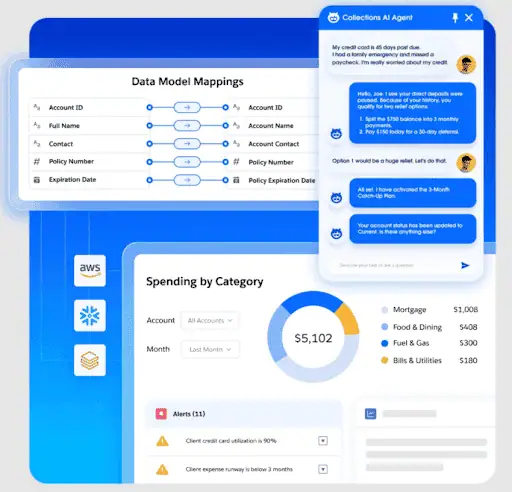
Implementation typically runs 3 months and needs a Salesforce admin or consulting partner. Once configured, it covers more out-of-the-box financial workflows (lending, wealth, insurance, banking) than any other CRM on this list.
Key features of Salesforce Financial Services Cloud
- Pre-built record structure for financial accounts, households, and policies, so reps see the full client picture without a custom build.
- Shield platform encryption and field audit trail, which keeps a documented history of who touched what (useful for SOC 2 and SOX audits).
- AppExchange marketplace with 5,000+ apps including nCino, Plaid, and DocuSign, shortening the integration build for a typical fintech stack.
- Agentforce and Einstein AI for lead scoring, next-best-action, and document summarization, embedded inside the CRM screens reps already use.
- Action Plans for repeatable onboarding, KYC, and loan-origination steps, cutting manual checklists and missed handoffs.
- Vertical accelerators for mortgage, retail banking, wealth, and insurance that ship with pre-configured workflows.
- Native mobile app with offline access, helpful for commercial lenders and advisors working in the field.
Pricing
Salesforce sells Financial Services Cloud on a per-user, per-month basis under an annual contract. There is no free plan, although a 30-day trial exists for base Sales Cloud, but FSC features themselves require a guided demo and a sales conversation.
The seat price isn’t the full bill. A typical fintech rollout also pays for implementation help (often $100K and up), sandbox environments, Shield encryption, higher API rate limits, and Agentforce credits if you’re using the AI features.
Here are the current published plans:
- Enterprise edition: $350/user/month
- Unlimited edition: $525/user/month
- Agentforce Industries add-on (Enterprise or Unlimited): +$150/user/month
- Agentforce 1 edition (Sales or Service): $750/user/month
What is Salesforce Financial Services Cloud good for?
Fintechs with revenue-facing users, a regulated workflow (lending, wealth, insurance, neobanking), and the budget to fund a Salesforce admin or partner. It can be overwhelming for pre-Series B startups or PLG B2B fintech without dedicated CRM ownership, where the configuration overhead tends to outweigh the value of the industry-specific structure.
Your CRM is only as good as the data inside it
Einstein and Agentforce both depend on the activity data inside Salesforce. Reps who don’t consistently log emails, meetings, and calls leave the AI working with a partial picture, and Salesforce’s own activity capture stores data outside Salesforce itself, which limits how reports and other AI features can use it. Salesforce teams often pair Einstein/Agentforce with Revenue Grid.
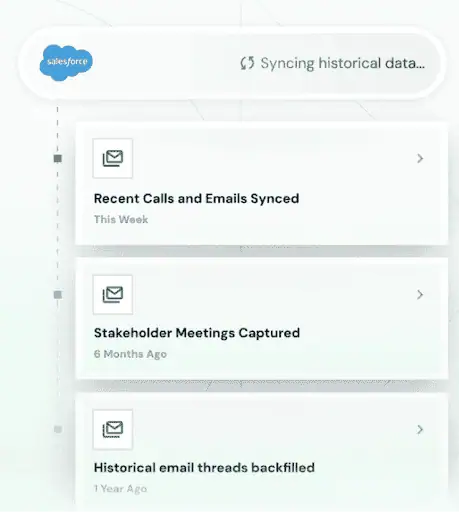
It runs automatic activity capture across every email, meeting, and conversation, so the AI on top has the full relationship intelligence to work with. AI sales assistants on top to forecast deals, prep meetings, and recommend the next move.
Book a demo with Revenue Grid to see how it can help level up your CRM →
2. Wealthbox CRM
Wealthbox is a CRM built specifically for financial advisors, RIAs, broker-dealers, and family offices. It ships ready for an advisory team out of the box, with the structure advisors actually need already in place.
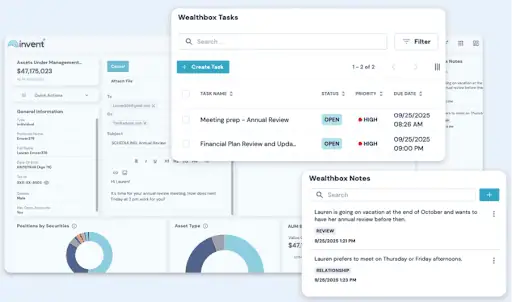
Implementation usually takes a few weeks because there’s no industry-specific build to do. The interface is simple enough that advisor teams actually log activity day to day, which is where most enterprise CRMs fall down.
Key features of Wealthbox CRM
- Contact and household management built for advisor workflows, tracking family relationships, beneficiaries, and account ownership without custom builds.
- Two-way email and calendar sync with Gmail, Outlook, and Office 365, so every client communication lands next to the contact record without manual logging.
- Compliant Note Archiving and SOC 2 compliance, keeping audit-ready records for SEC and FINRA reviews.
- Native integrations with custodians (Schwab, Fidelity, Pershing) and planning tools (MoneyGuidePro, eMoney, RightCapital), cutting out the need for middleware.
- Workflow templates with milestones and outcomes, useful for repeatable processes like client onboarding, annual reviews, and rebalancing prep.
- Opportunity pipelines with Kanban boards, helpful for RIAs tracking prospect deals and referral sources in one view.
- AI Notetaker add-on that transcribes client meetings and pushes notes into the CRM, cutting post-meeting admin time.
- Mobile app and Chrome extension for Gmail, letting advisors log activity from the inbox or on the go.
Pricing
Wealthbox charges per user, per month, and offers a free trial with no credit card needed. AI Notetaker is sold separately as an add-on. Enterprise pricing is custom for firms that need multi-workspace setups, SSO, or on-premise Exchange sync.
The seat price covers most of what a typical advisory firm needs. Outside of it, plan for migration time from your previous CRM (Wealthbox offers migration assistance, but data cleanup still falls on your team) and the AI Notetaker fee if meeting transcription is part of your workflow.
Here are the current published plans:
- Basic: $59/user/month
- Pro: $75/user/month
- Premier: $99/user/month
- Enterprise: Custom (contact sales)
- AI Notetaker add-on: $49/user/month (introductory rate)
What is Wealthbox CRM good for?
RIAs, broker-dealers, family offices, and wealth-tech fintech selling into the advisor channel. The advisor-native structure means less configuration and faster team adoption, especially for firms moving off spreadsheets or a legacy CRM like Redtail. It’s not the right pick for B2C robo-advisors at scale, payments or lending fintech, or any fintech outside the advisor ecosystem, since the underlying structure and integrations are built around traditional advisory practice management.
3. Redtail CRM
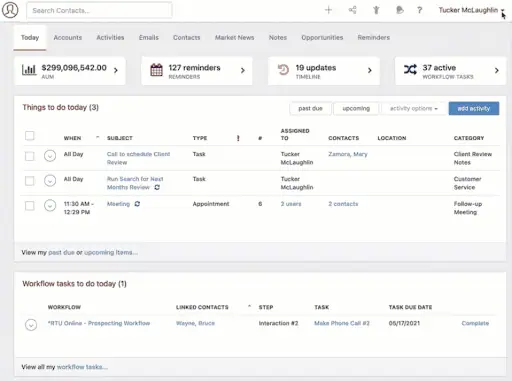
Redtail CRM is a financial advisor CRM owned by Orion, the wealth-tech platform used by advisory firms for portfolio management, planning, and reporting. It’s one of the older platforms in the advisor CRM space, and Orion’s acquisition has brought new investment into the interface and integrations.
The workflow and automation tools are what reviewers mention most consistently, and Redtail handles data migration from a previous CRM at no extra charge.
Key features of Redtail CRM
- Contact and household management with custom fields and segmentation, useful for tracking client relationships across families and accounts.
- Compliant note entry and archiving, logging every interaction for audit and FINRA review without extra rep effort.
- Automated workflows with templates for client onboarding, annual reviews, and service tasks (Growth plan), cutting repetitive admin work.
- Suite Sync for two-way email, calendar, and contact syncing with Gmail, Outlook, and Office 365, so client communication lands in the CRM without manual entry.
- 100+ integrations with the advisor stack (Orion, Schwab, Fidelity, eMoney, and others), reducing manual data movement between systems.
- Redtail Imaging and Speak bundled into the Growth plan: paperless document management with 200 GB storage and compliant text messaging that’s automatically archived.
- Sales pipeline tracker and seminar/event management for new business development, with opportunity permissions for team visibility.
- Complimentary data conversion from a previous CRM, included in onboarding, which keeps the switching cost low.
Pricing
Redtail charges per user, per month, with the option to pay annually (cheaper) or monthly. A free trial of the full Growth plan is available for new users with no credit card required. Enterprise pricing is custom for larger firms or advisor networks under a Premiere Partnership Agreement (PPA), with a minimum license commitment.
The seat price covers most of what an advisor team needs. Redtail Imaging (paperless document management) and Redtail Speak (compliant text messaging) are bundled into the Growth plan at no extra cost. Data migration help from a previous CRM is also included.
Here are the pricing plans for Redtail CRM:
- Launch plan: $39/user/month (annual billing) or $45/user/month (monthly billing), max 5 users
- Growth plan: $59/user/month (annual billing) or $65/user/month (monthly billing), unlimited users
- Enterprise plan: Custom pricing (contact sales)
What is Redtail CRM good for?
Established RIAs, broker-dealers, hybrid firms, and any advisor-focused fintech that wants the largest advisor CRM ecosystem and tight Orion integration. It’s a particularly good fit for firms already running Orion portfolio management or planning, since the data flow is native. It’s not the right pick for non-advisory fintech models like lending, payments, embedded finance, or B2C neobanks, since the structure and integrations are built around traditional advisor practice management.
4. Hubspot CRM
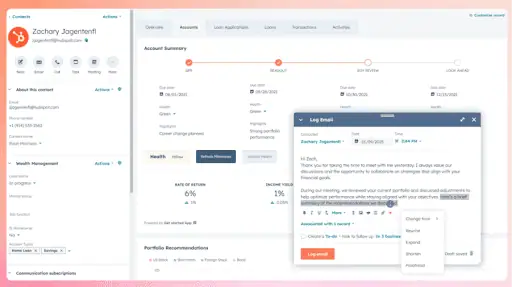
HubSpot CRM is a sales, marketing, and customer service platform that started as inbound marketing software and has expanded into a full CRM suite. It’s a natural fit for B2B fintech SaaS companies at the seed-to-Series-C stage because it ships with the marketing automation, lead scoring, and email tooling a growth-stage team uses on day one.
Implementation is fast: most companies are running in 1 to 2 weeks, and the interface is intuitive enough that reps adopt it without a formal training program. The catch shows up at scale. HubSpot’s contact-based pricing model can produce sharp cost jumps as your database grows, and the compliance and audit-trail features lag behind enterprise platforms like Salesforce FSC.
Key features of HubSpot CRM
- Free CRM tier with contact management, deal tracking, and basic email tools, usable for very small teams or pre-revenue startups.
- Sales Hub with sequences, meeting links, call tracking, and pipeline management, covering the core SDR and AE workflow.
- Marketing Hub with landing pages, email campaigns, forms, and automation workflows, so inbound marketing lives in the same system as sales.
- Custom objects (Enterprise tier) for modeling fintech-specific data like loan applications, accounts under management, or compliance reviews.
- Native integrations with Stripe, Chargebee, Intercom, Slack, Zoom, and 1,500+ apps via the App Marketplace.
- Breeze AI features for lead scoring, email drafting, and conversation summarization, included in Pro and Enterprise tiers.
- Reporting dashboards with deal stage analytics, custom reports, and revenue attribution across marketing and sales touchpoints.
Pricing
HubSpot has a free CRM tier with basic contact management, deal tracking, and email tools (no time limit, no credit card needed). Paid functionality is sold as separate “Hubs”: Sales Hub, Marketing Hub, Service Hub, CMS Hub, Operations Hub, Content Hub, and Commerce Hub. You can buy individual Hubs or the bundled CRM Suite.
The seat price isn’t the full bill, and HubSpot’s pricing model has a well-known gotcha. Sales, Service, and CMS Hubs are priced per seat, but Marketing Hub charges by marketing contact count, so costs can climb sharply as your contact database grows. Pro and Enterprise tiers also have seat minimums (3 and 5 respectively).
Here are the current published plans:
- Smart CRM Professional: $43/seat/month (annual) or SGD 70/seat/month (monthly), includes 3,000 HubSpot Credits
- Smart CRM Enterprise: $64/seat/month (annual), includes 5,000 HubSpot Credits
What is HubSpot CRM good for?
B2B fintech SaaS, payment infrastructure companies, API platform companies, and any growth-stage fintech that runs inbound marketing as a meaningful source of pipeline. HubSpot’s distinctive strength is having marketing automation, email, and sales in the same system, so demand generation and SDR work share the same contact records. It’s a poor fit for B2C lending, neobanking, or any fintech that needs native compliance workflows or audit-grade communication logging, where Salesforce-class platforms still pull ahead.
5. Zoho CRM
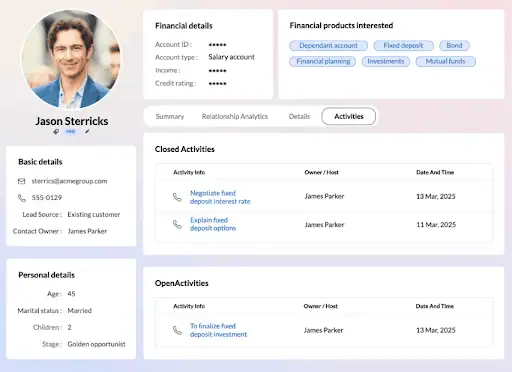
Zoho CRM is a horizontal CRM and part of the Zoho ecosystem of 50+ business apps (Books, Invoice, Desk, Analytics, Mail, Projects). For fintech teams, this means a single vendor can cover CRM plus back-office accounting, invoicing, support, and BI without stitching together separate point tools.
Zoho’s distinctive offer is feature depth at a low price, often half to a third of the per-seat cost of comparable mid-market CRMs. The trade-offs are a denser interface and fewer native integrations with fintech infrastructure. Connecting Stripe, Plaid, or an identity verification provider like Persona usually means Zapier or custom API work, not a one-click connector from the marketplace.
Key features of Zoho CRM
- Sales pipeline, deal tracking, and contact management across all tiers, with custom fields and modules unlocked at Enterprise and Ultimate.
- Zia AI assistant for lead scoring, anomaly detection, email sentiment analysis, and workflow suggestions, built into the CRM rather than sold as an add-on.
- Blueprint workflow automation for repeatable processes like loan origination, KYC review, and customer onboarding, configured in a visual no-code editor.
- Canvas design studio for drag-and-drop customization of the CRM interface, so reps see only the fields and views they actually use.
- Built-in email, telephony, SMS, live chat, and social media integration that all log to the contact record without needing separate tools.
- Integration with the rest of the Zoho ecosystem (Books for accounting, Invoice for billing, Desk for support, Analytics for BI), useful for fintech teams running lean on back-office tooling.
- Data center options in the US, EU, India, Australia, Japan, and China, addressing data residency requirements for cross-border fintech.
Pricing:
Zoho charges per user, per month, with discounts for annual billing. The Free Edition is free forever for up to 3 users (basic leads, deals, workflows, reports, mobile app). Higher tiers add CPQ, Zia AI features, journey orchestration, custom functions, and migration assistance.
Outside the seat price, there’s not much hidden cost. Zoho doesn’t gate core features behind costly add-ons the way some competitors do. Worth knowing about: Zoho One is a separate bundle that includes Zoho CRM plus the full suite of 50+ Zoho business apps for one per-user price, which is often the better value for fintech teams already using Books, Invoice, or Desk.
Here are the current published plans:
- Free Edition: $0, up to 3 users
- Standard: ~$13/user/month
- Professional: ~$22/user/month
- Enterprise: ~$40/user/month (most popular)
- Ultimate: ~$55/user/month
What is Zoho CRM good for?
Pre-Series A and SMB fintech teams that want CRM depth at a low price, especially those already running other Zoho apps like Books or Invoice. The cross-app data flow inside the Zoho ecosystem is the strongest reason to pick it over HubSpot or Pipedrive at this stage. It’s a poor fit for regulated lending, neobanking, or any fintech that needs deep Stripe, Plaid, or RegTech integration, where the thinner integration ecosystem becomes a real constraint.
6. AdvisorEngine CRM
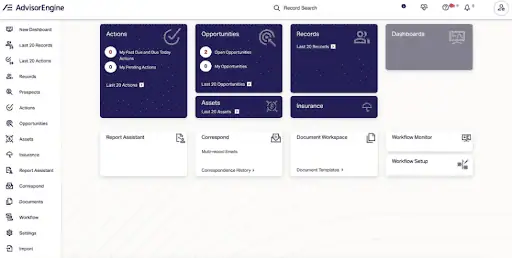
AdvisorEngine CRM is a financial advisor CRM owned by asset manager Franklin Templeton. The CRM heritage traces back to Junxure, a long-established RIA platform that was acquired and folded into AdvisorEngine’s broader wealth stack alongside digital onboarding, portfolio management, financial planning, and performance reporting.
The distinctive pricing offer is a single all-features tier instead of the multi-tier model used by Wealthbox or Redtail. You pay one per-user rate, get every feature in the product, and document storage is unlimited. The trade-off is no cheap starter option for solo advisors (minimum three users).
Key features of AdvisorEngine CRM
- Contact and household management built for advisor workflows, with relationship mapping across families and beneficiaries.
- Workflow engine for practice management, automating client onboarding, annual reviews, RMD tracking, and other repeatable advisor tasks.
- Prospect and lead pipeline tools with integration hooks into common advisor lead sources, so growth activities live in the same CRM as active client work.
- Dashboards with customizable visualizations for AUM trends, client engagement, advisor productivity, and pipeline health.
- Integration with the broader AdvisorEngine platform: digital account opening, portfolio management, financial planning, and performance reporting.
- Custodian and tech-stack integrations including Schwab, Fidelity, Black Diamond, Orion, Tamarac, MoneyGuidePro, and eMoney.
- Unlimited document storage included in the base price, which is unusual in the advisor CRM segment.
Pricing
AdvisorEngine CRM has a single pricing tier with all features included — $69/user/month. Billing is annual, with a three-user minimum.
Outside the seat price, there isn’t much to add. Document storage is unlimited, priority support comes standard, and AdvisorEngine markets a no-upcharges pricing approach. Migration and onboarding are handled through their services team during implementation.
What is AdvisorEngine CRM good for?
Established RIAs (3+ users) that want a single all-features pricing tier without upgrade decisions, especially firms that benefit from the broader AdvisorEngine wealth platform (digital onboarding, portfolio management, planning, reporting). It’s a poor fit for solo advisors who’d find the 3-user minimum too high, B2C wealth-tech models, or any fintech outside the advisor channel.
7. LeadSquared CRM
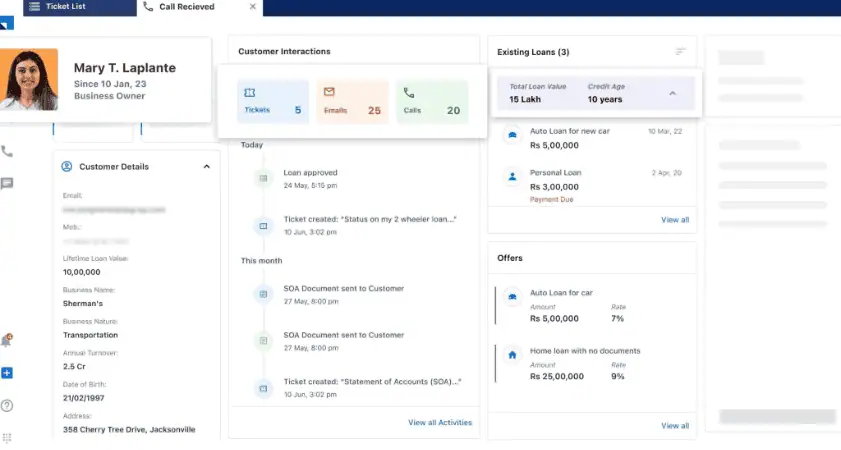
LeadSquared is a sales and marketing CRM, with strong vertical depth in banking, lending, and insurance (BFSI). It bundles a sales CRM, service CRM, marketing automation, and a mobile field-force app on one platform, useful for fintech and financial-services companies.
Key features of LeadSquared CRM
- High-volume lead capture from web forms, ads, chat, calls, and WhatsApp, with automatic distribution rules to the right rep or team.
- Lead Quality and Engagement Scoring to prioritize the most likely-to-convert applications, useful for lenders processing thousands of inbound applications per day.
- Mobile CRM with offline support, route optimization, and day planning for field-force teams (loan officers, insurance agents, bank reps).
- Service CRM with ticket capture, routing, and SLA tracking across email, chat, calls, WhatsApp, and social.
- Process automation for repeatable BFSI workflows like loan origination, KYC review, policy issuance, and document collection.
- SOC 2 Type II, ISO 27001, VAPT-tested, and DPDP-ready (India’s data protection law), useful for cross-border BFSI operations.
- Integration with core banking systems, loan origination systems (LOS), trading platforms, and contact center stacks via API.
Pricing
LeadSquared sells the Sales CRM as two main tiers, both billed per user per month. There’s no public free plan or trial; the path to access is a sales demo. Special startup pricing is available for qualifying companies, and the Mobile CRM app is sold as an optional add-on on top of the Sales tiers.
Outside the seat price, plan for the Mobile CRM add-on if you have a field team, and the Marketing Automation product if you want LeadSquared’s marketing capabilities (priced separately, not bundled with Sales CRM).
Here are the current published Sales CRM plans:
- Sales Pro: $40/user/month (essential lead, account, and opportunity management; 2GB + 20MB/user storage)
- Sales Super: $60/user/month (full suite with advanced automation; 10GB + 20MB/user storage)
- Mobile CRM: Optional add-on, contact sales for pricing
- Marketing Automation: Priced separately, contact sales
- Startup pricing: Available for qualifying companies on application
What is LeadSquared CRM good for?
Lending fintech, insurance-tech, neobanking, and any high-volume BFSI sales operation with inbound lead flow and field or call-center teams. LeadSquared’s strength is operationalizing thousands of leads per day with scoring, distribution, mobile field-force support, and BFSI workflow automation, at a price point well below Salesforce FSC. It’s a poor fit for low-volume enterprise sales motions (multi-year contracts, named accounts), wealth management, or B2B fintech SaaS, where horizontal CRMs like HubSpot or Pipedrive fit the sales motion better.
Power your fintech CRM with Revenue Grid
The CRM you pick is the start. The CRM that pays back the investment is the one that ends up full of accurate, current data: emails logged, meetings captured, contacts updated, deal signals visible to anyone reviewing the pipeline.
That part rarely happens on its own. You hired your best salespeople to close deals. Hours spent typing notes into the CRM are hours they’re not in front of buyers, and the less they log, the thinner the data inside the CRM gets. Thinner data means weaker forecasts, weaker pipeline reviews, and weaker coaching.
This is why most fintech revenue teams that get real value out of their CRM run a second piece of software on top of it. Something that handles the data work automatically, so the CRM stays full without anyone manually filling it in.
Revenue Grid is one product built for this. It sits on top of Salesforce and automatically captures every email, meeting, and customer interaction into the CRM. Reps work the way they already work, and the CRM stays current on its own.
Once that data is in place, four things change for a fintech revenue team:
- Forecasts you can defend. AI forecasting uses real activity data, so the numbers you bring to the board hold up.
- Pipeline reviews based on what’s actually happening. Managers see who’s replying to emails, who’s gone quiet, and where deals are stalling, before deals slip out of the quarter.
- Less time on meeting prep and follow-up. Reps walk into client meetings with the history already pulled from the CRM. Notes from the meeting flow back without typing.
- Audit-ready compliance. SOC 2 Type II, ISO 27001, GDPR, and HIPAA certifications, which matter when a regulated fintech buyer (lending, neobanking, insurance) runs the product through security review.
The result is that the CRM you bought becomes a tool that your team actually uses, and the data inside it becomes something the rest of the business can trust.
Book a demo with Revenue Grid to see how it can help level up your CRM →
Which CRM is best for an early-stage B2B fintech SaaS?
HubSpot is usually the strongest fit for seed-to-Series-C B2B fintech SaaS. It bundles marketing automation, email, and sales pipeline in one system, ships fast (1–2 weeks to go live), and the free tier covers pre-revenue teams. Zoho is a cheaper alternative if budget is tight.
Do fintech CRMs need to be SOC 2 compliant?
If you sell to banks, insurers, or any regulated buyer, yes. Most enterprise procurement teams require SOC 2 Type II as part of vendor review. Salesforce FSC, Wealthbox, Redtail, and LeadSquared all hold SOC 2 or equivalent certifications. Verify the specific certificate scope before signing a contract.
How long does it take to implement a CRM at a fintech company?
HubSpot and Zoho usually go live in 1–2 weeks. Wealthbox and Redtail take 2–4 weeks once data migration is scheduled. Salesforce Financial Services Cloud typically runs 3+ months and needs a partner or in-house admin. LeadSquared BFSI rollouts average 4–8 weeks.
Can a horizontal CRM like HubSpot work for a lending fintech?
Only at low volume. HubSpot handles a B2B fintech sales motion well, but high-volume consumer lending needs lead scoring, distribution rules, mobile field-force support, and audit-grade workflow automation. LeadSquared or Salesforce FSC fit that motion better once application volume reaches thousands per month.
What does a fintech CRM cost beyond the per-seat price?
Plan for implementation, integrations (Stripe, Plaid, KYC tools), and data work. Salesforce FSC rollouts often add $100K+ in services. Advisor CRMs usually include migration. Most teams also pay for an activity capture layer like Revenue Grid to keep CRM data current without rep effort