


As per Hubspot’s State of Sales report, sellers spend roughly 17% of their working week on administrative work. On a 50-person team, at a 75-five dollar loaded hourly cost, that runs past 1.5 million dollars a year in pure administrative time before counting the deals that close late because no one followed up.
The fixes revenue operations teams reach for first, including Einstein Activity Capture, validation rules at the field level, and weekly manager reminders, close part of the gap without removing the typing itself. The work still has to be done by a human at a keyboard, and the cost keeps showing up in late follow-ups, blank Contact Roles, and forecasts that miss commit by a wider margin every quarter.
The 10 categories of automation below remove the typing entirely, with specific vendors, the criteria to evaluate them on, and a comparison matrix to score them on the dimensions that matter for deal management. For broader context, our deal management guide covers the full opportunity lifecycle, and our overview of automated activity capture that eliminates manual CRM entry covers the foundational layer the rest of this list builds on.
Why manual data entry is the biggest threat to deal management accuracy
Manual entry shows up as five compounding costs across the pipeline, and each one bleeds into the next.
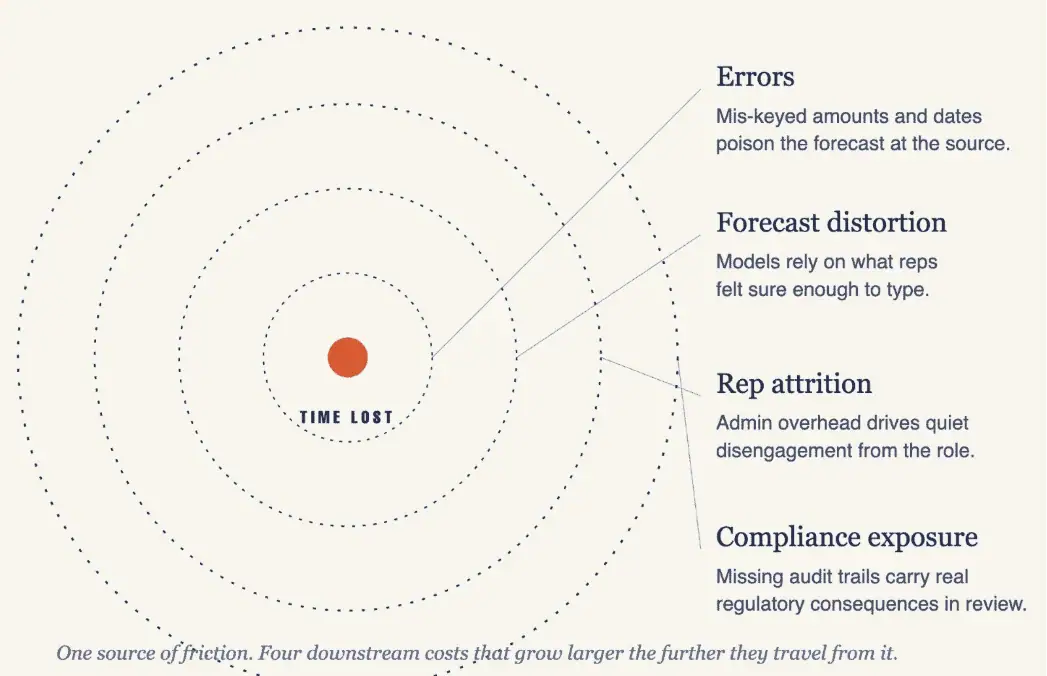
- Errors. IBM puts the cost of bad data to the United States economy at 3.1 trillion dollars. When four percent of opportunity amounts are mis-keyed across a two-hundred-million-dollar pipeline, roughly eight million dollars in phantom or missing pipeline lands in the quarterly forecast as noise. The fix sits upstream at the moment of capture, which is the operational discipline behind sound CRM data hygiene best practices.
- Forecast distortion. Without complete activity data in Salesforce, forecast models rely on what the rep felt confident enough to type into a stage field. Organizations that feed complete activity data into modern forecasting see up to seventy-one percent improvement in commit accuracy, per recent Gartner research.
- Rep attrition. Sellers who spend more time on administration disengage from the CRM first and from the role second. Exit interviews consistently surface the pattern that systems which feel like overhead lose adoption.
- Compliance exposure. In regulated verticals like financial services, healthcare, and government contracting, missing audit trails on client communications carry real regulatory consequences during reviews, well past any productivity loss.
Each category that follows attacks one or more of these costs at the source.
10 best solutions for eliminating manual data entry in deal management
1. Salesforce-native activity capture
Activity capture is the CRM integration that eliminates manual data entry for sales teams. It pulls every email, calendar event, and contact interaction out of Exchange or Google Workspace and writes it directly to Salesforce records. The category is the foundation everything else in this list depends on, because the rest of the automation operates on the data that activity capture surfaces.
Done well, the category removes the most common form of CRM entry from the rep’s workflow entirely. There is no manual logging step, no recap form to fill out, and no nightly cleanup pass.
Tools to consider:
- Revenue Grid: Writes every email and calendar event into Salesforce’s native object model, including custom fields on Opportunity, with admin-configurable matching rules and unlimited retention. Built for organizations that need captured data to flow into Salesforce Reports, dashboards, and forecasting models without any manual entry.
- Einstein Activity Capture: The native Salesforce option and a reasonable starting point. The captured data lives in a separate store with roughly twenty-four-month retention, and it does not write to standard Activity History or custom fields, which limits its usefulness for reporting and forecasting.
- Cirrus Insight: A reliable mid-tier option that syncs to standard Salesforce objects with stable performance over time. Custom-field support is more limited than the enterprise-grade alternatives.
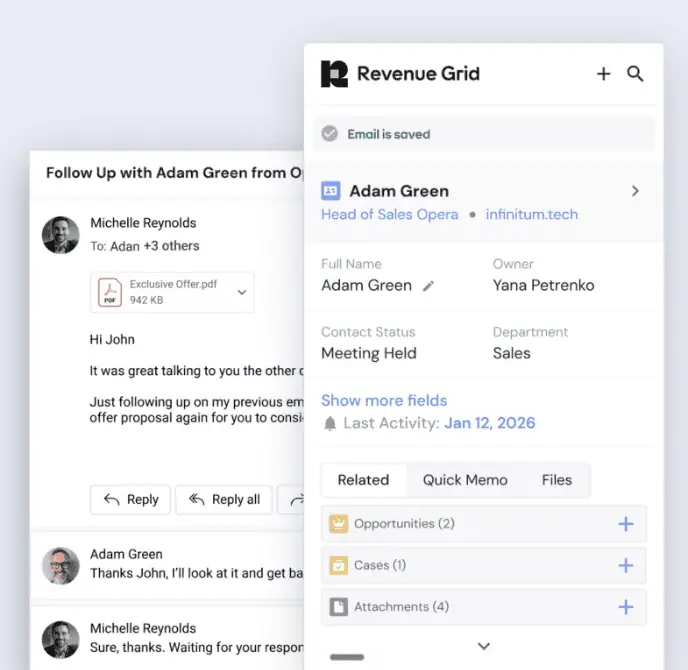
Revenue Grid’s Activity Capture
What to evaluate before you buy:
- Whether the tool writes to custom Opportunity fields in addition to standard Activity History.
- Whether matching rules are tunable at the field level by the Salesforce admin.
- Where captured data physically resides, and which data-residency options the vendor supports.
- Which compliance certifications the vendor carries, especially SOC 2 Type II, ISO 27001, GDPR, and HIPAA for regulated verticals.
2. Automated stakeholder mapping
These tools read captured email and calendar interactions to identify who is involved in a deal, then write those relationships into Salesforce as Contact Roles with influence scoring. The category exists because the single field most often left blank on a Salesforce Opportunity is Contact Roles, and without it, buying-committee visibility drops close to zero.
The strongest tools in this category surface engagement gaps the rep cannot see at a glance, map influence paths across an account, and flag single-threaded deals before they slip into trouble.
Tools to consider:
- Revenue Grid: Builds the stakeholder map on top of its own activity capture, which means it operates against a complete interaction dataset rather than a partial sample. Auto-populates Contact Roles, scores influence, and surfaces dormant relationships the rep has not engaged in weeks.
- Gong: Strongest stakeholder view among call-centric tools, with rich detail on who participated in conversations and how engagement shifted over the deal cycle. The view focuses on call participants, so it is most accurate for deals where calls are the primary communication channel.
- Clari: Surfaces buyer engagement signals on top of whatever the underlying CRM record already contains. Most useful as a forecasting overlay, with relationship coverage dependent on the completeness of the input data.
What to evaluate before you buy:
- Whether the tool writes Contact Roles back to the standard Salesforce object, not just a vendor dashboard.
- Whether engagement scoring is configurable to your sales motion (transactional, complex enterprise, or account-based).
- How the tool handles dormant or at-risk stakeholders, and whether it surfaces alerts inside the rep’s workflow.
- Whether the underlying data captures email and calendar activity, or only call recordings.
3. Guided selling and in-flow deal data prompts
Guided selling features in many CRMs and tools deliver contextual prompts inside the rep’s actual workflow, in the email sidebar, the Salesforce record, or a Slack channel, asking the rep to complete a required field or confirm a next step. The category converts a context-switching chore into a single click embedded in the moment of the conversation.
Tools to consider:
- Revenue Grid: Fires prompts against a complete activity and relationship picture, since the same platform captures the underlying data. Supports configurable playbook frameworks including MEDDICC, BANT, and custom field sets, with manager visibility into completion rates per rep.
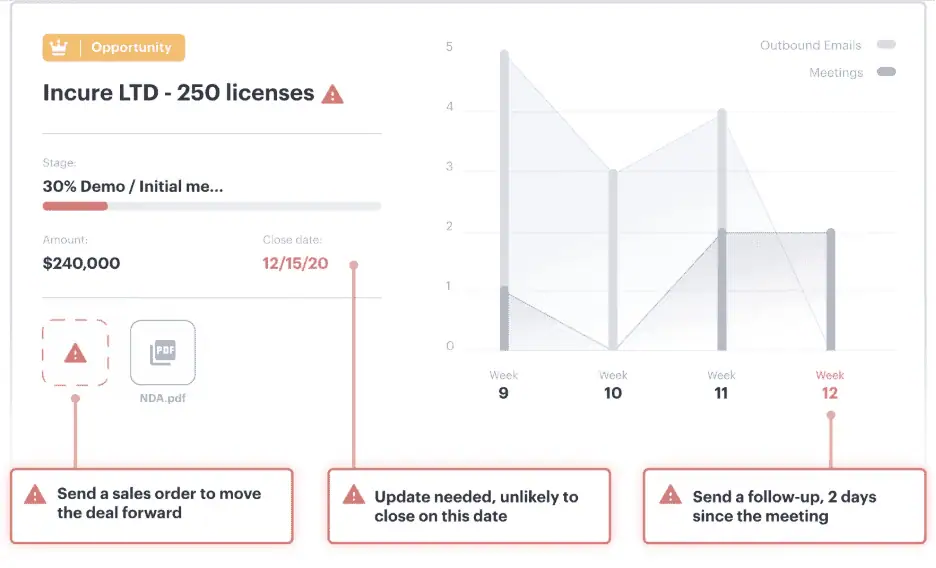
Revenue Grid guided selling feature
- Clari: Ships stage-change nudges inside its forecasting product, so prompts fire when the rep updates a deal in the existing flow. Strongest fit for organizations that already use Clari for forecasting.
- Outreach AI: Offers deal health cards that surface stale or at-risk deals during the rep’s outbound workflow. Salesforce write-back is limited to its own native fields.
What to evaluate before you buy:
- Whether prompts fire across the surfaces the rep already uses (email, Salesforce, Slack, mobile).
- Whether the AI can parse call summaries and pre-fill suggested values, rather than asking the rep to start from scratch.
- Whether manager dashboards expose per-rep field-completion rates without custom report building.
- Whether the playbook framework (MEDDICC, BANT, or your own) can be configured by the admin without vendor support.
4. Conversation intelligence routed into CRM fields
Conversation intelligence is one of the clearest examples of AI for data entry in the modern sales stack. It transcribes sales calls and meetings, then extracts deal-relevant data the rep would otherwise re-type. The category turns next steps, risks, competitor mentions, objections, and pricing discussed into structured outputs that write directly into Salesforce fields and tasks.
The capability matters most for late-stage deals, where the difference between a clean handoff and a fumbled close often comes down to whether the action items from the most recent call actually reached the Opportunity record.
Tools to consider:
- Gong: Market leader on call analytics and coaching depth, with strong topic extraction and a searchable call library tied to Opportunity records. The Salesforce integration pushes summarized call data into CRM but does not capture email or calendar activity.
- Chorus(now part of ZoomInfo): A credible alternative with strong transcription quality and tight integration with ZoomInfo’s intelligence layer for account context.
- Clari Copilot: Best fit for organizations already invested in the Clari forecasting stack, with conversation insights flowing into the same dashboards.
- Revenue Grid: Pairs conversation capture with the activity capture and relationship intelligence engine, so extracted insights enrich a complete Salesforce record.
What to evaluate before you buy:
- Whether topic extraction maps to specific Salesforce fields, or only into a vendor-owned summary view.
- Whether the call library is searchable and tied to Opportunity records at the link level.
- Whether coaching signals (talk-to-listen ratio, monologue alerts, filler words) are surfaced to managers in a useful format.
- Whether the tool captures only calls, or extends to emails, meetings, and other interaction types.
5. Intelligent document processing for deal artifacts
Intelligent document processing extracts structured data from deal-related documents, including proposals, statements of work, procurement forms, and redlined contracts, then pushes the values into Salesforce as field updates. The category exists because late-stage deals generate documents the CRM cannot read on its own.
When a rep receives a signed SOW with a revised amount and close date, document processing extracts those values and updates the Opportunity record automatically, instead of requiring the rep to read the PDF and re-type the numbers. This is how automatic data extraction reduces manual entry errors in late-stage deals: the specialist tool reads the document, the values flow to Salesforce, and the rep is no longer the bottleneck.
Tools to consider:
- Rossum: Strong template-agnostic extraction with native handling of varied document formats. Particularly common in finance and procurement workflows where document volume is high.
- Docsumo: A flexible mid-market option with solid Salesforce field mapping and clean integrations with DocuSign and Adobe Sign.
- Nanonets: Customizable AI extraction with strong support for human-in-the-loop verification on high-value figures, useful for deals where a misread number creates real financial risk.
What to evaluate before you buy:
- Whether the tool handles your actual document formats out of the box, without expensive per-template training.
- Whether extracted values map cleanly into the Salesforce fields where your team already tracks the data.
- Whether the integration with your e-signature platform (DocuSign, Adobe Sign) is supported natively.
- Whether human-in-the-loop verification is available for fields that affect revenue recognition or legal terms.
Pairing document processing with Salesforce-native activity capture is the cleanest setup. The specialist tool parses the documents themselves, and the email exchange that delivered them gets logged automatically alongside the Opportunity.
6. CRM deduplication and smart field mapping
Deduplication detects and merges duplicate Contacts, Accounts, and Opportunities in Salesforce, then enforces smart defaults so reps stop re-entering data the system already holds. The category addresses a structural problem where duplicate records fragment activity history and make deal analysis unreliable.
When half the emails attach to one Contact and half to another, the activity timeline tells the wrong story to managers, forecasters, and account-based marketing programs alike.
Tools to consider:
- Cloudingo: A well-established Salesforce-native deduplication tool with deep matching logic and configurable merge workflows. Strong fit for ongoing dedup discipline rather than one-time cleanup projects.
- DemandTools (from Validity): Enterprise-grade with mass-data operations, merge automation, and tight integration with enrichment providers. Best fit for large Salesforce orgs with complex data models.
- Duplicate Check for Salesforce: A lighter-weight option suited to mid-market teams that need automated duplicate prevention without the full DemandTools surface area.
What to evaluate before you buy:
- Whether fuzzy matching works across name, email, and domain without producing high false-positive rates.
- Whether merge workflows include approval gates, so high-stakes records are not auto-merged without review.
- Whether auto-fill rules can populate Account and Contact fields when a new Opportunity is created.
- Whether the tool integrates with enrichment providers (ZoomInfo, Clearbit) to backfill the gaps a dedup pass uncovers.
Running deduplication before enabling any new activity capture tool is the right sequence, because matching rules inside capture tools rely on clean records to attach activity to the correct account.
7. Sales sequence automation with auto-logged outcomes
Sales sequence automation is software that runs multi-step outbound cadences across email, phone, LinkedIn, and tasks, then logs every touchpoint to the Salesforce Activity Timeline on the relevant Opportunity. The category exists because cadenced outreach generates volume that no rep can log manually without falling behind.
On active deals, the same machinery powers post-demo follow-ups, proposal nudges, and renewal reminders, with every touch attached to the relevant Opportunity automatically.
Tools to consider:
- Outreach: Long-standing market leader on cadence orchestration, with deep prospecting workflows and strong reporting. The Salesforce sync maintains a separate engagement object and pushes summarized data into CRM, which can lag the actual touch by hours.
- Salesloft: Similar feature surface to Outreach with a slightly different design philosophy around conversation moments and rep coaching. Best fit for organizations that want sequence orchestration paired with conversation intelligence in a single vendor.
- Revenue Grid: Runs sequences on the same Salesforce-native sync engine that powers its activity capture. Sequence outcomes and organic activity live on a single unified Activity Timeline rather than separate stores that have to be reconciled afterward.
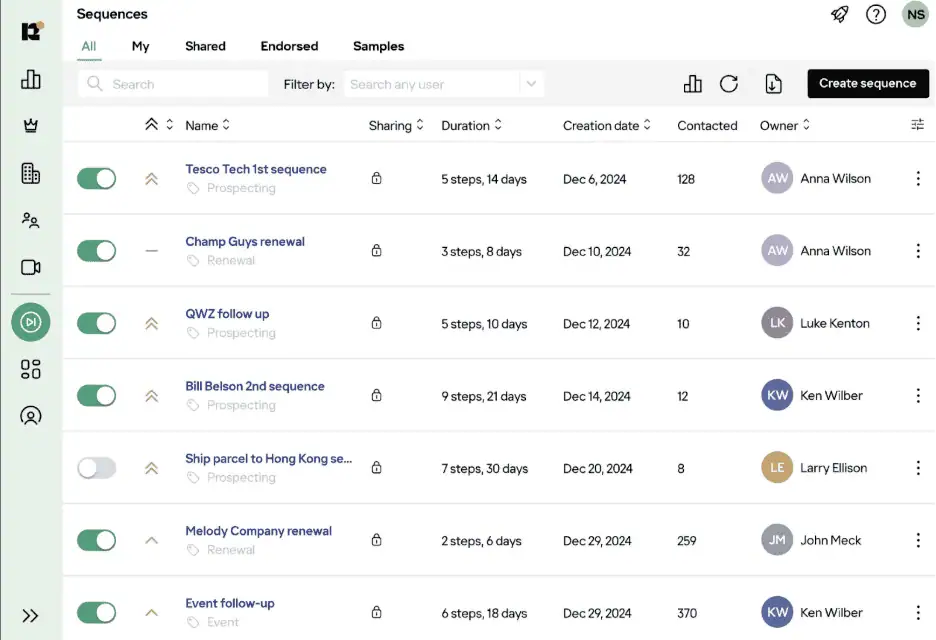
Revenue Grid Sales Sequence
What to evaluate before you buy:
- Whether engagement data lands in Salesforce’s standard Activity History, or in a vendor-controlled shadow object.
- Whether reply detection pauses the sequence and creates a Salesforce task without manual intervention.
- Whether A/B testing surfaces inside standard Salesforce reporting, or only in a vendor-specific dashboard.
- Whether the tool can run sequences against custom Salesforce objects, not just Lead and Contact records.
For a broader view of the design choices behind these tools, our overview of sales force automation strategies covers the category in depth.
8. Bidirectional email and calendar sync
Bidirectional email and calendar sync is the infrastructure layer between email and calendar systems and Salesforce. The category is what makes the rest of activity capture possible, because the captured data has to reach the CRM in both directions and stay consistent across edits, cancellations, and recurring meetings.
A meeting created in Outlook should appear on the relevant Opportunity, and a change made in Salesforce should reflect back in the calendar without the rep doing anything.
Tools to consider:
- Revenue Grid: Server-side, bidirectional, with accurate attendee matching against existing Contacts and Leads and configurable exclusion rules so personal correspondence stays out of the CRM. Carries the certifications regulated buyers need.
- Riva: The other enterprise-grade option in this category, with particular strength in compliance-heavy verticals and complex Exchange and Office 365 environments.
- Cirrus Insight: A serviceable mid-tier alternative for teams that need basic sync without the enterprise governance surface area of Revenue Grid or Riva.
What to evaluate before you buy:
- Whether the sync runs server-side, or requires a desktop client on every rep’s machine.
- Whether bidirectional reflection works cleanly for edits, cancellations, and recurring meetings.
- Whether attendee matching handles partial matches and bounced addresses without misattribution.
- Whether exclusion rules are admin-controlled, so personal threads and internal-only messages stay out of CRM.
For a closer look at the discipline behind good logging, our notes on automated sales activity tracking cover what to track and why.
9. Mobile and voice-to-CRM capture
Mobile and voice-to-CRM capture is software that lets field reps update Salesforce through speech-to-text or a mobile interface, instead of opening a laptop at the end of the day to back-fill the day’s notes. The category exists because field sales and hybrid reps generate pipeline-affecting interactions in places where a keyboard is impractical, including cars, lobbies, and the minutes between meetings.
Voice tools route dictated meeting summaries through natural-language processing into the right Salesforce fields, with confirmation prompts on the most consequential values such as close date and amount. This is how AI reduces manual data entry for sales reps who spend most of their day away from a keyboard
Tools to consider:
- Veloxy: A Salesforce-native mobile experience built specifically for field reps, with strong calendar and email integration on top of the standard Salesforce mobile surface.
- Troops (now owned by Salesforce): A Slack-first interface for updating Salesforce records through structured prompts, with broader workflow support beyond simple mobile capture.
- Otter.ai: Widely used for accurate meeting transcription with speaker diarization. Does not write back to CRM, so it pairs with a separate capture tool rather than replacing one.
What to evaluate before you buy:
- Whether speech-to-text accuracy holds up in real-world conditions, including car noise, accents, and multi-person conversations.
- Whether the tool maps spoken phrases to specific Salesforce fields, or only stores free-text notes.
- Whether offline capture is supported with reliable sync once connectivity returns.
- Whether confirmation prompts appear on the most consequential fields (close date, amount, stage).
10. Governance, audit trails, and compliance automation
Governance is the administrative layer that determines whether any of the previous nine categories of automation can be enabled in a regulated environment at all. The category covers field-level capture policies, admin-defined exclusion rules, data-residency configuration, audit logs, role-based access controls, and retention policies aligned to SOC 2, GDPR, HIPAA, FINRA, and SEC record-keeping requirements.
Automation that captures too much, including personal correspondence, or stores data outside approved boundaries, creates more regulatory risk than manual entry. Governance is what lets revenue operations roll out activity capture confidently in industries where procurement and security reviews gate every deployment.
Tools to consider:
- Revenue Grid: Carries SOC 2 Type II, ISO 27001, GDPR, and HIPAA certifications, supports configurable data residency across EU, US, and custom regions, and exposes field-level capture policies to the admin. Built for compliance-heavy verticals.
- Riva: The closest comparable specialist for regulated verticals, with strong compliance posture and support for complex enterprise environments.
- Salesforce Shield: Operates at the platform level rather than the capture layer, providing platform encryption, event monitoring, and field audit trails across the whole Salesforce instance. Complements rather than replaces a capture-specific governance posture.
What to evaluate before you buy:
- Whether field-level and object-level capture policies are configurable by the admin, not hard-coded by the vendor.
- Whether audit logs include timestamps, match rationale, and the user or service account responsible for every captured record.
- Whether data-residency options match your jurisdictional requirements (EU, US, or custom region).
- Whether the certifications match what your security review will demand (SOC 2 Type II, ISO 27001, GDPR, HIPAA, FINRA).
In regulated verticals like wealth management, lending, and insurance, governance should be a key part of the evaluation. Procurement and security review will gate the deal either way.
Scoring the whole stack: a comparison matrix
Before signing with any vendor in this space, the six dimensions below are the ones that determine whether captured data is actually usable inside Salesforce for deal management, forecasting, and audit. Use the matrix to score every tool above against your environment, not just the names already on your shortlist.
| Evaluation Dimension | Questions to Ask | Why It Matters for Deal Management |
|---|---|---|
| What gets auto-captured | Emails, calendar events, calls, contacts, custom objects? | Incomplete capture means incomplete Opportunity timelines |
| Where it writes in Salesforce | Standard Activity History, custom fields, or a separate store? | Separate stores break Reports, dashboards, and forecasting |
| Data retention and ownership | Who owns the data, how long is it stored, can it be exported? | Compliance, audit, and long-term pipeline analysis |
| Admin controls | Field-level policies, exclusion rules, matching logic? | Operations teams need control without filing support tickets |
| Security and compliance | SOC 2 Type II, ISO 27001, GDPR, HIPAA, FINRA, SEC? | Non-negotiable for regulated industries |
| Downstream impact | Does the captured data feed forecasting, relationship intelligence, and guided selling? | Capture is the input; revenue intelligence is the output |
For Salesforce-centric organizations, Revenue Grid scores highest on these six dimensions because activity capture, relationship intelligence, guided selling, and governance share a single Salesforce-native architecture rather than living in separate tools that have to be reconciled afterward. Book a demo to see a live walkthrough of Revenue Grid.
A simple way to quantify the impact
The single biggest barrier to buying any tool in this list is whether you can defend the spend in front of finance with a real number. Let’s do some back-of-the-envelope math that turns the time and accuracy losses from manual data entry into an annual dollar figure your business case can rest on.
The calculation has two halves. The inputs describe what your team looks like today, including how many reps you have, how much they type, and what an hour of their time actually costs you when fully loaded. The outputs describe what changes once activity capture and the rest of the categories above are in place, including hours returned to selling, dollars saved, and the forecast accuracy lift you can plan around without overpromising.
The inputs you need from your own team:
- Number of reps on the team.
- Average activities (emails, meetings, and calls combined) each rep logs per week.
- Minutes spent logging each activity manually.
- Loaded cost per rep per hour, including salary, benefits, and software.
- Current deal-data completeness rate, measured as the percentage of required Opportunity fields populated.
- Target deal-data completeness rate after automation.
The outputs the calculation produces:
- Hours saved per week across the team.
- Annual cost savings in dollars.
- Equivalent additional full-time selling capacity, expressed in headcount terms.
- Projected forecast accuracy improvement.
A 50-rep team logging 30 activities per week at 3 minutes each spends 300 seventy-five hours every week on manual entry. At a 75 dollar loaded hourly cost, that is roughly 1.46 million dollars a year in administrative time, before counting any cost from correcting errors downstream.
The forecast accuracy gain is the second half of the story, and it is the one that tends to draw the most scrutiny from finance. The Gartner research cited earlier puts the headline number at up to seventy-one percent improvement in commit accuracy when complete activity data feeds the model, but planning around a conservative twenty to thirty percent gain is the defensible starting point. The full effect compounds over the first few quarters as the model learns from a richer activity feed, which is also how clean data flowing into real-time pipeline tracking starts paying for the deployment inside the first year.
How to measure success in thirty, sixty, and ninety days
A revenue operations leader reducing and automating data entry across the team should track a fixed set of measures in the first 90 days. Here is the plan they can follow:
First 30 days, focused on adoption:
- Activity capture rate, measured as the percentage of emails and meetings auto-logged.
- Rep adoption rate, measured as the percentage of reps with active sync.
- Reduction in validation-rule errors compared to the prior month.
A working deployment usually moves the auto-capture rate from below thirty percent to above ninety percent inside the first month.
By day 30, focused on data completeness:
- Percentage of required Opportunity fields populated on open deals.
- Contact Role coverage on open Opportunities, measured as the share with three or more roles populated.
- Drop in stale Opportunity alerts compared to the prior quarter.
Improvements of forty to sixty percent across these measures are common when activity capture, relationship intelligence, and guided selling deploy together.
By day 90, focused on the business case:
- Commit-versus-actual forecast accuracy compared to the prior quarter.
- Pipeline velocity measured in days-in-stage.
- Rep satisfaction on time-spent-on-administration surveys.
Improving CRM adoption through activity capture is the throughline that ties every other measure together, and feeding the ninety-day actuals back into the ROI model is the cleanest way to justify expansion.
Stop entering data, start closing deals
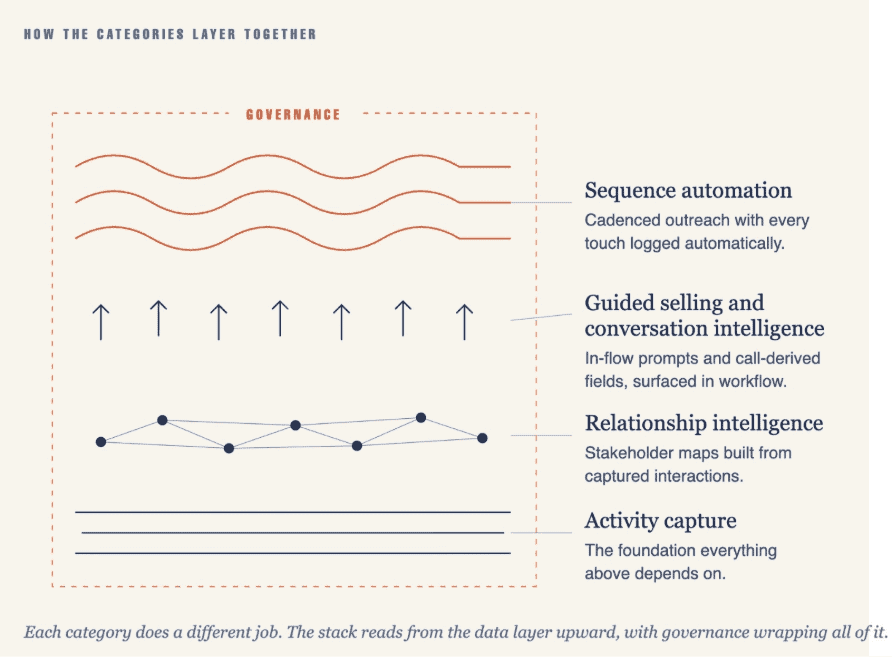
Manual data entry in deal management is a measurable drain on velocity, forecast accuracy, and seller morale. The most reliable fix is to layer multiple categories of automation together rather than chase a single point tool.
- Activity capture is the foundation that makes everything else work.
- Relationship intelligence reads the captured data into a picture of the buying committee.
- Guided selling and conversation intelligence convert that picture into structured CRM updates and next steps.
- Sequence automation keeps the cadence moving without dropping touchpoints.
- Governance ensures everything that gets captured is captured in a way procurement and compliance can defend.
Revenue Grid sits at the intersection of those categories on a Salesforce-native architecture, which is why every captured activity, every stakeholder interaction, and every engagement signal lands inside the Salesforce object model rather than a separate dashboard. To see what that looks like against your own pipeline, request a demo.
What is the best way to reduce manual data entry in Salesforce deal management?
The most effective approach is Salesforce-native activity capture, a server-side sync that logs emails, calendar events, and contact data directly to Opportunity records, including custom fields. Revenue Grid’s activity capture writes to standard Salesforce Activity History and custom objects with admin-configurable matching rules, which removes manual logging from the rep’s workflow entirely.
How does automated activity capture differ from Einstein Activity Capture?
Einstein Activity Capture stores email and calendar data in a separate store with retention typically capped around twenty-four months, and it does not write to standard Activity History or custom Salesforce fields, which makes the captured data largely invisible to Salesforce Reports and forecasting models. Revenue Grid writes every captured activity natively to Salesforce’s object model across both standard and custom fields, with unlimited retention and full reporting access.
How does automatic data extraction reduce manual entry errors in deal management?
Automated capture removes most of the human-error variable by matching communications to the correct Salesforce records using domain matching, thread analysis, and contact-association rules. Conversation intelligence reduces errors further by extracting structured data such as next steps, budget figures, and competitor mentions directly from call transcripts into specific CRM fields.
What security and compliance features should I look for in a CRM data capture tool?
Enterprise buyers should evaluate SOC 2 Type II certification, GDPR compliance, configurable data-residency options, field-level capture policies, admin-controlled exclusion rules, complete audit trails, and role-based access controls. Revenue Grid provides all of these as core platform features, with SOC 2 Type II, ISO 27001, GDPR, and HIPAA certifications relevant for financial services, healthcare, and other regulated verticals.
How long does it take to see ROI from automating deal data entry?
Most organizations see measurable impact within thirty to sixty days. By day thirty, the activity capture rate usually moves from below thirty percent to above ninety percent automated, and by day ninety, organizations typically report twenty to thirty percent improvements in commit-versus-actual forecast accuracy when forecasting models receive complete activity data.