


Key Takeaway
- Salesforce Revenue Intelligence is a genuine upgrade over standard Sales Cloud reporting, but at $220/user/month, it only makes sense if you have enough historical data, a large enough team, and a forecasting process complex enough to justify it.
- The features that actually move the needle are Pipeline Inspection (with Flow Chart), the Commit Calculator, and the Whitespace view. Everything else is useful, but those three are where the ROI shows up most clearly.
- Every AI model inside Revenue Intelligence like Einstein scoring, forecast predictions, account expansion signals is only as accurate as the activity data feeding it. If reps aren't logging consistently, the outputs will be confidently wrong.
- Revenue Intelligence is a reporting and analytics layer, not a data capture layer. It tells you what's happening in Salesforce; it doesn't fix what's missing from Salesforce in the first place.
- If your core problem is incomplete CRM data rather than insufficient dashboards, a tool that auto-captures activity is a better first investment than a tool that builds more reports on top of the gaps.
Sales teams spend hours a day inside CRMs. They log deals, update stages, chase approvals, and then try to piece together a forecast from spreadsheets. Somewhere in all that clicking, the actual job (talking to customers and closing deals) gets buried under admin work.
Salesforce Revenue Intelligence is the premium add-on (or a bundled SKU in higher editions) that’s supposed to fix this. It combines Sales Cloud data with CRM Analytics, Einstein AI models, and a set of purpose-built dashboards. Since it first launched, it has picked up a lot of new capabilities, and with Agentforce now in the mix, it has shifted from a reporting product into something closer to an always-on sales coaching layer.
Here’s a breakdown of the top features of Salesforce Revenue Intelligence worth knowing in 2026, what it costs, and an alternative for teams who’d rather build revenue on the strength of their customer relationships than on dashboards alone.
Top 10 Features of Salesforce Revenue Intelligence in 2026
Every feature shows up inside Salesforce, either as a tab, a side panel, or an inline view.
1.Revenue Insights Dashboard
The Revenue Insights Dashboard is the main view for sales leaders. It’s powered by CRM Analytics and rolls up everything that matters into one screen: quota attainment, pipe coverage, win rates, rep leaderboard, and gap to quota.
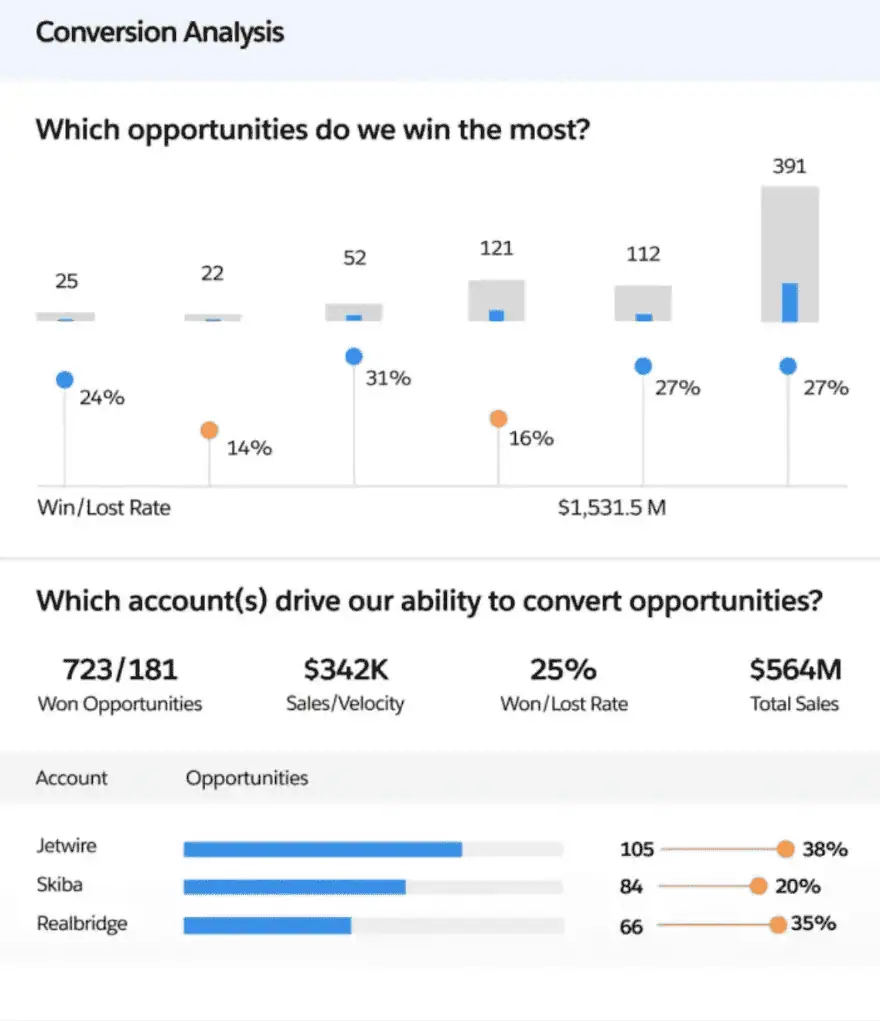
The Overview tab gives a bird’s-eye view. From there, you can drill into a Sales Performance tab where an AI model flags the top factors impacting win rate and time to close. So instead of guessing why deals are slipping, you can see that (for example) deals with more than three stakeholder changes take 40% longer to close, or that a certain product line is dragging the average down.
The Sales Stage Analysis tab shows where opportunities tend to get stuck. If every deal dies between “Proposal” and “Negotiation,” that’s a process problem, not a rep problem, and this view makes it obvious.
2.Forecast Insights and the Commit Calculator
Forecasting calls are often the worst meeting of the week. Managers ask reps to commit to numbers, reps hedge, and nobody really trusts the spreadsheet.
Forecast Insights replaces that mess with a tab that pulls year-over-year velocity data, weekly change signals, and pipe coverage, all tied to your actual forecast types. You can see which forecasts have moved in the last week and who moved them.
The Commit Calculator piece plays out “what if” scenarios in real time. Drag a deal in, drag another one out, bump a close date, and watch the projected number update instantly. Nothing you do here touches the real data, so you can model six different scenarios before your 9 am forecast call without breaking anything.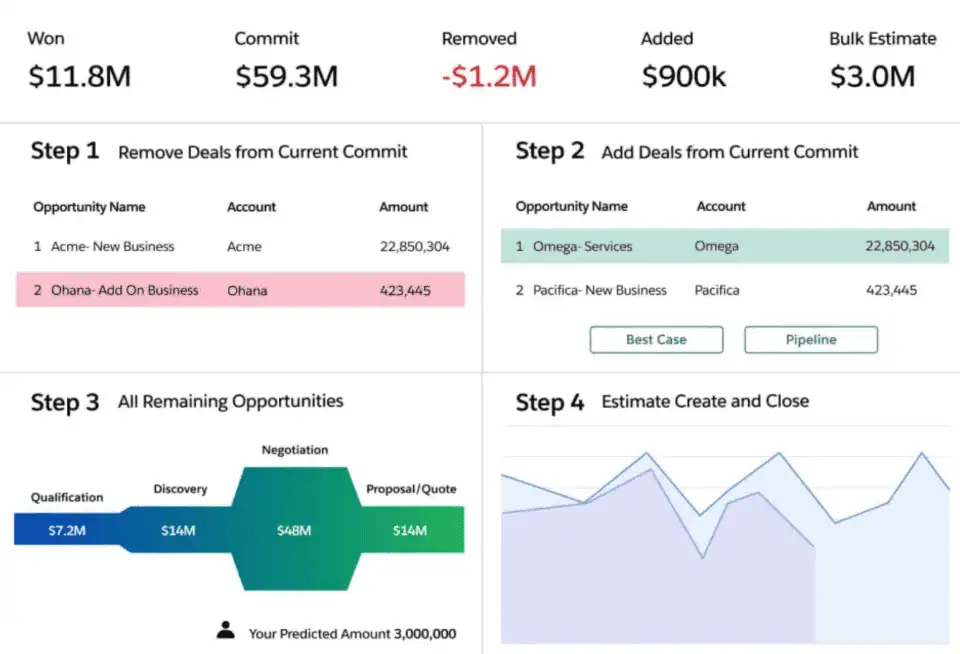
Since it added the ability to estimate last-minute opportunities based on historical trends, the calculator also stops you from over-committing or under-committing based on how your team has actually landed deals in past quarters.
3.Sales Rep Command Center
The Revenue Insights dashboard is great for leaders, but a frontline rep doesn’t care about the team leaderboard. They care about their own number.
The Sales Rep Command Center is the rep-level version of the same idea. It shows each seller their personal forecast, how it’s shifted week over week, their current pipe coverage, and a list of deals that are stagnating or overdue.
There’s also a What If Calculator here, so reps can model their own quota path without needing a manager to do the math for them. If a rep knows they’re $80K short and can see exactly which two deals would close the gap, they’re a lot more likely to actually work those deals.
This view used to require custom-built work. Now it’s out of the box, which saves admins a lot of time.
4.Pipeline Inspection (With Extra RI Features)
Pipeline Inspection is technically available without Revenue Intelligence, but the RI license unlocks the parts that matter.
The base feature gives sellers a spreadsheet-style view of their pipeline with inline editing, color-coded highlights for close date changes, stage changes, and amount changes, plus Einstein Opportunity Scoring shown as easy-to-read High/Medium/Low tiers instead of raw numbers. There’s also a Push Count field that tracks how many times an opportunity’s close date has been kicked out by a calendar month, which is gold for reporting.
Revenue Intelligence adds the Flow Chart tab, which shows how deals have moved between forecast categories over time. If half your Commit pipeline quietly slid back to Best Case last week, the Flow Chart will show it.
The right-hand side panel also pulls in activity counts, recent emails, call insights, and a list of who’s actually involved in the deal (both internal team members and external contacts). A Summer ’24 update added Contact Detractor Insights, which flags contacts on a deal who seem to be blocking progress.
5.Einstein Account Management and Whitespace View
Einstein Account Management focuses on accounts rather than deals. It scores your accounts on expansion potential and flags which ones have upside and which ones are at risk, similar to how lead scoring helps reps prioritize which prospects to work first, just applied to existing customers instead of new ones.
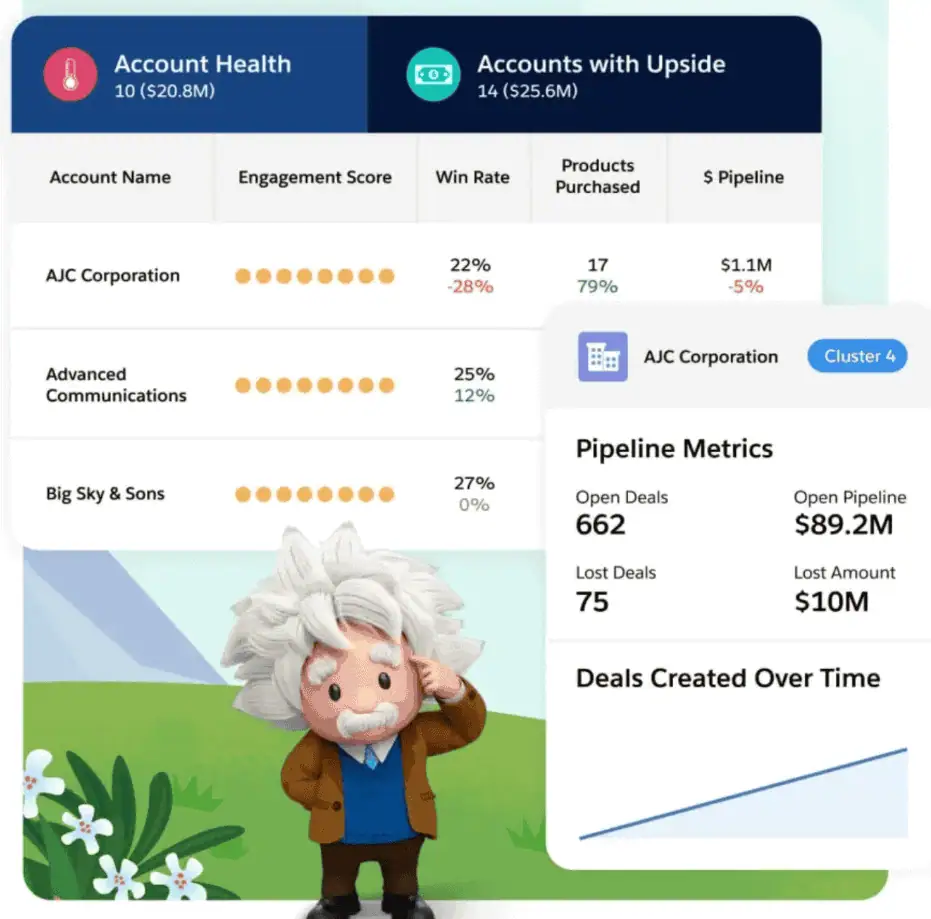
The Inspector tab shows what drove each score, so reps aren’t staring at a black box. It also benchmarks similar accounts against each other, so a rep can see what customers of the same size and industry typically spend and where the gaps are.
The Whitespace view is the feature that pays for itself. It breaks an account’s spend down by Product Name or Product Family and shows you what they haven’t bought yet. Instead of reps hunting through related lists to figure out if a customer owns Product X, the whitespace chart just tells them.
Winter ’25 added a few big upgrades here. Whitespace is now organized into clusters and cohorts, which makes it easier to spot patterns across similar accounts. You can also see how whitespace changes over time, and send outbound emails directly from the app when an account crosses a risk threshold. That last one is small but important: it shortens the gap between “here’s a signal” and “here’s a follow-up.”
6.Product Insights Dashboard
This was added in Winter ’24. Product Insights is for teams that sell more than one thing and want to know which products are actually working.
It uses heat maps to show product performance across segments, industries, and territories. If your new SKU is killing it in mid-market but flatlining in enterprise, the heat map shows that in one glance. You can also see which reps sell which products well, which products tend to get attached to winning deals, and where new markets might be opening up.
For product marketing and enablement teams, this is often more useful than a traditional sales report. It tells you what’s working at the product level, not just the deal level, so you can double down on training, messaging, or pricing where it’s making a difference.
7.Process Intelligence and Embedded Analytics
The last feature is for teams that want to go beyond the out-of-the-box dashboards.
Process Intelligence lets admins and analysts build their own AI-powered predictions on any Salesforce object with clicks, not code. Want to predict which leads will convert, which accounts will churn, or which deals will close on time? You can build a model for it. Einstein Discovery handles the heavy lifting and explains the factors driving each prediction, so you’re not shipping a black box to your sales team.
Embedded Analytics is the other half of this. Revenue Intelligence comes with 50+ native connectors that blend external data (marketing tools, billing systems, data warehouses) with your Salesforce data. You can then drop custom dashboards and components directly onto Sales Cloud pages, so reps see the blended view without ever opening a separate BI tool.
For RevOps teams, this is what makes Revenue Intelligence a real platform rather than just a set of prebuilt reports.
Salesforce Revenue Intelligence Pricing
Revenue Intelligence is priced at $220 per user per month as an add-on to Sales Cloud Enterprise or Unlimited editions. It requires an annual contract.
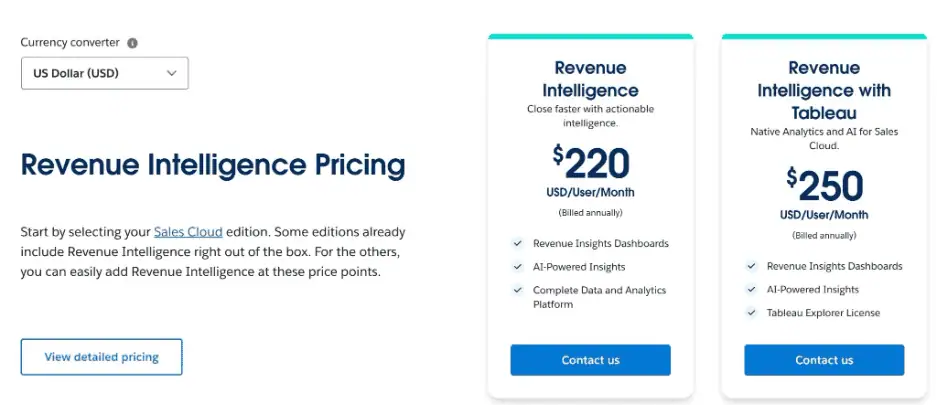
Here are a few things to keep in mind on pricing:
- It’s included in Agentforce 1 Sales, Salesforce’s top-tier Sales Cloud edition at around $550 per user per month. This edition replaced the old Einstein 1 Sales bundle in mid-2025. If you’re on it, you get Revenue Intelligence along with Data Cloud, Slack Enterprise+, Tableau Next, 1 million Flex Credits per org per year, and unmetered generative AI for employees.
- Industry Clouds have their own Intelligence SKUs. If you’re on Financial Services Cloud, Manufacturing Cloud (now Agentforce Manufacturing Intelligence), Communications Cloud, Consumer Goods Cloud, or Energy & Utilities Cloud, the industry-specific version of Revenue Intelligence is sold separately.
- Einstein Conversation Insights is a separate add-on. It starts at $50 per user per month, or comes bundled into Sales Engagement and Sales Cloud Unlimited. You need it if you want conversation-based deal insights. The generative AI features on top (Call Summaries, Call Explorer, Sales Signals) require either Agentforce 1 Sales or the Einstein for Sales add-on, plus Data Cloud.
- Agentforce is its own add-on. Agentforce for Sales starts at $125 per user per month on top of Enterprise or Unlimited editions. Usage of AI actions runs on Flex Credits (roughly $500 per 100,000 credits, or about $0.10 per action), which replaced the earlier $2-per-conversation model in 2025.
Who Should Actually Buy it?
Revenue Intelligence isn’t for every Salesforce customer. It pays off when:
- You have enough historical data in Salesforce for the AI models to be useful (typically a year or more of closed opportunities)
- Your sales team is large enough that manual forecast calls are eating up real time
- You care about whitespace and account expansion, not just new logo acquisition
- You’re already paying for third-party tools (Gong, Clari, Outreach analytics) and want to consolidate
If you’re a small team with under 20 reps and a simple product, then Sales Cloud reports, Pipeline Inspection on the Enterprise edition, and a few well-chosen sales productivity tools will probably cover you. The add-on starts making sense when you hit the point where your forecast call prep takes a full day every week.
Revenue Grid: An Alternative to Salesforce Revenue Intelligence
Not every team needs the full $220 per user per month add-on, and Salesforce Revenue Intelligence has a known weak spot: it only works as well as the data going into it. If reps aren’t logging activity properly, Einstein’s scores and forecasts are built on half the picture.
Revenue Grid is a Salesforce-native alternative that tackles that problem. It auto-captures 100% of sales activity (emails, meetings, contacts, attachments, tasks) from Outlook and Gmail straight into Salesforce as native records, so everything downstream (reports, Einstein models, forecasts) runs on complete data instead of what reps remembered to log.
Here’s what you get with Revenue Grid:
- Revenue Signals pushes real-time alerts into the inbox and Salesforce when a deal goes quiet, a close date slips, or a key contact stops replying. Reps don’t have to remember to open a dashboard.
- Relationship Intelligence maps out who’s actually involved in a deal based on real engagement, so you can see the real decision-makers and blockers, not just who’s listed as an Opportunity Contact.
- Deal Guidance gives AI-powered next-best-action recommendations on each deal, similar to Agentforce Sales Coach but without the Agentforce price tag or Data Cloud dependency.
- Full custom object support out of the box, which matters if your sales process relies on custom objects.
Revenue Grid is built for teams whose deals turn on trust, access, and relationship depth, and who want their revenue platform to reflect that reality. Book a demo to see it in action.
What's the difference between Salesforce Revenue Intelligence and standard Sales Cloud forecasting?
Standard Sales Cloud forecasting is built on what reps manually enter: deal stages, amounts, and close dates. Revenue Intelligence layers CRM Analytics, Einstein AI models, and purpose-built dashboards on top of that, giving leaders trend data, year-over-year velocity, stage-drop analysis, and scenario modeling that isn’t available in the base product. The gap matters most for larger teams running weekly forecast calls where manual aggregation becomes a real time cost.
Does Salesforce Revenue Intelligence replace tools like Gong or Clari?
Partially, for some teams. Revenue Intelligence covers pipeline inspection, forecasting, and account expansion analysis that overlaps with parts of what Clari does. It doesn’t replace conversation intelligence (Gong’s core strength) unless you also add Einstein Conversation Insights separately. Teams already paying for both Clari and Sales Cloud Enterprise sometimes find consolidating onto Revenue Intelligence reduces total cost, but the feature depth varies by use case.
How much historical Salesforce data do you need before Revenue Intelligence is useful?
At minimum, 12 months of closed opportunity data gives Einstein enough signal to produce reliable scores and predictions. Less than that, and the AI models are essentially guessing. Teams that have recently migrated to Salesforce or gone through a major sales process overhaul should expect a ramp period before the AI features become trustworthy.
What's the main limitation of Salesforce Revenue Intelligence?
It’s a reporting layer, not a data capture layer. If reps aren’t logging calls, emails, and meetings consistently in Salesforce, everything built on top, Einstein scores, forecast models, whitespace analysis, reflects an incomplete picture. Revenue Intelligence makes good data more useful; it doesn’t fix missing data. That’s the gap tools like Revenue Grid are specifically built to address by auto-capturing activity directly from inboxes.