

Key Takeaway
- Salesforce Inbox is retired. Einstein Activity Capture (EAC) is the official replacement, but it stores data outside standard Salesforce objects, so your reports, flows, and audit trails can't touch it.
- The replacement you pick depends on what you need beyond email sync: data ownership, pipeline visibility, engagement, or basic CRM logging.
- Revenue Grid — automated activity capture plus AI pipeline visibility for enterprise and regulated industries.
- Cirrus Insight — broadest Salesforce edition support, useful for Community Cloud, Force.com, and Industry Cloud.
- Yesware — free tier for individual reps and small teams; Salesforce sync on the Enterprise plan.
- Riva — strict data governance, MNPI controls, and enterprise-grade audit requirements.
- LinkPoint Connect — lightweight sidebar for straightforward email-to-CRM logging with data ownership.
- Mixmax — Gmail-only, with unique in-email polls, surveys, and embedded CTAs.
- For mid-market to enterprise Salesforce teams, the clearest pick is Revenue Grid. It writes to standard Salesforce fields, adds AI pipeline intelligence, and deploys in hours.
Salesforce Inbox was the add-on that quietly held a lot of sales workflows together. Emails logged to the right opportunity. Calendar events synced. Templates at the ready. It worked well enough that most teams stopped thinking about it.
Salesforce retired it. Support for Salesforce for Outlook officially ended in 2024, and Inbox Mobile followed soon after. The replacement Salesforce points everyone toward is Einstein Activity Capture (EAC). On paper, a reasonable successor. In practice, a different set of problems.
EAC captures emails and calendar events automatically. What it doesn’t do is store that data inside the standard Salesforce objects your reports, dashboards, and Flows actually query. So a CRO asks for an activity report by rep this quarter, and the dashboard comes back half-empty. Audit requests get messy. Compliance reviews get slower.
That gap is why thousands of Salesforce admins, RevOps leaders, and sales ops teams are actively searching for a Salesforce Inbox alternative (sometimes still called an SFDC Inbox replacement) in 2026. According to Salesforce’s own State of Sales report, reps spend only about 30% of their time actually selling. A broken email-sync layer makes that number worse, not better.
This guide evaluates the seven strongest Salesforce Inbox alternatives available in 2026: features, pricing context, sync depth, and a decision framework to match each tool to the right team. Let’s dig in.
Why Teams Are Moving Away From Salesforce Inbox
Before we get to the alternatives, it’s worth understanding why the EAC migration keeps going sideways. Because if you don’t know what broke, you’ll pick a replacement that breaks in the same way.
Quick context: What happened to Salesforce Inbox?
Salesforce Inbox (originally branded as Inbox by Salesforce) was the email productivity add-on that brought email tracking, templates, and calendar sync into Gmail and Outlook. Salesforce phased it out across 2023–2025 — Salesforce Inbox Mobile retirement was confirmed in 2025, and the recommended path is Einstein Activity Capture. EAC solves some of what Inbox did, and Salesforce’s Summer 2025 release closed part of the reporting gap by letting captured emails sync as native Task and EmailMessage records. The broader limitations, covered below, still apply, which is why most mid-market and enterprise teams end up evaluating third-party alternatives.
Here are the four reasons teams are looking elsewhere.
Shallow Sync That Left Real Work Undone
Salesforce Inbox handled basic email and calendar sync, mostly one-way, with very little control over which Salesforce objects received the data. Custom object mapping was thin. Multi-thread deals rarely got attributed to the right opportunity. Attachments didn’t always make it across.
For a small team on vanilla Sales Cloud, that was fine. For any org running real automation, custom object models, or multi-rep deal teams, Inbox was always going to hit a ceiling. Teams tolerated it because there wasn’t a better native option. Now that Salesforce has retired the product, tolerating the ceiling no longer makes sense.
For orgs running opportunity-level attribution, Flow triggers on activity, or reporting across custom objects, Salesforce Inbox was never going to get them there.
Rep Adoption That Never Got Above the Floor
The best email-to-CRM tool in the world is useless if reps don’t use it.
Salesforce Inbox required reps to toggle between their inbox and Salesforce, or remember to click “log to Salesforce” on the right emails. Most didn’t. The consequence was predictable: incomplete CRM data, skewed forecasts, and managers coaching from a timeline that was missing half the story.
This was a workflow problem. Any tool that depends on rep discipline to capture activity ends up capturing less than half of it. Once the data in Salesforce is incomplete, the forecast built on it is already wrong.
Licensing That Was Never Really “Included”
Salesforce Inbox ran about $25 per user per month as a paid add-on on top of Sales Cloud, or $50 per user per month bundled with Sales Cloud Einstein. For a 200-person sales org on the basic tier, that’s $60,000 a year for a tool that mostly logged emails and offered templates.
Plenty of admins quietly questioned whether the price matched the depth. Finance teams asked the same question during budget reviews. Factor in the cost of incomplete data, missed follow-ups, inaccurate forecasts, wasted rep hours cleaning up records, and the real total cost of ownership looked a lot less reasonable.
The economics never fully worked. Once Salesforce signaled the product was on its way out, paying separately for it stopped making sense at all.
A Retirement That Forced the Question
None of the above would have mattered if Salesforce had kept Inbox alive. It didn’t. The retirement timeline moved from maintenance-mode positioning in 2023, to the Inbox Mobile app being discontinued on February 1, 2024, to Salesforce Inbox being formally listed as retired in the Winter ’25 release notes.
Existing customers still have some functionality today. Nobody is building new implementations on it, and Salesforce has made clear there is no forward roadmap. Which means every Salesforce admin is now facing the same question from their CRO. If Inbox is gone, what replaces it, and does the replacement actually fix what Inbox never did well?
A quick recap of why teams are leaving Salesforce Inbox:
- Sync depth was always shallow, with minimal custom object mapping and thin attribution
- Rep adoption stayed low because logging depended on manual action
- Licensing at $25 per user per month was hard to justify against the depth it delivered
- Salesforce retired the product and offered no forward roadmap
Knowing the problem is one thing. Knowing what to screen replacements against is where most evaluations stall. The next section fixes that.
What to Look for in a Salesforce Inbox Alternative
Every vendor demo will tell you their product syncs with Salesforce. True for all of them. Useless as a shortlisting signal. Here are the eight criteria that actually separate real options from pretenders.
- Email and calendar sync depth. One-way or bidirectional? Mapping to custom objects or only standard ones? Granular rules or all-or-nothing?
- Data ownership. Captured data in standard Salesforce fields where you can report and audit, or dumped into a separate store?
- Email environment support. Gmail, Outlook, or both? Inherited a mixed environment from an acquisition? Gmail-only tools eliminate half your coverage.
- Salesforce edition compatibility. Not every tool supports Group, Professional, Partner Community, Force.com, or Industry Cloud. Check before you demo.
- Ease of setup and admin controls. Hours or weeks? Can your admin configure sync rules, permissions, and field mapping without a professional services engagement?
- Advanced features. AI insights, pipeline visibility, conversation intelligence, templates, sequences. Do you need them now, or will you need them in 12 months?
- Security and compliance. SOC 2 Type II, GDPR, ISO 27001, role-based access, audit logs, encryption. Non-negotiable for enterprise.
- Pricing transparency. Per-user costs, free tiers, bundled vs. à la carte, contract length. Hidden costs show up in year two.
Keep this list handy. Every tool below gets evaluated against it, whether we say so explicitly or not.
7 Best Salesforce Inbox Alternatives for 2026
Each alternative serves a different type of team. Some are lightweight replacements for Inbox. Others go well beyond it into full revenue intelligence. Here’s the at-a-glance view first, then a detailed breakdown of each tool.
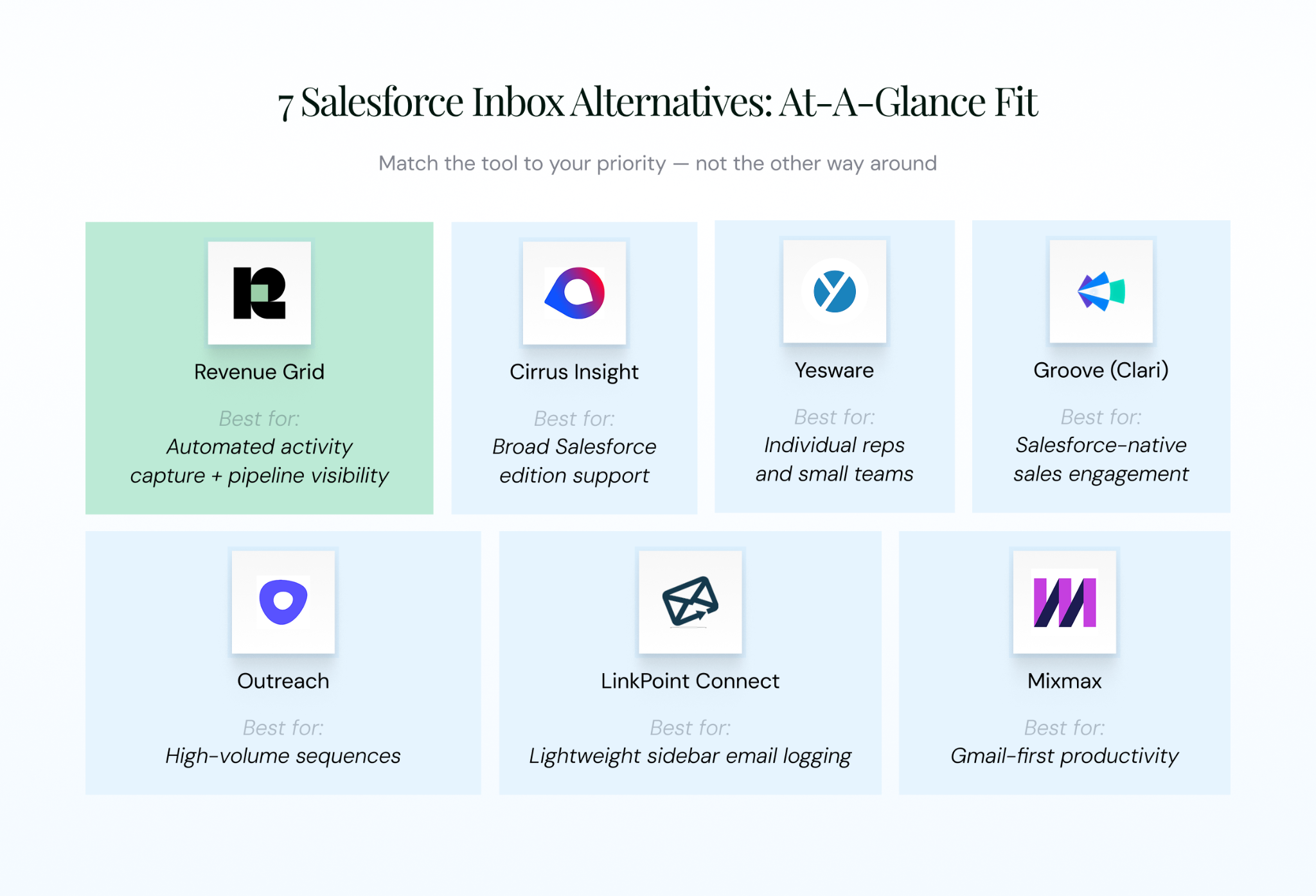
Figure 2: The 7 alternatives at a glance
| Tool | Best For | Gmail | Outlook | Bidirectional Sync | Data in Standard SF Fields | Key Differentiator | Pricing (Starting) |
|---|---|---|---|---|---|---|---|
| Revenue Grid | Activity capture + pipeline visibility | ✓ | ✓ | ✓ | ✓ | AI pipeline insights, fastest deployment | From ~$30/user/mo |
| Cirrus Insight | Broad Salesforce edition support | ✓ | ✓ | ✓ | ✓ | Widest SF edition compatibility | From ~$14/user/mo |
| Yesware | Individual reps and small teams | ✓ | ✓ | Limited | Partial | Free tier; email tracking focus | Free; SF tier ~$65/user/mo |
| Groove (Clari) | Salesforce-native sales engagement | ✓ | ✓ | ✓ | ✓ | Native Salesforce architecture | Contact Clari for pricing |
| Riva | Regulated industries and data governance | ✓ | ✓ | ✓ | ✓ | MNPI controls, deep data gating | Contact Riva (no public pricing) |
| LinkPoint Connect | Lightweight sidebar integration | ✓ | ✓ | Limited | ✓ | Simple setup, strong data ownership | From ~$16/user/mo |
| Mixmax | Gmail-first productivity | ✓ | ✗ | Limited | Partial | In-email polls, surveys, CTAs | Free; paid from ~$29/user/mo |
Pricing figures reflect publicly available data at time of writing. Verify with each vendor before purchase.
1. Revenue Grid — Best for Automated Activity Capture and Pipeline Visibility
Teams that need more than email sync: reportable activity data, pipeline visibility, and AI that surfaces where deals are actually slipping, tend to land on Revenue Grid.
Revenue Grid is a Revenue Action Platform, not an email plugin. It captures 100% of customer interactions (emails, calendar events, calls, meetings) across Gmail and Outlook, then maps them to the right CRM records even when deals cross multiple reps or threads. The captured data is written to standard Salesforce fields. Reports, dashboards, Flow, Process Builder, and audit trails all work the way your admin expects.
What sets Revenue Grid apart:
- Captures up to 2,000% more customer data than manual entry by covering emails, calendar, and calls across every rep, not just the ones who remember to log
- Writes to standard Salesforce fields (Task, Event, EmailMessage), so reports, Flow, Process Builder, and audit trails all work without workarounds
- Deploys in hours, not weeks, with no custom code required
- AI-driven pipeline intelligence layered on top of capture, flagging stalled deals, missing stakeholders, and engagement drop-offs before they hit the forecast
- Co-pilot and auto-pilot execution that acts on the captured data, not just stores it
Key Insight
Revenue Grid customers report capturing up to 2,000% more customer data compared to manual CRM entry, with sales teams saving an average of 10 revenue hours per week.
Pros:
- Best-in-class activity capture that maps interactions to the right CRM records automatically
- Data ownership in standard Salesforce fields — fully reportable, fully auditable
- Deep native Salesforce integration, including complex multi-object orgs
- AI pipeline visibility and forecasting that go well beyond email sync
- Enterprise certifications trusted by regulated industries
Cons:
- Built for revenue teams, may be more platform than a small team with simple sync needs requires
Pricing: From $30/user/mo. Three tiers: Activity Capture 360 ($30), Knowledge Capture ($49), Ultimate ($149).
Best for: Mid-market to enterprise Salesforce teams that need full activity capture, data ownership, pipeline visibility, and AI-driven revenue insights.
See how Revenue Grid replaces Salesforce Inbox — book a demo
2. Cirrus Insight — Best for Broad Salesforce Edition Support
Not every Salesforce org runs on vanilla Sales Cloud. Orgs that include Community Cloud, Force.com, or an Industry Cloud edition often find most vendors politely declining to support them. Cirrus Insight is usually the one that says yes.
Cirrus has been connecting Gmail and Outlook to Salesforce for over a decade. The platform handles email and calendar sync, record editing from the inbox sidebar, custom object support, meeting AI, and buyer signals. Its real differentiator is edition compatibility — Group, Professional, Enterprise, Unlimited, Partner Community, Force.com, Financial Services Cloud, and Industry Cloud are all supported.
Core features:
- Email and calendar sync for Gmail and Outlook
- Salesforce sidebar with record editing directly from the inbox
- Multi-object sync and custom object support
- Meeting AI and buyer signals
- Email templates, attachment tracking, calendar scheduling
Pros:
- Widest Salesforce edition support on the market
- Meeting intelligence and buyer signal features included on higher tiers
- Multi-object sync handles reasonably complex Salesforce data models
Cons:
- Primarily an email integration tool; lacks revenue intelligence and pipeline visibility
- G2 reviews flag renewal practices including a 30-day cancellation notice window, so read the contract carefully
Pricing: Three public plans: Salesforce Sync at $10/user/mo, Pro at $21/user/mo, and Expert at $29/user/mo — with add-ons available. Free trial offered.
Best for: Organizations using non-standard Salesforce editions that need edition compatibility guaranteed before anything else.
3. Yesware — Best for Individual Sales Reps and Small Teams
Every sales tool roundup needs a pick for individual reps. Yesware has owned that slot for over a decade. It lives inside Gmail and Outlook, handles email tracking and templates, and has a free tier that actually works.
Worth clearing up a common misconception: Yesware is often reported as a Zendesk acquisition. It isn’t. Vendasta acquired Yesware in October 2022, and in 2025 Yesware Premium launched inside the Vendasta Marketplace. That matters because Vendasta is channel-partner focused, which suggests Yesware’s roadmap will prioritize reseller integrations over enterprise Salesforce depth going forward.
Core features:
- Email tracking (opens, clicks, replies) inside Gmail and Outlook
- Email templates and multi-channel campaigns
- Meeting Scheduler with Google, Outlook, and Zoom integration
- Salesforce sync (Enterprise tier only)
- Prospector B2B contact database add-on
Pros:
- Free Forever plan genuinely available for individual reps
- Easy to install with minimal admin overhead
- Solid email tracking and template capabilities
Cons:
- Limited sync depth — not truly bidirectional, limited object mapping
- Not designed for enterprise-scale capture or compliance
- Salesforce integration is gated behind the Enterprise plan at approximately $65/user/mo
Pricing: Free tier. Pro from ~$15/user/mo. Premium ~$35/user/mo. Enterprise (with Salesforce) from ~$65/user/mo.
Best for: Individual reps or small teams (under 20 users) who need lightweight email tracking without a full platform deployment.
4. Groove (Clari Groove) — Best for Salesforce-Native Sales Engagement
Groove’s historical differentiator was its native Salesforce architecture. Data lives directly inside Salesforce, meaning real ownership without workarounds. That technical advantage still holds. Everything around it has changed.
Clari acquired Groove in August 2023, with plans to integrate its sales engagement capabilities into Clari’s AI-powered Revenue Platform. Forrester described the deal as a significant milestone in the consolidation trend across revenue tech, joining Outreach, Salesloft, and Gong in bundling sales engagement, conversation intelligence, and revenue operations.
For buyers, that creates a genuine question: are you evaluating Groove, or are you buying into Clari’s broader platform vision?
Core features:
- Salesforce-native architecture with true data ownership
- Email and calendar sync for Gmail and Outlook
- Activity capture and auto-logging
- Sales engagement workflows — sequences, cadences, dialer
- LinkedIn integration and analytics
Pros:
- Salesforce-native architecture means data lives inside your Salesforce org
- Strong multi-channel engagement workflow features
- Robust analytics and reporting
Cons:
- Clari integration means roadmap and standalone availability may shift
- Enterprise pricing can be prohibitive for smaller teams
- Engagement features are overkill if you only need email-to-CRM sync
One practical tip: ask Clari directly about product roadmap, standalone pricing, and the integration timeline before signing. Those answers tell you whether the tool fits a 24-month plan.
Pricing: Custom
Best for: Enterprise Salesforce teams that want a full sales engagement platform with native data architecture and are comfortable with the Clari trajectory.
5. Riva — Best for Regulated Industries and Enterprise Data Governance
Some industries can’t afford to be experimental with customer data. Wealth management, investment banking, pharma, government — sectors where “where exactly does this email live, and who can see it?” isn’t a curiosity question, it’s a quarterly audit question. Riva was built for those teams.
Riva is a CRM integration and activity capture engine with 20+ years of enterprise integration experience and 650+ enterprise customers, heavily concentrated in financial services. It captures emails, meetings, contacts, and calendar events from Outlook, Exchange, and Google Workspace, then makes them available in Salesforce (plus Microsoft Dynamics, NetSuite, Veeva, SAP, and Oracle). What sets it apart from most tools on this list is the governance layer: granular data gating, MNPI controls, header-only capture, and the ability to pass data through without retaining it.
Core features:
- Bidirectional sync of emails, calendar, contacts, and tasks across Outlook, Exchange, and Google Workspace
- Native CRM integration beyond Salesforce: Dynamics 365, NetSuite, Veeva, SAP, Oracle Sales Cloud
- Data gating and granular privacy controls, including MNPI handling for financial services
- Header-only email capture option for regulated or sensitive communications
- Enterprise-grade security with 1,100+ successful security reviews on record
- Insight side panel inside Outlook for CRM context without tool switching
- Sales Engagement add-ons: Riva Cadences and Riva Bookings, sit on top of the core sync
Pros:
- Strongest data governance story of any tool on this list, built for regulated environments
- Proven at enterprise scale (150,000+ simultaneous users, 5M+ monthly calendar events)
- Connects to a much wider range of CRMs than inbox-focused alternatives
Cons:
- Priced and positioned for enterprise, not suitable for organizations under 25 employees
- Core platform pricing runs significantly higher than most alternatives; starting around $25/user/mo for entry tiers and $40–$60/user/mo for RevOps and compliance plans
- Primarily a sync and governance engine, pipeline intelligence and AI forecasting are not its focus
Pricing: Custom
Best for: Financial services, healthcare, pharma, and other regulated industries that need enterprise-scale sync with deep data governance, MNPI handling, and audit-ready controls, especially when Outlook or Exchange is the primary email environment.
6. LinkPoint Connect — Best for Lightweight, Sidebar-Based Email Integration
Some teams don’t need AI, pipeline forecasting, or conversation intelligence. They need reps to log emails and events to Salesforce without leaving their inbox. LinkPoint Connect is exactly that tool.
LinkPoint Connect adds a Salesforce sidebar to Outlook and Gmail. One-click logging, custom field mapping, support for multi-object record creation. The data stays in standard Salesforce fields, which keeps reporting, auditing, and existing workflows intact. That’s a meaningful advantage for regulated industries worried about EAC’s external data store.
Core features:
- Salesforce sidebar for Outlook and Gmail
- One-click email and event logging
- Custom field mapping and multi-object record creation
- All captured data written to standard Salesforce fields
- Supports Salesforce Lightning and Classic
Pros:
- Simple setup with minimal admin overhead
- Full data ownership — everything stays in standard Salesforce fields
- Lower cost than full engagement or revenue intelligence platforms
Cons:
- No AI insights, no pipeline visibility, no conversation intelligence
- Primarily a logging and sync tool with no intelligence layer on top
- Limited engagement and automation capabilities
Pricing: Custom
Best for: Teams that want straightforward sidebar integration without platform complexity. Especially strong for regulated industries focused on data ownership and compliance.
7. Mixmax — Best for Gmail-First Teams Needing Email Productivity
Mixmax is a bit of an outlier on this list. Genuinely unique in one way — in-email polls, surveys, and embedded CTAs that no other tool here offers. Genuinely limited in another: it only supports Gmail.
For organizations running 100% on Gmail with no Outlook users, Mixmax can be delightful. The moment even 10% of the company uses Outlook, it’s out before the demo ends.
Core features:
- Gmail-native email tracking, templates, and sequences
- Meeting scheduler with calendar integration
- Salesforce integration (activity sync plus sidebar)
- Workflow automation and rules
- In-email polls, surveys, and embedded CTAs — unique on this list
Pros:
- Deep Gmail-native experience
- In-email interactive features no competitor offers
- Affordable entry pricing with a free tier
Cons:
- Gmail-only — no Outlook support at all
- Salesforce sync depth is limited compared to dedicated tools
- Not designed for enterprise data capture or pipeline visibility
Pricing: From $29/user/mo; Salesforce bi-directional moved to the Suite tier at $89/user/mo. The $29 starter tier no longer includes CRM integration.
Best for: Gmail-first sales teams (100% Gmail, no Outlook) that want email productivity with basic Salesforce sync.
How to Choose the Right Salesforce Inbox Alternative
Seven tools. Different strengths. Different price points. The honest question isn’t “which is best?” It’s “which is best for our team?”
Here’s how to narrow the shortlist fast.
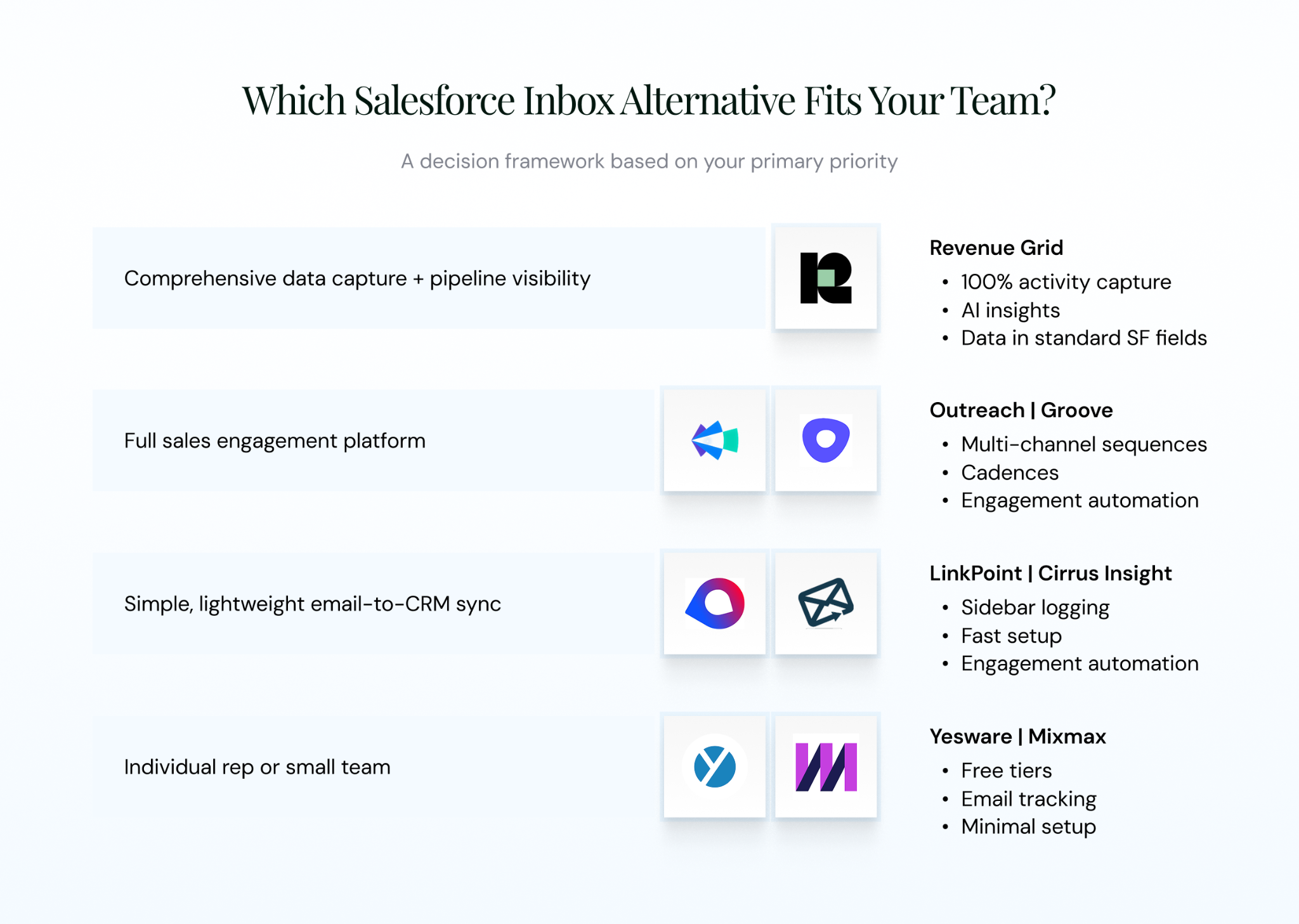
Figure 3: Decision framework for matching priority to tool
Decision matrix:
| Your Priority | Recommended Tool | Why |
|---|---|---|
| Comprehensive data capture + pipeline visibility | Revenue Grid | 100% activity capture, AI insights, data ownership |
| Full sales engagement platform | Groove | Multi-channel sequences and engagement automation |
| Regulated industry with strict data governance | Riva | MNPI controls, data gating, compliance-grade audit |
| Simple, lightweight email-to-CRM sync | LinkPoint Connect, Cirrus Insight | Sidebar logging, fast setup, lower cost |
| Individual rep or small team | Yesware, Mixmax | Free tiers, email tracking, minimal setup |
If You Need Comprehensive Data Capture and Pipeline Visibility
Go with the Revenue Grid. Teams with a mandate of “no more forecast surprises, no more incomplete activity data, no more compliance scrambles” belong in the Revenue Action Platform category, not a lightweight sync plugin. Revenue Grid writes to standard Salesforce fields and layers AI forecasting on top.
If You Need a Full Sales Engagement Platform
Groove. It is built for multi-channel sequences at scale. The tradeoff: they’re expensive, complex, and Salesforce sync is a feature, not the focus. Keep that in mind if email-to-CRM is actually your priority.
If You Need Simple, Lightweight Email-to-CRM Sync
LinkPoint Connect or Cirrus Insight. Both write to standard Salesforce fields and set up quickly. Pick LinkPoint if the priority is data ownership and low cost. Pick Cirrus Insight if your Salesforce edition is unusual or you need deep multi-object support.
If You’re in a Regulated Industry With Strict Data Governance
Riva. Financial services, healthcare, and pharma teams dealing with MNPI, audit requirements, or strict data-residency rules will find Riva’s configurable data gating and governance controls harder to match elsewhere. Revenue Grid is still a strong option if you also need pipeline intelligence on top of governance. Riva is the pure-governance pick.
If You’re a Small Team or Individual Rep
Yesware or Mixmax. Both have functional free tiers. Yesware wins on Outlook. Mixmax wins on Gmail-only teams that want the interactive email features. Start free, upgrade only when the limits start to bite.
Knowing which tool fits is one thing. Getting there without disrupting the sales team is another.
How to Migrate From Salesforce Inbox to a New Tool
Migrations go sideways for predictable reasons — unclear scope, no pilot, poor communication to reps. Here’s the six-step path that keeps you out of trouble.
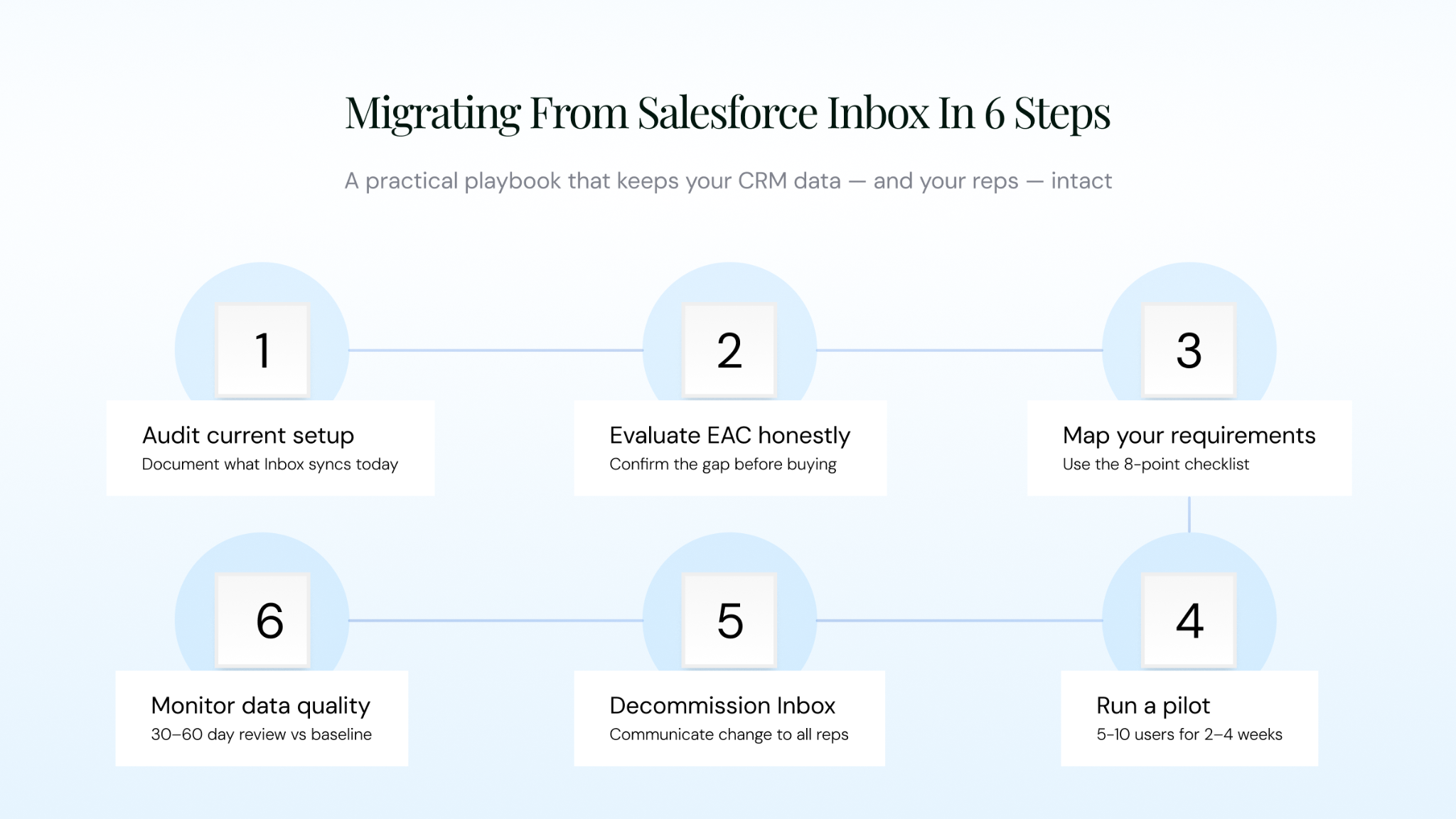
Figure 4: Six-step migration playbook for moving off Salesforce Inbox
- Audit your current setup. Document what Salesforce Inbox is syncing today — emails, events, contacts — to which Salesforce objects, and for which users. Export any sync rules or configuration settings. You can’t migrate what you haven’t mapped.
- Evaluate Einstein Activity Capture honestly. Before committing to a third-party tool, test whether EAC actually meets your requirements. If your team doesn’t need reportable data, custom object mapping, or compliance-grade audit trails, EAC might be enough. For most mid-market and enterprise teams, it isn’t — which confirms the need for an alternative.
- Map your requirements to the evaluation criteria. Use the eight-point checklist from earlier. Prioritize ruthlessly: sync depth, data ownership, email environment support, security, and budget. Everything else is nice-to-have.
- Run a pilot with a small team. Deploy the new tool with 5–10 users for 2–4 weeks. Validate sync accuracy, data quality in Salesforce, user adoption, and the admin experience. A struggling pilot is a clear signal that the full rollout will be worse.
- Decommission Salesforce Inbox. Once the pilot validates, disable Salesforce Inbox licenses and update admin settings. Send a clear, one-page communication to affected users explaining exactly what’s changing and how to use the new tool.
- Monitor data quality for 30–60 days. Track CRM data completeness, sync error rates, and user adoption against your pre-migration baseline. Catch drift early.
💡 Pro Tip
Revenue Grid can be deployed and delivering value within hours. One of the fastest migration paths available for teams that need comprehensive data capture from day one.
Finding the Right Salesforce Inbox Replacement
Salesforce Inbox’s retirement isn’t bad news. It’s an opportunity to fix a layer of the stack that was always half-built. The tools available in 2026 offer significantly more capability than Inbox ever did — better sync, better data ownership, better AI, better security.
The only question is which one matches your team.
For basic logging, pick a lightweight sidebar tool and move on. For scale and sequences, pick a full engagement platform. For forecast accuracy, pipeline visibility, compliance-grade data ownership, and AI-driven insights that actually change how a CRO runs Monday morning — that’s where Revenue Grid earns its place.
Quick recap of Revenue Grid’s differentiators:
- 100% automated activity capture across email, calendar, and calls
- Data written to standard Salesforce fields — fully reportable and auditable
- AI-driven pipeline visibility and forecasting
- Enterprise-grade security — GDPR, SOC 2 Type II, ISO 27001
- Deployed within hours, not weeks
Ready to see how Revenue Grid replaces Salesforce Inbox and delivers full pipeline visibility? Book a demo.