


Key Takeaway
- Salesforce Inbox is the rep-facing email productivity layer. Einstein Activity Capture is the background sync engine. They solve different problems and are designed to run together.
- Since the Spring '23 release, Inbox users can be included in any Einstein Activity Capture configuration, which means one setup, not two.
- Einstein Activity Capture stores email data on AWS by default, and this single fact shapes reporting, automation, and compliance in ways most admins only discover after go-live.
- Two deadlines deserve a place on every admin's 2026 calendar. Activity 360 Reporting retires in Summer '26, and Microsoft Graph becomes the only supported authentication method for EAC on Microsoft 365 in August 2026.
- For teams that have outgrown native tools, Revenue Grid replaces both Salesforce Inbox and Einstein Activity Capture with one platform starting at $30 per user per month, storing every interaction as a native Salesforce record.
There’s no doubt that Salesforce has given sales teams a new lease of life. A lot of the manual work that reps used to dread has been quietly taken off their plate by native tools like Einstein Activity Capture and Salesforce Inbox. Sellers have enjoyed cleaner timelines, managers have gained more visibility, and admins have finally found some relief from the copy-paste CRM hygiene that used to eat entire afternoons. It is also a fact that these two products are majorly responsible for that shift inside thousands of Salesforce orgs.
While all of this seems to bode well for revenue teams and nothing seems to be out of place when admins rejoice their move to native capture, is there something they should be wary of? Yes, actually.
Salesforce reps still spend only about 28% of their week actively selling, according to Salesforce’s own State of Sales report. The rest of their time goes to admin work, logging, and hunting for context across tools. Einstein Activity Capture and Salesforce Inbox were built to close exactly that gap. For many teams, they do. For others, they run into limitations that are rarely discussed in the official documentation and almost never surface until a CRO asks the kind of question no admin wants to answer on a Monday morning.
This guide walks through how Salesforce Inbox with Einstein Activity Capture actually works together, how to set it up without regret, which edition and license combinations you need, where the quiet limitations hide, and when it makes sense to look past the native stack.
What Is Einstein Activity Capture?
Einstein Activity Capture, commonly called EAC, is Salesforce’s automated background sync tool. It connects a user’s Microsoft 365 or Google Workspace account to Salesforce, then captures emails, calendar events, and contacts and displays them on the activity timeline of related records. It runs server-side, which is part of why it replaced the older Lightning Sync plugin that depended on client-side syncing.
The goal is simple enough. Reps send and receive emails. EAC reads those emails, matches senders and recipients against Salesforce contacts and leads, and places the interaction on the right record so no one has to click “Log to Salesforce” ever again. For teams used to manual logging, this feels like a small miracle in the first week.
There’s a catch, though, and it’s the kind of catch that shows up in a pipeline review six months later. By default, EAC stores captured email data on AWS infrastructure managed by Salesforce, not inside the Salesforce org as a standard task or event record. The Summer ’25 release introduced a Sync Email as Salesforce Activity option that writes new emails as native records, but the migration is irreversible and historical backfill is capped at 180 days. For the complete breakdown of what changed in Summer ’25 and why the storage model matters, the Einstein Activity Capture pricing and limitations guide walks through it in depth.
What EAC Captures, and What It Doesn’t
Before going further, it helps to be crystal clear about what EAC actually sees, because the list of what it misses is longer than most admins realize.
| What EAC captures | What EAC does not capture |
| Emails sent and received via the connected mailbox | Phone calls and voicemails |
| Calendar events from the connected calendar | SMS and text messages |
| Contacts matched by email address | LinkedIn messages and InMail |
| Einstein Email Insights flags | Slack and Microsoft Teams conversations |
| Items queued in the Internal Activity Feed | Video meeting transcripts and recordings |
| WhatsApp and other messaging channels |
Put this into real selling terms. If a rep has five calls, three LinkedIn exchanges, and a Slack thread with a prospect over two weeks, none of that shows up in Salesforce through EAC. The activity timeline looks complete because the emails are there, but the rep’s actual engagement with the buyer is only partially captured. For teams that run multi-channel motions, which is the norm in B2B selling, this gap is the difference between a report that reflects reality and one that quietly misleads leadership.
What Is Salesforce Inbox?
Salesforce Inbox is often confused with Einstein Activity Capture, and it’s easy to see why. The names overlap, both products live inside Sales Cloud, and both deal with email. The distinction matters, though, and stating it plainly usually clears up the confusion in one sentence.
Salesforce Inbox is a rep productivity add-on that lives inside Outlook or Gmail. It is not a capture tool. It gives reps a Salesforce sidebar next to every email thread, plus features like email tracking, templates, send-later scheduling, and calendar availability sharing. EAC works in the background. Inbox works in the foreground. Both can run on their own, but together they deliver the experience most revenue teams are actually looking for.
Key distinction: Einstein Activity Capture automates background data sync. Salesforce Inbox gives reps productivity tools inside their email client. They solve different problems, and most orgs run both.
Salesforce Inbox Features at a Glance
Inbox packs a short but useful list of features that reps interact with every day. Each one requires the Inbox license and permission set to be active for the user.
- Email open and click tracking sends notifications when a recipient opens an email or clicks a link
- Email templates with merge fields pull live Salesforce data into pre-built messages
- Send-later scheduling queues emails to send at a specific time
- Calendar availability insertion drops open meeting slots into an email thread
- Salesforce sidebar in Outlook and Gmail shows contacts, accounts, and open opportunities next to each thread
- Create and update CRM records from the inbox, so reps never leave their email client to log activity
- Engage integration connects to Marketing Cloud Account Engagement (formerly Pardot) for orgs that use it
None of these features are radical on their own. Put together, they let a rep work inside their email client with Salesforce context always one glance away, which is often enough to speed up the day by a few hours a week.
Salesforce Inbox vs. Einstein Activity Capture: Key Differences
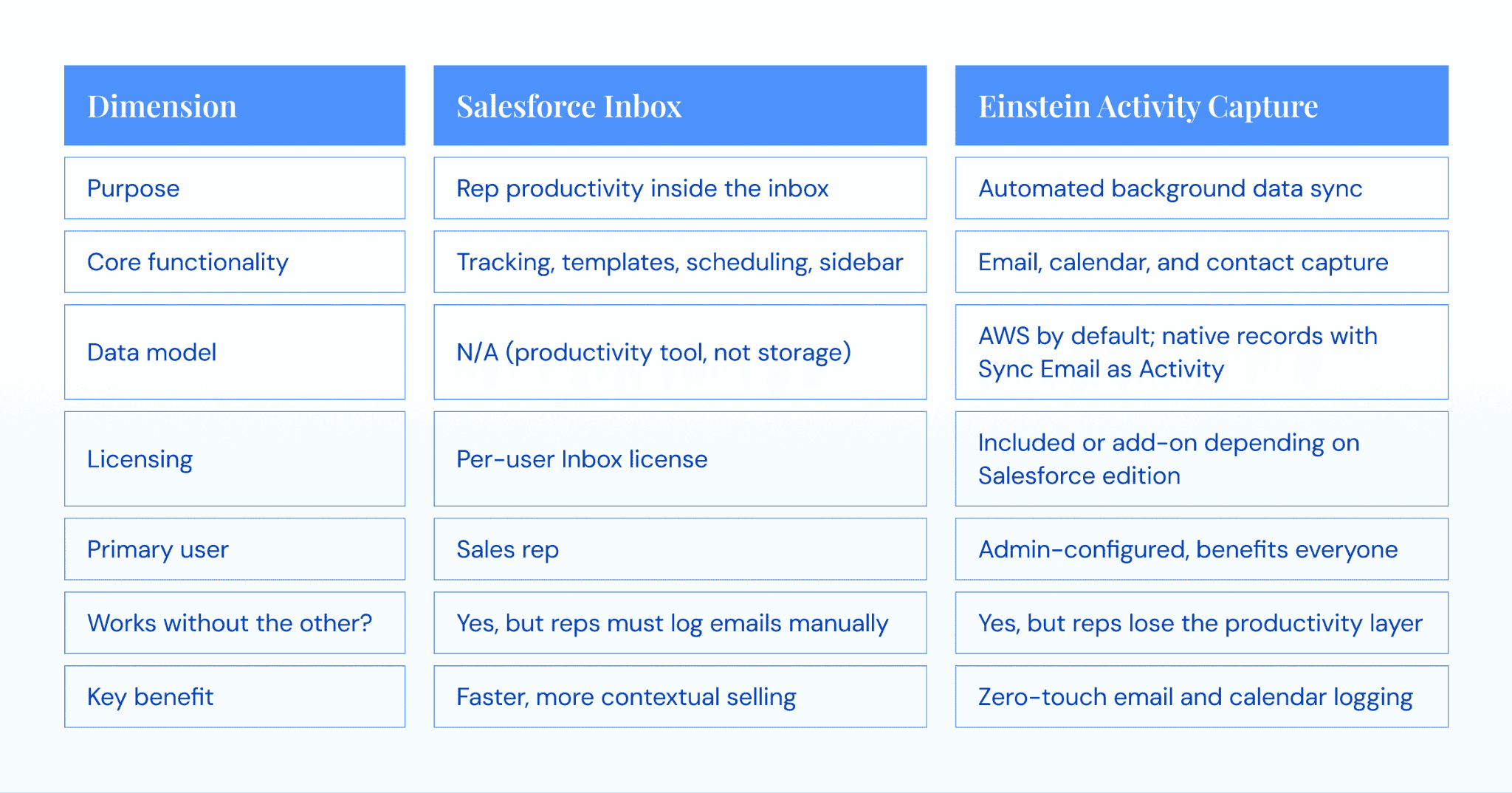
Admins new to this stack often ask the same question. Why are there two products, why do they sound alike, and which one do I actually need? The honest answer is that these two products have overlapping names and related functionality, which leads to constant mix-ups, but they were built to complement each other, not compete.
Here’s how they line up side by side.
Do You Need Both?
For most organizations, yes. Without EAC, Inbox users have to log emails manually, which cancels out half the reason for buying Inbox. Without Inbox, EAC captures data but reps miss tracking, templates, and the sidebar. Running both together produces more value than either one alone.
Since Spring ’23: Inbox users can be included in any EAC configuration. Before this change, Inbox required a separate EAC configuration, and admins managed two sets of rules for the same users. Now it’s one configuration.
If budget forces a choice, keep EAC. It captures the foundational data the whole org benefits from. Inbox is a productivity layer on top that individual reps appreciate.
Editions, Licensing, and Requirements
Both Einstein Activity Capture and Salesforce Inbox have edition requirements, and both may need add-on licenses depending on which edition the org is on. The combinations are not always intuitive.
Salesforce Editions and What’s Included
| Edition | EAC Standard | EAC Full | Salesforce Inbox | Notes |
| Starter / Pro Suite | Yes (up to 100 users) | No | No | 6-month retention, Standard tier only |
| Professional | Yes (up to 100 users) | Add-on | Add-on | Standard tier default |
| Enterprise | Yes (up to 100 users) | Add-on | Add-on | Full version needs Sales Cloud Einstein |
| Unlimited | Yes | Yes | Yes | Included in base license |
| Performance | Yes | Yes | Yes | Included in base license |
| Sales Cloud Einstein | Yes | Yes | Yes | All-in bundle for EAC, Inbox, and Einstein |
The Standard tier of EAC has a 100-user cap and a 6-month data retention window. Organizations on Enterprise edition often assume EAC is free because the Standard tier is included, then discover during implementation that their needs require the Full tier or the Sales Cloud Einstein bundle.
Salesforce Inbox Licensing
Salesforce Inbox is a separate per-user license. It’s included in Unlimited, Performance, and the Sales Cloud Einstein bundle. For Enterprise and Professional editions, it runs as an add-on at roughly $25 per user per month at list price. Licenses are assigned per user, not org-wide. A 100-rep team on Enterprise is looking at around $30,000 per year for Inbox alone, a figure that deserves its own line item in the implementation budget.
Permission Sets and User Assignments
Two things must be active for features to work: the license and the permission set. The license alone won’t surface features. The permission set alone won’t work either.
- For EAC: Setup → Permission Sets → Standard Einstein Activity Capture → Manage Assignments → Add Assignments
- For Inbox: Setup → Permission Sets → Salesforce Inbox → Manage Assignments → Add Assignments
Skip either step and features never appear for the user. This is the single most common reason admins open support tickets after a rollout.
Tip: A license assigned without a permission set won’t surface features. A permission set assigned without a license won’t work either. This is the setup error that produces the most “it’s not working for me” messages in the first week after go-live.
How to Set Up Salesforce Inbox With Einstein Activity Capture
These steps assume you’ve verified edition compatibility and have the necessary licenses ready to assign. Enable EAC first, then assign Inbox: Inbox users benefit from EAC’s automated capture being active from day one. From Spring ’26, Inbox users can be included in any EAC configuration, which eliminates the old two-configuration problem.
Step 1: Enable Einstein Activity Capture in Setup
Navigate to Setup → Einstein → Einstein Activity Capture → Settings → Enable. The Setup Assistant walks through three key decisions: which users or profiles to include, which objects to sync (emails, events, and contacts), and whether to include Inbox users in this configuration.
Orgs with different needs across teams can create multiple configurations. A sales team and a customer success team often need different sync settings, splitting them now is easier than untangling one config later.
Tip: Start with a pilot group of 5 to 10 users. Verify sync behavior and data quality for a week before expanding org-wide.
Step 2: Connect Email Accounts (Microsoft 365 or Google Workspace)
The two supported platforms connect differently.
- Microsoft 365 uses an admin-level connection via Microsoft Graph API. Graph lets admins connect all users centrally without chasing individual authentications. August 2026 is the hard deadline for any Microsoft 365 org still using legacy authentication with EAC. Exchange Web Services begins shutting down in October 2026 and retires permanently in April 2027. If basic auth is still in play, address it before anything else in this guide.
- Google Workspace uses user-level OAuth. Each rep authorizes the connection individually. This is simpler to start but harder to manage at scale, every new hire becomes an auth task and every expired token becomes a help ticket.
Feature parity between the two platforms is close but not identical. Check Salesforce’s current documentation for platform-specific sync behavior before a production rollout.
Step 3: Configure Sync Settings
This is where the real decisions get made. Walk through each setting carefully, because the defaults are rarely the right fit for a real organization.
- Objects to sync: emails, events, and contacts can each be toggled independently
- Event sync direction: one-way from email to Salesforce, or two-way. Start with one-way. Two-way is where the duplicate-event horror stories begin.
- Email filtering rules: exclude internal domains, exclude specific external domains, and exclude emails below a recipient count
- Add Emails to Salesforce Records: controls whether captured emails auto-associate with matching records
- Matching logic: EAC matches email addresses against Contact and Lead records, then links to related accounts and opportunities. No match means no record association.
There’s no perfect setting here. Broad matching creates noise. Narrow matching misses important interactions. Aim for the middle, review weekly for the first month, and adjust as the data tells you where the gaps are.
One thing to note: EAC’s sync rules are largely preset. Admins can toggle objects and set exclusion filters, but there is no granular, rule-based engine for controlling which emails sync to which records under which conditions. If your org needs conditional logic, for example, syncing only emails that match a specific opportunity stage or account segment, EAC’s configuration options won’t cover it.
Step 4: Assign Inbox Licenses and Permission Sets
This step has two parts, and both are required.
The license is assigned at Setup → Users → select user → Edit → assign Inbox license → Save. The permission set is assigned at Setup → Permission Sets → Salesforce Inbox → Manage Assignments → Add Assignments. Features won’t appear in the rep’s Outlook or Gmail until both are active and the user has installed the Salesforce Inbox extension in their email client, which is the step admins most often forget to communicate.
Tip: After assigning licenses and permission sets, email the affected reps with installation instructions. Features won’t show up until the extension is installed and the email client is restarted. A five-line email saves a week of tickets.
Step 5: Verify and Test the Integration
Run through this checklist with one pilot user before declaring setup complete. It takes about 30 minutes and catches problems before they spread org-wide.
- Have the pilot user send a test email to a known Salesforce contact. Verify the email appears on the contact’s activity timeline within 15 to 30 minutes.
- Have them create a calendar event with a Salesforce contact. Verify the event syncs to the contact’s timeline.
- Open Outlook or Gmail and confirm the Salesforce sidebar is visible. Test email tracking by sending a tracked email and confirming the open notification fires.
- Check the Einstein Activity Capture dashboard in Setup for sync status and error flags.
- Verify captured activities appear on the correct records, with no duplicates and no missing data.
Warning: EAC sync is not real-time. Allow up to 24 hours for historical backfill and anywhere from 15 minutes to several hours for new activities to appear. If nothing has shown up after 24 hours, check the EAC dashboard for error messages before opening a support ticket.
Common Setup Pitfalls and Troubleshooting
Even a well-planned implementation runs into friction. The following four issues account for the large majority of questions that show up in the Salesforce Trailblazer Community, and they’re the ones worth knowing about before they find you.
Sync Delays and Missing Activities
EAC sync is not real-time, which is something that catches new admins off guard. Normal delays run anywhere from 15 minutes to several hours. Anything longer than 12 to 24 hours usually signals a configuration issue, a Salesforce service disruption, or an authentication problem with the connected email account. Check the EAC dashboard in Setup first. If delays persist past 24 hours, verify the user’s email account connection is active and have them re-authenticate.
Duplicate Activities on the Timeline
When multiple EAC-enabled users sit on the same email thread, each user’s copy can capture separately, which creates duplicate entries on a shared contact or opportunity record. Configure exclusion rules and review the Assign Emails to Records settings to reduce the noise. Some level of duplication is inherent to EAC’s architecture and cannot be fully eliminated, only managed.
Email Matching Errors
EAC’s matching logic depends entirely on email addresses matching Salesforce Contact or Lead records. If a prospect writes from a personal Gmail address that isn’t in Salesforce, the email is captured but doesn’t associate with any record. Outdated contacts cause the same failure in reverse. The fix is upstream, not in EAC settings. Regular data hygiene, deduplication, and a quarterly scrub of inactive contacts keep matching accuracy high. Bad CRM data breaks EAC silently, and most admins don’t notice until someone asks why a key account’s timeline is empty.
Microsoft Graph Authentication Issues
Organizations migrating from basic authentication to Microsoft Graph API frequently run into sync failures, “reconnect your account” errors, or new users unable to connect at all. The resolution involves verifying Microsoft Graph permissions in Azure AD, confirming the Salesforce connected app has the required scopes, and having affected users re-authenticate. For the complete context on this migration and its knock-on effects, Microsoft’s shift to MS Graph API and its impact on Salesforce users walks through the timeline.
| Issue | Common cause | Resolution |
| Sync delays | Normal latency or auth failure | Check EAC dashboard, re-authenticate if persistent |
| Duplicate activities | Multiple EAC users on the same thread | Configure exclusion rules and review Assign Emails settings |
| Matching errors | Missing or outdated email addresses in CRM | Data hygiene, dedupe, quarterly contact cleanup |
| Microsoft Graph auth failures | Basic auth migration issues | Verify Azure AD scopes, re-authenticate affected users |
Limitations of Salesforce Inbox With Einstein Activity Capture
Four issues account for the majority of questions in the Salesforce Trailblazer Community. Address these proactively.
Sync Delays and Missing Activities
EAC sync is not real-time. Normal delays run from 15 minutes to several hours. Anything beyond 12 to 24 hours usually signals a configuration issue, a Salesforce service disruption, or an authentication problem. Check the EAC dashboard in Setup first. If delays persist past 24 hours, verify the user’s email account connection is active and have them re-authenticate.
Duplicate Activities on the Timeline
When multiple EAC-enabled users sit on the same email thread, each user’s copy can capture separately, creating duplicate entries on a shared contact or opportunity record. Configure exclusion rules and review the Assign Emails to Records settings to reduce noise. Some level of duplication is inherent to EAC’s architecture and can be managed but not fully eliminated.
Email Matching Errors
EAC’s matching logic depends entirely on email addresses matching Salesforce Contact or Lead records. If a prospect writes from a personal Gmail address that isn’t in Salesforce, the email captures but doesn’t associate with any record. Outdated contacts cause the same failure in reverse. Regular data hygiene, deduplication, and a quarterly scrub of inactive contacts keep matching accuracy high. Poor CRM data breaks EAC silently, most admins notice only when someone asks why a key account’s timeline is empty.
Microsoft Graph Authentication Issues
Organizations migrating from basic authentication to Microsoft Graph API frequently encounter sync failures, “reconnect your account” errors, or new users unable to connect. Resolution involves verifying Microsoft Graph permissions in Azure AD, confirming the Salesforce connected app has the required scopes, and having affected users re-authenticate.
| Limitation | Impact | Severity |
| Default data not in native records | No standard reporting on captured emails | High |
| Only email and calendar captured | No phone, SMS, LinkedIn, Slack, or Teams | High |
| 6 to 24 month retention window | Compliance gap for regulated industries | High |
| One-way calendar sync, no custom objects | Daily friction, hard stop for complex orgs | Medium |
| Activity 360 retires Summer ’26 | Forced reporting migration with 180-day backfill cap | High |
| Microsoft Graph deadline August 2026 | Forced auth migration, legacy stops working | High |
When EAC and Inbox Are the Right Call
Not every org needs to look past native tools, and this is worth saying out loud because most alternative-focused content skips it entirely. Einstein Activity Capture and Salesforce Inbox are genuinely the right choice when the situation is simple.
If your team is under 100 sales users and uses only Salesforce as the CRM, if sales cycles are short and deals rarely cross reps, if activity data doesn’t drive forecasting or coaching decisions, if you don’t need to report on email volume or engagement patterns, if you’re comfortable enabling Sync Email as Salesforce Activity and accepting the 180-day backfill cap, if you don’t operate in a regulated industry with long retention requirements, and if you don’t need call recording or meeting transcripts, then turn on EAC, assign Inbox to the reps who want it, and move on.
The native stack is included or close to free on most editions, it’s supported by Salesforce, and it does what it says it does within that scope. The alternatives conversation only makes sense when those conditions stop being true. A few may complain here and reason that any admin advising someone to stay native is doing a disservice to their organization. Nothing is farther from the truth. The right tool is the one that fits the job, not the one with more features the org will never use.
When to Consider a Third-Party Activity Capture Platform
The native stack runs out of room when specific conditions show up. The more of these that apply to your organization, the stronger the case for a different approach.
- Reportable data is essential. Your leadership needs activity data in standard Salesforce reports and Flows, not stored on AWS outside the trust boundary.
- Deals are cross-threaded. Multiple reps engage the same account, multiple stakeholders sit in every meeting, and accurate attribution matters to commission and forecasting.
- Multi-channel capture is required. Email and calendar aren’t enough. The team engages through calls, meetings, SMS, or LinkedIn.
- Meeting content matters. Your coaching process needs to know what was said, not just who attended.
- Regulated industry. A 6-month retention window doesn’t meet your compliance floor.
- Custom objects or complex Salesforce workflows. Activities need to link to more than just standard objects.
- Forecast accuracy matters. You’re tired of forecasts that reflect gut feel instead of reality.
If two or more of these are on your list, a third-party platform is worth evaluating.
What to Look for in an Activity Capture Platform
Six criteria are worth scoring any option against. Most platforms meet one or two. Very few meet all six.
- Native Salesforce data model — activities stored as standard task and event records, fully reportable, API-accessible, queryable via SOQL, usable in Flow and Apex
- Multi-channel capture — email, calendar, calls, meetings, SMS, LinkedIn, Slack, and Teams
- Enterprise-grade compliance — SOC 2 Type II, ISO 27001, ISO 27701, GDPR, and HIPAA where needed
- Custom object support — activities link to any Salesforce object, standard or custom
- Unlimited or long retention — beyond EAC’s 6-month default
- Deployment flexibility — cloud, private cloud, or on-premises for regulated environments
Revenue Grid as the Unified Alternative
Revenue Grid replaces both Salesforce Inbox and Einstein Activity Capture with one platform, and the architecture is worth understanding because it mirrors the native stack but runs in the opposite direction on every trade-off. There’s an activity capture engine on the back end and an inbox sidebar on the front end. Together they deliver the same footprint as EAC plus Salesforce Inbox, with a native Salesforce data model underneath and a long list of capabilities the native tools simply don’t support.
Revenue Grid writes every email, meeting, attachment, and task directly into Salesforce as native activity records. Standard reports work. Flows trigger. SOQL queries return results. Apex triggers fire. There’s no separate data store, no rolling expiration, and no retention cliff to plan around. Multi-channel capture extends beyond email and calendar to include calls, meetings, LinkedIn, and attachments, across Outlook, Gmail, Zoom, Teams, and Slack. The platform is natively integrated with Salesforce, which eliminates the sync delays and data mismatches that come with external storage models.
On the compliance side, Revenue Grid holds SOC 2 Type II, ISO 27001, ISO 27701, GDPR, and HIPAA certifications, along with private cloud deployment options for organizations with data residency requirements. Fidelity and Moody’s are among the named customers, which tells you where the security bar sits. Two-way calendar sync is reliable, custom objects are fully supported, and the configuration adapts to orgs that have grown past what standard Salesforce can hold.
The proof points come from real customers. Slalom, the management consulting firm, saw over a 3x increase in auto-created contacts and tied a 1% lift in conversion rate to $60 million in sales. A commercial bank deploying on-premises reported 50% more meetings per quarter, 15+ hours saved per banker per week, and 10x more calendar events auto-captured in Salesforce, all within 90 days. Customertimes cut forecast call preparation from roughly two hours down to 10 to 15 minutes. CAPIS doubled client activity without changing how reps worked, because the capture happened in the background.
One honest trade-off deserves a mention. Revenue Grid is more complex to configure than EAC. If your sales process is simple, that complexity isn’t worth paying for. If your process is real, meaning custom objects, compliance requirements, multi-channel engagement, and pipeline forecasting that actually matters, then the complexity buys you something. The $30 per user per month base tier bundles both the capture engine and the inbox sidebar, which is close to the same per-user economics as native Inbox alone on Enterprise edition, with none of the architectural compromises.
| Capability | Salesforce Inbox + EAC | Revenue Grid |
| Data stored as native Salesforce records | Captured: AWS. Synced: native (new data only) | Always native |
| Standard Salesforce reporting | Partial (synced emails only) | Full |
| SOQL, Flow, and Apex access | Partial | Full |
| Channels captured | Email and calendar | Email, calendar, calls, meetings, LinkedIn, more |
| Custom object support | No | Yes |
| Two-way calendar sync | Unreliable | Stable |
| Retention window | 6 to 24 months rolling | Unlimited |
| Compliance certifications | Salesforce trust boundary only | SOC 2 Type II, ISO 27001/27701, GDPR, HIPAA |
| Deployment options | Salesforce cloud only | Cloud, private cloud, on-premises |
| Base price per user | ~$25/mo Inbox + EAC included or add-on | $30/mo bundled |
For teams that need complete activity capture stored as native Salesforce records, with enterprise-grade compliance and reliable two-way sync,
book a Revenue Grid demo
to see how it works in your own Salesforce org.
What is the difference between Salesforce Inbox and Einstein Activity Capture?
Salesforce Inbox is a rep-facing email productivity add-on that gives sellers features like tracking, templates, send-later scheduling, and a Salesforce sidebar inside Outlook or Gmail. Einstein Activity Capture is a background sync engine that automatically captures emails and calendar events and associates them with Salesforce records. Inbox works in the foreground. EAC works in the background. Most orgs run both together.
Does Salesforce Inbox require Einstein Activity Capture?
Technically, no. Inbox features work without EAC, but reps have to log emails manually, which cancels out most of the reason for buying Inbox. Enabling both is the recommended setup because EAC automates the logging that Inbox alone can’t handle.
Which Salesforce editions include Einstein Activity Capture?
EAC Standard is included with Starter, Professional, Enterprise, and Unlimited editions, capped at 100 users with 6-month retention. EAC Full requires Unlimited or Performance editions, or the Sales Cloud Einstein add-on. Verify current details with your Salesforce account executive, because edition rules change with releases.
Is Einstein Activity Capture data stored as native Salesforce records?
Not by default. Captured email data lives on AWS infrastructure and displays on the activity timeline, but it’s not stored as a standard Salesforce task or event record. The Summer ’25 Sync Email as Salesforce Activity option writes new emails as native EmailMessage records, but the migration is irreversible and historical backfill is capped at 180 days.
Can Einstein Activity Capture sync with Microsoft 365 and Google Workspace?
Yes, both. Microsoft 365 uses Microsoft Graph API with admin-level centralized connection, and August 2026 is the hard deadline for migration from legacy authentication. Google Workspace uses user-level OAuth, which means each rep authorizes the connection themselves. Sync behavior is close but not identical between the two platforms.
What are the main limitations of Einstein Activity Capture?
Captured data isn’t stored as native Salesforce records by default, which limits reporting and automation. Only email and calendar are captured, so phone, SMS, LinkedIn, Slack, and Teams stay invisible. Retention windows are short at 6 to 24 months, matching logic is basic, and compliance questions remain open for regulated industries. For the full cost and limitations breakdown, see the Einstein Activity Capture pricing guide.
Are there alternatives to Einstein Activity Capture for Salesforce activity logging?
Yes. Revenue Grid replaces both Salesforce Inbox and Einstein Activity Capture with one platform. It stores activities as native Salesforce records, captures across email, calendar, calls, meetings, LinkedIn, and more, holds SOC 2 Type II, ISO 27001, ISO 27701, GDPR, and HIPAA certifications, and starts at $30 per user per month. It’s designed for organizations that need more than what native tools provide.