

Key Takeaway
- Einstein Activity Capture pricing isn’t standard. Costs often depend on Salesforce editions, add-ons, retention limits, and reporting needs.
- The biggest ROI driver is productivity, but forecasting and execution gains only materialize if captured activity is reporting-ready and consistently adopted.
- Hidden operational costs matter. Admin setup, governance, enablement, reporting configuration, and ongoing maintenance significantly impact total cost of ownership.
- The free EAC Standard tier is limited, suitable for testing capture behavior but insufficient for long-term reporting, analytics, or forecasting.
- Revenue Grid is a strong alternative for teams needing clearer pricing, full Salesforce data ownership, unlimited retention, and execution-level pipeline and forecasting capabilities.
For Sales Managers, RevOps leaders, and Salesforce administrators in mid-to-large enterprises, Einstein Activity Capture (EAC) can sound like an easy productivity win: automatic email and meeting logging, cleaner pipelines, and less CRM friction. However, when looking at Einstein Activity Capture pricing in 2026, the picture can get complicated.
EAC pricing is often tied to Salesforce editions, add-ons, retention limits, reporting capabilities, and support plans, making it hard to evaluate how much you end up paying vis-a-vis the realistic value. Many teams enable EAC expecting better forecasting and productivity, only to run into hidden operational costs, reporting limitations, or governance challenges.
In this guide, you’ll find a breakdown of how Einstein Activity Capture works, hidden and indirect costs, the total cost of ownership (TCO), beyond the license, and real ROI drivers.
What is Einstein Activity Capture?
Einstein Activity Capture (EAC) is a Salesforce productivity feature that automatically syncs data among Salesforce, email, and calendar applications. Instead of relying on sales reps to manually log every customer touchpoint, EAC captures and syncs key engagement activity so teams can focus more on selling and less on CRM admin.
EAC focuses on three core data types:
- Emails
- Events
- Contacts
Once enabled, EAC can relate this activity to Salesforce records such as accounts, contacts, leads, opportunities, contracts, and quotes, helping maintain a more complete relationship history.
EAC is available in Lightning Experience and can be accessed through different Salesforce editions and licenses, which impacts retention, analytics access, and reporting behavior.
Key Features of Einstein Activity Capture
Einstein Activity Capture (EAC) is built to improve CRM completeness by automatically keeping Salesforce aligned with email and calendar activity. Its core capabilities include:
- Automatic Activity Capture: Logs customer-facing emails and meetings, and associates them with the right Salesforce records.
- Event and Contact Syncing: Aligns Salesforce and Microsoft/Google calendars and contacts based on admin configuration.
- Admin Governance Controls: Supports activity-sharing rules, privacy settings, and excluded domains/addresses.
- Sales Visibility Improvements: Creates consistent engagement timelines across accounts, leads, and opportunities.
Einstein Activity Capture Pricing Overview
In most Salesforce environments, EAC is accessed through Salesforce edition or through add-ons. That means your total cost depends on which licensing path you choose and what additional capabilities you need like retention, reporting, analytics, and governance.
Einstein Activity Capture pricing is a result of one of three paths:
- Included in certain Salesforce editions
- Einstein Activity Capture Standard (limited free tier)
- Bundled via paid add-ons (most commonly Sales Engagement)
In practice, Salesforce differentiates these options by usage depth and access. The free Standard tier is designed for smaller teams or light use cases, while paid or included options unlock longer data retention, deeper reporting, and analytics features through Sales Cloud upgrades or add-ons.
Per-User Pricing Model
When EAC is accessed through a paid bundle, Salesforce typically prices it using a per-user, per-month model, priced at:
- $50 USD/user/month (billed annually)
This includes Einstein Activity Capture plus sales execution features like cadences.
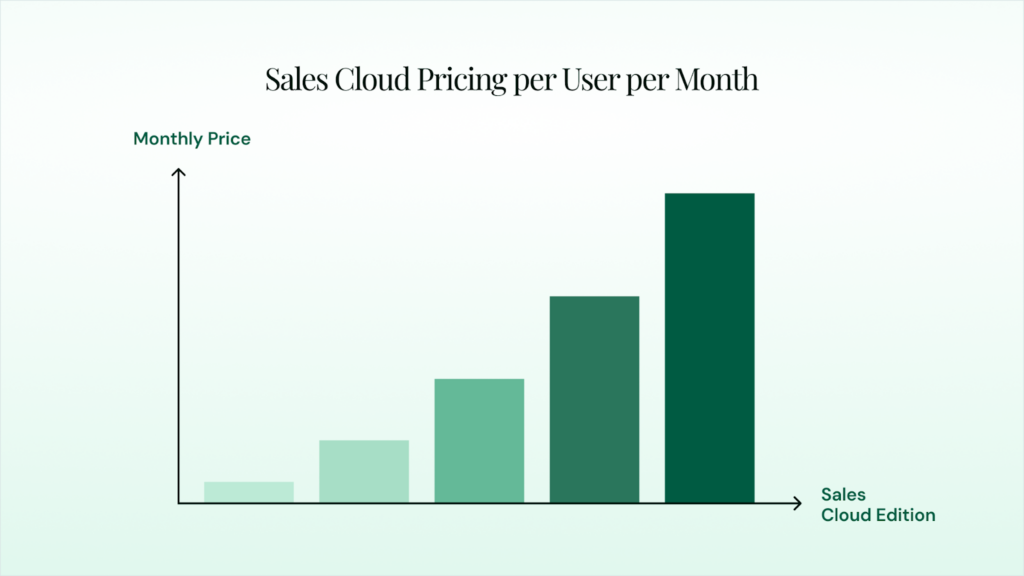
At the Sales Cloud level, pricing can also vary significantly depending on edition, for example:
- Starter Suite: $25/user/month
- Pro Suite: $100/user/month
- Enterprise: $175/user/month
- Unlimited: $350/user/month
- Agentforce 1 Sales: $550/user/month
Your effective EAC cost depends on whether you already have the right edition or must upgrade to deploy EAC at the required scale.
Contract Terms and Commitments
In most enterprise scenarios, Einstein Activity Capture-related costs come with the same contract structure as the underlying Salesforce licenses:
- Annual billing is common, especially for Sales Engagement and higher Sales Cloud editions
- Pricing often scales by user count and package selection
- Add-ons (like Success Plans, Revenue Intelligence, or services) can change the total contract value significantly
Is There a Free Version of Einstein Activity Capture?
Yes. Salesforce offers a limited free version called Einstein Activity Capture Standard, best as an entry-level option for basic email and calendar connectivity. It helps teams validate capture behavior before expanding to paid licensing.
Free-Tier Availability and Limitations
Einstein Activity Capture Standard is available for up to 100 users who have only a Salesforce user license and don’t already have higher-tier bundles like Performance/Unlimited or paid Einstein-related add-ons.
Key limitations to plan around include:
- User cap: Available for up to 100 users
- Retention: Activity history is typically limited to up to 6 months
- Analytics access: The activities dashboard is often read-only
- Reporting window: Dashboard visibility may be limited (commonly ~90 days)
- Feature depth: Advanced reporting and extended capabilities require paid bundles/add-ons
This is where many teams run into a mismatch between expectations and outcomes—EAC Standard captures activity flowing into timelines, but often, the data can’t be used by leadership for consistent reporting and long-term analysis.
Trial Options and Getting Started
The free tier is most useful to confirm basic requirements in a workflow real-time, like capture accuracy, record matching, sharing behavior, and exclusions. If your team needs longer historical visibility, deeper reporting, or activity data for forecasting and execution, a paid licensing path (or an alternative platform) is usually required.
There may be some hidden costs that come with using EAC. Read on to get insights into what they are and how they can add to the total cost of ownership.
Benefits of Using Einstein Activity Capture
Einstein Activity Capture improves Salesforce activity completeness, while reducing manual effort from teams. When configured correctly, it strengthens engagement visibility across accounts and opportunities, and supports consistent pipeline execution.
1. Enhancing Sales Productivity
Sales productivity is one of the most common reasons organizations invest in Einstein Activity Capture. The logic is straightforward: if reps spend less time on CRM admin work, they spend more time selling.
Automatic Data Capture Benefits
Automatic capture creates a baseline of consistent activity data across the team. EAC can standardize email and meeting data across Salesforce, link activity to key records, reduce false inactivity in deals, and improve manager visibility without adding manual logging for reps. For managers, this improves visibility into engagement patterns without reps having to spend time logging every touchpoint.
Time Savings and Efficiency Gains
The biggest measurable productivity gain is time saved per rep. EAC reduces repetitive tasks like logging emails into Salesforce, creating calendar events manually, reconstructing relationship history before pipeline calls, and updating activity timelines.
2. Improving Forecasting Accuracy
Forecast accuracy improves when pipeline decisions are based on real signals. Activity capture contributes to this by making engagement patterns more visible and measurable.
Data Quality Enhancement
EAC improves forecasting by increasing activity coverage, creating more consistent engagement timelines, and accurately associating emails and meetings with the correct Salesforce records.
Pipeline Visibility Improvements
Improved activity visibility helps teams spot declining engagement, weak stakeholder involvement, and risky deals early, enabling timely intervention, better resource allocation, stronger execution control, and more reliable forecasts.
3. Integration With Salesforce Ecosystem
One of Einstein Activity Capture’s strongest advantages is that it fits naturally into Salesforce. For organizations that are already committed to Salesforce as their system of record, this reduces the friction of adding a new platform.
Benefits often include familiar admin controls and governance models, activity visibility inside Salesforce records, easier adoption for teams already working with Salesforce, and reduced need for separate login environments.
Hidden Costs In Einstein Activity Capture
For most mid-market and enterprise teams, the true cost of EAC shows up after enablement. These “hidden costs” don’t always appear as a separate Salesforce line item, but they directly impact your total cost of ownership (TCO) and ROI timeline.
Implementation and Setup Fees
Even as a Salesforce-native feature, EAC requires admin and IT effort to deploy correctly, like assigning permission sets and user access, connecting Microsoft/Google accounts, creating and testing capture or sync configurations, and defining excluded domains and addresses. Even if Salesforce doesn’t charge a setup fee, Salesforce admin time, RevOps resources, IT coordination, and validation cycles incur additional internal costs.
Training and Support Costs
Adoption and support planning can add meaningful cost, especially at scale, through:
- Rep enablement
- Manager training
- Preventing duplicate processes
- Success Plan upgrades for faster support
Integration and Customization Expenses
For most enterprise teams, additional costs can come via:
- Reporting enablement
- API access needs for analytics and integrations
- Governance and compliance controls
- Migration constraints, for example, Lightning Sync incompatibility
- Ongoing admin overhead
Often, licensing cost is only one part of the financial picture. Real cost includes implementation effort, operational change management, and ensuring the captured data can be used for organizational goals.
Evaluating Total Cost of Ownership (TCO)
A useful TCO analysis looks beyond subscription pricing and accounts for the ongoing effort required to keep activity data accurate, accessible, and usable over time. With Einstein Activity Capture, costs are not limited to licenses alone, they also include operational work tied to data retention, reporting readiness, and system maintenance.
To make this clearer, the total cost of ownership can be broken down into direct costs, which are paid for explicitly, and indirect costs, which emerge through ongoing operational effort and limitations in how captured data can be used.
Direct costs usually include:
- Salesforce edition or add-on licensing required for EAC
- Per-user pricing for bundled access
- Support plan costs tied to Salesforce contract
Indirect costs often including:
- Admin/RevOps configuration and maintenance time
- IT/security review and email/calendar integration work
- Enablement and adoption management
- Reporting and governance work to align activity data with pipeline processes
Factors Affecting Long-Term TCO
EAC costs can scale significantly depending on how your organization operates. Key factors that influence long-term TCO include:
- User counts
- Sales processes across teams/regions
- Compliance requirements
- CRM hygiene
- Reporting expectations
A strong TCO evaluation should account for these realities, especially if the goal is to improve forecasting and execution, not just automate logging.
Cost-Benefit Analysis Framework
A cost-benefit framework typically includes four measurable categories:
- Productivity Savings: Via reduced time spent logging emails, meetings, and activities, reduced admin work, and faster onboarding for new reps.
- Data Quality Improvements: Via complete engagement history across accounts and opportunities, better visibility into deals, and stronger consistency in reporting and pipeline inspection
- Forecasting and Pipeline Impact: Through early detection of stalled deals or weak engagement, accurate pipeline coverage assumptions, fewer “surprises” because of hidden inactivity
- Operational Efficiency: Through reduced manual dependence, less RevOps effort spent chasing missing updates, and better cross-team alignment
Pro Tip: The key is to assign realistic internal values to these outcomes. For example, if a team saves 30 minutes per rep per day, the ROI may be significant, but only if activity capture is accurate and adoption remains high.
ROI Timeline and Break-Even Analysis
Einstein Activity Capture ROI usually appears in two phases: fast productivity gains followed by longer-term pipeline and forecasting improvements. Break-even depends on user count, configuration quality, and whether captured activity is usable in reporting and coaching.
Phase 1: Quick Wins (Weeks 1–8)
Most teams see early value through:
- Less manual logging of emails and meetings
- Cleaner activity timelines in Salesforce
- Faster pipeline reviews with fewer missing updates
- Higher rep adoption due to reduced CRM admin work
Phase 2: Pipeline + Forecasting Impact (Months 2–6+)
ROI strengthens when managers use activity signals to:
- Spot stalled deals and weak engagement early
- Improve pipeline inspection and coaching consistency
- Reduce late-quarter surprises caused by hidden inactivity
Common Breakeven Blockers
- Reporting limitations like visibility issues
- Matching issues between activities and CRM records
- Limited retention windows or inconsistent rollout
For most organizations, break-even typically comes within 3–9 months, when EAC is deployed with clear governance and measurable adoption targets.
Choosing the Right AI Platform: Alternatives to Consider
Einstein Activity Capture is a strong option when your primary goal is to keep Salesforce activity history current with minimal rep effort. But many organizations evaluating EAC are actually trying to solve a bigger problem: improving pipeline execution, forecasting reliability, and revenue predictability.
EAC is best suited for teams that want native Salesforce activity capture with minimal workflow disruption. The trade-off is that reporting readiness, retention behavior, and analytics access can vary depending on licensing path and configuration.
That’s where Revenue Grid comes in.
Revenue Grid is designed to automatically capture every Salesforce interaction while giving organizations full control over sync rules, exclusions, and data ownership. Key capabilities include:
- Capture and Sync Across Channels
Revenue Grid supports automatic syncing of emails, meetings and events, contacts, and attachments. This improves CRM completeness while keeping the process lightweight for end-users.
- Inbox-First Workflow
Revenue Grid supports an inbox sidebar, allowing reps to save emails, contacts, and events to Salesforce, trigger follow-ups and workflows directly from the inbox, track engagement signals such as opens and clicks, and reduce toggling time. For teams reliant on emails, this can reduce workflow friction significantly.
- Governance, Security, and Compliance
Revenue Grid stands out with enterprise-grade data ownership, storing activity directly in Salesforce, offering unlimited retention, flexible sync controls, and strong GDPR/CCPA compliance for regulated, security-conscious organizations.
- Revenue Execution Layer
Revenue Grid also extends beyond capture into intelligence and guidance, including:
- True pipeline visibility
- Sales forecasting
- Deal guidance
- Intel assistance
- Team analytics and coaching support
This is where many organizations see the gap between “capturing activity” and “using activity to improve outcomes.” While EAC improves visibility, Revenue Grid focuses on turning that visibility into execution.
Feature Comparison and Value Proposition
| Category | Einstein Activity Capture (Salesforce) | Revenue Grid |
|---|---|---|
| Core purpose | Automated activity capture inside Salesforce | Automated activity capture with the execution layer |
| Data captured | Emails, events, contacts | Emails, events, contacts, attachments |
| Reporting readiness | Depends on setup (Sync Email as Salesforce Activity vs timeline-only capture) | Native Salesforce activity reporting (data stored for analytics/auditing) |
| Retention approach | Varies by license/tier (captured data retention policies apply) | No retention limits + historical data preservation (as positioned) |
| Pipeline visibility | Basic visibility through activity history | True pipeline visibility (add-on) |
| Deal execution guidance | Limited (capture-focused) | Deal guidance + intel assistance (add-on) |
| Customization and flexibility | Configuration-based within Salesforce constraints; limited control over data storage model; roadmap-driven enhancements | Greater flexibility in data ownership, sync rules, field mapping, governance controls, and workflow extensions; adaptable to complex enterprise processes |
| Best fit | Teams standardized on Salesforce bundles needing baseline capture | Teams needing capture + governance + forecasting + execution in one platform |
Pricing Comparison with Competitors
One of Revenue Grid’s biggest advantages is pricing transparency. Revenue Grid offers three clear tiers:
- Activity Capture 360: $30/user/month
Best for teams that want automated capture and clean CRM data.
- Knowledge Capture: $49/user/month
Best for teams that want capture plus searchable intelligence
- Revenue Grid Ultimate: $149/user/month
Best for teams that need full revenue execution and forecasting control
Implementation and Integration Considerations
Most organizations want activity capture to “just work” in the background while keeping teams productive in the tools they already use. When evaluating solutions, key workflow questions include:
- Does the platform integrate cleanly with Outlook and calendars?
- Do reps need to change their daily workflow?
- Is activity capture visible inside Salesforce without extra clicks?
- Can managers inspect pipeline risk without exporting reports?
- Does it support frontline execution—not just leadership dashboards?
Platforms that fit naturally into rep workflows typically see higher adoption and faster time-to-value. Even so, setup requirements vary by environment, and enterprise buyers should plan for:
- Data validation and permission mapping
- Testing activity associations across Salesforce objects
- Defining capture rules and governance policies
- Enablement for reps, managers, and RevOps
- Ongoing monitoring to ensure sync accuracy
The difference is that some platforms stop at “capture,” while others help teams operationalize the captured signals into repeatable pipeline execution and forecasting discipline.
Factors to Consider When Evaluating EAC
Einstein Activity Capture can be a practical upgrade for improving CRM activity completeness, but it isn’t automatically the best financial decision for every organization. The right choice depends on what you’re trying to achieve.
- Activity Coverage: Does it consistently capture emails, meetings, and contacts across your team’s tools?
- Reporting Readiness: Is the activity usable in standard reporting, automation, and analytics (not just visible in timelines)?
- Governance + Privacy: Can you enforce exclusions, sharing rules, and content controls at scale?
- Admin Overhead: How much ongoing monitoring and troubleshooting will RevOps/Salesforce admins need?
- Retention Needs: Does the retention window support your sales cycle and forecasting horizon?
- Scalability: Does cost scale predictably as headcount grows?
When Einstein Activity Capture Makes Sense
Einstein Activity Capture is often a good fit when:
- Your organization is Salesforce-centric and needs a native solution
- The primary goal is to reduce manual CRM logging
- You need basic email/calendar syncing to improve activity completeness
- You have strong Salesforce admin capacity to manage rollout and governance
- You are looking for a foundational step toward better CRM hygiene
For teams with straightforward workflows and a focus on CRM data completeness, EAC can deliver practical productivity gains.
When to Consider Alternatives
Alternatives become more attractive when activity capture is only one part of a broader revenue execution and forecasting strategy. You should strongly consider other platforms if:
- You need true pipeline inspection beyond activity timelines
- Forecasting requires execution-level signals, not just captured activity
- Managers need deal guidance and coaching workflows, not only visibility
- You want stronger governance + reporting-ready activity data by default
- You prefer clear, tiered pricing tied to execution outcomes
Conclusion: Why Choose Revenue Grid as a Superior Alternative
Einstein Activity Capture can be a useful step toward cleaner Salesforce data and reduced manual logging, but when activity capture alone is no longer enough, alternatives like Revenue Grid become stronger alternatives.
Revenue Grid’s Competitive Advantages
Revenue Grid focuses on outcomes and operational control, not just automation. Key advantages include:
- Full Salesforce Data Ownership: Captured activity is stored directly in your Salesforce org, supporting analytics, auditing, and compliance needs.
- No Retention Limits and Historical Preservation: Revenue Grid emphasizes long-term access to engagement history, which matters for enterprise reporting and long-cycle sales motions.
- Inbox and Calendar Workflow Execution: Reps can work directly from an inbox sidebar to sync activity, schedule meetings, and take action without switching tools constantly.
- Customization and flexibility: Revenue Grid provides flexibility in data ownership, sync rules, field mapping, governance controls, and workflow extensions; adaptable to complex enterprise processes
- Revenue Intelligence and Execution Features: Higher tiers include capabilities such as true pipeline visibility, forecasting benefits, team analytics, deal guidance, intel assistance, and meeting assistance.
Better ROI and Cost-Effectiveness
From an ROI perspective, Revenue Grid offers two advantages:
- Clear tiered pricing aligned to business maturity
- Better value when measured by outcomes, not license cost
For organizations where forecasting reliability and execution discipline are strategic priorities, these gains often justify the investment faster than a capture-only approach.
If you’re comparing Einstein Activity Capture with alternatives and want a clearer path to CRM automation, stronger pipeline visibility, and forecasting confidence, Revenue Grid is worth evaluating.
Book a Demo with Revenue Grid to see how automated activity capture, inbox execution, and revenue intelligence work together in a single platform.
How does Einstein Activity Capture integrate with other CRM tools?
EAC is native to Salesforce and connects with Microsoft/Google email and calendar. External CRM integrations depend on Salesforce APIs and whether captured data exists as Salesforce records.
What are the limitations of the free version of Einstein Activity Capture?
EAC Standard is a limited version intended for smaller rollouts. It supports up to 100 users with a Salesforce user license, has shorter activity retention (commonly up to 6 months), and provides limited Activities Analytics dashboard access.
Can Einstein Activity Capture be customized for specific business needs?
Yes. Admins can choose what to capture like emails/events/contacts, set exclusions, define sharing rules, and control email capture depth with Sync Email.
What kind of support is available for Einstein Activity Capture users?
Support depends on your Salesforce Success Plan. Standard support is included with Salesforce licenses. Premier Success Plan adds expedited support and guidance. Signature Success Plan offers a more proactive partnership model.
How does Einstein Activity Capture contribute to sales forecasting accuracy?
EAC improves forecasting inputs by making engagement activity more complete, consistent, and through better visibility that improves momentum, cuts out inactivity risk, and highlights pipeline gaps more reliably.
How long are the contracts for Einstein Activity Capture?
Contract length depends on the Salesforce product bundle or edition through which you access EAC. Many Salesforce plans and add-ons are billed annually, and contract terms typically depend on the Salesforce agreement.
Can I upgrade my Einstein Activity Capture plan at any time?
Upgrades usually happen through Salesforce licensing changes and depend on your contract. However, expansions are commonly supported.
What are the integration options with outside applications and systems?
EAC integrates directly with Microsoft and Google tools. Other integrations rely on Salesforce automation and APIs, depending on how the data is stored.