

Key Takeaway
- Salesforce Inbox still handles basic logging, but gaps in data ownership, sync reliability, and reporting make it hard to trust at scale.
- Revenue teams now need real engagement insight, not just raw activity, especially for forecasting, coaching, and multi-threaded deals.
- Revenue Inbox captures every interaction natively inside Salesforce, delivers stable two-way calendar sync, and surfaces deal risk in real time.
- Teams are moving to Revenue Inbox because it provides complete, reliable data that modern pipelines, reviews, and revenue processes depend on.
What Is Salesforce Inbox?
Salesforce Inbox is Salesforce’s native email-and-calendar integration for Gmail and Outlook. It was designed to bring CRM context straight into the inbox so reps can work where conversations actually happen, without losing the data leaders rely on inside Salesforce.
For many teams, Inbox became the first real step away from manual updates. Instead of copying notes or logging emails after a call, activity started flowing into Salesforce automatically. Reps spent more time selling, operations teams saw cleaner timelines, and managers finally gained a more consistent record of customer engagement.
At its core, Salesforce Inbox delivers three key capabilities:
- In-inbox visibility. A sidebar that surfaces Salesforce records: contacts, accounts, opportunities, next to every email thread.
- Automated logging. Emails and calendar events captured and associated with the right records through Einstein Activity Capture (EAC).
- Simple productivity tools. Templates, availability sharing, meeting scheduling, and basic email tracking.
All of this is powered by Einstein Activity Capture, the engine that listens in the background and connects inbox activity to Salesforce the moment it happens.
To understand how that plays out in day-to-day sales work, let’s look at what Salesforce Inbox actually does behind the scenes, and how each feature works in practice.
How Salesforce Inbox Actually Works
Salesforce Inbox runs on a simple idea: let reps work directly inside Gmail or Outlook while Salesforce captures the activity behind the scenes.
Einstein Activity Capture (EAC) makes this possible. It monitors the inbox and calendar, pulls in new emails and meetings, and links them to the right Salesforce records whenever it recognizes a sender or attendee. That’s what creates the familiar flow: open an email, and the sidebar surfaces the relevant contacts, open opportunities, recent history, and the Salesforce Inbox features reps interact with every day.
For a long time, this felt like enough. It cut down manual logging, kept timelines reasonably clean, and gave managers a basic sense of what was happening across deals. It fit the rhythm of an earlier sales environment, where simply having activity recorded in Salesforce was considered progress.
But selling has changed. Deals involve more people. Engagement patterns matter more than raw activity counts. And forecasting depends on signals that go far deeper than “an email was logged.” This is where the gap opens. Inbox shows the “what,” but modern revenue teams need help understanding the “why.”
That shift in expectations is what exposes the cracks—and why teams start to feel the limitations of Inbox as their motion grows more complex.
Where Salesforce Inbox Falls Short
Salesforce Inbox delivers on the basics. The gaps show up at scale, in complex sales environments, or when forecasts depend on complete engagement data.
These aren’t bugs. They’re design decisions that made sense when the product was built but create friction as revenue operations mature. Here’s where teams hit walls.
Data lives outside Salesforce (until recently)
For years, Inbox stored email and calendar activity on AWS instead of inside your Salesforce org. That architectural choice made sense technically, but created cascading problems that revenue teams still face:
- No standard reporting. Activities didn’t appear in Salesforce reports or dashboards. You could see them in the Activity Timeline, but you couldn’t build the custom reports revenue ops teams depend on.
- No workflow triggers. Process Builder, Flow, and APEX couldn’t act on captured data because it wasn’t stored as standard Salesforce records.
- Limited retention. Data disappeared after 6 to 24 months. For long sales cycles, compliance requirements, or historical analysis, that timeline wasn’t enough.
One Stack Exchange user even described these problems plainly: “Einstein Activity Capture saves all records on servers outside Salesforce, meaning it’s not a normal Task record, and it plays by different rules.”
The Summer 2025 “Sync Email as Salesforce Activity” update addresses this by storing emails as native records.
It’s not a simple toggle. The change is irreversible, increases storage consumption, and requires Flow configuration to work correctly. For many teams, that’s not a straightforward upgrade.
Sync reliability breaks under pressure
Even after Salesforce moved to native storage, one problem kept coming back: Inbox doesn’t always sync when it should. If you’ve ever refreshed Salesforce multiple times waiting for a critical email to appear, you know the frustration. And you’re not alone—Trailblazer Community threads and Stack Exchange posts echo the same issues across teams of every size.
Sync delays are common. Some emails take hours to land in Salesforce; others show up twice. Recurring meetings disappear. Attachments don’t always carry over. For teams that rely on custom objects, common in legal, services, and project-heavy environments, Inbox hits a hard stop, because activity links only to standard objects.
Calendar sync introduces its own friction. Events often move from Salesforce to the rep’s calendar, but not the other way around. That mismatch forces reps to double-check schedules manually. Shared mailboxes add more cleanup, since Inbox supports only primary accounts.
Then came the retirement of the Inbox mobile app in 2024. Field teams that depended on quick, mobile-first workflows suddenly found themselves dealing with slower, inconsistent behavior in the main Salesforce app.
A TrustRadius reviewer summarized what many teams feel: “We have to manually approve the logging of activity. The auto-log feature wasn’t showing up on reports.”
That’s the breaking point.
Once sync becomes unreliable, reps stop trusting the system. They return to manual updates, side notes, and rechecking timelines, undoing the very efficiency Inbox was supposed to create.
This is where the next challenge becomes unavoidable: once reliability slips, the cost of maintaining Inbox rises fast. What should save time ends up demanding more of it, and the ROI story begins to change.
The cost calculation doesn’t always work
Salesforce Inbox is $25/user/month on its own, or $50/user/month with Sales Cloud Einstein. For a 100-person team, that’s $30,000–$60,000 a year, before you add implementation time, ongoing troubleshooting, or the extra storage tied to the Summer 2025 change.
The promise is less manual data entry, more rep time, better data. That math works, if activity is captured automatically and shows up reliably in reports. However, when reality looks like manual approvals, duplicate cleanups, reporting gaps, and retention workarounds, ROI erodes fast. You’re paying for automation that still needs human intervention.
There’s also the hidden cost: incomplete data. Organizations lose ~$12.9M annually on average due to poor CRM data quality. If Inbox captures 60% of activity when you need 95%, the shortfall hits forecasts, coaching, and deal risk visibility.
So the question isn’t “Is $25 expensive?” It’s “Does partial capture at $25 beat complete capture at ~$30 with fewer limitations?”
Even when the numbers add up, there’s a deeper issue: logging history isn’t the same as understanding what that history means.
It captures history, not intelligence
Salesforce Inbox records what happened. What it doesn’t do is interpret any of it.
If a deal sits in Commit for three weeks with no replies, Inbox logs the silence. It won’t flag that the deal is slipping. If a new stakeholder suddenly joins a meeting, Inbox captures the event but never highlights that your team has zero relationship coverage with a critical decision-maker.
That’s the core limitation. Inbox tracks activity, but it doesn’t understand patterns, context, or risk.
Modern revenue teams need more than a timeline of emails and meetings. They need a system that recognizes when engagement drops, when buying committees shift, and when a deal needs attention before it falls apart.
That’s where revenue intelligence platforms come in: reading signals, mapping stakeholders, and surfacing risk automatically. Inbox wasn’t designed for that world. It was built to reduce manual logging, and within that scope, it performs well.
However, the moment you need insight instead of history, Salesforce Inbox reaches its limits, and that’s exactly when revenue teams start looking for alternatives like Revenue Inbox.
Why Revenue Inbox Is The Next Evolution of Salesforce Inbox
Revenue teams don’t just need activity logs anymore. They need clarity. Forecasts, reviews, and coaching all depend on complete engagement data, and that’s where partial capture becomes a real risk. Salesforce Inbox was built for a different era. Revenue Grid is built for where teams operate now.
Complete data ownership that eliminates uncertainty
Before getting into features, it helps to look at what happens in the real world.
Vapotherm switched to Revenue Grid and immediately saw 110,000 emails and 27,000 meetings captured in a year. That single shift returned 761 rep-days and delivered $175,000 in productivity. More importantly, their managers finally saw the full engagement picture they’d been missing.
That level of accuracy is possible because Revenue Grid writes every email, meeting, attachment, and task directly into Salesforce as a native Activity record. No external storage. No expiry windows. No invisible gaps. Just clean, complete data where teams already work.
When every interaction finally lands where it should, the workflow changes. Reps stop chasing missing threads. Managers stop questioning the activity timeline. Forecasts start reflecting reality instead of assumptions.
This data foundation sets the stage for the next friction point: the calendar.
Reliable scheduling with two-way sync
Email capture is only half of the equation. Salesforce Inbox calendar sync is where many teams feel the daily friction.
One-way sync creates mismatches that reps have to correct manually. For instance, a meeting updated in Outlook doesn’t reflect in Salesforce, a reschedule disappears, a recurring event never shows up. Those small inconsistencies pile up and slow teams down.
Revenue Grid solves this at the infrastructure level. Its two-way sync works across Outlook, Gmail, shared calendars, recurring events, and complex Salesforce workflows. Nothing falls off, overwrites, or goes missing. Events land with the right participants, attachments, and context on the first try.
Teams also get enterprise-grade scheduling controls:
- Templates
- Routing rules
- Calendar privacy
- Fallback ownership logic
- Internal vs. external scheduling paths
Instead of cleaning up meetings after the fact, reps move from “fixing” to simply selling.
With capture and calendar reliability in place, the next challenge becomes clarity. Teams need to know which deals are healthy, which ones are slipping, and where managers should focus their attention.
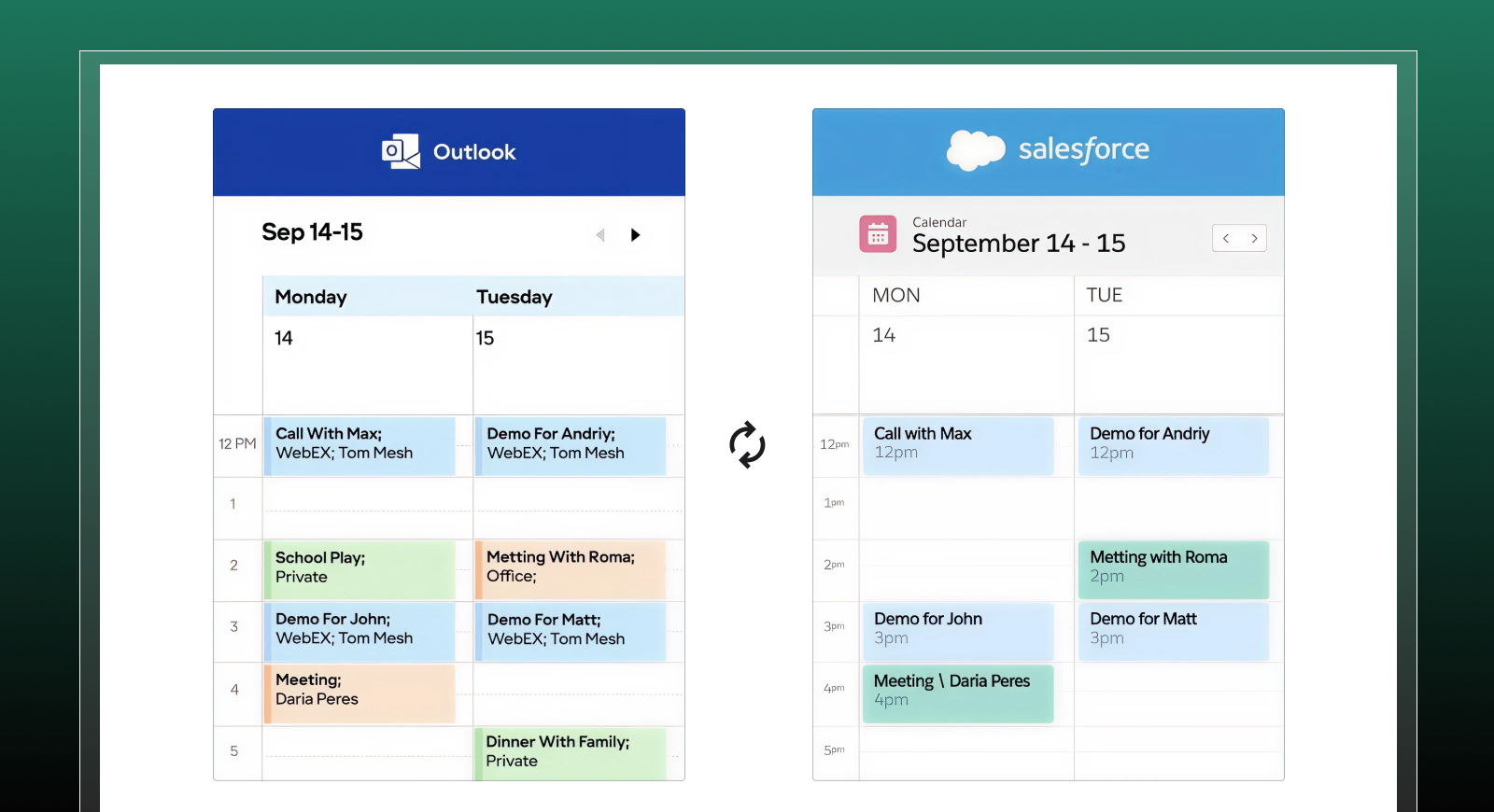
Effortlessly sync Salesforce with Outlook and Gmail to prevent conflicts and streamline scheduling
Intelligence on top of capture
Once the data foundation is reliable, the next question becomes obvious: What deserves attention right now?
This is where Revenue Grid moves beyond activity logging. It reads engagement patterns across emails, meetings, and deal history and highlights the moments that matter:
- A quiet commit-stage deal gets flagged early.
- A buying committee gap becomes visible before it hurts momentum.
- A normally responsive contact going dark triggers an alert.
- Sudden changes in deal velocity surface in real time.
Inbox shows what happened. Revenue Grid shows what needs action. That difference determines whether teams react late or intervene on time.
Yet, none of this intelligence works unless the underlying data lands in the right place. And this is where many tools break, especially inside real, messy Salesforce orgs that look nothing like the demo environment.
Built for complex Salesforce environments
Most revenue teams don’t work in a clean demo org. They work with custom objects, layered approvals, multiple Experience Cloud sites, case-heavy operations, and workflows that have evolved for years.
Platforms built only for standard Salesforce objects break here.
Revenue Grid adapts to this complexity. It maps emails, meetings, and attachments to the right record, whether it’s standard, custom, or deeply customized. It performs consistently at scale, even in private cloud deployments or high-volume customer service models
The Compounding Effect of a Reliable Foundation
When activity maps cleanly to the structure of the Salesforce org, teams stop firefighting. They stop chasing missing emails, fixing mis-logged events, or correcting data after the fact.
That stability compounds quickly.
Deal reviews get sharper; coaching becomes more specific; forecasts tighten. Teams move in sync because they’re guided by the same complete, trusted data.
It’s the difference between managing a pipeline through patches and running a revenue engine that simply stays aligned.
If you want to see how that looks inside your own Salesforce org, there’s no guesswork needed, test it directly with Revenue Grid demo.
What happened to Salesforce Inbox in 2024?
In 2024, Salesforce retired the Salesforce Inbox mobile app. The core desktop experience continues through Gmail and Outlook integrations, but the standalone mobile functionality is no longer available. Salesforce also announced the upcoming retirement of the legacy Salesforce for Outlook plugin in 2027, prompting many teams to reassess their long-term setup.
How does Revenue Grid differ from Salesforce Inbox?
Salesforce Inbox for Outlook focuses on basic activity capture and in-inbox visibility. Revenue Grid goes further by capturing every interaction as a native Salesforce record, providing dependable two-way sync, and offering AI-based engagement signals. The result is a clearer view of deal momentum and more reliable data for forecasting and coaching.
Does Revenue Grid replace Einstein Activity Capture (EAC)?
Yes. Revenue Grid captures email and calendar activity directly into Salesforce without relying on EAC’s external data store or retention limits. For teams that need complete, reportable engagement data, this provides a more stable and transparent alternative.
Can I still use parts of Salesforce Inbox?
Yes. The Gmail and Outlook side panels, email templates, and basic automation features continue to work. The main changes relate to the retired mobile app and the gradual shift away from older plugins. Teams using Inbox today can continue operating normally while planning for longer-term adjustments
How does Revenue Grid integrate with Gmail and Outlook?
Revenue Grid connects to Gmail and Outlook through secure API-based integrations. Emails, events, attachments, and updates sync automatically and appear as native Salesforce records. The Outlook and Gmail sidebars allow reps to view Salesforce context, update records, and manage follow-ups without switching tabs.
How much does Salesforce Inbox cost, and what’s included?
Salesforce Inbox is typically offered as an add-on, priced at around twenty-five dollars per user per month, with additional cost when bundled with Sales Cloud Einstein. The package includes the inbox sidebar, basic scheduling, simple email tracking, and automated activity logging through Einstein Activity Capture.
How can I migrate from Salesforce Inbox to Revenue Grid?
Most organizations approach the transition in three steps:
- Review existing Inbox/EAC settings to understand what is being captured today.
- Install and configure Revenue Grid, mapping email and calendar activity to the appropriate objects.
- Disable or phase out EAC once native activity logging is fully operational.
Revenue Grid offers implementation guidance to help teams migrate without losing visibility or disrupting existing workflows.