

Every sales team in 2026 wants AI in its CRM. The question is which AI, in which CRM, for which job. AI for CRM automation now spans predictive AI for lead scoring and sales forecasting, generative AI for email drafts and content, and agentic AI that runs multi-step sales workflows end-to-end. The market is full of options that all promise different outcomes (cleaner data, sharper pipeline visibility, faster customer engagement, fewer hours of manual data entry). Some are CRMs with AI built in, some are AI layers that add relationship intelligence on top of an existing CRM, and one of the most useful tools on this list isn’t a CRM at all.
This guide is a comparison of the best AI tech for CRM automation in 2026, covering 8 tools across both categories. We’ve covered each tool’s key features, pricing, and best-fit use cases, from sales automation and pipeline management to customer engagement and prospecting workflows.
Quick comparison: AI tools for CRM automation
Before we get into the deep dives, here’s a side-by-side look at where each tool starts on price and the kind of team it’s actually built for. You can use it as a shortcut to narrow the list, then jump to the full breakdown on the two or three that fit your stack.
| Tool | Starting Price | Best Fit |
|---|---|---|
| Salesforce Agentforce + Einstein | Free starter via Salesforce Foundations (Enterprise Edition+); Flex Credits $500 per 100,000 ($0.10 per standard action) | Enterprises already on Sales/Service Cloud at Enterprise tier with admin capacity and clean CRM data |
| HubSpot Breeze AI | Marketing Hub Professional from $800/mo; Customer Platform Professional $1,300/mo; agents $0.50–$1 per outcome | Teams running the full HubSpot stack that want AI across marketing, sales, and service in one data model |
| Revenue Grid | $20 per user/month (Activity Capture 360) | Salesforce enterprises where rep CRM adoption is broken and pipeline visibility is unreliable, especially in regulated industries |
| Microsoft Dynamics 365 + Copilot for Sales | Sales Professional $65/user/mo (no Copilot); Sales Enterprise $105/user/mo (Copilot included) | Organizations already standardized on Microsoft 365 where Outlook and Teams are the main work surfaces |
| Zoho CRM with Zia | Free up to 3 users; Zia unlocks at Enterprise $40/user/mo | Cost-conscious mid-market teams wanting broad AI surface area without enterprise CRM pricing |
| Pipedrive AI Sales Assistant | Essential $14/user/mo (no AI); AI unlocks at Advanced $29/user/mo | SMB and lower-mid-market teams (under ~50 reps) wanting a clean visual pipeline with AI in the daily workflow |
| Freshsales with Freddy AI | Free up to 3 users; Growth $9/user/mo for basic Freddy; Pro $39/user/mo for full insights | Growth-stage SMB and mid-market teams getting their first proper CRM with low admin overhead |
| Vtiger with Calculus AI | One Pilot free (no AI); One Growth $12/Standard user/mo (AI included) | SMB and mid-market teams that want unified sales-marketing-support with mixed seat types (Standard vs. Single App) |
How we chose and compared these tools
We focused on eight tools that show up most consistently in 2026 buyer conversations around AI for CRM automation, deliberately spanning three categories rather than picking only one.
- AI-native CRMs (HubSpot, Zoho, Pipedrive, Freshsales, Vtiger) cover teams shopping for a CRM and an AI strategy at the same time.
- Enterprise CRMs with mature AI layers (Salesforce Agentforce + Einstein, Microsoft Dynamics 365 + Copilot) cover teams already running a system of record and looking to extend it.
- And the relationship-intelligence layer category (Revenue Grid) covers the case where the gap between rep activity and CRM data is the real blocker.
For each tool, the comparison draws on three sources. Tool’s product documentation and feature pages for capability descriptions. Their current pricing page as of publication (May 2026). And public user reviews on G2, and Capterra to validate that product claims match what teams report in real world application.
Pricing reflects each vendor’s published rates at the time of writing and may change. Where pricing is consumption-based (Agentforce Flex Credits, HubSpot’s outcome-based agents, Microsoft Copilot Credits), the per-unit rates are listed in each tool’s section so you can estimate your own usage costs.
- Salesforce Agentforce + Einstein
Salesforce’s AI for CRM automation sits in two layers, combining predictive AI with the newer wave of agentic AI.
Einstein is the predictive AI layer that has lived inside Sales Cloud for close to a decade, scoring leads, ranking opportunities, recommending next-best actions, and forecasting deal close probability. Agentforce is the agentic AI layer: autonomous AI agents that take action on those predictions. Where Einstein tells a rep “this lead looks hot,” Agentforce can qualify the lead, book the meeting, draft the follow-up, and update the record without any manual intervention, automating multi-step sales workflows that previously required a human at every step.
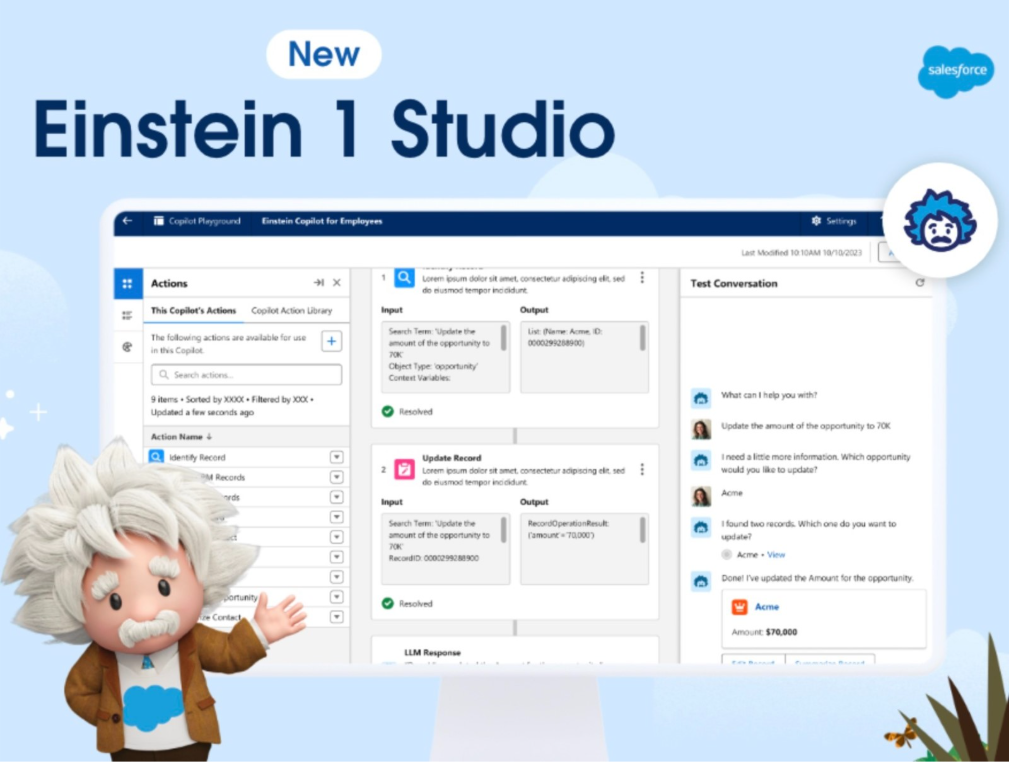
The two are designed to work together inside Salesforce. Agentforce runs on the Atlas Reasoning Engine, which interprets a request, decides what CRM data and actions it needs, and then executes those actions inside the customer’s existing Salesforce setup. Builders configure agents through Agentforce Builder, a unified workspace that combines drafting, testing, and deployment in one place.
Key features of Salesforce Agentforce + Einstein
- One workspace for build, test, and deploy: Agentforce Builder collapses the usual build-and-test loop into a single conversational workspace, with a low-code canvas for business users and a pro-code script view for developers.
- Hybrid reasoning with Agent Script: Pairs deterministic steps with LLM reasoning, so an agent can follow a strict qualification flow while still handling unscripted moments inside the same conversation.
- Voice agents on phone, web, and mobile: Agentforce Voice gives agents a configurable voice that matches the brand, so the same agent that handles chat can also take a call.
- Reads unstructured sources: Intelligent Context structures information from PDFs, transcripts, emails, and support tickets so agents reason on the full content of those documents alongside whatever data already lives in the CRM.
- Atlas Reasoning Engine decides and acts: Understands intent, decides what data and actions a request needs, and then executes those actions inside Salesforce without a human picking the path.
- Einstein predictions feed the agents: Lead scoring, opportunity insights, next-best-action, and forecast predictions sit in the same record an agent reads from, so action follows the prediction inside one system.
- Guardrails on by default: Configurable controls keep agents on-topic, block off-policy responses, and reduce hallucinations. Admins can adjust without writing code.
- Extends through AgentExchange and MCP: Pre-built agent actions and templates from the AppExchange marketplace, plus Model Context Protocol servers, connect Agentforce to third-party platforms and data that live outside Salesforce.
Pricing
Salesforce moved Agentforce to consumption-based pricing in late 2025. Flex Credits are bought in blocks and drawn down per agent action. Every Salesforce customer on Enterprise Edition or higher gets a free starter tier through Salesforce Foundations. Customer-facing Service agents can also be billed per conversation at a fixed rate. Sales Cloud or Service Cloud licensing is required separately to run the underlying CRM.
- Salesforce Foundations (free with Enterprise Edition+): Agent Builder, Prompt Builder, 200,000 Flex Credits, 250,000 Data Cloud credits, and the first 1,000 Service conversations included.
- Flex Credits: $500 per 100,000 credits ($0.005 per credit). A standard agent action draws 20 credits ($0.10). A voice action draws 30 credits ($0.15). Buy upfront, pay monthly in arrears, or commit to a pool.
- Service per-conversation pricing: $2 per conversation for customer-facing Service agents under the fixed model.
- Sales Cloud / Service Cloud: Required separately. Pricing varies by edition; current rates on salesforce.com/pricing.
What is Salesforce Agentforce + Einstein good for?
Salesforce’s AI stack fits enterprises already running Sales Cloud or Service Cloud at Enterprise Edition or higher, with the admin capacity to configure agents and the data quality to make predictions trustworthy. It works best when the CRM is the system of record for accounts, opportunities, and cases, and the team wants its AI to live inside that same system. Smaller orgs without a dedicated Salesforce admin, and teams whose CRM data is too thin for Einstein to train on, will see faster value from a lighter-weight AI CRM until the underlying data layer is in place.
- HubSpot Breeze AI
Breeze is HubSpot’s AI layer built directly into the HubSpot Customer Platform. The whole stack (marketing, sales, service, content) sits inside one tool, so the AI sees email engagement, sales conversations, and service tickets in the same data model. Breeze comes in three forms:
- An AI companion called Breeze Assistant that answers questions using CRM data and the customer’s knowledge base
- Specialized Breeze Agents that handle specific repetitive jobs like prospecting and customer support,
- A layer of 100+ smaller AI features sprinkled across the platform for everyday tasks like email drafting, blog writing, and conversation analysis.
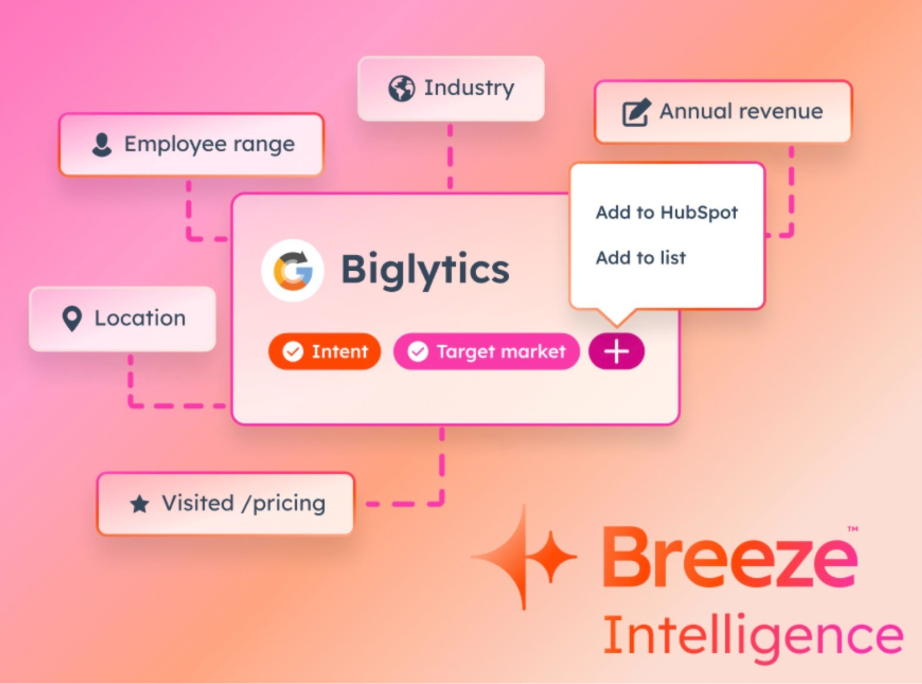
Key features of HubSpot Breeze AI
- Breeze Assistant on every screen: An AI companion that knows the user’s role and the company’s data, answering questions from the CRM, knowledge base, and HubSpot Academy. Works on desktop and mobile.
- Prospecting Agent for outbound work: Monitors target accounts for buying signals, finds contacts in HubSpot, and drafts personalized outreach for reps to review and send. Reps stay in the loop on what goes out.
- Customer Agent for service: Resolves customer questions on-brand across support channels, with configurable hand-off rules so the team steps in when needed.
- Data Agent answers questions about your customers: Reads CRM data, conversation history, documents, and the web to answer questions in plain language, with no report-building or dashboard configuration required.
- Company Research Agent for meeting prep (Beta): Researches target accounts directly in HubSpot using the company website, recent news, and prior CRM history, so reps walk into the call already informed.
- Customer Health Agent for retention (Beta): Assesses account health using CRM signals, surfaces suggested next steps and talking points, and drafts a follow-up email ready to send.
- Breeze Studio for custom agents (Beta): Tailor pre-built agents across marketing, sales, and customer service without writing code, and create custom assistants for specific workflows.
- 100+ embedded AI features: AI Blog Writer, Content Remix, Website Generator, AI Email Writer, Sales Reporting, and Conversation Intelligence are built into the same screens reps and marketers already use.
Pricing
HubSpot prices Breeze across two layers: the HubSpot Hub subscription a team is already on (Marketing Hub, Sales Hub, Service Hub, or the combined Customer Platform), and a usage-based credit system on top. Each plan tier includes a monthly bundle of Breeze credits that get consumed as the AI tools run. In April 2026, HubSpot moved Customer Agent and Prospecting Agent to outcome-based pricing, so customers pay per resolved customer conversation or per qualified lead instead of per token of AI usage.
- Marketing Hub Professional: $800 per month, with a base Breeze credit allotment.
- Customer Platform Professional (Marketing + Sales + Service + Content + Operations): $1,300 per month, 5,000 Breeze credits included (~50 customer conversations).
- Customer Platform Enterprise: $4,700 per month, with higher credit allotments and access to Breeze Studio for custom agents.
- Outcome-based agent pricing: Customer Agent $0.50 per resolved conversation; Prospecting Agent $1 per lead recommended for outreach. Agents generally require a Professional or Enterprise plan.
- Revenue Grid
Revenue Grid is a relationship intelligence tool with an AI layer that sits above Salesforce. It runs natively inside Salesforce.
Most AI inside a CRM is making predictions on a partial dataset. Reps don’t log every email, every meeting, or every conversation that actually moved the deal, so the CRM only ever sees half the picture. Any forecasting, scoring, or coaching layer built on top inherits that gap.
Revenue Grid closes the gap. It reads what reps already do across email, calendar, meetings, and conversations, brings the full picture into Salesforce as native records, and uses AI on top to direct the next move while the moment is still alive.
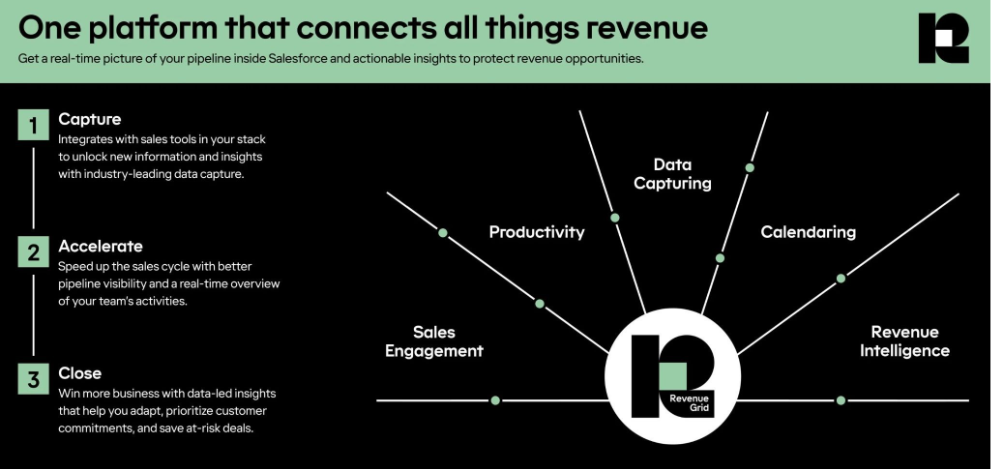
Key features of Revenue Grid
- Activity Capture: auto-logs emails, calendar events, meetings, contacts, and attachments into Salesforce as native records, with no rep input required.
- Pipeline Assistant: combines CRM data with emails, calendar meetings, chat, and meeting recordings to show which deals are progressing, which are stalling, and what to do about each one.
- Meeting Assistant: drafts pre-meeting briefs using Salesforce data, recent communications, LinkedIn, and social context for each attendee; captures meeting outcomes; drafts the follow-up.
- Intel Assistant: automates customer and account research in real time, pulling from internal sources (CRM, ERP, emails, chats) and external ones (market data, social media, public records).
- CRM Records Assistant: automates record updates and field hygiene so reps spend less time inside Salesforce maintaining the data the rest of the AI relies on.
- AI Forecasting: predictive forecasting built on captured activity instead of self-reported deal stages, so the forecast reflects what is happening rather than what reps remembered to type in.
- Native to Salesforce: deploys as a managed package on the Salesforce AppExchange; captured data lands inside Salesforce as standard records reachable by reports, Flow, and the Salesforce API.
- Compliance-ready: SOC 2 Type II, ISO 27001, GDPR, and HIPAA, which matter for regulated industries running formal procurement security review.
Pricing
Revenue Grid uses tiered per-seat pricing, billed monthly with no multi-year lock-in. Plans start at $20 per user per month for the activity capture tier, with higher tiers adding meeting intelligence, the AI Sales Assistants, and predictive forecasting. A customizable Founder Pricing option is available for early-stage teams.
- Activity Capture 360: automatic activity capture into Salesforce; starts at $20 per user per month.
- Knowledge Capture: adds meeting intelligence (capture, summarization, follow-up drafting) on top of Activity Capture.
- Revenue Grid Ultimate: full platform, including the AI Sales Assistants, predictive forecasting, sales sequences, and pipeline visibility.
- Founder Pricing: custom pricing for early-stage teams, configured directly with Revenue Grid.
What is Revenue Grid good for?
Revenue Grid fits enterprise sales teams already running Salesforce, where the gap between what reps actually do (email, meetings, conversations) and what makes it into the CRM is the biggest blocker to reliable AI. The fit is strongest in industries that need both deep CRM hygiene and strong compliance, like financial services, fintech, wealth management.
- Microsoft Dynamics 365 + Copilot for Sales
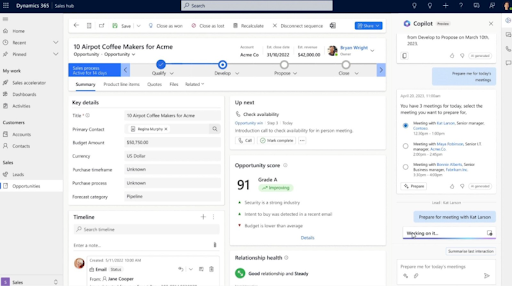
Microsoft copilot brings CRM-aware assistance into Dynamics 365 Sales, Outlook, and Teams, so a salesperson can read, write, and update from whichever screen they’re already on. Newer agentic features run multi-step sales tasks end-to-end without a rep starting each one. The fit is strongest for organizations already running Microsoft 365 across the company.
Key features of Microsoft Dynamics 365 + Copilot for Sales
- Record summarization: generates concise summaries of leads, opportunities, and accounts directly inside the record, so a seller can ramp on a relationship without scrolling through history.
- Recent changes and news: highlights what changed on a record since the seller last looked, plus summarized news about the customer’s company.
- Meeting preparation: drafts a pre-meeting brief from the opportunity record, attached files, and recent activity, so reps walk in ready.
- Email assistance: drafts professional emails, summarizes long threads, and offers to log the summary back to the customer’s CRM record.
- CRM inside Outlook: read, edit, and create Dynamics 365 records without leaving Outlook; pull opportunity summaries directly into the inbox.
- CRM inside Teams: conversation intelligence on Teams calls, collaborative deal rooms, and real-time tips during a meeting.
- Pre-built sales agents: Sales Qualification Agent, Sales Opportunity Agent, Sales Research Agent, and Sales Close Agent (preview) handle multi-step sales tasks autonomously, drawing on Copilot Credits.
- Custom agents via Copilot Studio: build organization-specific agents to automate CRM workflows beyond the pre-built ones.
Pricing
Microsoft Dynamics 365 Sales has four tiers. Copilot capabilities are included from Enterprise edition upward; Copilot Credits for running pre-built and custom agents are bundled at the Premium tier and available separately via Copilot Studio (pre-purchase or pay-as-you-go through Azure). All pricing assumes annual billing.
- Sales Professional: $65 per user per month. Core CRM, Microsoft 365 interoperation, reporting, and dashboards. Does not include Copilot capabilities in Dynamics.
- Sales Enterprise: $105 per user per month. Adds advanced sales force automation, conversation intelligence, customization, and full Copilot capabilities in Dynamics 365, Outlook, and Teams.
- Sales Premium: $150 per user per month. Everything in Enterprise, plus Sales Insights, AI-powered recommendations, AI data enrichment, and 1,000 Copilot Credits per user per month for agentic features.
- Microsoft Relationship Sales: custom pricing. Sales Enterprise plus LinkedIn Sales Navigator. 10-seat minimum.
- Additional Copilot Credits: available via Copilot Studio pre-purchase (save up to 20% with Commit Units) or Azure pay-as-you-go.
What is Microsoft Dynamics 365 + Copilot for Sales good for?
Microsoft Dynamics 365 + Copilot fits organizations already deeply on Microsoft 365, where Outlook and Teams are where most of the work happens. The integration removes the context-switching tax for sellers and gives admins one identity layer, one security model, and one set of agents that work across the whole productivity stack.
- Zoho CRM with Zia
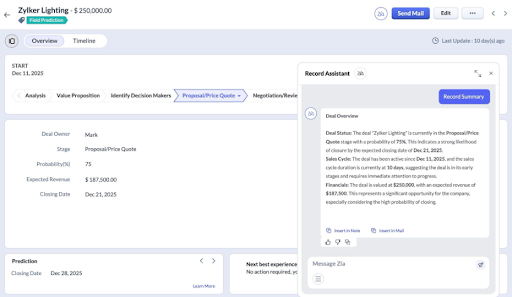
Zia is Zoho CRM’s built-in AI. It spans sales predictions, recommendations, automation suggestions, communications analysis, image extraction, and customer-sentiment tracking, all running inside the same CRM the team already uses.
For cases the pre-built models don’t cover, Zoho ships a no-code machine learning builder so teams can train custom models on their own CRM data.
Key features of Zoho CRM with Zia
- Lead and deal predictions: scores leads and opportunities, predicts which deals are likely to close, and predicts missing field values from the surrounding record.
- Churn prediction: flags customers at risk of leaving, including which specific product or service a subscription customer might churn from.
- Recommendation engine: suggests the next product or service for upsell or cross-sell, similar-record recommendations, and the best time and channel to reach each contact.
- Sales forecasting with anomaly detection: revenue forecasts from user pipelines, gap analysis against targets, and automatic alerts when pipeline behavior deviates from expected trends.
- AI for calls: transcribes call recordings, surfaces customer sentiment, intent, and emotion, and summarizes conversations directly inside the CRM.
- AI for emails: drafts replies, summarizes long threads, and extracts contact info from email signatures into records.
- Vision AI with ICR: intelligent character recognition extracts data from business cards and document images into Zoho records; duplicate-image detection and image validation built in.
- Generative AI and QuickML: create modules, reports, workflows, and Canvas views from a prompt; build custom ML models in a no-code interface for cases the pre-built Zia features don’t cover.
Pricing
Zoho CRM has five tiers. Zia’s AI capabilities unlock at the Enterprise tier and continue in Ultimate. Pricing below assumes annual billing; monthly billing runs roughly 20–30% higher. A free plan is available for teams up to 3 users.
- Free: up to 3 users; basic CRM features. No Zia.
- Standard: $14 per user per month. Custom fields, basic lead scoring, Zoho Marketplace access. No Zia.
- Professional: $23 per user per month. Adds sales process automation (Blueprint), inventory management, Google Ads integration. No Zia.
- Enterprise: $40 per user per month. Zia unlocks here. You get predictions, recommendations, anomaly detection, AI for emails and calls, vision AI, plus territory management, custom functions, and sandbox.
- Ultimate: $52 per user per month. Everything in Enterprise plus Zoho Analytics, 2,000 daily email limit, expanded storage, priority support, and dedicated infrastructure.
What is Zoho CRM with Zia good for?
Zoho CRM with Zia fits cost-conscious mid-market teams that want a broad AI surface without paying enterprise CRM prices. The breadth at the Enterprise tier (predictions, calls, emails, vision, custom ML) is unusual at $40 per user per month. Teams already invested in the wider Zoho ecosystem (Desk, Campaigns, Books) get the most from it, since Zia pulls signal across the whole suite.
- Pipedrive AI Sales Assistant
Pipedrive’s AI Sales Assistant is a natural-language layer built into Pipedrive’s deal-pipeline CRM. Reps and managers can ask questions about their pipeline and the assistant pulls answers straight from Pipedrive data, covering deal summaries, performance comparisons, win patterns, and recommended next moves.
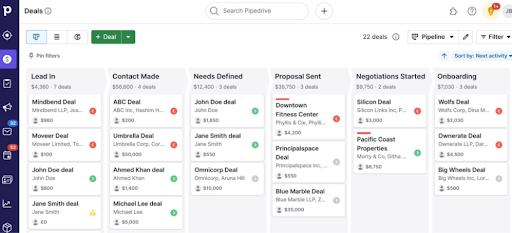
Alongside the prompt interface, the assistant drives a proactive notifications feed that surfaces pipeline issues automatically. It tracks stalled deals, deals without scheduled activity, late-stage opportunities, and performance shifts, so the team sees what needs attention without going looking for it.
Key features of Pipedrive AI Sales Assistant
- Natural-language prompts: ask the Sales Assistant questions about the pipeline (“which deals are most likely to close this month?”, “which reps are behind quota?”) and get instant answers without building a report.
- Win probability predictions: AI-scored win probability on every open deal, with next-best-action recommendations to improve the odds on each one.
- Deal-rotting and momentum alerts: the notifications feed flags deals without scheduled activity, deals stuck in a stage, and deals in their final stage so nothing slips.
- Bottleneck analysis: identifies which stages are slowing deals down by analyzing average time-in-stage across the pipeline.
- AI email generator: drafts sales outreach emails from a short prompt, customized to the deal and contact context.
- AI email summarizer: summarizes long email threads in one click so reps can act fast.
- Smart Contact Data and feature suggestions: the assistant nudges users toward Pipedrive features that fit what they’re trying to do, like Smart Contact Data for prospect qualification or Deal Rotting for cold-pipeline cleanup.
- AI Marketplace search: find third-party Pipedrive integrations in natural language (“find me a calling tool that connects to Pipedrive”) rather than browsing categories.
Pricing
Pipedrive uses five per-seat tiers, billed monthly with annual prepayment. The AI Sales Assistant unlocks at the Advanced tier and is included in every tier above it. Monthly-only billing runs about 21% higher than the annual figures below.
- Essential: $14 per user per month. Core deal pipeline, contacts, and reports. AI Sales Assistant not included.
- Advanced: $29 per user per month. Adds email tracking, workflow automation, and the AI Sales Assistant.
- Professional: $49 per user per month. Adds revenue forecasting, deeper customization, and document tracking.
- Power: $69 per user per month. Adds team analytics, project planning, and phone support.
- Enterprise: $99 per user per month. Unlimited customization, custom permissions, and dedicated support.
Add-ons (LeadBooster for prospecting, Campaigns for email marketing, Web Visitors for site identification, Smart Docs for proposals) are sold separately on top of any plan.
What is Pipedrive AI Sales Assistant good for?
Pipedrive’s AI Sales Assistant fits SMB and lower-mid-market sales teams that want a clean, visual pipeline CRM with AI living inside the day-to-day rep workflow. The combination of deal-centric AI, low setup overhead, and predictable per-seat pricing makes it a natural pick for organizations under about 50 reps that want the AI value of a bigger platform without the implementation cost.
- Freshsales with Freddy AI
Freddy AI for Sales is Freshworks’ AI assistant built into Freshsales CRM. It scores leads on behavioral data, drafts personalized prospecting emails in a chosen tone, and surfaces deal-specific insights and risk signals so reps know which opportunities need attention next.

The assistant runs in two layers. Freddy AI Copilot handles the upfront work of finding contacts, scoring them, and writing outreach. Freddy AI Insights focuses on the deal itself, parsing emails and historical patterns to recommend next-best actions on each open opportunity.
Key features of Freshsales with Freddy AI
- Predictive lead scoring: scores contacts based on data points and behavioral patterns to surface the ones most likely to convert.
- Duplicate contact resolution: automatically finds and merges duplicate contacts so reps work from clean records.
- AI email writer: drafts personalized prospecting emails covering both subject line and body copy, customized to each prospect.
- Personality-matched tone options: lets reps choose a tone that matches how they actually write, so AI-drafted emails don’t all sound the same.
- Deal-specific insights and risk signals: flags at-risk opportunities by analyzing email engagement, communication gaps, and historical deal patterns.
- Next-best-action recommendations: suggests specific moves on each open deal, drawing on the team’s own past deals and current activity.
- Real-time email parsing: reads inbound and outbound emails on a deal and pulls relevant context into the opportunity record automatically.
Pricing
Freshsales has a free plan plus three paid tiers. Freddy AI’s basic features (lead scoring, email tools) start in the Growth plan, with the deeper deal insights and next-best-action recommendations unlocking at Pro. All pricing below is annual billing; monthly billing runs about 20% higher.
- Free: up to 3 users; basic contact and deal management. No Freddy.
- Growth: $9 per user per month. Lead scoring, workflows, integrations, basic Freddy capabilities.
- Pro: $39 per user per month. Full Freddy AI Insights, advanced workflows, multiple pipelines, call analytics, forecasting, quotas, API access.
- Enterprise: $59 per user per month. Custom modules, advanced permissions, audit logs, plus deeper Freddy features including forecasting insights and next-best actions.
What is Freshsales with Freddy AI good for?
Freshsales with Freddy AI fits SMB and mid-market sales teams that want a clean, accessible CRM with AI baked into the core workflow. The $9 entry pricing makes it a natural pick for growth-stage teams getting their first proper CRM, with a clear upgrade path to Pro as the need for deeper deal insights and forecasting shows up. The biggest payoff comes for teams that value ease of setup, low admin overhead, and AI that lives inside the rep’s daily screens.
- Vtiger with Calculus AI
Vtiger CRM bundles sales, marketing, and support into one platform, with Calculus AI as the built-in AI layer running across all three. Calculus covers deal scoring, next-step recommendations, call and email analysis, contact engagement intelligence, and an AI chatbot for inbound queries.
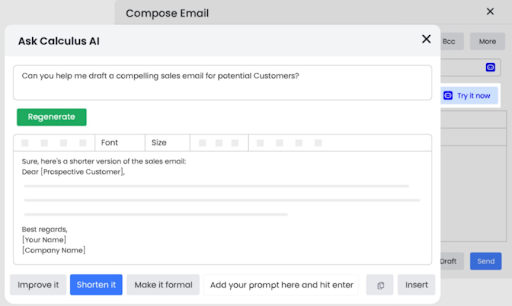
For teams that want to go beyond the pre-built capabilities, Vtiger’s higher tiers include no-code builders for custom predictive and generative AI flows on top of CRM data.
Key features of Vtiger with Calculus AI
- Deal Health scoring: generates a 0–100 deal health score by combining engagement signals, sentiment, fit, and historical patterns from previous closures.
- Next action recommendations: suggests the next-best step on each open deal based on patterns from similar deals the team has run before.
- Call analysis: monitors call quality on factors like talking speed, talk-to-listen ratio, monologue length, and sentiment, surfacing coaching cues for managers.
- Email assistant: drafts replies, summarizes long threads, and runs sentiment analysis on incoming messages.
- Best Time to Contact: identifies optimal engagement windows for each contact based on observed response patterns.
- AI Chatbot: handles inbound lead qualification and customer questions, with bot management tools for tuning responses over time.
- Natural-language CRM queries: ask the CRM questions in plain English (“show me deals over $50K that haven’t moved in two weeks”) and get instant results.
- Generative and Predictive AI Designers: no-code builders for creating custom AI flows on top of Vtiger data, available in the One AI edition.
Pricing
Vtiger uses tiered pricing with two seat types: Standard users get full access to all five Vtiger apps (Sales, Marketing, Help Desk, Projects, Inventory), Single App users get full access to one app and read-only on the rest. All prices below are annual; monthly billing runs about 34% higher.
- One Pilot: free. Up to 10 users, 3,000 records, basic CRM features. No Calculus AI.
- One Growth: $12 per Standard user per month. Adds Predictive AI, Generative AI, natural language queries, AI Chatbot, plus deal playbooks and multiple pipelines.
- One Professional: $30 Standard / $20 Single App per user per month. Adds lead scoring, sales forecasting, quotas, Process Designer, social ticketing, internal team collaboration.
- One Enterprise: $42 Standard / $30 Single App per user per month. Adds Best Time to Contact, multi-currency, internal ticketing, work order management, project automation.
- One AI: $50 Standard / $38 Single App per user per month. Adds Voice Assistant integration, Generative AI Designer, and Predictive AI Designer for custom AI flows.
What is Vtiger with Calculus AI good for?
Vtiger fits SMB and mid-market teams that want a unified sales-marketing-support CRM with AI built in from the lowest paid tier. The mixed pricing model (Standard for power users, Single App for role-specific staff) makes it a natural pick for teams that want to give support, marketing, and sales reps different levels of access without paying full price for every seat.
How to choose the right AI for your CRM
The right AI tool depends less on the feature list and more on the answers to a few specific questions about your team’s stack, data, and workflow.
Here are some questions worth asking before you buy:
- What CRM are you already on, and is changing it on the table? If you’re running Salesforce or Dynamics 365 with a custom data model, switching CRMs to get AI features is rarely worth it. Pick an AI layer that adds to what you have. If you’re shopping for a CRM and an AI strategy at the same time, the native AI CRMs (HubSpot, Zoho, Freshsales, Pipedrive, Vtiger) collapse the decision into one.
- What’s the actual pain you’re solving? Reps spending Sunday nights logging activity is an activity-capture problem. Forecasts off by 30% is a data-completeness and pipeline-intelligence problem. Reps drafting bad cold emails is a generative-AI problem. The list narrows fast once you can name the pain in one sentence.
- Which tier do the AI features actually live at? Every CRM gates predictive AI, agentic AI, and the deeper deal intelligence at higher tiers. The entry plan is almost never where the useful AI sits. Map your real budget to the tier you actually need.
- What’s your consumption-based pricing exposure? Agentforce Flex Credits, HubSpot’s outcome-based agent pricing, and Microsoft’s Copilot Credits all scale with usage. Run a back-of-envelope estimate before signing.
- Will reps actually use it on Monday morning? Tools that require new behavior typically die. Tools that automate existing behavior typically stick. Adoption is the difference between an AI investment that pays off and a line item on the CFO’s chopping block next quarter.
When Revenue Grid is the right call
If you’re already on Salesforce and you want more than just data sync (actual relationship intelligence over the connections that lead to deals), Revenue Grid is the choice. It’s the AI layer that captures every email, meeting, and conversation, brings the full picture into Salesforce as native records, and runs AI sales assistants on top of that clean data foundation. The forecast tracks what’s actually happening in the pipeline. The meeting brief writes itself. The next-best action sits on the deal record before the rep has to go looking for it.
For Salesforce teams where rep CRM adoption is broken and pipeline visibility is unreliable, Revenue Grid is the fastest way to turn an existing CRM into a system that actually directs the sale.
Book a demo to turn an existing CRM into a system that actually brings in the sale.
What's the difference between predictive AI, generative AI, and agentic AI in a CRM?
Predictive AI scores and forecasts. It tells a rep which lead is hot or which deal will close. Generative AI drafts content — emails, summaries, meeting briefs. Agentic AI takes action on multi-step workflows, so instead of just flagging a hot lead, it qualifies the lead, books the meeting, and updates the record. Most modern CRM AI stacks combine all three, with agentic AI being the newest layer.
Do I need to switch CRMs to get good AI features?
If you’re already running Salesforce, Dynamics 365, or another established CRM with a custom data model, switching is rarely worth it. AI layers like Revenue Grid sit on top of your existing CRM and add relationship intelligence without disrupting the system of record. Switching CRMs only makes sense if you’re shopping for both at the same time or your current CRM is fundamentally broken.
How much should I budget for AI in my CRM?
It depends on the pricing model. Per-seat AI (Pipedrive, Freshsales, Zoho, Revenue Grid) is predictable — multiply seats by tier price. Consumption-based pricing (Salesforce Flex Credits, HubSpot outcome-based agents, Microsoft Copilot Credits) scales with usage and can surprise you. Run a back-of-envelope estimate of monthly agent actions or resolved conversations before you sign, and build in a 20–30% buffer.
Will my sales reps actually use AI features?
Adoption depends on whether the AI automates existing behavior or asks reps to learn new behavior. Tools that log activity automatically, draft emails inside the rep’s inbox, or surface next-best actions on the deal record tend to stick. Tools that require reps to open a new app, prompt an assistant, or change their workflow tend to die quietly. Ease of fit into the daily screen is the single biggest predictor of ROI.
Is AI in a CRM secure enough for regulated industries?
It can be, but you have to check. Financial services, healthcare, and wealth management need vendors with SOC 2 Type II, ISO 27001, GDPR, and (where relevant) HIPAA compliance. Salesforce, Microsoft, and Revenue Grid all meet those bars; some lighter-weight SMB tools don’t. Run your security and procurement review against the actual certifications, not the marketing page, before committing.