

Key Takeaway
- Salesforce Einstein Activity Capture (EAC) automates email and calendar logging into Salesforce, but captured data has historically lived on AWS, outside standard reports, dashboards, and Flows.
- The Summer '25 release introduced Sync Email as Salesforce Activity, which writes emails as native records. The migration is irreversible and historical backfill is capped at 180 days.
- Two deadlines are colliding in 2026: Activity 360 Reporting retires in Summer '26, and the Microsoft Graph migration deadline lands in August 2026.
- Revenue Grid writes every interaction directly into standard Salesforce objects, captures meeting content, and supports SAP, Oracle, and Microsoft Dynamics alongside Salesforce.
What Is Salesforce Einstein Activity Capture?
Salesforce Einstein Activity Capture is a Sales Cloud feature that connects a user’s Microsoft 365 or Google Workspace account to Salesforce, then automatically captures emails, calendar events, and contacts, and displays them on the Activity Timeline of related records. Einstein is Salesforce’s AI layer, and EAC is one of its most widely adopted features. It replaced the older Lightning Sync plugin, and it runs server-side, which makes it more reliable than the client-side tools it replaced.
EAC captures five things:
- Emails: sent and received messages matched against Salesforce Contacts, Leads, and Users
- Calendar events: meetings synced as Event records, with one-way or two-way options
- Contacts: address book contacts matched against Salesforce Contacts to reduce duplicates
- Einstein Email Insights: AI flags on emails that mention pricing, competitors, or urgency
- Internal Activity Feed: a central queue where unmatched activities land when EAC can’t figure out which record they belong to
Each of these sounds clean in isolation. The complexity lives in how the data is stored, which is where most evaluation conversations get tripped up.
How Einstein Activity Capture Actually Works
EAC runs server-side. When a user connects their mailbox, it scans new emails and calendar events, matches senders and attendees against Salesforce records by email address, then surfaces matches on the right timeline. For years, that was good enough. Then pipelines got more complex, reporting got more important, and the storage question stopped being a technical detail.
The captured vs. synced distinction that changes everything
EAC offers two ways to handle email data, and they behave very differently.
Captured emails (the legacy default). EAC scans incoming and outgoing emails, matches them to Salesforce records, and displays them on the Activity Timeline. The catch is that the underlying data lives on AWS, not inside Salesforce. You can see these emails on a record, but you cannot report on them, query them with SOQL, trigger a Flow from them, or export them in a standard backup.
Paul B. Fischer, a Salesforce consultant with 19 certifications, described it in a Cloud on Purpose post with a line that stuck with many admins:
“Salesforce is merely a window from which to view this email.”
The window is real, but what you’re looking at isn’t actually in the house.
Synced emails (Sync Email as Salesforce Activity). The Summer ’25 release changed this. With the option enabled, EAC writes emails as native Salesforce EmailMessage records that standard reports, dashboards, Flows, and APIs can reach.
The table below shows the difference in one glance.
| Attribute | Captured (default) | Synced (Sync Email as Activity) |
|---|---|---|
| Where data is stored | Separate AWS data store | Standard EmailMessage object |
| Visible on Activity Timeline | Yes | Yes |
| Available in standard reports | No | Yes |
| Queryable via SOQL or API | No | Yes |
| Triggers Flows and automations | No | Yes |
| Requires separate admin enablement | No | Yes |
| Historical backfill at migration | N/A | Capped at 180 days |
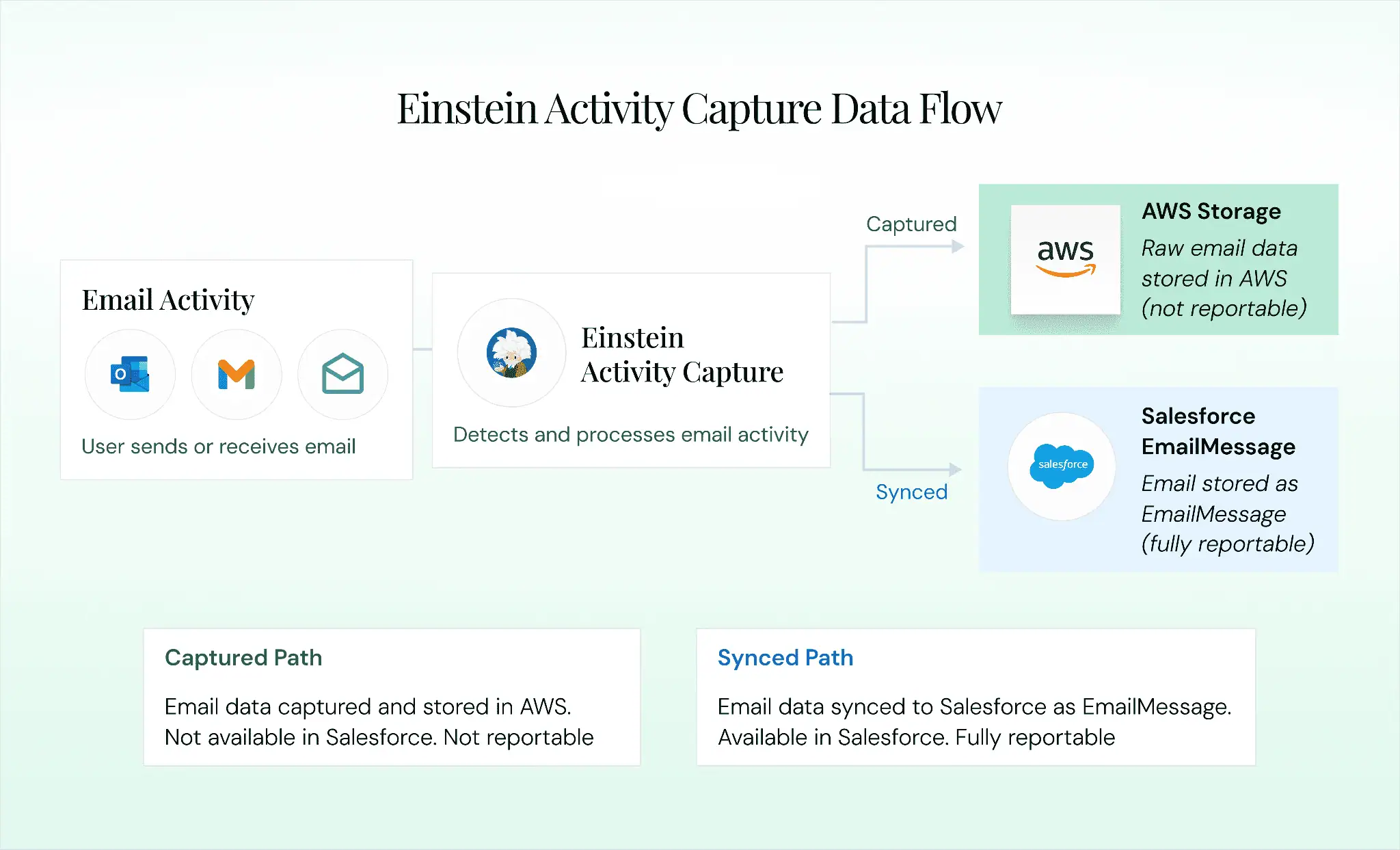
If your org turned EAC on three years ago and never switched to Sync Email as Salesforce Activity, every email captured in that time is sitting in AWS, invisible to your reports, and subject to a rolling retention window of 6 or 24 months. The Summer ’25 option helps new email going forward. It does not rescue the past.
Calendar, contact, and record matching
Calendar events have always been written as standard Salesforce Event records, which means they are reportable. Admins choose between one-way and two-way sync, and most teams should start with one-way to avoid duplicate events. Contact sync matches address book contacts against Salesforce Contacts by email address, with scope set to specific folders to keep personal contacts out of the org.
Record matching pulls email addresses from the To, From, CC, and attendee fields, then searches Contact, Lead, and User records for a match. When matching fails, the activity lands in the Internal Activity Feed, where admins manually associate orphaned activities with the right records. Since Summer ’25, admins can build custom matching rules using Salesforce Flow, which requires Flow expertise many admin teams do not have in unlimited supply.
What is historical activity sync and how does it work in Salesforce?
Historical activity sync is the Einstein Activity Capture behavior that brings past emails and calendar events from a newly connected Microsoft 365 or Google account into Salesforce. The look-back period is typically limited to 180 days, although exactly how that activity is stored depends on your EAC configuration. Legacy email capture can surface historical emails on the Activity Timeline without creating standard Salesforce email records, while Sync Email as Salesforce Activity can write supported historical emails into Salesforce as Activity and EmailMessage records.
Here’s how historical activity sync works:
- It runs when an account is connected or historical data is synced: EAC looks back at eligible activity from the user’s connected Microsoft 365 or Google account rather than starting only from the day of connection.
- It can bring in past emails and calendar events: Salesforce applies EAC’s matching, filtering, and exclusion rules when deciding which activities appear against CRM records.
- The look-back is limited: Salesforce supports up to 180 days of historical email, with a limit of 50,000 historical emails per user when using Sync Email as Salesforce Activity. Past event backfill can also extend up to 180 days.
It is not a full mailbox archive, though. Activity outside the allowed look-back period, excluded emails or domains, and events outside the configured sync rules are not automatically brought into Salesforce.
If you need a longer history inside Salesforce, Revenue Grid can backfill past emails and meetings as native Salesforce records and retain that activity without EAC’s rolling retention window.
Setting Up Einstein Activity Capture Without Regretting It Later
The full click-by-click setup lives in Salesforce Help. This section covers the decisions that matter most.
Before enabling EAC, confirm your Salesforce edition, System Administrator permissions, and the 100-user cap on the Standard tier. If you plan to enable Sync Email as Salesforce Activity, every synced email will consume Salesforce data storage, so estimate volume in advance.
The setup flow is sequential:
- Enable EAC in Setup and pick the edition behaviors that match your org
- Configure email and calendar integration with Microsoft 365 or Google Workspace
- Select calendar sync direction, starting with one-way to avoid duplicate event headaches
- Set up contact sync scope, deciding which folders or groups are in scope
- Assign EAC to users through permission sets, starting with a pilot group of 5 to 10
- Configure excluded domains, including your own internal email domains
- Enable Sync Email as Salesforce Activity if you need email data to be reportable
Step 7 is the single most important decision in this list. For Microsoft 365 customers, this is also the moment to migrate from Exchange Web Services to Microsoft Graph, because the deadline is not far away.
Where Einstein Activity Capture Starts to Break Down
EAC works well when the goal is simply to reduce manual email and calendar logging. The problems show up when teams need that activity data to do more inside Salesforce.
The biggest issue is data accessibility. Activity stored outside standard Salesforce records can create gaps in reporting, automation, and downstream workflows.
Retention is another constraint, with EAC applying limits to how long captured activity remains available depending on the setup.
And record matching is not always perfect. Complex accounts, changed email addresses, multiple contacts, and heavily threaded deals can leave activities unmatched or associated with the wrong record.
There are other considerations too, including sync delays, meeting-content limitations, and requirements around Salesforce-specific infrastructure.
For the full list, examples, and implications, see 12 Einstein Activity Capture limitations →.
EAC limitations at a glance
| Limitation | Impact | Severity |
|---|---|---|
| Default data stored outside standard objects | No standard reports on captured data | High |
| Limited matching accuracy | Emails associated with wrong records on complex deals | Medium |
| No call or meeting content capture | No visibility into what was discussed | High |
| Rolling data retention (6 or 24 months) | Compliance gap in regulated industries | High |
| Sync latency | Delays between activity and CRM visibility | Medium |
| Salesforce-only ecosystem | Cannot serve multi-CRM environments | Medium |
| Activity 360 retirement (Summer ’26) | Forced migration with limited historical backfill | High |
Why can’t you report on EAC data (and what changed in 2025–26)
If you can see Einstein Activity Capture emails on a Salesforce record but can’t use them in a standard report, the reason is usually how those emails were stored. Under EAC’s legacy architecture, captured emails lived outside standard Salesforce objects, so Salesforce could display them on the Activity Timeline without making them available to standard reports, Flows, triggers, APIs, or exports.
That started changing with Salesforce’s Summer ’25 release.
Sync Email as Salesforce Activity stores captured emails directly in Salesforce as Activity (Task) and EmailMessage records. Those emails can appear in standard activity reports and can be used by Salesforce automation and APIs.
Salesforce is now moving EAC customers toward this architecture. New EAC setups that meet Salesforce’s requirements have Sync Email as Salesforce Activity enabled automatically, while existing customers are being migrated on a rolling basis. Salesforce is also retiring the legacy Activity 360 Reporting, Activity Metrics, Activities Dashboard, and Recommended Connections features in Spring ’27.
There are still a few things to keep in mind:
- Legacy captured email may still behave differently: Until an org migrates to Sync Email as Salesforce Activity, its EAC email data remains outside standard Salesforce reporting and automation.
- Historical migration is limited: Salesforce can migrate up to six months of existing captured email history, so moving to the new architecture does not necessarily make an org’s entire historical EAC dataset available as native Salesforce records.
- The old EAC reporting layer is going away: Organizations using Activity 360 reports and related metrics need to rebuild those workflows using standard Salesforce activity reports and platform automation before the legacy features retire.
If you need historical activity stored as reportable Salesforce records without relying on EAC’s separate reporting architecture or rolling retention window, Revenue Grid can backfill past activity as native Salesforce records and keep it available for reporting and automation.
When EAC Is the Right Call, and When It Isn’t
EAC is not the wrong choice for every org. It is likely enough if you have fewer than 100 sales users, use only Salesforce as your CRM, run simple sales cycles, and don’t rely on activity data for forecasting. It also works if you’re comfortable enabling Sync Email as Salesforce Activity and don’t need call recording or meeting transcripts.
EAC runs out of room when your team needs full activity capture across emails, calls, and meetings, when reportable data is essential for forecasting and coaching, when deals are cross-threaded across multiple reps, when meeting content matters more than attendance, or when you operate in a regulated industry or a multi-CRM environment.
Why Revenue Teams Are Moving to Revenue Grid
Teams don’t leave EAC because they stop believing in activity capture. They leave because they need activity data that actually works inside the rest of their revenue process.
Data that lives where your reports live
Vapotherm, a publicly traded medical device manufacturer, replaced its legacy activity capture approach with Revenue Grid. In year one, the platform auto-captured 110,000 emails and 27,000 calendar events, returning 761 person-days saved from manual data entry and $175,000 in cost savings. More importantly, their managers finally had the full engagement picture they had been missing, and forecasts started reflecting activity reality.
That happens because Revenue Grid writes every email, meeting, attachment, and task directly into Salesforce as native records. No external data store, no expiration window, no invisible gaps. Reports can reach it, dashboards can chart it, Flows can trigger on it, and AI features can use it.
Meeting content, not just meeting counts
Revenue Grid’s capture engine captures what was said, what was decided, and how the interaction aligns with opportunity progression. That is the gap EAC leaves open for coaching and deal review.
Morgan & Morgan, the law firm, saw a 15 to 20% increase in the number of matters their case staff could handle each month after deploying Revenue Grid. Brian Walsh, Senior Platform Analyst, described the outcome:
“By using Revenue Grid, we’ve found that there’s a 20% increase in the number of cases that our case staff can handle. That’s a big increase in productivity.”
Deal intelligence, multi-CRM support, and enterprise compliance
Revenue Grid reads engagement patterns across emails, meetings, and deal history, then surfaces the moments that matter: a quiet commit-stage deal flagged early, a buying committee gap made visible, a responsive contact going dark. According to Gartner’s 2024 Sales Survey, sellers who partner with AI effectively are 3.7 times more likely to meet quota.
The platform is native to Salesforce, SAP, Oracle, and Microsoft Dynamics, and covers SOC 2 Type II, ISO 27001, ISO 27701, and GDPR compliance. Full details are on the Revenue Grid security page.
Einstein Activity Capture vs Revenue Grid
| Capability | Einstein Activity Capture | Revenue Grid |
|---|---|---|
| Email capture | Yes (with limitations) | Yes (100% capture) |
| Calendar and contact capture | Yes | Yes |
| Call and meeting content capture | No | Yes |
| Data in standard CRM objects | No (AWS by default) | Yes |
| Full reporting on captured data | Limited | Yes |
| AI-driven pipeline insights | Basic | Advanced |
| Multi-CRM support (SAP, Oracle, Microsoft) | Salesforce only | Yes |
| Data retention | 6 or 24 months (rolling) | Unlimited |
| Deployment flexibility | Salesforce cloud only | Cloud, private cloud, or on-premises |
Want to see the difference in your own Salesforce org?
What is Einstein Activity Capture in Salesforce?
EAC is a Salesforce Sales Cloud feature that automatically captures emails, calendar events, and contacts from a user’s connected Microsoft 365 or Google Workspace account and displays them on the Activity Timeline of related records. It runs server-side and replaces the older Lightning Sync plugin.
Is Einstein Activity Capture free?
EAC Standard is included with Sales Cloud Starter, Professional, Enterprise, and Unlimited editions, capped at 100 users with 6-month data retention. The full version requires Unlimited, Performance, or the Sales Cloud Einstein add-on.
Where does Einstein Activity Capture store data?
By default, EAC stores captured email data on AWS, not in standard Salesforce objects. Calendar events and contacts are written as standard records. Sync Email as Salesforce Activity, introduced in Summer ’25, writes emails as native EmailMessage records, but the migration is irreversible and historical backfill is capped at 180 days.
Can I run reports on Einstein Activity Capture data?
By default, no. Captured email data is not available in standard reports, dashboards, or list views. Enabling Sync Email as Salesforce Activity makes new email data reportable. For full reporting across emails, calls, and meetings, a platform like Revenue Grid writes all activity data into standard CRM objects from the start.
What are the main limitations of Einstein Activity Capture?
Captured data stored outside standard objects, matching accuracy issues on complex deals, no meeting content capture, rolling data retention, sync latency, Salesforce-only support, and the Activity 360 retirement in Summer ’26.
Are there alternatives to Einstein Activity Capture?
Yes. Revenue Grid captures 100% of sales activities, stores data in standard Salesforce objects, supports multi-CRM environments including SAP, Oracle, and Microsoft Dynamics, and provides AI-driven pipeline insights.
Is Einstein Activity Capture free?
EAC Standard is included at no additional cost with eligible Sales Cloud editions, but its user, retention, and feature limits depend on your setup. See our Einstein Activity Capture pricing guide for current pricing, licensing options, and restrictions.
How do I turn on Einstein Activity Capture?
In Salesforce Setup, search for Einstein Activity Capture, enable it, connect your Microsoft 365 or Google Workspace account, configure email and calendar sync, and assign EAC to the users who need it. See the setup section above for the key decisions to make before switching it on.
What does Einstein Activity Capture do?
Einstein Activity Capture connects Salesforce with Microsoft 365 or Google Workspace and automatically captures emails, calendar events, and contacts. It matches those activities to the relevant Salesforce records so reps do not have to log every interaction manually.